1. はじめに
This manual provides essential information for the safe and efficient operation of your VEVOR S4040 CNC Router Machine. This 3-axis wood engraving and milling machine features a 300W spindle, a 15.75 x 15.75 x 2.36 inch working area, and an offline controller. It is designed for precise engraving and cutting on various materials including wood, acrylic, MDF, leather, plastic, foam, vinyl, and soft metals.
機械を正しく使用し、損傷や怪我を防ぐために、機械を操作する前にこのマニュアルをよくお読みください。
2. 安全に関する注意事項
Always prioritize safety when operating the CNC router machine. Failure to follow these instructions may result in serious injury or damage to the equipment.
- マニュアルを読む: 使用する前にすべての指示と警告を理解してください。
- 個人用保護具(PPE): Always wear safety glasses to protect your eyes from flying debris. Consider hearing protection and a dust mask, especially when working with materials that produce fine particles.
- 作業エリア: 作業場は清潔で、明るく、障害物がないことを確認してください。操作中は、お子様や関係者以外の方が機械に近づかないようにしてください。
- 安全なワークピース: 常に安全にamp your material to the workbed to prevent movement during engraving or cutting.
- 緊急停止: 緊急停止ボタンの位置と操作方法をよく理解しておいてください。
- 電源切断: Disconnect power before performing any maintenance, adjustments, or when changing tools.
- ツーリング: Use only sharp, appropriate cutting tools for the material being processed. Dull or incorrect tools can cause kickback or breakage.
- 換気: Ensure adequate ventilation, especially when working with materials that produce fumes or dust.
- 電気安全: 濡れた手や暗い場所で機械を操作しないでください。amp conditions. Ensure all electrical connections are secure and properly grounded.
- 放置しないでください: マシンを無人で稼働させたままにしないでください。
3. パッケージ内容
Upon unpacking, verify that all components are present and undamaged. If any items are missing or damaged, contact VEVOR customer support immediately.
- 1 x CNC Router Machine (main unit)
- オフラインコントローラー
- 電源アダプター
- USBケーブル
- Assorted Engraving Bits
- Clamps
- レンチと六角キー
- ブラシ
- Other necessary accessories for assembly

Image: VEVOR S4040 CNC Router Machine with its various included accessories, such as the offline controller, power supply, USB cable, and tools.
4. セットアップ
The VEVOR S4040 CNC Router Machine features a pre-assembled design for quick installation. Key components come pre-assembled and pre-wired, simplifying the setup process.
4.1組み立て手順
- コンポーネントを解凍します: Carefully remove all parts from the packaging and place them on a clean, stable surface.
- Connect Pre-assembled Modules: The machine consists of a few main pre-assembled modules. Follow the included quick start guide or detailed assembly instructions to connect these modules. Typically, this involves attaching the gantry to the base and securing the spindle assembly.
- 安全な配線: Ensure all pre-wired connections are properly seated and secured. Use cable ties if necessary to manage cables and prevent them from interfering with moving parts.
- 電源接続: Connect the power adapter to the machine and then to a grounded electrical outlet. Do not power on yet.
- コンピュータ接続(オプション): If you plan to operate the machine via a computer, connect the USB cable from the machine to your computer.
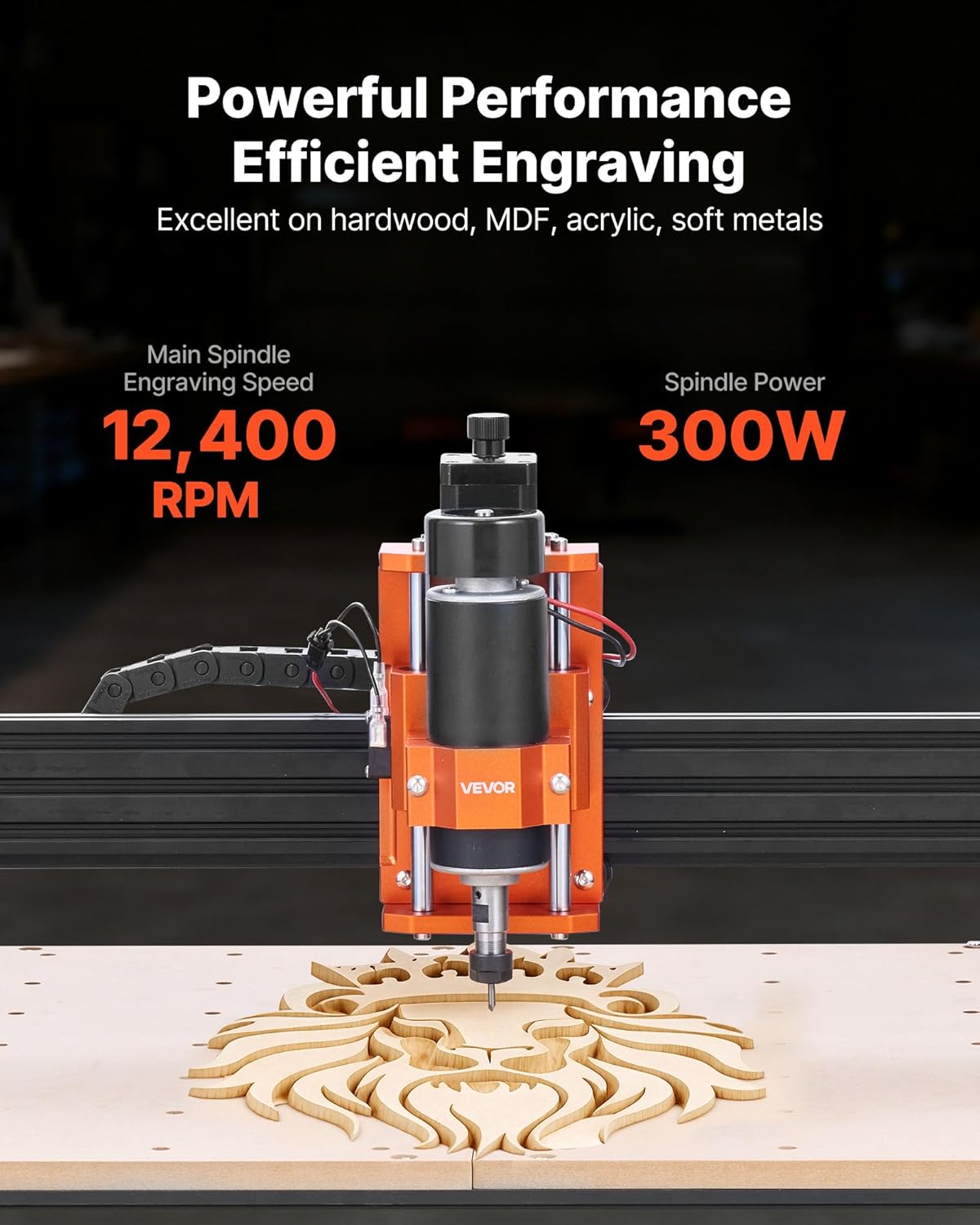
Image: The VEVOR S4040 CNC Router Machine shown fully assembled, ready for operation.
5. 操作手順
The VEVOR S4040 offers both offline control via its 2.4-inch touchscreen controller and online control through compatible software.
5.1 オフライン制御
The 2.4-inch touchscreen offline controller allows you to operate the machine without a computer connection.
- Gコードを準備します。 Gコードを保存する files (design instructions) onto a USB drive.
- USBドライブを挿入します: Plug the USB drive into the offline controller.
- 電源オン: 機械の電源スイッチをオンにします。
- 選択 File: Use the touchscreen interface to navigate and select your desired G-code file.
- ワークピースの位置: Secure your material on the workbed using the provided clamps.
- 原点を設定: Manually move the spindle to the desired starting point (origin) for your engraving/cutting job and set the X, Y, and Z axes origin through the controller.
- 運用開始: Initiate the engraving or cutting process from the controller.
- Adjust Spindle Speed: Use the rotary knob on the machine to precisely control the spindle speed during operation.

画像: クローズアップ view of the 2.4-inch touchscreen offline controller, showing its interface for file selection and machine control.
5.2 Software Compatibility (Online Control)
The machine is compatible with all software that supports GRBL f1.1 firmware. Popular compatible software includes:
- CNC (Candle): Supports Windows 7/8/10/11 and macOS.
- Easel: Supports Windows 7/8/10/11, macOS, and Linux.
- レーザーGRBL: Supports Windows 7/8/10/11 and macOS (via Virtual Machine).
- ライトバーン: Supports Windows 7/8/10/11 and macOS.
To operate via computer, install the necessary drivers and software, connect the machine via USB, and follow the software's instructions for loading G-code, setting parameters, and initiating jobs.

Image: The VEVOR S4040 CNC Router Machine connected to a laptop, demonstrating its compatibility with various design and control software.
5.3 彫刻と切断材料
The VEVOR S4040 is suitable for a wide range of materials:
- Wood (hardwood, softwood, MDF)
- 透明アクリル
- レザー
- プラスチック
- フォーム
- ビニール
- Soft Metals (e.g., aluminum, brass)

Image: The VEVOR S4040 CNC Router Machine actively engraving a detailed lion head design into a piece of wood, showcasing its precision.
6. メンテナンス
Regular maintenance ensures the longevity and optimal performance of your CNC router machine.
- クリーニング: After each use, clean the work area, rails, and lead screws to remove dust, chips, and debris. Use a brush or vacuum. Avoid using compressed air directly on sensitive electronic components.
- 潤滑: Periodically apply a small amount of appropriate lubricant to the linear rails and lead screws to ensure smooth movement. Refer to the manufacturer's recommendations for lubricant type and frequency.
- 接続を確認してください: Regularly inspect all electrical connections, cables, and mechanical fasteners to ensure they are secure. Tighten any loose screws or bolts.
- スピンドルケア: Keep the spindle clean and free of debris. Ensure proper ventilation around the spindle motor to prevent overheating. The spindle motor features current detection protection, extending its lifespan up to 5,000 hours.
- ツール検査: Inspect cutting bits before each use for sharpness and damage. Replace dull or broken bits immediately.
7。 トラブルシューティング
このセクションでは、発生する可能性のある一般的な問題について説明します。ここに記載されていない問題については、VEVORカスタマーサポートにお問い合わせください。
| 問題 | 考えられる原因 | 解決 |
|---|---|---|
| マシンの電源が入らない | Power cable loose; Power switch off; Faulty power adapter | Check power cable connection; Ensure power switch is ON; Test power adapter with another device if possible. |
| モーターが動かない | Emergency stop engaged; Loose motor cables; Software connection issue | Disengage emergency stop; Check all motor cable connections; Verify software connection and settings. |
| 不正確な彫刻/切断 | Loose workpiece; Dull bit; Incorrect G-code/settings; Loose belts/lead screws | Secure workpiece firmly; Replace bit; Verify G-code and software settings; Check and tighten belts/lead screws. |
| スピンドルが回転しない | Spindle cable loose; Spindle speed set to zero; Spindle motor fault | Check spindle cable connection; Increase spindle speed via controller/software; Contact support if issue persists. |
| Offline controller not responding | Controller cable loose; Controller frozen | Ensure controller cable is secure; Restart the machine and controller. |
8. 仕様
Detailed technical specifications for the VEVOR S4040 CNC Router Machine.
| 特徴 | 仕様 |
|---|---|
| 商品型番 | S4040 |
| 入力ボリュームtage | AC100-220V、50/60Hz |
| Maximum Spindle Power | 300W |
| Effective Work Area (X, Y, Z) | 15.75 x 15.75 x 2.36 インチ (400 x 400 x 60 mm) |
| 互換性のあるソフトウェア | All software supporting GRBL f1.1 firmware |
| コンピュータ接続 | USB |
| オフライン操作 | 2.4-inch Touchscreen Offline Controller |
| スピンドル速度 | 12,400 回転 |
| X/Y/Z Axis Speed | 1200mm/分 |
| 繰り返し位置決め精度 | ≦0.05 mm |
| 主な材質 | 6061アルミニウム合金 |
| 正味重量 | 28.66 ポンド / 13.0 kg |
| 製品寸法(長さ x 幅 x 高さ) | 27.95 x 23.62 x 12.60 インチ (710 x 600 x 320 mm) |

Image: The VEVOR S4040 CNC Router Machine with its overall dimensions and working area clearly indicated.
9. 保証とサポート
保証情報、テクニカルサポート、またはサービスに関するお問い合わせは、VEVORカスタマーサービスまでご連絡ください。ご購入時の書類またはVEVOR公式ウェブサイトをご覧ください。 web具体的な保証条件および連絡先の詳細については、サイトをご覧ください。
When contacting support, please have your model number (S4040) and purchase date available.


