1. はじめに
Thank you for choosing the GOBOULT Z40 V2.0 True Wireless Earbuds. These earbuds are designed to provide a high-quality audio experience with features such as extended playtime, clear call quality, and low-latency gaming. This manual provides instructions for setup, operation, maintenance, and troubleshooting to ensure optimal use of your device.

Image 1.1: GOBOULT Z40 V2.0 True Wireless Earbuds and Charging Case.
2.製品オーバーview
2.1 含まれるコンポーネント
パッケージには以下のアイテムが含まれています:
- GOBOULT Z40 V2.0 Earbuds
- 充電ケース
- USB充電ケーブル
- イヤーチップ(各種サイズ)
- ユーザーマニュアル
- 保証書
2.2 主な特徴
- 合計再生時間は最大70時間
- Quad Mic Environmental Noise Cancellation (ENC) for clear calls
- 13mm Bass Drivers for enhanced audio
- 45ms Low Latency Gaming Mode
- Bluetooth v5.4 for stable connectivity
- IPX5防水
- Smart Touch Controls with Voice Assistant support
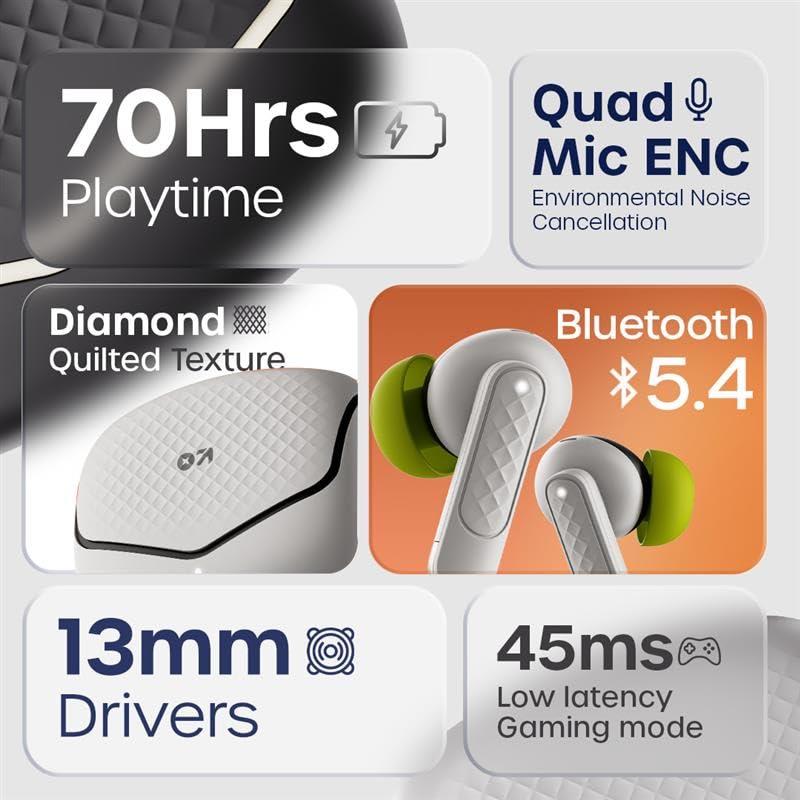
画像2.1: 以上view of GOBOULT Z40 V2.0 key features.
3. セットアップ手順
3.1 イヤホンとケースの充電
初めて使用する前に、イヤホンと充電ケースを完全に充電してください。
- イヤホンを充電ケースに入れます。
- USB 充電ケーブルをケースの充電ポートと電源に接続します。
- ケースのインジケーターライトが充電状態を示します。
- A 10-minute charge provides approximately 120 minutes of playtime. The case offers up to 70 hours of total battery life for the earbuds.

Image 3.1: Charging and battery life details.
3.2Bluetoothペアリング
The GOBOULT Z40 V2.0 earbuds utilize Bluetooth v5.4 for quick and reliable pairing.
- Open the charging case. The earbuds will automatically enter pairing mode (Blink&Pair™ Tech).
- デバイス(スマートフォン、タブレット、ラップトップ)で Bluetooth を有効にします。
- 検索する available Bluetooth devices and select "GOBOULT Z40 V2.0" from the list.
- 接続されると、イヤホンにペアリングが成功したことを示すメッセージが表示されます。
- イヤホンはケースから取り出すと、最後にペアリングしたデバイスに自動的に再接続されます。

Image 3.2: Bluetooth 5.4 and Blink&Pair™ technology.
4. 操作手順
4.1 タッチコントロール
イヤホンには、さまざまな機能を管理するための直感的なタッチ コントロールが搭載されています。
- 再生/一時停止: どちらかのイヤホンを 1 回タップします。
- 次のトラック: 右のイヤホンをダブルタップします。
- 前のトラック: 左のイヤホンをダブルタップします。
- 通話の応答/終了: どちらかのイヤホンを 1 回タップします。
- 通話を拒否: どちらかのイヤフォンを2秒間押し続けます。
- 音声アシスタントを有効にする: どちらかのイヤホンをトリプルタップします。
- ゲームモードを切り替える: Press and hold the right earbud for 2 seconds (specific gesture may vary, refer to quick start guide).

Image 4.1: Hands-free control and voice assistant activation.
4.2 電話をかけたり受けたりする
The Quad Mic ENC system ensures clear voice transmission during calls by reducing environmental noise.
- イヤホンがデバイスに接続されていることを確認してください。
- Use the touch controls to answer, end, or reject calls.

Image 4.2: Quad Mic ENC for clear calls.
4.3 ゲームモード
Activate Combat™ Gaming Mode for a low-latency audio experience, ideal for gaming and video playback.
- Refer to the touch control section for activating Gaming Mode (typically a press and hold gesture).
- This mode reduces audio latency to 45ms, providing synchronized sound with on-screen action.

Image 4.3: Low Latency Gaming Mode.
5. メンテナンス
5.1 クリーニング
定期的にクリーニングすると、イヤホンの性能と寿命を維持するのに役立ちます。
- 柔らかく乾いた糸くずの出ない布を使用して、イヤホンと充電ケースを拭いてください。
- Gently remove any earwax or debris from the eartips and speaker mesh using a small brush or cotton swab.
- 研磨剤、アルコール、化学洗剤の使用は避けてください。
5.2 防水性能(IPX5)
The earbuds are rated IPX5 water-resistant, meaning they can withstand sweat and light splashes.
- イヤホンを水に浸さないでください。
- Avoid exposing them to heavy rain or strong water jets.
- 損傷を防ぐため、イヤホンを充電ケースに戻す前に必ず乾いていることを確認してください。
Image 5.1: IPX5 Water Resistance.
6。 トラブルシューティング
If you encounter any issues with your GOBOULT Z40 V2.0 earbuds, please refer to the following common solutions:
- 音が出ない: Ensure the earbuds are charged and properly paired with your device. Check the volume level on both the earbuds and your device.
- ペアリングの問題: お使いのデバイスでBluetoothが有効になっていること、そしてイヤホンがペアリングモードになっていることを確認してください。イヤホンのペアリングを解除し、再度ペアリングしてみてください。
- 断続的な接続: Ensure you are within the 10-meter Bluetooth range. Avoid obstacles between the earbuds and your device.
- 充電の問題: 充電ケーブルがしっかりと接続され、電源が入っていることを確認してください。イヤホンとケースの両方の充電端子を清掃してください。
- マイクが機能しない: Ensure the earbuds are properly seated in your ears. Check if any debris is blocking the microphone ports.
If the problem persists, please contact GOBOULT customer support for further assistance.
7. 仕様
Detailed technical specifications for the GOBOULT Z40 V2.0 True Wireless Earbuds:
| 特徴 | 仕様 |
|---|---|
| モデル名 | Z40 V2.0 (Airbass Earbuds) |
| 接続技術 | ワイヤレス(Bluetooth) |
| Bluetoothバージョン | 5.4 |
| Bluetooth範囲 | 10メートル |
| オーディオドライバーのサイズ | 13ミリメートル |
| オーディオドライバータイプ | ダイナミックドライバ |
| 周波数応答 | 20Hz |
| 感度 | 115デシベル |
| バッテリー寿命(イヤホン) | 最大70時間(充電ケース使用時) |
| 充電時間 | 10 Minutes for 120 minutes playtime |
| マイクロフォン | ENC付きクアッドマイク |
| 音声遅延 | 45ミリ秒(ゲームモード) |
| 耐水性 | IPX5 |
| コントローラータイプ | 触る |
| ハードウェアインターフェイス | USBタイプC |
| 耳の位置 | 耳に装着 |
| 製品寸法 | 5.8 x 4 x 4.9 cm |
| アイテム重量 | 600 g(パッケージ総重量) |

Image 7.1: 13mm Bass Drivers for enhanced audio.
8. 保証とサポート
8.1 製造元の保証
The GOBOULT Z40 V2.0 True Wireless Earbuds come with a 1-year manufacturer’s warranty. This warranty covers manufacturing defects and ensures product quality and durability.
8.2 カスタマーサポート
For any product-related queries, technical assistance, or warranty claims, please contact GOBOULT customer support. Refer to the warranty card included in your package for contact details or visit the official GOBOULT webサイト。


