1.製品オーバーview
The BN-LINK WiFi Smart Plug (Model CP-J31WT) allows you to control your home appliances remotely, set schedules, and use voice commands for a smarter, more convenient lifestyle. This compact plug is designed for ease of use and integrates seamlessly with popular smart home platforms.

Image: BN-LINK WiFi Smart Plug overview with icons for WiFi, timer, app control, voice control, remote operation, and group control.
主な特徴:
- リモートコントロール: Turn appliances ON/OFF from anywhere using your smartphone.
- 音声コントロール: AlexaおよびGoogle Homeと互換性があり、ハンズフリー操作が可能です。
- タイマー機能: Schedule appliances to turn ON/OFF automatically, saving energy and preventing overcharging.
- コンパクトなデザイン: Small size ensures it doesn't block adjacent outlets.
- 安全機能: Equipped with high-temperature flame-retardant material, overload protection, electric shock prevention, and anti-tracking design.

Image: Diagram highlighting the smart plug's features: LED indicator, ON/OFF button, WiFi connection, timer function, remote operation, and voice control.
2. 安全情報
本製品をご使用になる前に、すべての安全に関する指示をよくお読みになり、理解してください。指示に従わない場合、感電、火災、または重傷を負う可能性があります。
- デバイスを分解したり改造したりしないでください。
- 湿気の多い環境や水の近くでは使用しないでください。
- プラグがコンセントにしっかりと差し込まれていることを確認してください。
- 最大負荷定格15A/1500Wを超えないでください。
- お子様の手の届かない場所に保管してください。
- 清掃する前に、コンセントからデバイスのプラグを抜いてください。
- この製品は屋内専用に設計されています。
内蔵の安全機能:
- High-Temperature Flame-Retardant Material: Reduces fire risk.
- 過負荷保護: 過電流による損傷を防ぐために自動的に電源を遮断します。
- Electric Shock Prevention Design: Enhanced safety against accidental contact.
- Anti-Tracking Design: Prevents dust accumulation and potential short circuits.
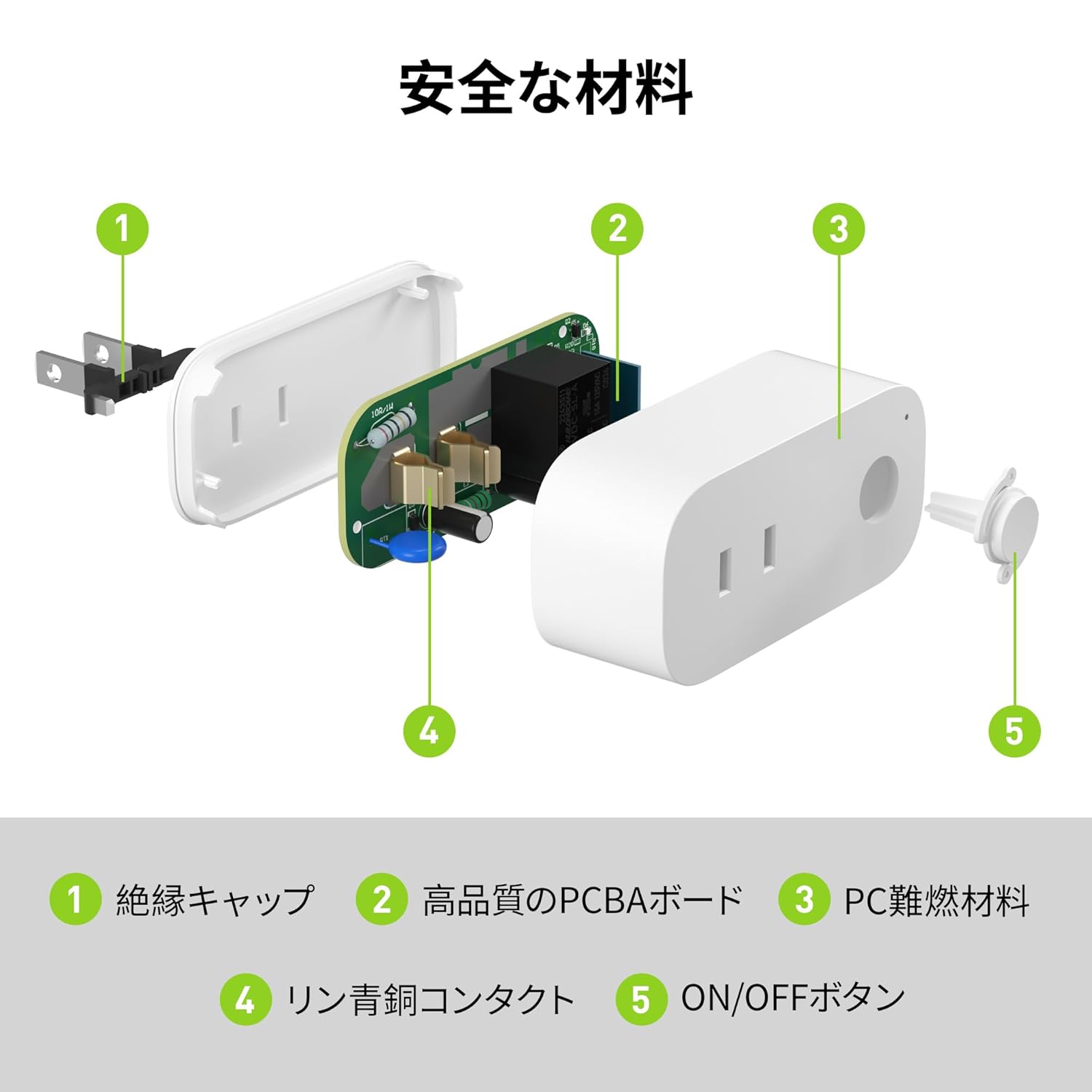
Image: Internal components of the smart plug, highlighting safety features such as the insulation cap, high-quality PCBA board, PC flame-retardant material, phosphor bronze contacts, and the ON/OFF button.
3. セットアップ手順
3.1. 初期設定
- Unpack the BN-LINK Smart Plug from its packaging.
- Plug the smart plug into a standard wall outlet.
- Observe the indicator light on the plug. It should start blinking. If it does not blink, press and hold the ON/OFF button for approximately 5 seconds until it starts blinking rapidly.
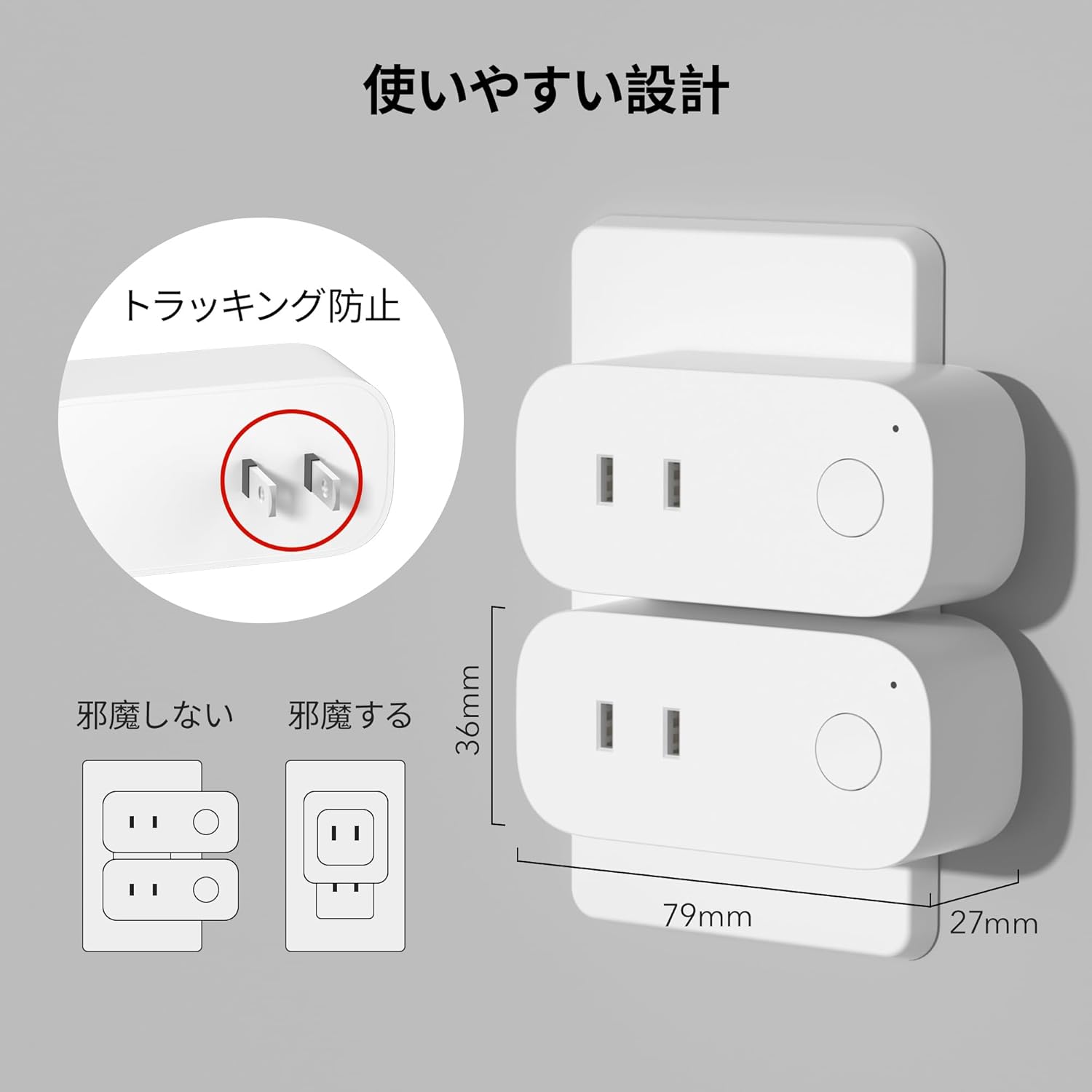
Image: The compact design of the smart plug, illustrating how it fits into an outlet without obstructing the adjacent one. Dimensions are also shown.
3.2. アプリのインストールとWi-Fi接続
To utilize all smart features, you need to install the BN-LINK app and connect the plug to your 2.4GHz Wi-Fi network. This device only supports 2.4GHz Wi-Fi.
- Download the "BN-LINK" app from your smartphone's app store (Google Play Store for Android or Apple App Store for iOS).
- アプリを開いてアカウントを作成するか、すでにアカウントをお持ちの場合はログインします。
- 「+」アイコンまたは「デバイスの追加」をタップして、ペアリングプロセスを開始します。
- Select "Smart Plug" from the device list.
- Follow the on-screen instructions to connect the smart plug to your 2.4GHz Wi-Fi network. Ensure your phone is also connected to the 2.4GHz network during setup.
- Once connected, you can rename your smart plug for easy identification (e.g., "Living Room Lamp、"コーヒーメーカー"など。
Video: This video demonstrates the process of connecting the smart plug to the BN-LINK app and your Wi-Fi network, including resetting the device and confirming indicator light status.
Video: This video provides a step-by-step guide on setting up the ePlugBT and connecting it to Wi-Fi, which is similar to the BN-LINK Smart Plug setup process.
4. 操作手順
4.1. アプリによるリモートコントロール
Once connected to Wi-Fi, you can control your appliances from anywhere with an internet connection.
- Open the BN-LINK app.
- Tap on the device name you wish to control.
- Use the ON/OFF toggle button within the app to switch your appliance on or off.

Image: Remote operation of the smart plug via the BN-LINK app on a smartphone. The image shows the app's ON/OFF control for a device connected to the smart plug, with a WiFi router in the background.

Image: A user controlling a smart plug remotely with their smartphone in a modern kitchen environment.
4.2. 音声コントロール
Integrate your smart plug with Amazon Alexa or Google Home for convenient voice commands.
- Ensure your smart plug is successfully connected to the BN-LINK app and your Wi-Fi network.
- Alexa または Google Home アプリを開きます。
- Follow the app's instructions to add a new device or skill, searching for "BN-LINK" or "Smart Plug."
- リンクすると、次のような音声コマンドを使用できるようになります。
- 「アレクサ、[デバイス名]をオンにして。」
- 「OK Google、[デバイス名] をオフにして。」

Image: A user in a living room controlling a lamp connected to a smart plug using voice commands with an Alexa device. The image also indicates Google Home compatibility.

Image: A smart plug connected to an outlet, being controlled by a Google Home device. A person is shown in bed, illustrating hands-free operation.
4.3. タイマー機能とスケジュール
Set custom schedules to automate your appliances and manage energy consumption.
- In the BN-LINK app, select your smart plug.
- Navigate to the "Timer" or "Schedule" section.
- Set specific ON/OFF times for your appliances. You can create daily, weekly, or one-time schedules.
- Use the countdown timer for temporary automation, such as turning off a charger after a set period to prevent overcharging.

Image: The BN-LINK app displaying timer and scheduling features. Examples show a coffee maker turning on at 7:15 AM and a lamp turning off at 10:00 PM, demonstrating automated control.

Image: A smart plug connected to a microwave, with the app interface showing a timer set to turn the device ON at 7:00.
5. メンテナンス
To ensure optimal performance and longevity of your BN-LINK Smart Plug, follow these maintenance guidelines:
- クリーニング: 清掃する前に、スマートプラグを電源コンセントから抜いてください。表面は乾いた柔らかい布で拭いてください。液体洗剤やスプレーは使用しないでください。
- ストレージ: If not in use for an extended period, unplug the device and store it in a cool, dry place away from direct sunlight and moisture.
- 検査: Periodically check the plug and outlet for any signs of damage, wear, or overheating. If any issues are found, discontinue use and contact customer support.
6。 トラブルシューティング
If you encounter issues with your BN-LINK Smart Plug, refer to the following common problems and solutions:
| 問題 | 考えられる原因 | 解決 |
|---|---|---|
| デバイスは Wi-Fi に接続できません。 | Incorrect Wi-Fi password, 5GHz Wi-Fi network, weak signal, or device not in pairing mode. |
|
| リモコンが機能しない。 | No internet connection on phone or smart plug, or app issue. |
|
| 音声コントロールが応答しません。 | Incorrect device name, smart assistant not linked, or internet connection issue. |
|
| プラグが応答しません。 | パワーアウトtage, device malfunction, or firmware issue. |
|
7. 仕様
| 特徴 | 詳細 |
|---|---|
| ブランド | BNリンク |
| モデル番号 | CP-J31WT |
| アイテム重量 | 70グラム |
| パッケージ寸法 | 8.2 x 4.7 x 4.3 cm |
| サイズ | 1パック |
| スイッチタイプ | 1ウェイ |
| 含まれるコンポーネント | Smart Plug body, Instruction Manual |
| 使用電池 | いいえ |
| 動作モード | オンオフ |
| 現在の評価 | 15 Amps |
| 営業巻tage | 100ボルト |
| コネクタタイプ | プラグイン |
| 材料 | プラスチック |
| 回路タイプ | 1ウェイ |
8. 保証とサポート
BN-LINK products are designed for quality and reliability. For warranty information and customer support, please refer to the contact details provided in the product packaging or visit the official BN-LINK webサイト。
さらにサポートが必要な場合は、Amazon プラットフォームを通じて販売者に直接問い合わせることもできます。
オンラインリソース:
- Official BN-LINK Webサイト: www.bn-link.com (注意:これはプレースホルダーです URL, replace with actual if available)
- Amazon商品ページ: Amazon.co.jp Product Page


