1. はじめに
This manual provides instructions for the safe and effective operation of the OWON ADS824A Digital Oscilloscope. The ADS824A is a 200MHz, 4-channel, 12-bit digital oscilloscope designed for high-precision testing. It features a 1.25GSa/s real-time sampling rate and a 50M storage depth, making it suitable for signal integrity verification, circuit fault identification, digital circuit design, debugging, and automotive electronics testing. This device integrates an oscilloscope, frequency counter, voltmeter, and FFT spectrum analyzer into a single unit.
2.製品オーバーview
2.1 主な特徴
- 200MHz bandwidth with four analog channels.
- 1.25GSa/s real-time sampling rate and 50M storage depth.
- Up to 700,000wfms/s waveform refresh rate.
- 12-bit vertical resolution (4096 levels) for capturing microvolt-level signal fluctuations.
- Integrated functions: oscilloscope, frequency counter, voltmeter, and FFT spectrum analyzer.
- Supports 43 automatic measurements with advanced math functions and a built-in glossary.
- 7-inch multi-touch TFT-LCD display.
- Communication interfaces: HDMI, USB device, USB Host, Trig Out(P/F), LAN.
- Supports various triggering modes including edge, video, pulse width, slope, Nth edge, and logic.
- Includes 2-channel hardware decoding for RS-232/UART, I2C, SPI, CAN, and LIN protocols.
2.2 箱の中身
The OWON ADS824A package typically includes:
- OWON ADS824A Digital Oscilloscope Unit
- 電源アダプター
- ユーザーマニュアル
- USBケーブル
2.3 物理的オーバーview

図2.3.1: 前面 view of the OWON ADS824A Digital Oscilloscope, showing the display and control panel.

Figure 2.3.2: Front panel highlighting key specifications such as 4 channels, 1.25GSa/s, 200MHz bandwidth, and 700,000 wfms/s refresh rate.

図 2.3.3: 拡大図 view of the control knobs for horizontal and vertical adjustments.
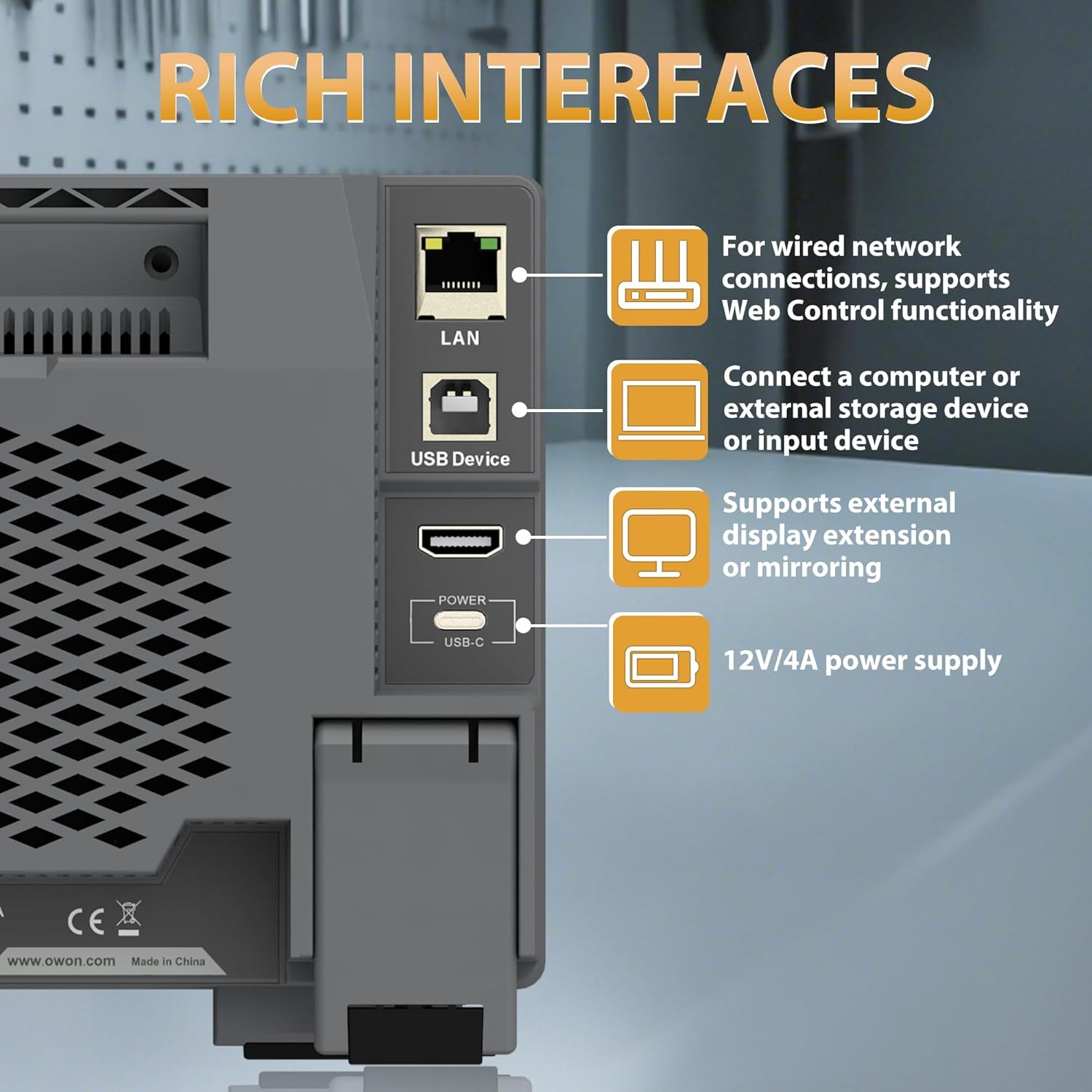
Figure 2.3.4: Rear panel showing the LAN, USB Device, HDMI, and USB-C Power interfaces.

図2.3.5: 上面と背面 view illustrating the overall dimensions and port layout.
3. セットアップ
3.1電源接続
- Connect the provided power adapter to the USB-C Power interface on the rear panel of the oscilloscope.
- 電源アダプタを適切な AC 電源コンセントに差し込みます。
- 前面パネルにある電源ボタンを押して、デバイスの電源を入れます。
3.2 プローブ接続
- Connect the BNC connector of the oscilloscope probe to one of the four input channels (CH1-CH4) on the front panel.
- Ensure the probe's ground clip is securely connected to the ground reference of the circuit under test.
- Attach the probe tip to the test point on the circuit.
4. 操作手順
4.1 基本操作
The ADS824A features a 7-inch multi-touch display for intuitive control.

Figure 4.1.1: The 7-inch multi-touch TFT-LCD display allows for direct interaction with the waveform and menu settings.
- 電源オン/オフ: フロントパネルの電源ボタンを押します。
- ナビゲーション: Use the multi-touch screen or the physical control knobs to navigate menus and adjust settings.
- 自動設定: Press the 'Autoset' button to automatically adjust horizontal and vertical settings for optimal waveform display.
4.2 Waveform Display and Control
- 水平コントロール: Adjust the time base (s/div) and horizontal position using the dedicated knobs.
- 垂直コントロール: 音量を調整するtage scale (V/div) and vertical position for each channel using their respective knobs.
- ズーム: The device supports zoom windows for detailed waveform analysis.

Figure 4.2.1: Illustration of the waveform capture rate, showing the ability to display complex signals effectively.
4.3 測定関数
The ADS824A offers extensive measurement capabilities:
- Auto Measurements: Access 43 automatic measurement functions. A built-in glossary assists in understanding technical terms for quick setup.
- Parametric Statistics: Supports measurement indicators and cursor gating for detailed analysis.
- Cursor Gating: Utilize visual indicators and zoom windows for precise cursor measurements in FFT and XY modes.

Figure 4.3.1: Display showing the interface for 43 auto measurements and the technical terms glossary.

図4.3.2: 画面 views demonstrating parametric statistics and cursor gating with visual indicators.
4.4 トリガー
The oscilloscope supports various triggering options to capture specific events:
- トリガーの種類: Edge, Video, Pulse Width, Slope, Nth Edge, Logic, Under-amplitude, Over-amplitude, and Timeout.
- 設定: Access trigger settings via the dedicated 'Trigger' button or on-screen menu.

Figure 4.4.1: Interface showing advanced triggering options and hardware decoding capabilities.
4.5高度な機能
- FFT スペクトル アナライザー: Perform 1M-point FFT analysis for accurate frequency component display.
- Digital Voltmeter (DVM): Integrated 4-digit voltmeter for ACrms, DC, and AC+DCrms measurements.
- 周波数カウンター: Integrated 6-digit digital frequency counter.
- プロトコルデコード: Supports 2-channel hardware decoding for common serial protocols including RS-232/UART, I2C, SPI, CAN, and LIN.
- 高解像度: The 12-bit vertical resolution (4096 levels) allows for capturing minute signal fluctuations, crucial for power ripple and noise analysis.

Figure 4.5.1: Display illustrating the FFT spectrum analysis and 256-level grayscale display features.

図4.5.2: 画面 views demonstrating 50Mpts storage depth settings, 4-digit voltmeter, and 6-digit frequency counter.

Figure 4.5.3: Comparison illustrating the enhanced detail provided by the 12-bit high-resolution display compared to a standard oscilloscope.
4.6 外部デバイス接続
The ADS824A supports various external devices:
- USBホスト: Connect a mouse or keyboard for enhanced control and efficiency.
- USBデバイス: Connect to a computer for data transfer or remote control.
- LAN: For wired network connections and Web 制御機能。
- HDMI: Connect to an external display for extended or mirrored viewing。
5. メンテナンス
5.1 クリーニング
デバイスのパフォーマンスと外観を維持するには:
- 外側は柔らかくて乾いた布で拭いてください。amp 布。
- Avoid using abrasive cleaners or solvents that may damage the casing または画面。
- デバイスの開口部に液体が入らないようにしてください。
5.2 ストレージ
オシロスコープを使用しないときは、直射日光や極端な温度を避け、清潔で乾燥した環境に保管してください。
5.3バッテリーケア
The ADS824A includes a built-in lithium battery for portability. Proper battery care ensures longevity:
- 最初に使用する前に、バッテリーを完全に充電してください。
- バッテリーを頻繁に完全に放電することは避けてください。
- 長期間保管する場合は、バッテリーを約 50% まで充電し、数か月ごとに再充電してください。
- The built-in battery helps avoid issues caused by ground loops, providing a safe floating ground for measurements.

Figure 5.3.1: Information regarding the built-in lithium battery, emphasizing portability and ground loop avoidance.
6。 トラブルシューティング
This section addresses common issues you might encounter with the OWON ADS824A oscilloscope.
| 問題 | 考えられる原因 | 解決 |
|---|---|---|
| 電源なし | Power adapter not connected or faulty; battery discharged. | Check power connections. Ensure adapter is working. Charge the battery. |
| 波形が表示されない | Probe not connected; signal too small/large; incorrect trigger settings. | Verify probe connection. Adjust vertical scale (V/div). Press 'Autoset'. Check trigger level and mode. |
| 不安定な波形 | Incorrect trigger level or mode; noisy signal. | Adjust trigger level. Change trigger mode. Use averaging acquisition mode. |
| 画面が反応しない | 一時的なソフトウェアの不具合。 | デバイスを再起動してください。問題が解決しない場合は、サポートにお問い合わせください。 |
7. 仕様
Detailed technical specifications for the OWON ADS824A Digital Oscilloscope.

Figure 7.1.1: Table detailing key oscilloscope specifications including bandwidth, sampling rate, and vertical resolution.
| パラメータ | 価値 |
|---|---|
| 帯域幅 | 200 MHz |
| チャンネル | 4 |
| Sampリンレート | 1.25 GSa/s(リアルタイム) |
| 最大波形キャプチャレート | 700,000 wfms/秒 |
| Max Memory Depth | 50 Mpts |
| 分解能 | 12ビット |
| 垂直感度範囲 | 500 uV/div - 10 V/div |
| 入力インピーダンス | 1 MΩ±2%, parallel with 20 pF±5 pF |
| 時間基準範囲 | 1 ns/div - 1000 s/div |
| タイムベースの精度 | ±(0.01% + 0.1tdv) |
| バスデコード | RS232/UART、I2C、SPI、CAN、LIN |
| 入力カップリング | DC、AC、アース |
| 製品寸法 | 10.25 x 3.07 x 6.3インチ |
| アイテム重量 | 3.3ポンド |
8. 保証とサポート
For warranty information and technical support, please refer to the documentation provided with your purchase or visit the official OWON webサイト。カスタマー サービスの連絡先は通常、製造元のサポート ページに記載されています。


