1.製品オーバーview
The KLIM Cassette Player Boombox is a versatile audio device combining classic cassette playback with modern features like AM/FM radio, Bluetooth connectivity, and USB playback/recording. Its portable design allows for use at home or on the go.
主な特徴:
- カセットプレーヤーとレコーダー
- AM/FM Radio Tuner
- Bluetooth Connectivity for wireless streaming
- USB Port for MP3 playback and recording
- Integrated Microphone for direct recording
- Headphone Jack for private listening
- Dual Power: AC power cord or 4 x C-type batteries (not included)
- Portable design with a carrying handle
箱の中身:
- KLIM Cassette Player Boombox
- AC電源コード
- ユーザーマニュアル

図1: 前面 view of the KLIM Cassette Player Boombox, showcasing its controls and cassette compartment.
2. セットアップ
デバイスに電力を供給する:
The KLIM Cassette Player Boombox can be powered in two ways:
- AC電源: Connect the included AC power cord to the device's power input and then to a standard wall outlet.
- バッテリー電源: For portable use, insert 4 x C-type batteries (not included) into the battery compartment located on the underside of the device. Ensure correct polarity.

図2: 下面 view showing the battery compartment for portable power.
3. 操作手順
3.1. Cassette Player/Recorder
- Slide the function selector to 'TAPE'.
- Press the 'OPEN' button to open the cassette compartment.
- カセットテープを開いている面を上にして挿入します。
- カセットコンパートメントを閉じます。
- Use the 'PLAY', 'STOP/EJECT', 'FFWD' (Fast Forward), and 'REW' (Rewind) buttons to control playback.
- To record, ensure a blank tape is inserted. Press the 'REC' button to start recording from the built-in microphone, radio, or USB.

図3:上 view of the boombox with a cassette tape inserted into the compartment.
3.2. AM/FMラジオ
- Slide the function selector to 'RADIO'.
- 最適な受信状態を得るために伸縮アンテナを伸ばします。
- Use the 'BAND' switch to select between AM and FM frequencies.
- Rotate the 'TUNING' knob to find your desired radio station.
3.3. Bluetooth接続
- Slide the function selector to 'BT' (Bluetooth).
- The device will enter pairing mode, indicated by a flashing light or audible prompt.
- スマートフォンまたはタブレットで Bluetooth を有効にし、利用可能なデバイスを検索します。
- Select 'KLIM Cassette Player' (or similar name) from the list to pair.
- ペアリングすると、デバイスからワイヤレスでオーディオをストリーミングできます。
3.4. USB再生と録音
- Slide the function selector to 'USB'.
- MP3オーディオが入ったUSBフラッシュドライブを挿入します filesUSBポートに接続します。
- デバイスは自動的にオーディオの再生を開始します files. Use the playback controls (play/pause, skip) to navigate.
- To record to USB, ensure a USB drive is inserted. Press the 'REC' button while in radio or cassette mode to record the audio source directly to the USB drive.
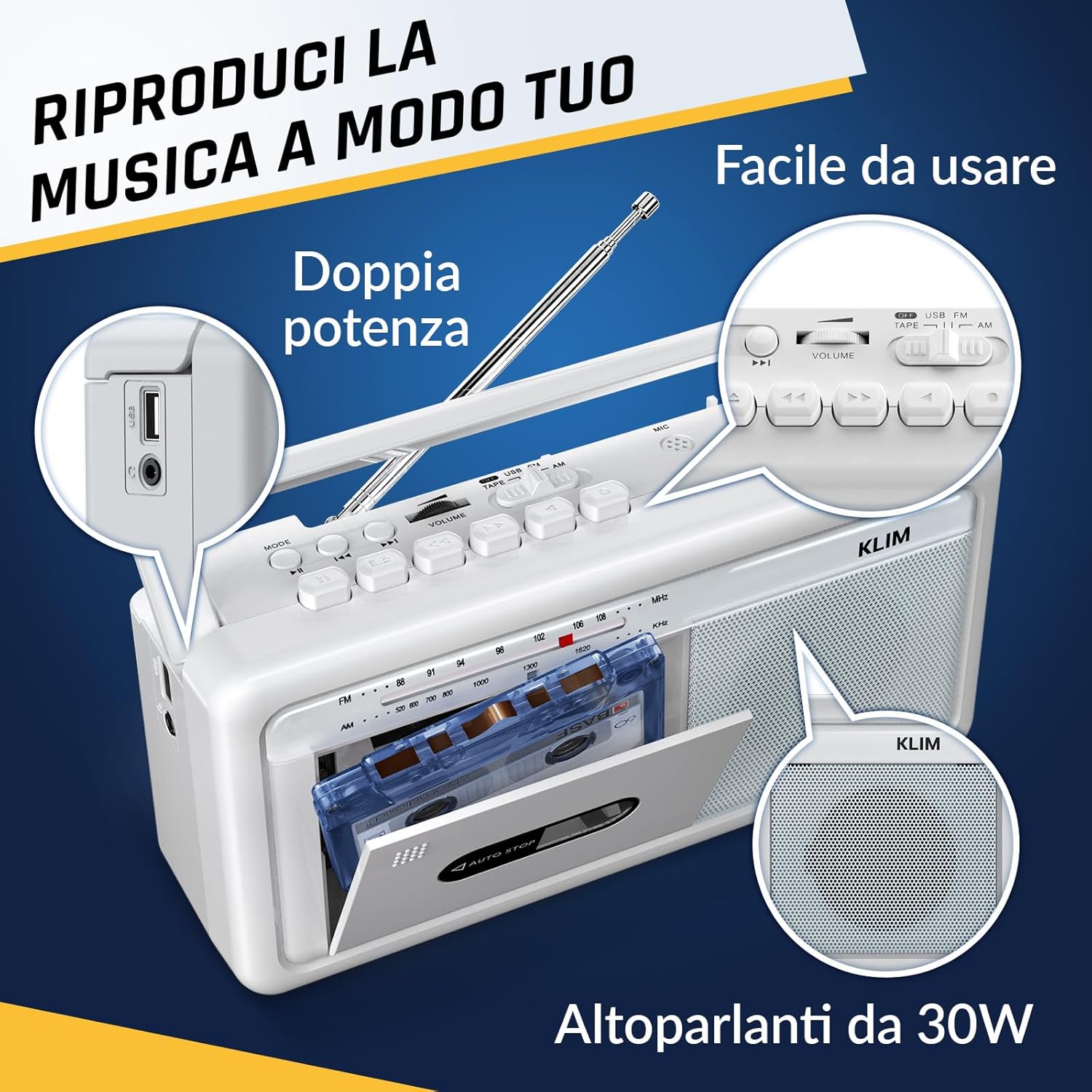
図4:側面 view highlighting the USB port for media playback and recording.
3.5. ヘッドホンの使用
Connect standard 3.5mm headphones to the headphone jack for private listening. The internal speakers will automatically mute when headphones are connected.
Video 1: Instructions on how to record a tape to USB using the WTB-795 model. This video demonstrates the USB recording functionality.
ビデオ2: 終了view of a retro cassette player with USB, Bluetooth, and AM/FM radio features, similar to the KLIM Cassette Player Boombox.
4. メンテナンス
- 柔らかく乾いた布で拭いてデバイスを清潔に保ちましょう。液体クリーナーや溶剤の使用は避けてください。
- カセットヘッドとピンチローラーを綿棒で軽く拭いて定期的に清掃してください。amp最適な音質を確保し、テープへの損傷を防ぐために、イソプロピルアルコールで消毒されています。
- デバイスを直射日光、熱源、過度のほこりや湿気から遠ざけてください。
- 長期間使用しない場合は、液漏れを防ぐために電池を取り外してください。
5。 トラブルシューティング
| 問題 | 考えられる解決策 |
|---|---|
| 電源なし | Check if the AC power cord is securely connected. If using batteries, ensure they are inserted correctly and are not depleted. |
| スピーカーから音が出ない | Increase the volume. Ensure headphones are not connected. Check the function selector is in the correct mode (TAPE, RADIO, BT, USB). |
| ラジオの受信状態が悪い | Extend the telescopic antenna fully. Adjust the antenna direction. Try moving the unit to a different location. |
| カセットテープが再生/録音されない | Ensure the tape is inserted correctly. Check if the tape is damaged. Clean the cassette head and pinch rollers. |
| Bluetoothが接続されない | Ensure the unit is in Bluetooth mode. Make sure your device's Bluetooth is enabled and within range. Try unpairing and re-pairing the device. |
| USB再生の問題 | USBドライブが正しくフォーマット(FAT32)されており、互換性のあるオーディオファイルが含まれていることを確認します。 files (MP3, WAV, WMA, AAC, FLAC). Try a different USB drive. |
6. 仕様
- ブランド: クリム
- モデル: カセットプレーヤー
- 製品寸法: 25 x 13.1 x 7.6 cm
- 商品の重量: 1キロ
- 対応デバイス: MP3プレーヤー、スマートフォン、タブレット
- オーディオ出力モード: ステレオ
- サポートされているオーディオ形式: Cassette, Analog Radio, MP3, WAV, WMA, AAC, FLAC, Bluetooth
- 電源: Corded Electric (AC) / 4 x C-type Batteries (not included)
- 接続技術: USB、ブルートゥース
- 色: フロストホワイト
- 商品番号: KLSIN4825
7.保証とサポート
The KLIM Cassette Player Boombox comes with a 5年間保証. For any questions, technical assistance, or warranty claims, please contact KLIM customer support. Our team is available 24/7 to assist you.
Please refer to the contact information provided in your product packaging or visit the official KLIM web詳細については、サイトをご覧ください。