1.製品オーバーview
The Mars Gaming MC-3TCORELCD is an ATX gaming case designed for PC enthusiasts. It features an integrated 7.2-inch IPS screen, triple removable tempered glass panels, and a dual-chamber structure for efficient cable management and optimized airflow. This manual provides instructions for assembly, operation, and maintenance of the MC-3TCORELCD case.

Figure 1: Mars Gaming MC-3TCORELCD ATX Gaming Case.
2. セットアップとインストール
This section details the steps for installing your components into the MC-3TCORELCD case.
2.1 ケースの準備
- サイドパネルを取り外す: The MC-3TCORELCD features triple tempered glass panels that are removable without screws. Carefully detach the front, side, and central panels to access the interior.
- アクセサリ キット: Locate the accessory kit containing screws, cable ties, and other mounting hardware.

図2: パノラマ view with removable triple tempered glass for easy access.
2.2マザーボードの取り付け
The case supports ATX, MicroATX, and Mini-ITX motherboards, including those with inverted connectors.
- スタンドオフの取り付け: Ensure the correct standoffs are installed for your motherboard form factor.
- マザーボードのマウント: マザーボードをスタンドオフに慎重に置き、付属のネジで固定します。
2.3 ドライブのインストール
The case provides internal bays for storage devices.
- 3.5インチHDD: Up to 2x 3.5" HDDs can be installed.
- 2.5インチSSD: Up to 3x 2.5" SSDs can be installed.
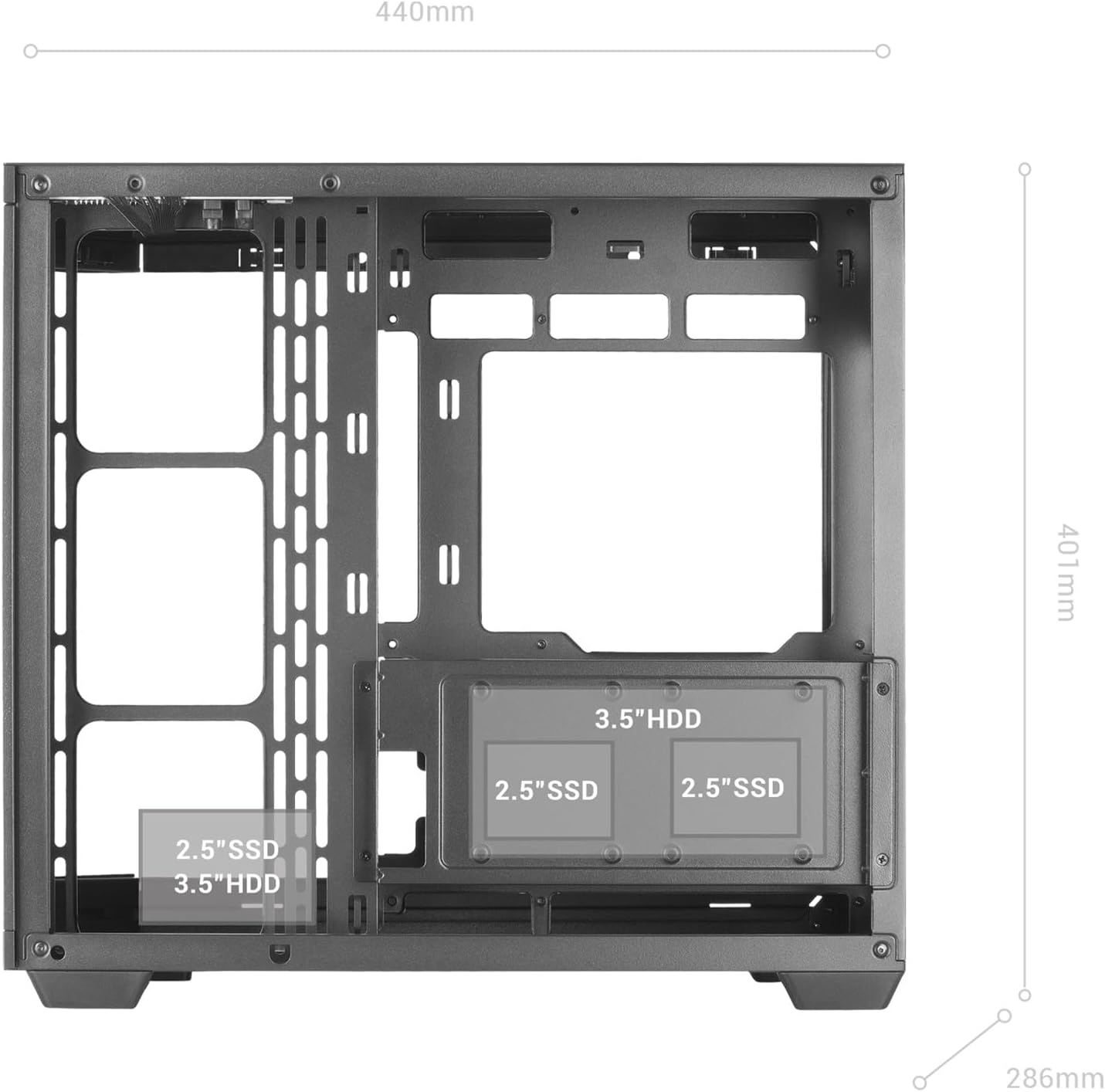
Figure 3: Internal layout indicating drive bay positions.
2.4 電源とケーブル管理
The dual-chamber design facilitates clean cable routing.
- 電源を取り付けます: Mount your ATX power supply in the designated bottom-mount area.
- ケーブルの配線: Utilize the dual-chamber structure to route cables behind the motherboard tray, minimizing clutter and improving airflow.

Figure 4: Double side chamber for efficient cable management.
2.5 冷却システムの設置
The case supports extensive air and liquid cooling solutions.
- ファン: Install up to 10x 120mm fans or a combination of 7x 120mm and 2x 140mm fans.
- 液体冷却: Supports liquid cooling radiators up to 360mm.

Figure 5: Liquid cooling and fan installation options.
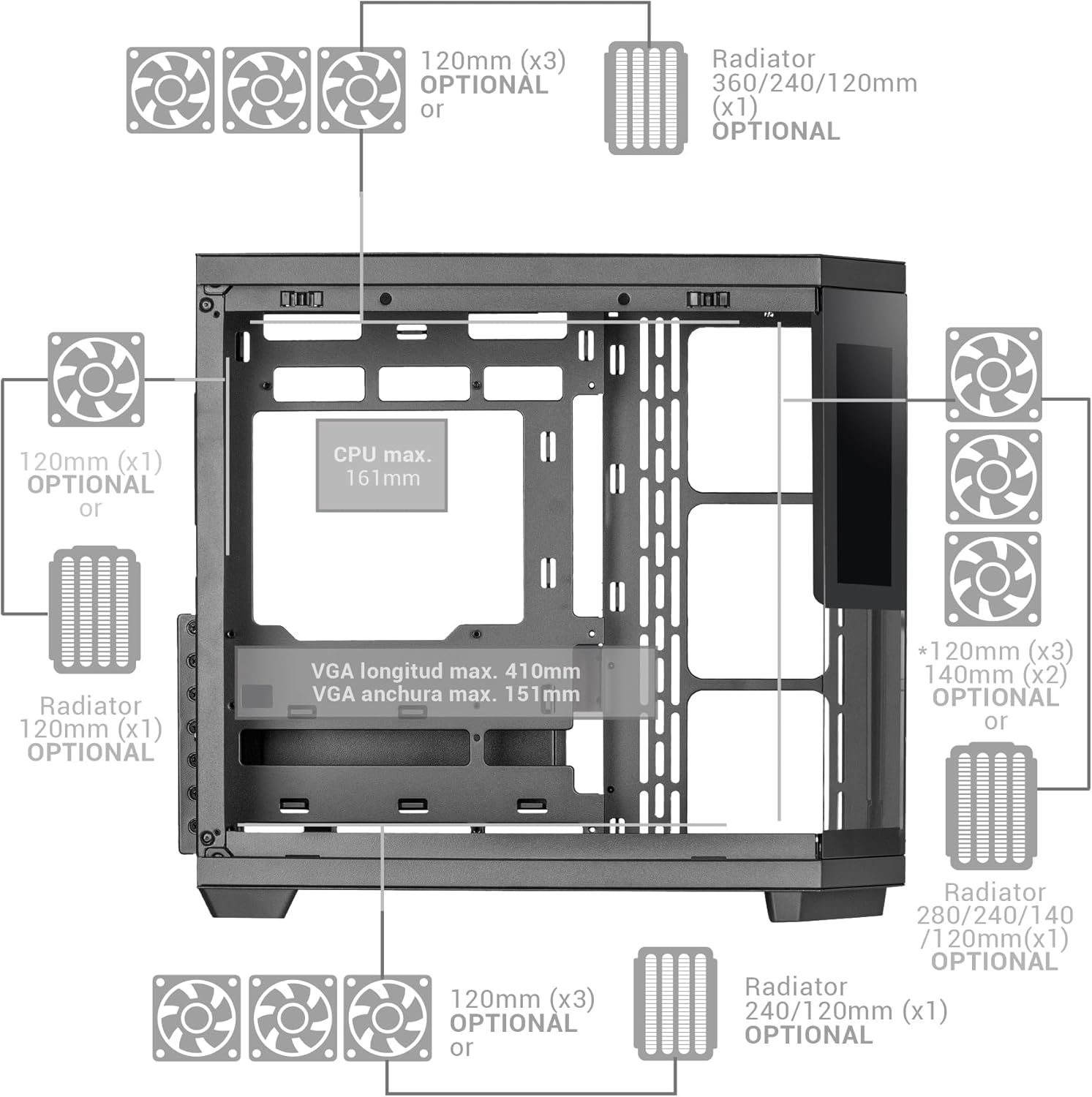
Figure 6: Detailed fan and radiator compatibility diagram.
2.6 Top Panel Connectivity
Connect the front panel headers from your motherboard to the corresponding ports on the case's top panel.
- USB-Cポート
- USB 3.0 ポート
- USB 2.0 ポート
- HD Audio + Microphone Jacks

Figure 7: Top panel connectivity ports.
3. Operating the IPS Screen
The integrated 7.2-inch IPS screen allows for real-time system monitoring and custom visual displays.
- ソフトウェアのインストール: Install the dedicated control software for the IPS screen (refer to the manufacturer's webダウンロード用のサイトをご覧ください。
- 接続性: Ensure the screen is properly connected to your motherboard or graphics card as per the installation guide.
- カスタマイズ: Use the software to display system telemetry (temperatures, usage), custom images, animations, or videos.

Figure 8: Customizable 7.2-inch IPS screen in operation.
4. メンテナンス
定期的なメンテナンスにより、PC ケースの最適なパフォーマンスと寿命が確保されます。
- ダストフィルター: The case includes two magnetic dust filters. Regularly remove and clean these filters to prevent dust buildup and maintain efficient airflow.
- インテリアクリーニング: With the removable tempered glass panels, the interior is easily accessible for cleaning. Use compressed air to remove dust from components and a soft, dry cloth for surfaces.
- ガラスパネル: Clean tempered glass panels with a microfiber cloth and a glass cleaner suitable for electronics.
5。 トラブルシューティング
このセクションでは、発生する可能性のある一般的な問題について説明します。
- 空気の流れが悪い: Ensure all fan positions are utilized effectively and dust filters are clean. Verify that cables are managed to not obstruct airflow.
- IPS Screen Not Displaying: Check all cable connections to the motherboard/graphics card. Ensure the control software is installed and running correctly. Consult the software's troubleshooting guide.
- コンポーネントの適合の問題: Refer to the specifications for maximum component dimensions (GPU length, CPU cooler height). Ensure components are correctly seated and secured.
6. 仕様
| 特徴 | 詳細 |
|---|---|
| ブランド | マーズゲーミング |
| モデル名 | MC3TCORELCD |
| 色 | 黒 |
| ケースタイプ | ミッドタワー |
| 材料 | 強化ガラス |
| マザーボードの互換性 | ATX、マイクロATX、ミニITX |
| 内部ドライブベイ | 2x 3.5" HDD / 3x 2.5" SSD |
| GPUの最大長 | 410mm |
| 最大GPU幅 | 151mm |
| CPUクーラーの最大高さ | 161mm |
| ファン容量 | Up to 10x 120mm or 7x 120mm + 2x 140mm |
| 液体冷却サポート | Up to 360mm radiators |
| 電源取付タイプ | Bottom Mount (ATX) |
| 冷却方法 | 空気 |
| 特集 | Dust filter, 7.2" IPS Customizable Screen, Triple Removable Tempered Glass, Dual Chamber Structure |
| Top Panel Connectivity | USB-C, USB 3.0, USB 2.0, HD Audio + Mic |
| アイテム重量 | 6.58キログラム |
7. 保証情報
この製品には、 3年間のメーカー保証. Please retain your proof of purchase for warranty claims. For detailed terms and conditions, refer to the official Mars Gaming webサイトをご覧いただくか、カスタマー サポートにお問い合わせください。
8. サポート
For further assistance, technical support, or to download the latest drivers and software for the IPS screen, please visit the official Mars Gaming webサイト:
You may also contact Mars Gaming customer service through the contact information provided on their webサイト。