1. はじめに
Thank you for choosing the SUNLU S4 Filament Dryer. This device is designed to effectively dry 3D printer filaments, improving print quality and preventing common issues caused by moisture absorption. The S4 features a large capacity for up to four 1KG spools, rapid heating, uniform drying with triple fans, and intelligent humidity control for optimal filament conditioning.
2. 安全に関する注意事項
- デバイスを操作する前に、すべての指示をお読みください。
- 電源のボリュームを確認してくださいtage matches the specifications indicated on the device.
- 濡れた手や濡れた状態でデバイスを操作しないでください。amp 環境。
- デバイスを可燃性物質や熱源から遠ざけてください。
- 運転中は通気口を塞がないでください。
- 使用していないときや清掃する前には、デバイスのプラグを電源コンセントから抜いてください。
- 自分でデバイスを分解したり修理したりしないでください。 サポートが必要な場合は、カスタマー サポートにお問い合わせください。
- お子様の手の届かない場所に保管してください。
3. パッケージ内容
パッケージに以下の項目が含まれているか確認してください。
- SUNLU S4 Filament Dryer Unit
- 電源アダプター
- ユーザーマニュアル(このドキュメント)
- 1KG White High Speed PLA+2.0 Filament (bundled item)
4.製品オーバーview
The SUNLU S4 Filament Dryer is designed to provide optimal drying conditions for various 3D printing filaments. Key features include:
- 大容量: Accommodates up to four 1KG spools simultaneously, enabling multi-color or multi-machine printing without interruption.
- 急速加熱: Equipped with a 350W PTC heater, the S4 heats from 25℃ to 50℃ in approximately 30 minutes, ensuring efficient drying.
- Uniform Drying: Three built-in fans (two circulating on sides, one on bottom) maintain a temperature balance within ±3℃ for consistent drying throughout the box.
- Triple Security: Features PTC, temperature switch, and software protection for enhanced safety and real-time temperature monitoring.
- Smart Auto Humidity Control: Allows users to set a desired humidity range (30%~50%). The dryer automatically starts drying when humidity exceeds the set range and stops when it falls below 25% to prevent over-drying.
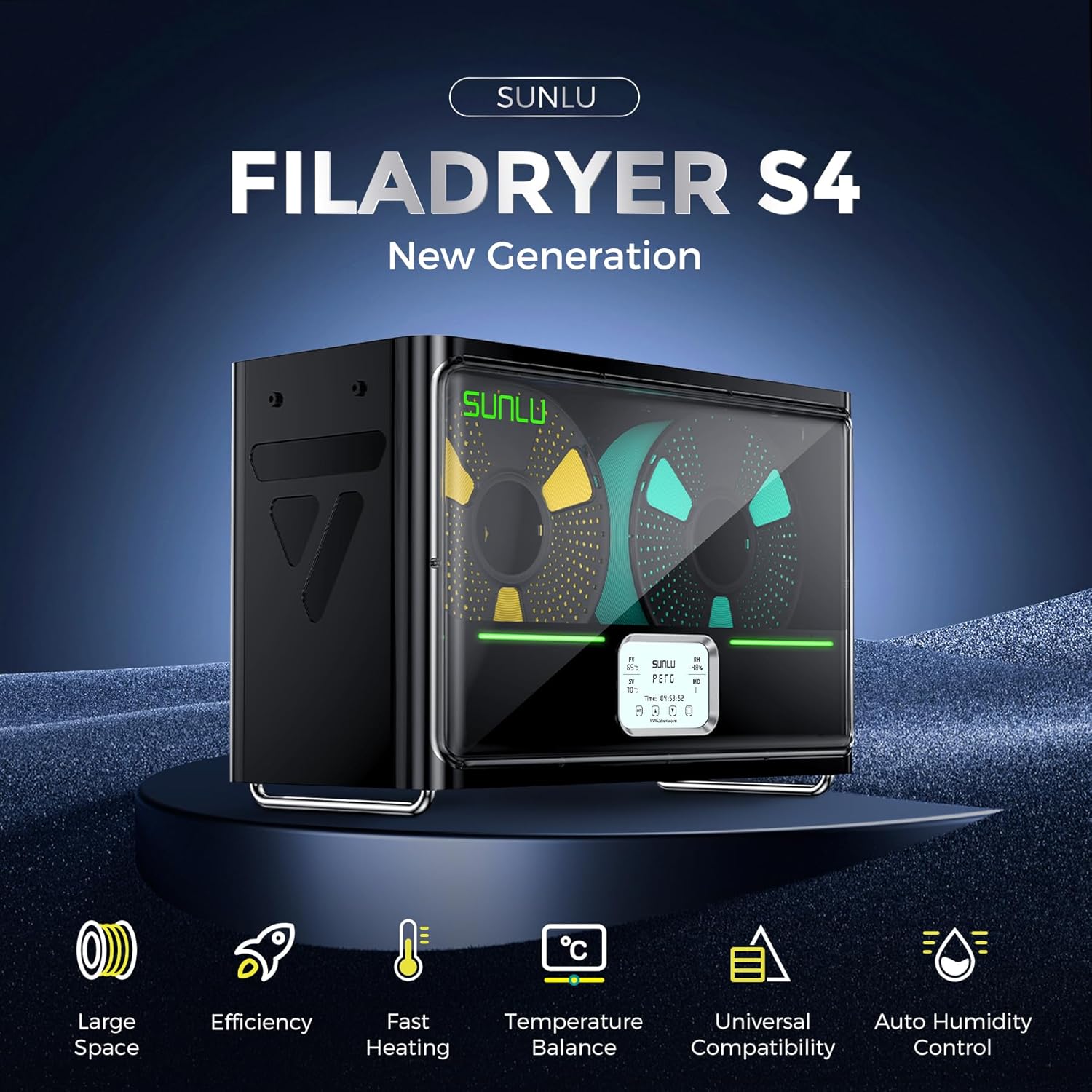
Image: The SUNLU S4 Filament Dryer highlighting its main features including large space, efficiency, fast heating, temperature balance, universal compatibility, and auto humidity control.
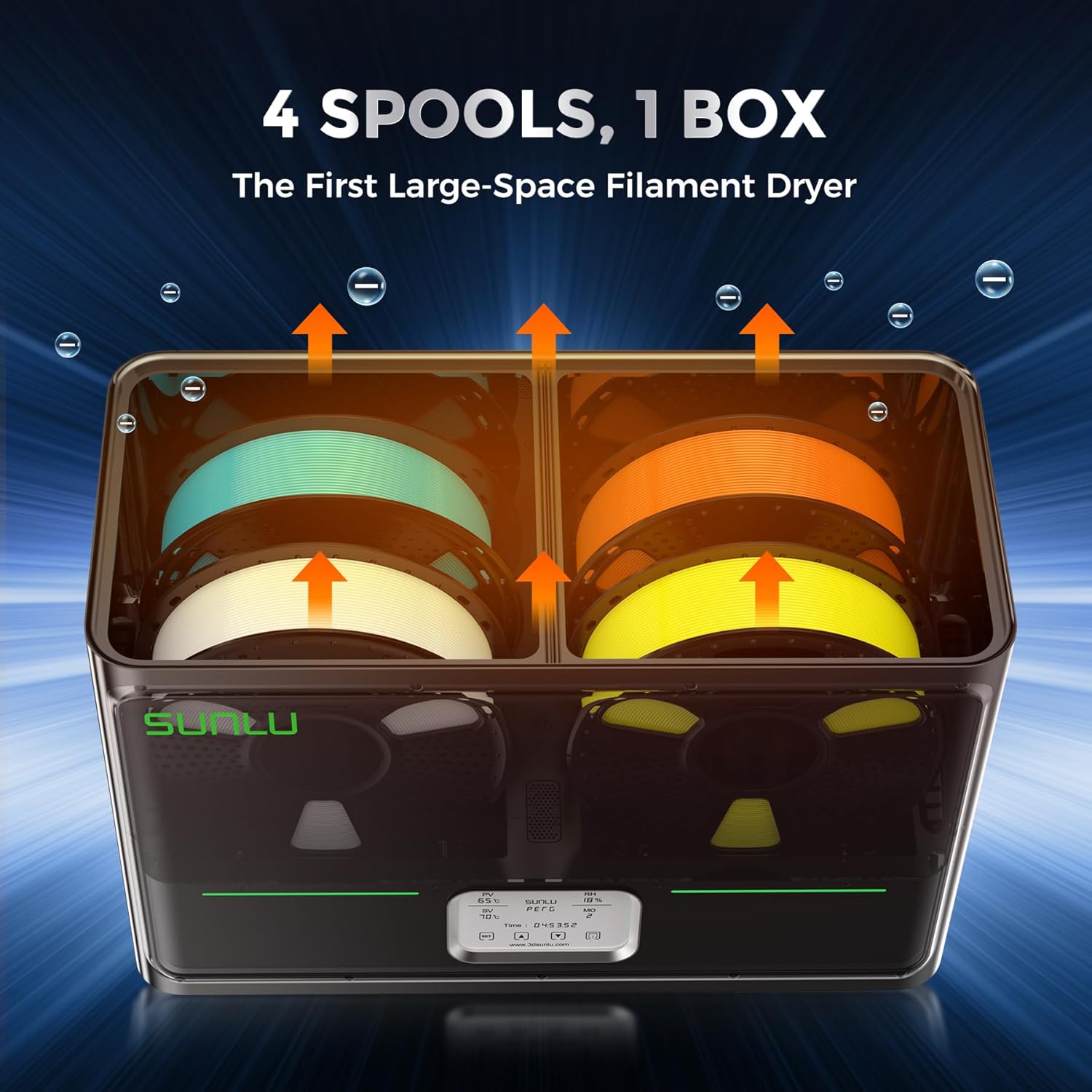
画像: 内部 view of the SUNLU S4 Filament Dryer demonstrating its capacity to hold four 1KG filament spools, with arrows indicating airflow for drying.

Image: A visual comparison showing a 3D printed object made with wet filament (left, rough surface) versus the same object made with dried filament (right, smooth surface), illustrating the benefits of drying.
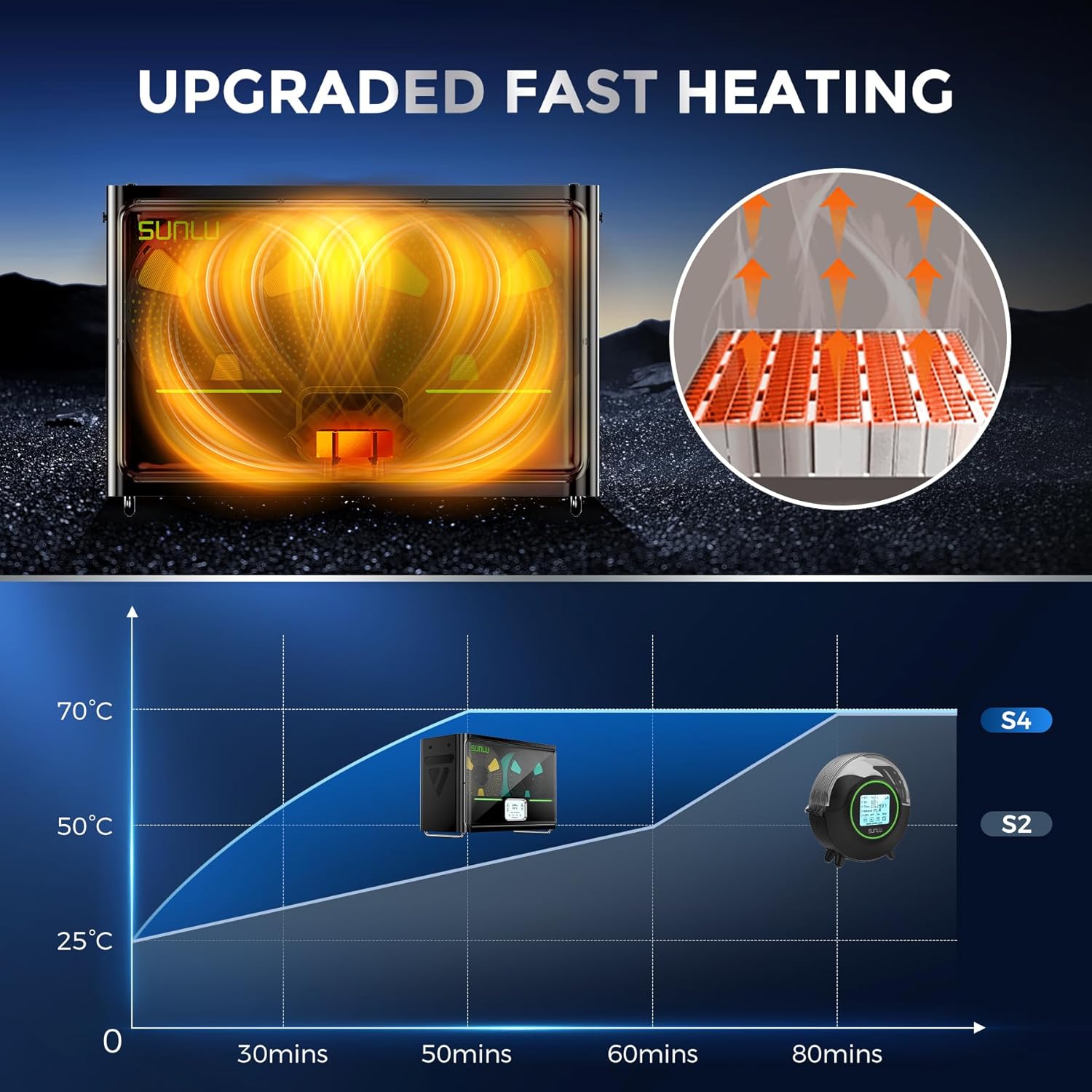
Image: A graph illustrating the rapid heating capability of the SUNLU S4, showing it reaches 50°C from 25°C in approximately 30 minutes, significantly faster than previous models.

Image: An illustration depicting the three internal fans of the SUNLU S4, highlighting their role in circulating air for uniform and 360-degree drying of filament.

Image: A diagram showing the triple security features of the S4: Smart PTC, Temperature Switch, and Software Protection, ensuring safe operation with real-time temperature monitoring.
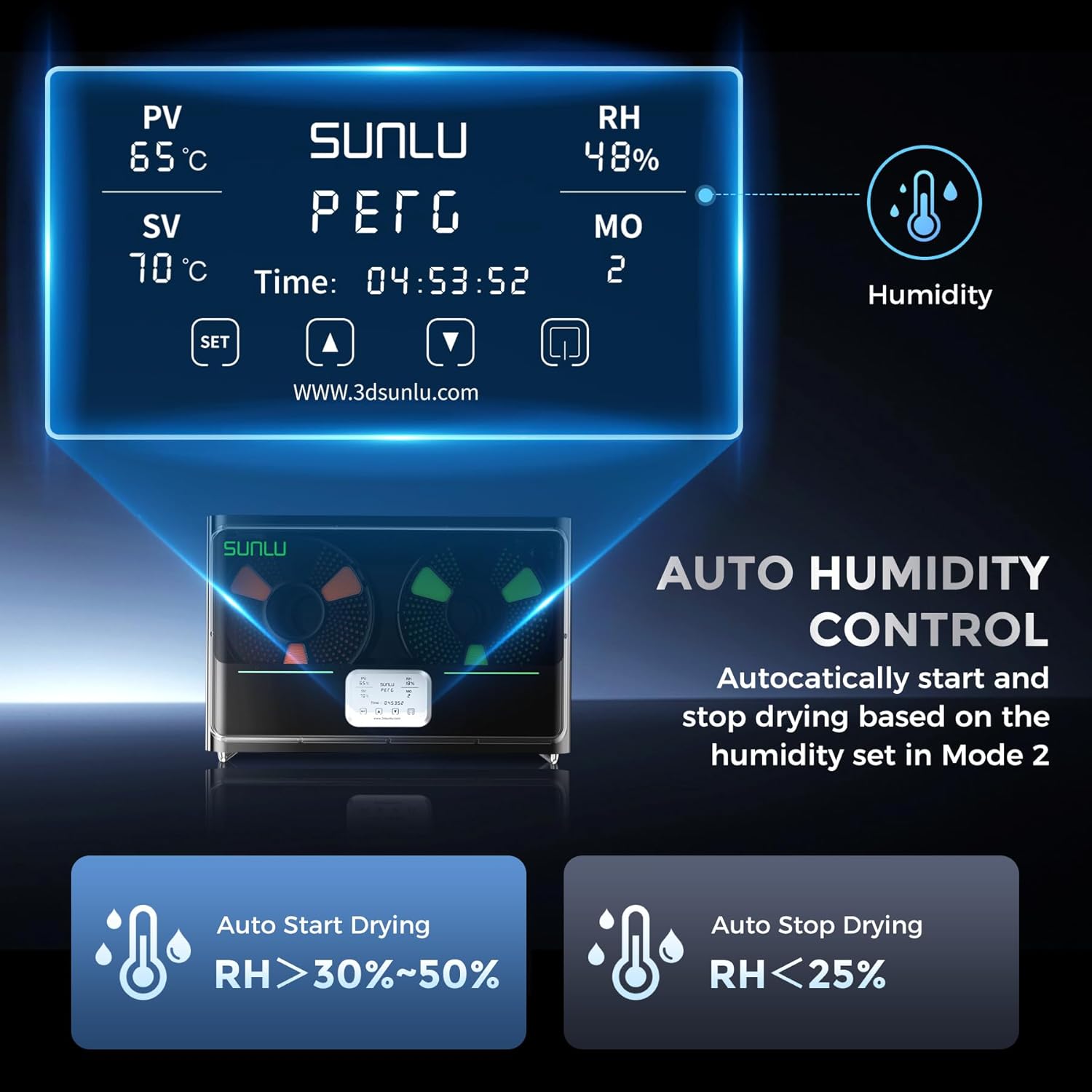
Image: The control panel display of the SUNLU S4, showing current temperature (PV), set temperature (SV), relative humidity (RH), and mode (MO). It also illustrates the auto humidity control logic for starting and stopping drying.
5. セットアップ
- 開梱: Carefully remove the SUNLU S4 Filament Dryer and all accessories from the packaging.
- 配置: 乾燥機は安定した平らな耐熱性の面に置き、周囲に十分な換気を確保してください。
- フィラメントを装填: Open the lid of the dryer. Place up to four 1KG filament spools onto the internal rollers. Ensure the filament can unroll smoothly.
- 接続電源: Plug the power adapter into the dryer's power input port, then connect the adapter to a suitable power outlet.
- 電源オン: Press the power button to turn on the device. The display will illuminate.
6. 操作手順
The SUNLU S4 offers various modes for drying filament. Refer to the display and control buttons for operation.
6.1. 基本操作
- 電源オン/オフ: 電源ボタンを押して、ユニットの電源をオンまたはオフにします。
- Temperature Setting (SV): Use the 'SET' button to enter temperature adjustment mode. Use the up/down arrows to set the desired drying temperature. Press 'SET' again to confirm.
- Drying Time Setting: The dryer typically operates for a set duration or until humidity targets are met. Consult the on-screen display for current drying time.
6.2. Auto Humidity Control (Mode 2)
This mode allows the dryer to automatically manage humidity levels to prevent over-drying while ensuring optimal conditions.
- Activate Mode 2: Navigate to Mode 2 on the display.
- Set Humidity Range: In Mode 2, you can adjust the target humidity range, typically between 30% and 50%.
- 自動操作: The S4 will automatically initiate drying when the internal relative humidity (RH) rises above your set range.
- 自動停止: Drying will automatically cease when the internal RH drops below 25%, preserving filament quality.
注記: Always refer to the specific filament manufacturer's recommendations for optimal drying temperatures and durations.
7. メンテナンス
- クリーニング: Ensure the device is unplugged before cleaning. Use a soft, dry cloth to wipe the exterior. Do not use abrasive cleaners or solvents.
- 内部クリーニング: Periodically check the interior for any filament debris or dust. Use a soft brush or compressed air to gently remove any accumulation.
- ストレージ: When not in use for extended periods, store the dryer in a cool, dry place, away from direct sunlight and moisture.
8。 トラブルシューティング
| 問題 | 考えられる原因 | 解決 |
|---|---|---|
| デバイスの電源が入らない | 電源が供給されていない、接続が緩んでいる | Check power cable connection; ensure outlet is functional. |
| フィラメントが効果的に乾燥しない | Incorrect temperature/time settings; heavily saturated filament | Increase drying temperature or duration; ensure correct mode is selected. |
| 気温の変動 | Blocked vents; extreme ambient temperature | Ensure vents are clear; operate in a stable room temperature environment. |
| ディスプレイが機能しない | Power issue; internal fault | Power cycle the device. If issue persists, contact support. |
9. 仕様
| 特徴 | 詳細 |
|---|---|
| モデル | S4 |
| ブランド | サンル |
| 火力 | 350W PTCヒーター |
| フィラメント容量 | Up to 4 x 1KG spools |
| 温度制御 | ±3℃ balance |
| 湿度コントロール | Auto start (RH > 30-50%), Auto stop (RH < 25%) |
| 安全機能 | PTC, Temperature Switch, Software Protection |
| ASIN | B0FS74DPRD |
| 初回利用可能日 | 6年2025月XNUMX日 |
10. 保証とサポート
SUNLU products are manufactured to high-quality standards. For warranty information, technical support, or service inquiries, please refer to the official SUNLU website or contact your retailer. Please have your product model (S4) and purchase information ready when contacting support.


