導入
Thank you for choosing the Baseus Bowie MH1 Adaptive Active Noise Cancelling Headphones. This manual provides essential information for setting up, operating, and maintaining your headphones to ensure optimal performance and longevity. Please read this manual thoroughly before using the product.
箱の中身
- Baseus Bowie MH1 Noise Cancelling Headphones ×1
- キャリングケース×1
- USB-C Data Cable ×1
Note: An AUX cable is not included to reduce electronic waste. Wired mode works with any standard AUX cable.
製品終了view
The Baseus Bowie MH1 headphones are designed for superior audio quality and comfort, featuring advanced noise cancellation and personalized sound experiences.
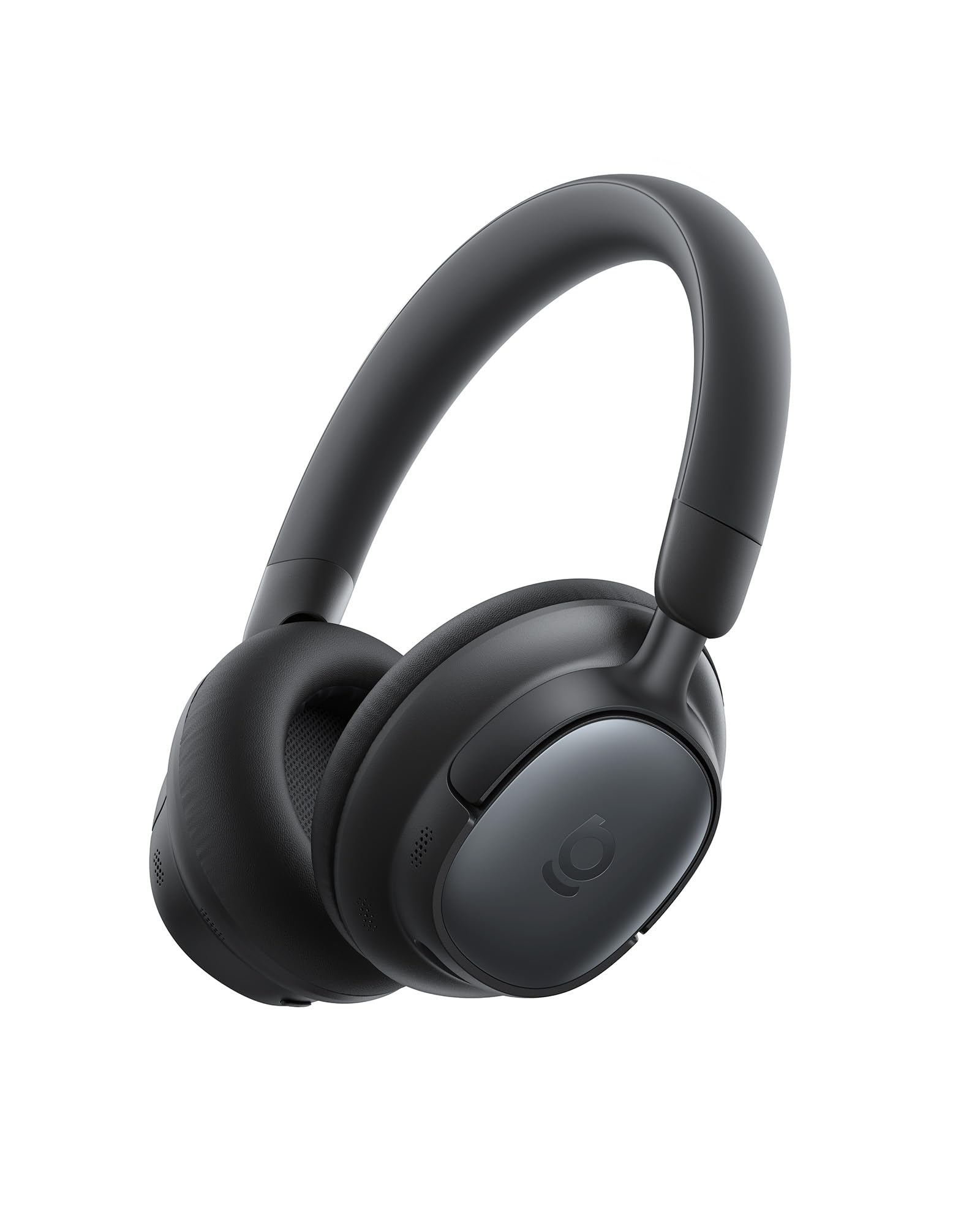
Figure 1: Baseus Bowie MH1 Headphones in Cosmic Black.
主な特徴:
- Crystal-Clear Hi-Res Audio: Certified Hi-Res & Hi-Res Wireless with LDAC codec and 36 mm dynamic drivers.
- アダプティブハイブリッドANC: Blocks up to 99.8% of noise with -48 dB deep noise cancellation.
- 5マイクAIクリア通話: Enhanced voice capture and wind-noise reduction for clear communication.
- 80時間のバッテリー寿命: 1 回の充電で再生時間が延長されます。
- 快適なフィット感: Integrated cushioned headband and cloud-soft protein leather earcups.

図2:以上view of Baseus Bowie MH1 features including sound quality, ANC, call clarity, and battery life.
設定
1.電源のオン/オフ
- 電源オン: Press and hold the Power button (located on the left earcup) for 3 seconds until the indicator light flashes blue and you hear an audible 'Power On' prompt.
- 電源を切る: Press and hold the Power button for 3 seconds until the indicator light turns off and you hear an audible 'Power Off' prompt.
2.Bluetoothペアリング
- ヘッドフォンの電源がオフになっていることを確認してください。
- インジケーター ライトが青と赤に交互に点滅し、ペアリング モードを示すまで、電源ボタンを 5 秒間押し続けます。
- On your device (smartphone, tablet, laptop), enable Bluetooth and search for 'Baseus Bowie MH1' in the list of available devices.
- Select 'Baseus Bowie MH1' to connect. The indicator light will turn solid blue once connected.
3. デュアルデバイス接続(マルチポイント)
The Baseus Bowie MH1 supports simultaneous connection to two Bluetooth devices. To enable this feature, activate 'Dual Device Connection' in the Baseus App.
操作手順
コントロールオーバーview

図3:詳細 view of the 4-Layer Noise-Cancelling System components.
- ANCボタン: Toggle between ANC On, ANC Off, and Transparency modes.
- 音量ボタン(+/-): Short press to adjust volume. Long press for previous/next track.
- 多機能ボタン: Play/pause music, answer/end calls (single press), reject calls (long press), toggle spatial audio (double press), activate low latency mode (triple press).
アクティブノイズキャンセリング(ANC)と透明モード
The Adaptive Hybrid ANC system blocks up to 99.8% of ambient noise, providing an immersive listening experience. Transparency mode allows you to hear your surroundings without removing the headphones.

Figure 4: Visual representation of -48dB deep noise cancellation.
Press the ANC button to cycle through ANC On, Transparency, and ANC Off modes. You can customize ANC levels and modes via the Baseus App.

Figure 5: Tailored quiet for various venues, including traveling, working, commuting, and exercising.
電話をかける
The 5-Mic AI Clear Calls feature utilizes AI-powered voice boost and wind-noise reduction for crystal-clear conversations. Use the Multi-function button to manage calls.

Figure 6: 5-Mic AI Clear Calls ensure crystal-clear voice capture and seamless conversations.
サウンド機能
Hi-Res Audio & LDAC
Enjoy lossless sound quality with Hi-Res Audio certification and LDAC codec support, delivering up to 3X the audio detail compared to standard Bluetooth. The 36 mm dynamic drivers with LCP diaphragms provide balanced clarity across all frequencies.

Figure 7: Experience lossless Hi-Res Sound with LDAC, delivering rich, low-distortion audio.
SuperBass 2.0 & BISA Spatial Audio
SuperBass 2.0 intelligently adjusts low frequencies in real-time for deep, impactful bass. Baseus Immersive Spatial Acoustics (BISA) technology creates a lifelike soundstage that surrounds you, offering a truly immersive audio experience.

Figure 8: SuperBass 2.0 dynamically enhances low frequencies for powerful sound.

Figure 9: Baseus Immersive Spatial Acoustics (BISA) delivers a soundstage that feels alive.
SoundFit Personalization
SoundFit technology adapts audio to your unique hearing profile, providing a custom-tuned listening experience. This feature can be enabled via the Baseus App after ensuring the app and firmware are updated.

Figure 10: SoundFit personalizes your hearing profile for fine-tuned audio at any volume.
快適さとデザイン
The Bowie MH1 headphones are designed for extended wear, featuring an integrated cushioned headband and cloud-soft protein leather earcups with resilient memory foam. This design evenly distributes pressure for cloud-like comfort and superior noise isolation.

Figure 11: Designed for ultimate comfort with snag-free headband, smooth protein leather, and resilient memory sponge.
The headphones are also foldable and lightweight, making them compact and travel-ready for commutes, travels, and daily use.

Figure 12: Compact and travel-ready design allows headphones to slip easily into bags or cases.
バッテリーと充電
The Baseus Bowie MH1 offers an impressive battery life of up to 80 hours with ANC off, and 55 hours with ANC on. A quick 10-minute charge provides up to 10 hours of playback.

Figure 13: Week-long playtime with 80 hours (ANC off) and 10-minute quick charge for 10 hours of playback.
- 充電ポート: USB-C (located on the left earcup).
- 充電時間: フル充電には約1.5時間かかります。
- バッテリーインジケーター: Check battery status via the Baseus App or the LED indicator on the headphones.
接続性
The headphones feature Bluetooth 6.0 for fast, stable, and ultra-low-latency connections. The Baseus Smart Connect (BSC) technology enables seamless switching between two paired devices.

Figure 14: Instant Multipoint Connection with Bluetooth 6.0 for seamless switching between devices.
低遅延モード
Activate Low Latency Mode for improved audio and video synchronization, ideal for gaming or watching videos. This can be toggled via the Multi-function button (triple press) or the Baseus App.
Baseus App Control
Unlock the full potential of your Baseus Bowie MH1 headphones with the dedicated Baseus App. The app provides comprehensive control over various settings and features.
Figure 15: Smart App Control allows full customization of your listening experience, including Noise Reduction Modes, Spatial Audio, Bass Boost, and EQ Modes.
アプリの機能:
- ノイズ低減モード: ANC レベルを調整し、モードを切り替えます。
- 空間オーディオ: Enable/disable Baseus Immersive Spatial Acoustics.
- EQ Modes & Bass Boost: Select from various equalizer presets or activate SuperBass 2.0.
- SoundFit: Personalize audio based on your hearing profile.
- Find Your Headphones: Locate misplaced headphones using the app's tracking feature.
Figure 16: Effortlessly find your headphones using the Baseus App's location feature.
メンテナンス
- クリーニング: ヘッドフォンのお手入れには、柔らかく乾いた布をご使用ください。刺激の強い化学薬品や研磨剤は使用しないでください。
- ストレージ: 使用していないときは、ほこりや損傷からヘッドフォンを保護するために、付属のキャリングケースに保管してください。
- バッテリーのケア: バッテリー寿命を延ばすには、ヘッドフォンを頻繁に完全に放電させないでください。頻繁に使用しない場合でも、定期的に充電してください。
- 極端な状況を避ける: ヘッドフォンを極端な温度、湿度、直射日光にさらさないでください。
トラブルシューティング
| 問題 | 解決 |
|---|---|
| ヘッドホンの電源が入らない | Ensure the headphones are charged. Press and hold the Power button for 3 seconds. |
| Bluetoothでペアリングできない | Ensure headphones are in pairing mode (flashing blue/red). Turn off and on Bluetooth on your device. Forget previous pairings and try again. |
| 音が出ない、または音量が小さい | ヘッドホンとデバイスの音量レベルを確認してください。ヘッドホンが正しく接続されていることを確認してください。両方のデバイスを再起動してみてください。 |
| ANCが効果的に機能していない | Ensure ANC mode is activated. Adjust ANC levels via the Baseus App. Ensure earcups form a good seal around your ears. |
| 通話品質が悪い | Ensure microphone is not obstructed. Check network signal on your device. Try moving to a quieter environment. |
仕様
| 特徴 | 詳細 |
|---|---|
| モデル名 | Baseus Bowie MH1 |
| 騒音制御 | Active Noise Cancellation (-48 dB) |
| 接続技術 | ワイヤレス(Bluetooth 6.0) |
| オーディオドライバーのサイズ | 36ミリメートル |
| バッテリー寿命 | 80時間(ANCオフ)、55時間(ANCオン) |
| 充電時間 | 10分で10時間再生 |
| ヘッドフォンジャック | No Jack (3.5mm AUX compatible) |
| コントロールタイプ | Button Control, Smart APP Control |
| 材料 | 合成皮革、プラスチック |
| アイテム重量 | 1.08ポンド |
| 製品寸法 | 7.87 x 6.5 x 1.97インチ |
保証とサポート
Baseus products are designed and manufactured to the highest quality standards. For warranty information, technical support, or customer service inquiries, please refer to the warranty card included in your product packaging or visit the official Baseus webサイトでご確認ください。保証請求に備えて購入証明書を保管してください。
公式製品ビデオ
ビデオ1: 公式製品終了view of the Baseus Bowie MH1 Adaptive Active Noise Cancelling Headphones, highlighting key features and design.


