1. はじめに
The DOOGEE Note56X Pro is an Android 16 smartphone designed for optimal performance and user experience. It features a sleek design, a powerful octa-core processor, a high-capacity battery, and advanced camera capabilities. This manual provides essential information for setting up, operating, and maintaining your device.

This image displays the DOOGEE Note56X Pro smartphone in light blue and black, showcasing 洗練されたプロfile and key features such as its 8.45mm ultra-thin design, 6150mAh silicon-carbon battery, integrated Gemini AI with Android 16, 128GB expandable ROM, and a 6.56-inch HD+ 90Hz display.
2. 箱の中身
製品パッケージにすべてのアイテムが揃っていることを確認します。
- 1 x DOOGEE Note56X Pro Smartphone
- 充電ケーブル x 1
- 充電器 x 1
- 1 xスクリーンプロテクター(事前塗布済み)
- 1 x SIM Card Ejection Tool
- 保護ケース x 1
- 1 x梱包箱
- ユーザーマニュアル x 1
- 1 xサービスカード
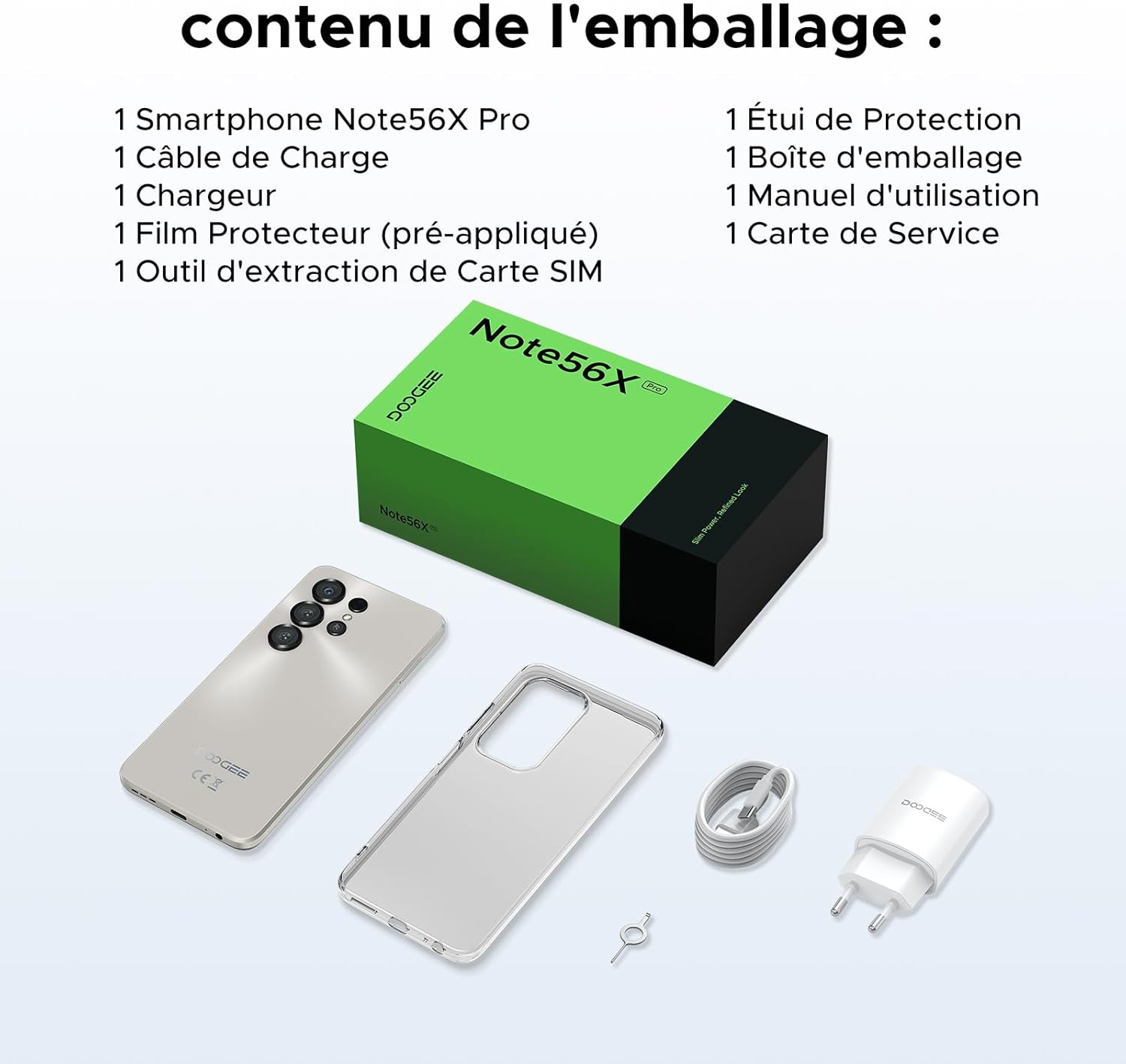
This image shows the contents included in the DOOGEE Note56X Pro packaging: the smartphone, a charging cable, a charger, a pre-applied screen protector, a SIM card ejection tool, a protective case, the packaging box, a user manual, and a service card.
3. はじめに
3.1. SIMカードの挿入
The DOOGEE Note56X Pro supports Dual SIM functionality. To insert your SIM card(s):
- デバイスの側面にある SIM カード トレイを見つけます。
- Use the provided SIM ejection tool to open the tray.
- 金色の接点を下にして、Nano-SIM カードおよび/または microSD カードをトレイに置きます。
- トレイがデバイスと面一になるまで、慎重にスロットに押し戻します。
3.2.電源のオン/オフ
- 電源を入れるには: DOOGEE ロゴが表示されるまで電源ボタンを押し続けます。
- 電源を切るには: 電源オプションが画面に表示されるまで電源ボタンを長押しし、「電源を切る」を選択します。
- 再起動します: 電源オプションが表示されるまで電源ボタンを押し続け、「再起動」を選択します。
3.3. 初期設定
初めて電源を入れたら、画面の指示に従って初期セットアップを完了します。
- 言語を選択します。
- Wi-Fi ネットワークに接続します。
- Google アカウントでサインインするか、新しいアカウントを作成してください。
- Set up screen lock (PIN, pattern, password, fingerprint, or Face ID).
- Review 利用規約に同意します。
4. デバイスの操作
4.1. ディスプレイ
The Note56X Pro features a 6.56-inch HD+ IPS Waterdrop display with a 90Hz refresh rate, offering smooth visuals and vibrant colors. The 90% screen-to-body ratio provides an immersive viewing の経験。

This graphic highlights the display features of the DOOGEE Note56X Pro, including a 90Hz refresh rate for smooth visuals, support for 16.7 million colors, and a 90% screen-to-body ratio for an immersive viewing の経験。
A brief video demonstrating the smooth gaming experience on the DOOGEE Note56X Pro's 6.56-inch HD+ 90Hz display, showing responsive gameplay.
4.2. パフォーマンス
Powered by an UNISOC T7225 Octa-Core processor, the Note56X Pro ensures fluid multitasking and efficient application launch. It comes with 32GB of RAM (4GB physical + 28GB virtual) and 128GB of internal storage, expandable up to 2TB via a TF card (sold separately).

This image presents a technical diagram of the UNISOC T7225 Octa-Core processor, highlighting its 1.8 GHz high frequency and Mali G57 ARM GPU, ensuring smooth performance for web browsing, online learning, and chats.

This graphic illustrates the memory configuration of the DOOGEE Note56X Pro, featuring 32GB RAM (4GB physical + 28GB virtual) and 128GB ROM, expandable up to 2TB with a TF card (sold separately), providing ampアプリケーションとメディア用の十分なスペース。
A short video highlighting the internal components of the DOOGEE Note56X Pro, specifically the Octa-Core UNISOC T7225 processor and the 32GB RAM (4GB + 28GB virtual) and 128GB ROM configuration.
4.3. バッテリー
Equipped with a 6150mAh Silicon-Carbon battery, the Note56X Pro offers extended usage time and supports 5W reverse charging. The battery is designed for durability, with up to 1000 charge/discharge cycles and an estimated 4-year lifespan.

A detailed diagram showing the internal structure of the 6150mAh Silicon-Carbon battery within the DOOGEE Note56X Pro, emphasizing its extended endurance, 1000 charge/discharge cycles, 4-year lifespan, 20% reduced size, and 5W reverse charging capability.
短いビデオショーasing the sleek design, vertical lens arrangement, ultra-thin 8.45mm body, lightweight 195g build, and available colors (Midnight Black, Glacier Blue, Titanium Grey Mist) of the DOOGEE Note56X Pro.
4.4. カメラ
Capture clear and vibrant photos with the Note56X Pro's camera system:
- メインカメラ: 13MP with AI recognition, HDR, Pro Mode, Smile Capture, Panoramas, Burst Mode, Night Mode, and Fun Filters.
- フロントカメラ: 8MP with Beauty Mode and Portrait Mode for natural selfies.

This graphic highlights the features of the 13MP main camera on the DOOGEE Note56X Pro, including AI recognition, HDR, Pro Mode, Smile Capture, Panoramas, Burst Mode, Night Mode, and Fun Filters, illustrated with a landscape photo taken by the phone.

This image showcases the 8MP front camera features of the DOOGEE Note56X Pro, including Beauty Mode and Portrait Mode, designed to simplify photography and produce bright, natural selfies.

This graphic details the intelligent features of the Google Smart Camera on the DOOGEE Note56X Pro, such as displaying search results, text extraction and translation, homework analysis, plant and animal identification, and online search capabilities.
4.5. 接続性
The device supports 4G cellular networks, Wi-Fi, Bluetooth 5.0, and NFC for secure contactless payments. It also includes GPS for precise navigation and OTG functionality for connecting external devices.
4.6. セキュリティ機能
The Note56X Pro offers multiple security options to protect your data:
- 顔認証: 顔認識を使用して携帯電話のロックを解除します。
- 指紋認識: 側面に搭載された指紋センサーにより、迅速かつ安全なアクセスが可能になります。
- 標準の PIN、パターン、パスワードのオプションも利用できます。
4.7. オペレーティングシステムとAI
Running on Android 16, the Note56X Pro provides an intuitive and secure user experience. It integrates Google Gemini AI, offering intelligent assistance for various tasks.

A visual representation of the Android 16 operating system interface on the DOOGEE Note56X Pro, showcasing various application icons and a clean, intuitive user experience.

This image shows the Google Gemini AI chat interface on the DOOGEE Note56X Pro, demonstrating its capability for planning vacations, discussing current events, and practicing interview 質問。
5. 仕様
| 特徴 | 仕様 |
|---|---|
| ブランド | ドゥージー |
| モデル名 | Note56X Pro |
| オペレーティング·システム | アンドロイド16 |
| 画面サイズ | 6.56インチ |
| 画面解像度 | 720×1612 |
| リフレッシュレート | 90Hz |
| プロセッサ | UNISOC T7225 オクタコア |
| インストールされているRAMサイズ | 32 GB (物理 4 GB + 仮想 28 GB) |
| メモリストレージ容量 | 128 GB(最大2TBまで拡張可能) |
| 電池のタイプ | リチウムポリマー |
| バッテリー容量 | 6150mAh |
| セルラーテクノロジー | 4G |
| 無線通信事業者 | すべてのキャリア(ロック解除済み) |
| 接続性 | Wi-Fi、Bluetooth 5.0、NFC |
| 特集 | Dual SIM, Integrated GPS, USB OTG Support, Face ID, Fingerprint Recognition |
| オーディオジャック | 3.5ミリメートル |
| 寸法(厚さ) | 8.45ミリメートル |
| 重さ | 195グラム |

サイド view of the DOOGEE Note56X Pro, emphasizing its ultra-thin 8.45mm profile and lightweight 195g construction, designed for easy portability and comfortable handling throughout the day.

This image displays the DOOGEE Note56X Pro in its available elegant colors: Midnight Black, Titanium Grey Mist, and Glacier Blue, showcasing the aesthetic options for the device.
6. メンテナンス
To ensure the longevity and optimal performance of your DOOGEE Note56X Pro, follow these maintenance guidelines:
- クリーニング: 画面と本体の清掃には、柔らかく糸くずの出ない布をご使用ください。研磨剤や刺激の強い化学薬品の使用は避けてください。
- ソフトウェアアップデート: 最新の機能、セキュリティパッチ、パフォーマンスの改善を活用するために、定期的にシステムアップデートを確認し、インストールしてください。 設定 > システム > システムアップデート.
- バッテリーのケア: 極端な温度を避けてください。バッテリーを頻繁に完全に放電させないでください。最適な充電には、純正の充電器をご使用ください。
- ストレージ管理: 定期的に不要なものをクリアする files and uninstall unused apps to free up storage space and maintain device speed.
- 保護: 付属の保護ケースとスクリーンプロテクターを使用して、傷や軽度の衝撃から保護します。
7。 トラブルシューティング
If you encounter issues with your DOOGEE Note56X Pro, try the following solutions:
- デバイスの電源が入らない: バッテリーが充電されていることを確認してください。充電器を接続し、数分待ってから再度電源を入れてください。
- 画面が反応しない: Force restart the device by pressing and holding the Power button for about 10-15 seconds.
- アプリがクラッシュ/フリーズする: 問題のあるアプリのキャッシュをクリアします(設定 > アプリ > [アプリ名] > ストレージとキャッシュ > キャッシュを消去)。問題が解決しない場合は、アプリをアンインストールして再インストールしてください。
- バッテリー寿命が短い: Check background app usage (設定>バッテリー). Reduce screen brightness, disable unused features like Wi-Fi, Bluetooth, GPS when not needed.
- ネットワーク接続の問題: Toggle Airplane Mode on and off. Restart the device. Check SIM card insertion. Reset network settings (設定 > システム > リセットオプション > Wi-Fi、モバイル、Bluetoothをリセット).
- 指紋/顔IDが機能しない: Ensure your fingers are clean and dry for fingerprint scanning. For Face ID, ensure adequate lighting and that your face is clearly visible to the front camera. Re-register your fingerprint or face if necessary.
- パフォーマンスが遅い: 使用していないバックグラウンドアプリを閉じます。キャッシュと一時ファイルを消去します。 files. Consider a factory reset as a last resort (設定 > システム > リセット オプション > すべてのデータを消去 (工場出荷時設定にリセット) - 注意:これにより、携帯電話のすべてのデータが消去されます。重要な情報は事前にバックアップしてください。).
8. 保証とサポート
Your DOOGEE Note56X Pro comes with a 24-month warranty and a 30-day return policy. For any questions or assistance, please contact DOOGEE customer service via Amazon. Our dedicated support team is available to help you.

This image displays DOOGEE's customer service commitments: a 30-day money-back and free return guarantee, a 2-year limited warranty, and 24/7 online individual assistance.


