1.製品オーバーview
The OREI BK-4929 is an advanced 4x1 HDMI switch with eARC audio extraction capabilities, designed to seamlessly connect up to four HDMI 2.1 sources to a single 8K or 4K@120Hz display. This device allows for the extraction of full eARC audio, enabling users to send high-quality audio formats like Dolby Atmos to a compatible soundbar or AV receiver without compromising video quality. It is ideal for gaming setups, home theaters, and PC users whose monitors lack ARC/eARC functionality.
The switch supports ultra-high-speed 48Gbps video bandwidth and is compliant with HDMI 2.1 and HDCP 2.3 standards. It handles resolutions up to 8K@60Hz and 4K@120Hz, ensuring crystal-clear picture quality. Advanced video and audio formats are supported, including HDR10+, Dolby Vision, HLG, LPCM 7.1CH, Dolby TrueHD, Dolby Atmos, DTS-HD Master Audio, and DTS:X. The device also features Variable Refresh Rate (VRR), Auto Low Latency Mode (ALLM), Quick Media Switching (QMS), Quick Frame Transport (QFT), Source-Based Tone Mapping (SBTM), and Consumer Electronics Control (CEC) for integrated system control.
2. パッケージ内容
- 1x OREI BK-4929 HDMI eARC Audio Extractor Switch
- リモコン x 1 (電池は付属しません)
- 1x 100–240V Power Adapter
- ユーザーマニュアル x 1
3.製品コンポーネント

図1: 前面と背面 View of the BK-4929 Switch.
This image displays the compact design of the OREI BK-4929. The front panel features LED indicators for power, input selection (IN 1-4), output, auto-switching, and eARC status, along with buttons for eARC and input switching. The rear panel shows four HDMI input ports (IN 1-4), a TV (eARC) output port, a Soundbar (eARC) output port, and a DC 5V power input.
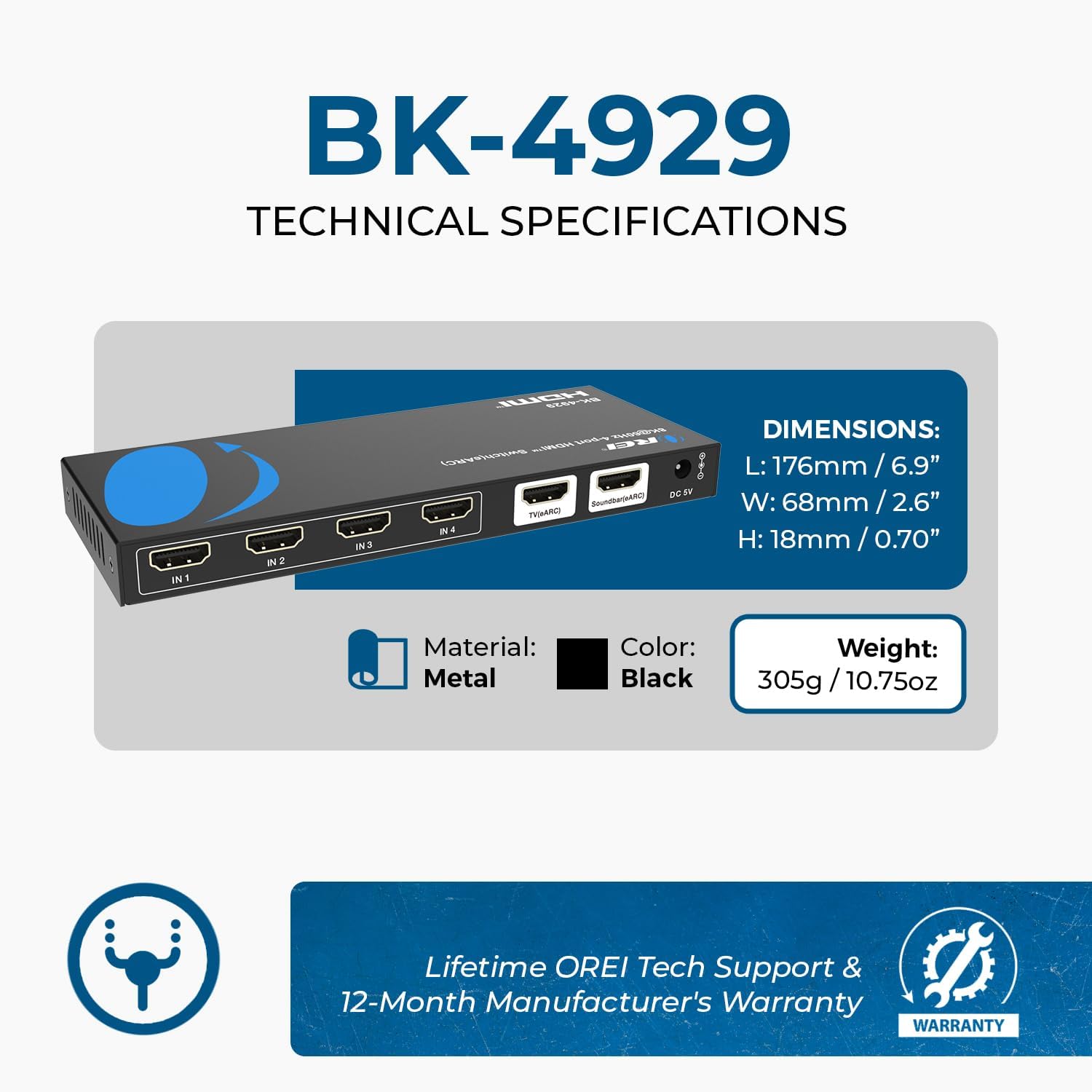
図 2: 付属のリモコン。
The remote control provides convenient access to power, eARC toggle, auto-switching, and direct selection of HDMI inputs 1 through 4.
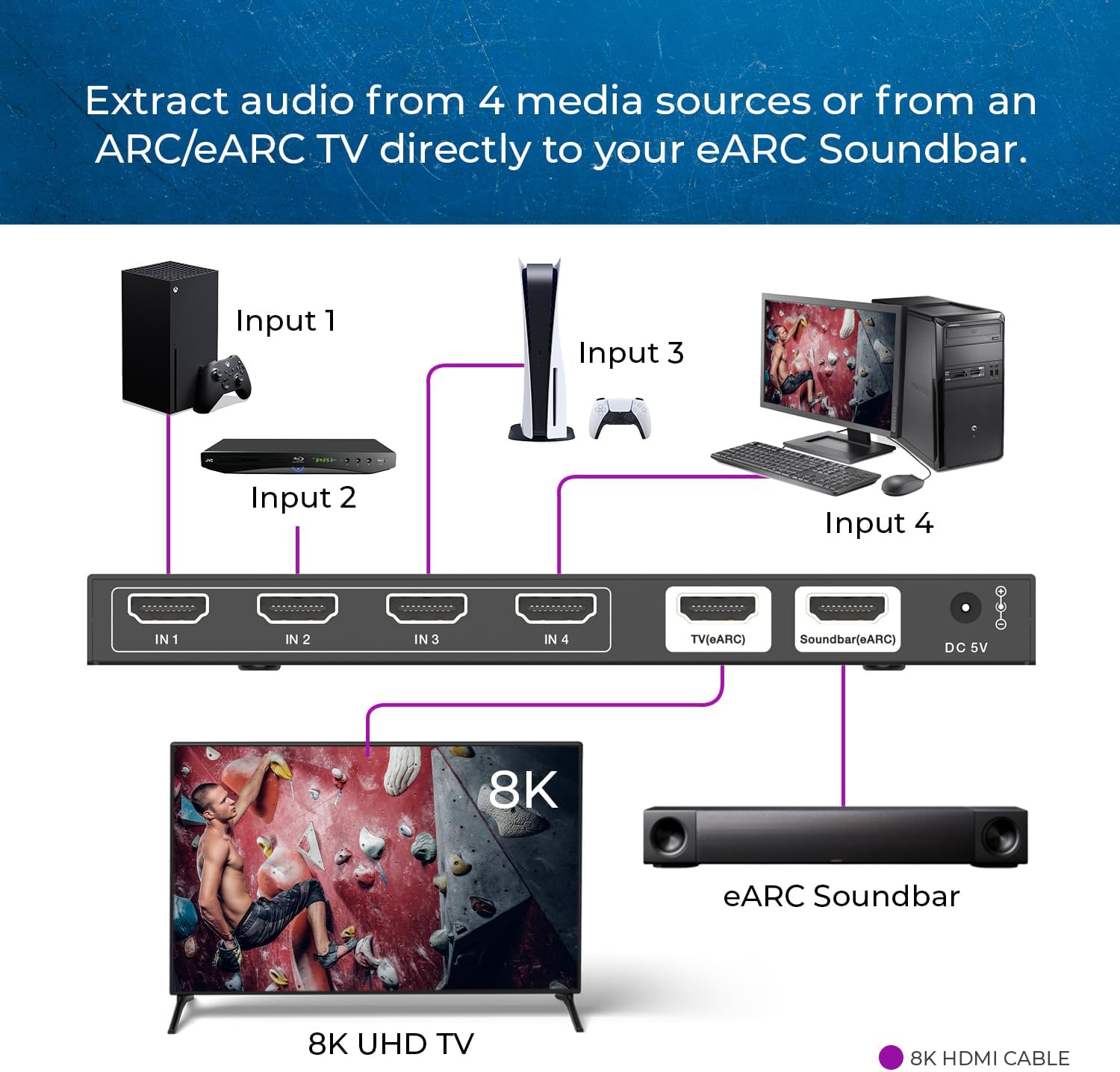
Figure 3: Typical Connection Diagram.
This diagram illustrates how to connect various media sources (Xbox, Blu-ray player, PS5, PC) to the BK-4929's input ports, with the TV (eARC) output connected to an 8K UHD TV and the Soundbar (eARC) output connected to an eARC soundbar.
4. セットアップ手順
- 電源接続: Connect the provided 100–240V power adapter to the DC 5V input port on the rear of the BK-4929 switch. Plug the adapter into a standard wall outlet. The power indicator LED on the front panel will light up after an internal self-test, indicating the unit is ready.
- 入力ソース接続: Connect your HDMI 2.1 source devices (e.g., Apple TV, PS5, Xbox Series X, streaming boxes, Blu-ray players, PCs) to the HDMI IN 1-4 ports on the rear of the switch using high-quality HDMI 2.1 cables (recommended under 10 feet).
- ディスプレイ接続: Connect your 8K or 4K@120Hz display (TV or monitor) to the HDMI TV (eARC) OUT port on the rear of the switch using a high-quality HDMI 2.1 cable.
- Audio System Connection (Optional eARC): If using an eARC-enabled soundbar or AV receiver, connect it to the HDMI Soundbar (eARC) OUT port on the rear of the switch using a high-quality HDMI 2.1 cable. This allows for extraction of advanced audio formats.
- リモートコントロールの設定: Insert batteries (not included) into the remote control. Ensure the infrared receiver window on the front of the switch is visible to the remote for proper operation.
5. 操作手順
- 電源オン/オフ: Use the power button on the remote control or the front panel to turn the device on or off.
- 入力切り替え:
- 手動切り替え: Press the 'SWITCH' button on the front panel or the numbered buttons (1-4) on the remote control to cycle through or directly select your desired HDMI input source. The corresponding input LED will illuminate.
- 自動切り替え: Hold the 'SWITCH' button on the front panel for 3 seconds or more to enable automatic input switching. The 'AUTO' LED will light up. In this mode, the switch will automatically detect and select the active input source.
- eARC Function: Press the 'eARC' button on the front panel or the remote control to toggle the eARC audio extraction function. The 'eARC' LED will indicate its active status. When active, audio from the selected HDMI source will be extracted and sent to the connected soundbar/AV receiver via the dedicated eARC output.
- CECコントロール: The switch supports CEC, allowing you to control connected devices (e.g., adjust soundbar volume, power on/off) using your TV's remote control. Ensure CEC is enabled on your TV and connected devices.
Video 1: Connecting 4 Devices to One eARC Soundbar with OREI BK-4929.
This video demonstrates the practical application of the OREI BK-4929, showing how to connect multiple HDMI sources and route audio to an eARC soundbar. It highlights the ease of switching between devices and the benefits of eARC audio extraction for a comprehensive home theater experience.
6. 仕様
| 特徴 | 説明 |
|---|---|
| 製品寸法 | 6.93 x 2.68 x 0.71インチ |
| アイテム重量 | 12.7オンス |
| 商品型番 | BK-4929 |
| 色 | 黒 |
| コネクタタイプ | HDMI |
| 対応デバイス | Blu-Ray Player, Gaming Console, Monitor |
| ケーブルタイプ | HDMI |
| HDMI準拠 | HDMI 2.1 |
| HDCP準拠 | 2.3 の |
| ビデオ帯域幅 | 48Gbps |
| 最大解像度 | 8K@60Hz、4K@120Hz |
| HDR サポート | HDR10+, Dolby Vision, HLG |
| オーディオフォーマット | LPCM 7.1CH, Dolby TrueHD, Dolby Atmos, DTS-HD Master Audio, DTS:X |
| 特集 | VRR, ALLM, QMS, QFT, SBTM, CEC |
7。 トラブルシューティング
- ビデオ/オーディオ出力なし:
- Ensure all HDMI cables are securely connected to the correct input and output ports.
- Verify the power adapter is properly connected and the power indicator LED is on.
- Check that the correct input source is selected on the BK-4929 switch (indicated by the input LEDs).
- ディスプレイが正しい HDMI 入力に設定されていることを確認します。
- Try using different high-quality HDMI 2.1 cables, especially for 8K/4K@120Hz signals.
- Power cycle all connected devices (source, switch, display, soundbar) by unplugging them for a few seconds and plugging them back in.
- Audio Dropouts/No Dolby Atmos:
- Ensure the eARC function is enabled on the BK-4929 switch and your soundbar/AV receiver.
- Verify that your soundbar/AV receiver supports the specific audio format (e.g., Dolby Atmos, DTS:X) being sent.
- Check audio settings on your source device (e.g., PS5, Xbox, PC) to ensure it's outputting the desired audio format.
- Some older soundbars or receivers may have compatibility issues; ensure firmware is up to date on all devices.
- リモコンが動作しない:
- リモコンの電池を確認して交換してください。
- Ensure there are no obstructions between the remote and the IR receiver window on the front of the switch.
- 自動切り替えの問題:
- Some source devices may constantly send a signal even when in standby, preventing auto-switching. In such cases, manual switching may be required.
8. メンテナンス
- デバイスは直射日光や極端な温度を避け、涼しく乾燥した場所に保管してください。
- 柔らかく乾いた布でデバイスを拭いてください。液体クリーナーやエアゾールは使用しないでください。
- 過熱を防ぐために、ユニットの周囲に適切な換気を確保してください。
9. 保証とサポート
The OREI BK-4929 HDMI eARC Audio Extractor Switch comes with a 1年間のメーカー保証. Additionally, OREI provides Lifetime U.S.-Based Technical Support. For any technical assistance or warranty claims, please contact OREI customer service.
For the latest firmware updates or additional support resources, please visit the official OREI webサイトにアクセスするか、テクニカル サポート チームに連絡してください。


