1. はじめに
The RAINPOINT ITP153 Automatic Indoor Plant Watering System is designed to provide efficient and consistent watering for your potted plants. This system is ideal for indoor use, balconies, offices, patios, greenhouses, and plant stands, ensuring your plants remain hydrated even when you are away. It features a large display for easy programming and includes an exclusive Cycle & Soak mode for optimized water absorption and plant health.

Image: The RAINPOINT ITP153 Automatic Indoor Plant Watering System in operation, connected to a water reservoir and distributing water to several potted plants.
2. 箱の中身
パッケージにすべてのコンポーネントが含まれていることを確認します。
- 1 x Auto Watering Pump
- 1 x 1/6" Main Line Tubing (4mm)
- 1 x 1/8" Branch Line Tubing (3mm)
- 10 x T Barb Fitting
- 10 x Drip Emitter
- 1 x T Cross Barb Fitting
- アンチサイフォンバルブ×1
- フィルター x 1
- 3 x Tubing End Plug
- USBケーブル1本
- 1 x Detachable Mounting Hook
- ジップタイ

Image: All included components of the RAINPOINT ITP153 kit, including the pump, tubing, emitters, fittings, and accessories.
3. Tubing Setup
The system utilizes 4mm main line tubing and 3mm branch line tubing to ensure even water distribution and minimize pressure loss.
- チューブを準備する: Plan your drip watering layout. Cut the 4mm main line tubing to the desired lengths for connecting plants. For easier installation, soak the cut tubing ends in boiling water for 10 seconds to soften them.
- フィルターを接続: Insert the filter into one end of the 4mm main line tubing. Place the filter end into your water container.
- ポンプに接続: Connect the 4mm main line tubing (with filter) to the 'IN' port of the auto watering pump.
- Install Anti-Siphon Valve: Connect the anti-siphon valve to the 'OUT' port of the pump. Ensure the valve is installed correctly according to the water flow direction (indicated by arrows on the valve). This prevents backflow and siphoning.
- Branching Tubing: Use T-barb fittings to split the 4mm main line tubing into 3mm branch lines for individual plants. For splitting into more than two directions, use the cross barb fitting.
- Install Drip Emitters: Attach the 3mm micro drip emitters to the end of each branch line. Insert the emitters at least 3 inches deep into the soil at the base of each plant to ensure water reaches the roots effectively.
- 安全なチューブ: Use zip ties or the detachable mounting hook to secure the tubing and pump as needed.
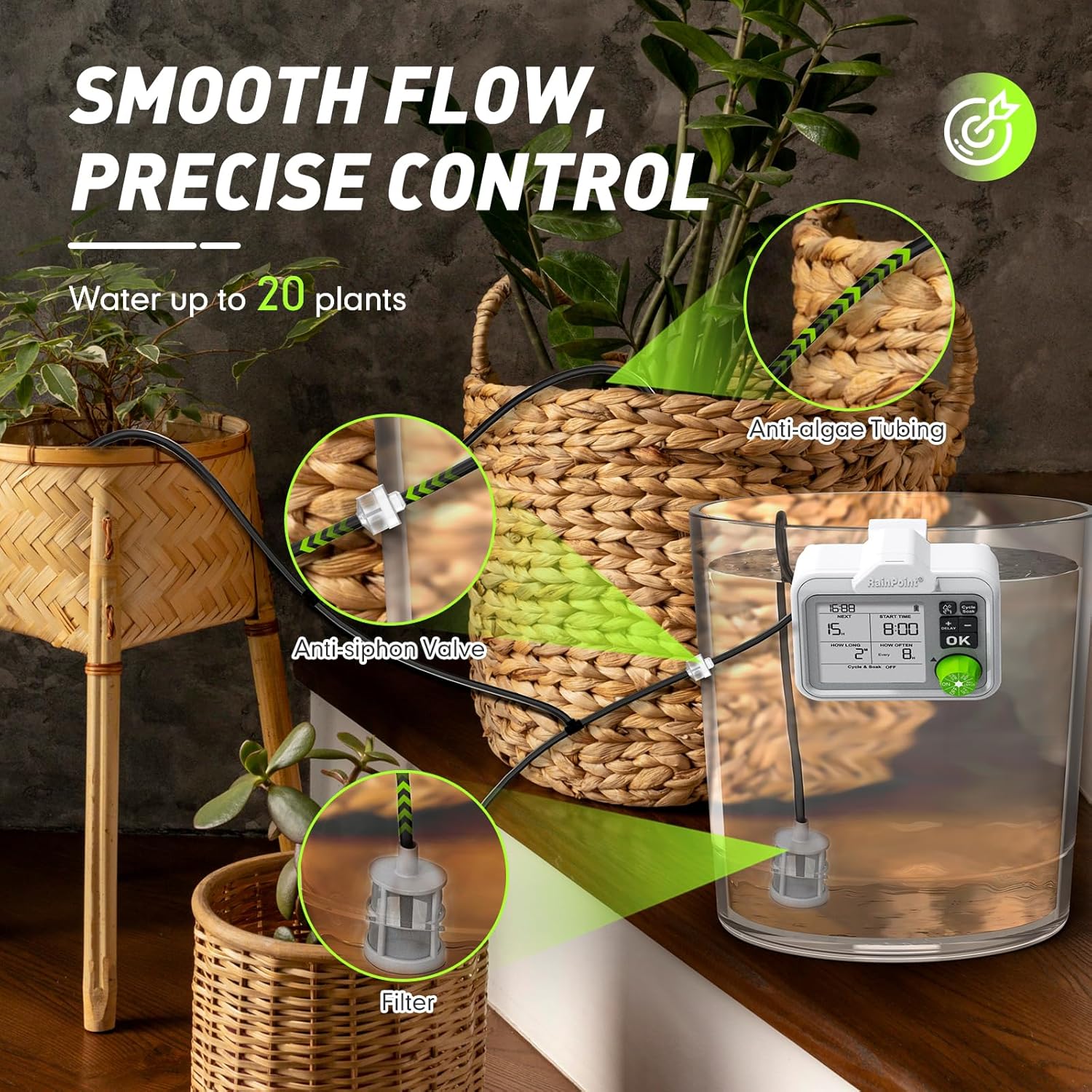
Image: Close-up of the tubing setup, showing the anti-siphon valve, filter in a water reservoir, and drip emitters in potted plants.
Video: Tubing Setup Guide
Video Description: A step-by-step tutorial demonstrating how to connect the tubing, fittings, and emitters for the RAINPOINT ITP153 system.
4. 操作手順
4.1ディスプレイオーバーview
The large LCD display provides all necessary information at a glance, including current time, next watering countdown, start time, watering duration, and frequency settings. A battery level indicator and water shortage indicator are also present.
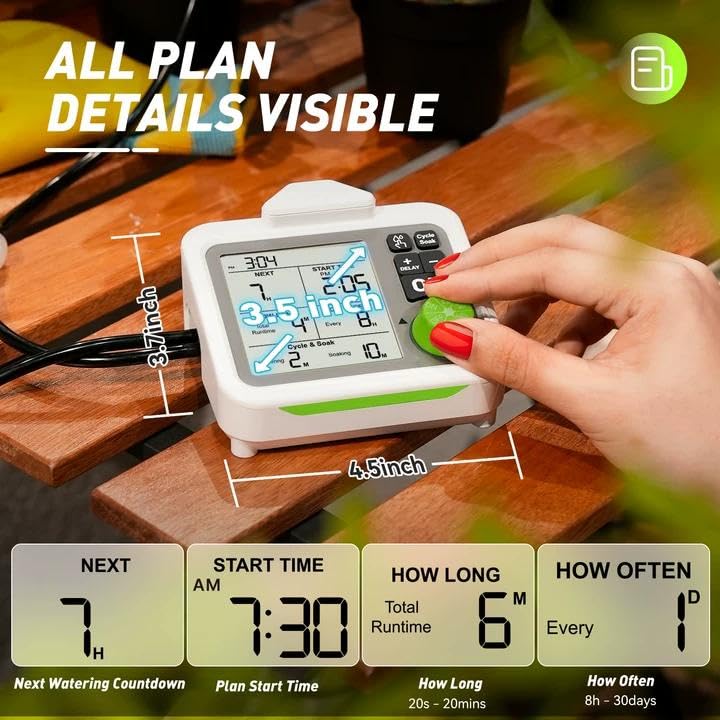
Image: The large LCD display of the RAINPOINT ITP153, highlighting various settings like next watering time, start time, duration, and frequency.
4.2 現在の時刻の設定
- Turn the knob to 'SET CLOCK'.
- Press '+' or '-' buttons to select 12H or 24H format. Press 'OK' to confirm.
- Press '+' or '-' buttons to set the hour. Press 'OK' to confirm.
- Press '+' or '-' buttons to set the minute. Press 'OK' to confirm.
4.3 Setting Auto Watering Plan
The system allows for flexible programming to meet diverse plant needs.
- 開始時刻の設定: Turn the knob to 'START TIME'. Press '+' or '-' buttons to select the desired start time (hour and minute). Press 'OK' to confirm each setting.
- 散水時間の設定: Turn the knob to 'HOW LONG'. Press '+' or '-' buttons to set the watering duration. The duration can range from 20 seconds to 20 minutes. Press 'OK' to confirm.
- 水やり頻度の設定: Turn the knob to 'HOW OFTEN'. Press '+' or '-' buttons to set the watering frequency. Options range from every 8 hours to once every 30 days. Press 'OK' to confirm.
4.4 Cycle & Soak Mode
This exclusive feature divides irrigation into shorter cycles with soak periods, saving water and promoting deeper root growth. It is available when the total watering duration is 2 minutes or more.
- To activate/deactivate, press the 'Cycle & Soak' button.
- When active, you can set watering and soaking intervals (e.g., 1 minute watering, 5 minutes soaking).

Image: The RAINPOINT ITP153 display illustrating the Cycle & Soak feature, showing alternating water and soak periods for optimal soil saturation.
Video: RAINPOINT Cycle & Soak Watering Mode Overview
ビデオの説明: 簡単にview demonstrating how to set and utilize the Cycle & Soak watering mode on the RAINPOINT ITP153.
4.5 手動散水
For temporary watering without interrupting your preset schedule:
- Ensure the knob is in the 'ON' position.
- Press the water drop icon button to activate manual watering mode.
- Press '+' or '-' buttons to set the desired duration.
- Press 'OK' to confirm. Manual watering will start immediately.
- Press the water drop icon button again to end the manual watering session.
4.6 Suspend Auto Watering Plan (Delay Function)
To conserve water or avoid over-watering (e.g., on rainy days):
- Ensure the knob is in the 'ON' position.
- Long press the 'DELAY' button to activate the delay function.
- Press '+' or '-' to choose the delay duration (24, 48, or 72 hours).
- Press 'OK' to confirm. 'Delay' will appear on the display.
- Long press 'DELAY' again to cancel the function.

Image: The RAINPOINT ITP153 display illustrating the Delay and Manual watering options, showing how to temporarily pause or initiate watering.
5. 仕様
| 特徴 | 詳細 |
|---|---|
| 製品寸法 | 6.3 x 5.71 x 4.72インチ |
| 商品型番 | ITP153 |
| バッテリー | 1 個のリチウムイオン電池が必要 (付属) |
| アイテム重量 | 0.72キログラム(1.59ポンド) |
| 散水能力 | Up to 20 plants (with additional accessory kit) |
| 散水時間 | 20秒から20分 |
| 散水頻度 | Every 8 hours to once every 30 days |
6。 トラブルシューティング
- 水流なし: Check if the filter is submerged in water. Ensure tubing connections are secure and not kinked. Verify the pump is charged and the watering schedule is active.
- 不均一な水の分配: Ensure the anti-siphon valve is correctly installed. Check for blockages in emitters or tubing. The system is designed for even flow, but extreme differences in plant height or tubing length can affect this.
- Pump Not Responding: Check battery level. Recharge the pump if necessary using the provided USB cable.
- 水漏れ: Ensure all tubing connections are tight. Soaking tubing ends in hot water before connecting can help create a tighter seal.
7.保証とサポート
The RAINPOINT ITP153 Automatic Indoor Plant Watering System comes with a 3年間保証.
For further assistance, troubleshooting, or warranty claims, please visit the official RAINPOINT webサイトにアクセスするか、カスタマー サポートにお問い合わせください。


