1. はじめに
This manual provides essential instructions for the safe and efficient operation of your Minuteman EN450G 450VA Standby Uninterruptible Power Supply (UPS). The EN450G is designed to provide reliable backup power and surge protection for various electronic devices, including gaming consoles, desktop PCs, home office equipment, and network devices. Please read this manual thoroughly before installation and use, and retain it for future reference.
2. 重要な安全上の注意事項
WARNING: To reduce the risk of electric shock, fire, or injury to persons, read all instructions before using this product.
- このUPSには危険物が含まれていますtages. Do not attempt to disassemble the unit. Servicing should be performed by qualified service personnel only.
- 医療機器、生命維持装置、電子レンジ、掃除機など、コンピュータに関連しないものを UPS に接続しないでください。
- 通気口を塞がないでください。ユニット周囲に十分な空気の流れを確保してください。
- Do not install the UPS in direct sunlight, near heat sources, or in areas with excessive dust, moisture, or flammable liquids.
- Connect the UPS to a properly grounded AC power outlet.
- The battery is hot-swappable. Exercise caution when replacing the battery. Refer to the Maintenance section for instructions.
- In case of emergency, press the power button to turn off the UPS and disconnect the power cord from the AC power outlet.
3.製品オーバーview
The Minuteman EN450G UPS provides comprehensive power protection. Familiarize yourself with its components:
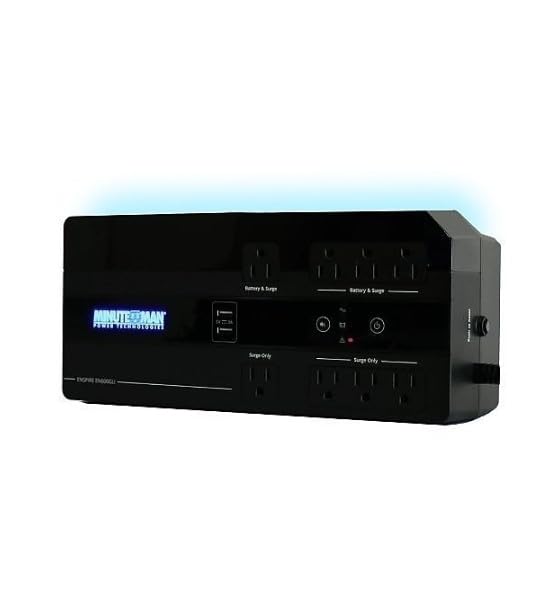
図1: Minuteman EN450G UPS Unit. This image displays the Minuteman EN450G UPS unit. The front panel features the 'Minuteman Power Technologies' logo, two USB charging ports, and control buttons. The top surface shows four 'Battery & Surge' protected outlets and four 'Surge Only' outlets, clearly labeled. The unit is black and designed for compact placement.
3.1 フロントパネルの機能
- 電源ボタン: UPS の電源をオンまたはオフにします。
- USB充電ポート: Two ports for charging mobile devices.
- ステータスインジケータ: LEDs indicating power status, battery status, and fault conditions.
3.2 リアパネルの機能
- Battery & Surge Outlets (x4): Provide battery backup power and surge protection for critical devices.
- Surge Only Outlets (x4): Provide surge protection only for non-critical devices.
- AC入力: Connects the UPS to the wall power outlet.
- 遮断器: リセット可能な過負荷保護。
4. セットアップとインストール
4.1 開梱
UPSを慎重に開梱し、輸送中の損傷がないか点検してください。損傷が見つかった場合は、機器を操作せず、販売店にご連絡ください。
4.2 配置
The EN450G is designed for versatile placement:
- デスクトップ: ユニットを安定した平らな面に置きます。
- 床: Position on the floor, ensuring ventilation is not obstructed.
- ウォールマウント: The unit can be mounted on a wall using appropriate hardware (not included). Ensure the mounting surface can support the weight of the UPS.
Ensure the installation area is clean, dry, and has adequate ventilation. Avoid placing the UPS near heat-emitting appliances or in direct sunlight.
4.3電源への接続
- UPS がオフになっていることを確認してください。
- Plug the UPS power cord into a grounded 120V AC wall outlet.
- 最適なバッテリ稼働時間を確保するために、初めて使用する前に UPS を少なくとも 8 時間充電してください。
4.4 デバイスの接続
- Battery & Surge Protected Outlets: Connect critical devices such as your computer, monitor, router, or other essential electronics that require continuous power during outages。
- サージのみのアウトレット: Connect non-critical devices like printers, scanners, or desk lamps that only require surge protection.
CAUTION: Do not connect laser printers or shredders to the battery backup outlets, as their high power draw can overload the UPS.
5. 操作
5.1 UPS のオン/オフ
- スイッチをつける: Press and hold the power button for approximately 2 seconds until you hear a beep and the power indicator illuminates.
- 電源を切るために: Press and hold the power button for approximately 2 seconds until you hear a beep and the power indicator turns off.
5.2 ステータスインジケータ
The front panel LEDs provide information about the UPS status:
- 緑色の LED (点灯): UPS is operating normally, providing AC power.
- Green LED (Flashing) & Audible Alarm: UPSは停電時にバッテリー電源で動作していますtage.
- Red LED (Solid) & Audible Alarm: Battery low or fault condition. Refer to Troubleshooting.
5.3 バッテリー駆動時間
The EN450G provides approximately 3 minutes of runtime at full load (450VA/255W) and 11 minutes at half load. Actual runtime may vary based on connected equipment and battery age.
6. メンテナンス
6.1 電池の交換
The EN450G features a hot-swappable Sealed Lead Acid (SLA) battery, allowing replacement without interrupting power to connected devices. Batteries typically last 3-5 years depending on usage and environmental conditions. A flashing red LED or continuous alarm may indicate a need for battery replacement.
- Ensure the UPS is connected to AC power and operating normally.
- Locate the battery access panel (refer to product diagram if available).
- Carefully slide out the old battery pack.
- Insert the new, fully charged replacement battery pack, ensuring correct orientation.
- Secure the battery access panel.
- Allow the new battery to charge for 8-12 hours to reach full capacity.
WARNING: Use only approved replacement batteries. Improper battery replacement can result in fire or explosion. Dispose of old batteries properly at a recycling facility.
6.2 クリーニング
UPSの外装は、定期的に柔らかく乾いた布で清掃してください。液体洗剤やエアゾール洗剤は使用しないでください。通気口に埃やゴミが詰まっていないことを確認してください。
7。 トラブルシューティング
This section addresses common issues you may encounter with the EN450G UPS. If a problem persists after attempting the solutions below, contact technical support.
| 問題 | 考えられる原因 | 解決 |
|---|---|---|
| UPSがオンになりません。 | バッテリーが接続されていないか放電されています。 電源コードが接続されていません。 | バッテリーが正しく接続され、充電されていることを確認してください。 Verify power cord is securely plugged into wall outlet and UPS. |
| UPS beeps continuously or red LED is solid. | バッテリー残量が少ないか故障状態です。 Overload on battery outlets. | Allow battery to charge. If problem persists, battery may need replacement. Disconnect non-essential devices from battery outlets. Check circuit breaker. |
| UPS は頻繁にバッテリーで動作します。 | 不安定なAC入力電源。 UPS sensitivity setting (if applicable, though not specified for this model). | Check the quality of your incoming AC power. Consider connecting to a different outlet. |
| No power from surge-only outlets. | 回路ブレーカーが落ちた。 | Press the circuit breaker reset button on the rear panel. Reduce load if necessary. |
8. 仕様
| 特徴 | 詳細 |
|---|---|
| モデル | EN450G |
| 容量 | 450VA/255W |
| 入出力ボリュームtage | 120V 交流 |
| 出力波形 | シミュレートされた正弦波 |
| アウトレット | 4 x Battery & Surge Protected, 4 x Surge Only |
| 電池のタイプ | Sealed Lead Acid (SLA), Hot-Swappable |
| 標準的な実行時間(フルロード) | 最大3分 |
| Typical Runtime (Half Load) | 最大11分 |
| 寸法(D x W x H) | 12.8 x 5.7 x 4.1 インチ (32.5 x 14.5 x 10.4 cm) |
| 重さ | 4.4ポンド(2kg) |
| 取り付けオプション | Desktop, Floor, Wall Mount |
9. 保証情報
Please refer to the warranty card included with your product or visit the manufacturer's web保証条件の詳細については、ウェブサイトをご覧ください。保証請求の際は、購入証明書を保管してください。
10. テクニカルサポート
If you require technical assistance or have questions regarding your Minuteman EN450G UPS, please contact your dealer or the manufacturer's customer support. Have your model number (EN450G) and serial number ready when contacting support.
For more information, you may visit the official Minuteman webサイト。


