1. はじめに
ご購入ありがとうございますasing the Monster S350 Bluetooth Speaker. This portable wireless speaker features a touch screen, Bluetooth 6.0 connectivity, and support for TF cards, offering a versatile audio experience. This manual provides detailed instructions for setup, operation, maintenance, and troubleshooting to ensure optimal performance and longevity of your device.
2. 安全情報
- スピーカーを極端な温度、直射日光、高湿度にさらさないでください。
- スピーカーを落としたり、強い衝撃を与えたりしないでください。
- スピーカーを水やその他の液体から遠ざけてください。
- スピーカーをご自身で分解、修理、改造しないでください。必要に応じて、資格のあるサービス担当者にご連絡ください。
- 付属の充電ケーブルまたは認定された同等品のみを使用してください。
- 電池は地域の規制に従って廃棄してください。焼却しないでください。
3. パッケージ内容
パッケージに以下の項目が含まれているか確認してください。
- Monster S350 Bluetooth Speaker
- USB充電ケーブル
- ユーザーマニュアル
4.製品オーバーview
Familiarize yourself with the components of your Monster S350 speaker.

図4.1: フロント view of the Monster S350 Bluetooth Speaker, showcasing its retro design and touch screen.

図4.2: Close-up of the speaker's top controls, illustrating the long press function for power and swipe gestures for volume adjustment.
コントロールとポート:
- パワー/ボリュームノブ: Long press to turn on/off. Swipe up to increase volume, swipe down to decrease volume.
- タッチスクリーンディスプレイ: For navigation, settings, and displaying information.
- TFカードスロット: ローカルで音楽を再生するには、TF (microSD) カードを挿入します。
- USB-C充電ポート: スピーカーの充電用。
5. セットアップ
5.1 スピーカーの充電
- Connect the USB charging cable to the speaker's USB-C port.
- ケーブルのもう一方の端を USB 電源アダプター (別売) またはコンピューターの USB ポートに接続します。
- 画面上の充電インジケーターに充電状態が表示されます。フル充電には通常約2~3時間かかります。
5.2 電源のオン/オフ
- 電源を入れるには: Long press the Power/Volume knob until the screen lights up.
- 電源を切るには: Long press the Power/Volume knob until the screen turns off.
5.3Bluetoothペアリング
Pair your Monster S350 with a Bluetooth-enabled device.
- スピーカーの電源がオンになっており、Bluetooth デバイス (スマートフォン、タブレットなど) の範囲内にあることを確認します。
- Bluetooth デバイスで Bluetooth を有効にし、利用可能なデバイスを検索します。
- 見つかったデバイスのリストから「Monster S350」を選択します。
- ペアリングが完了すると、スピーカーに接続が成功したことが表示され、オーディオの再生を開始できます。

図5.1: The speaker displaying its Bluetooth connection status alongside a smartphone's Bluetooth settings.
5.4 TFカードの再生
TF (microSD) カードから直接音楽を再生します。
- スピーカーの電源がオフになっていることを確認します。
- Insert a TF card (up to 32GB, formatted to FAT32) into the TF card slot until it clicks into place.
- Power on the speaker. The speaker will automatically detect the TF card and switch to local music playback mode, or you can select it from the touch screen menu.

図5.2: Demonstrating the insertion of a TF card into the speaker's dedicated slot for local music playback.
6. 操作手順
6.1 基本的なオーディオ再生
- 再生/一時停止: Tap the play/pause icon on the touch screen.
- 次のトラック: Swipe right on the touch screen or tap the next track icon.
- 前のトラック: Swipe left on the touch screen or tap the previous track icon.
- 音量コントロール: Swipe up on the Power/Volume knob to increase volume, swipe down to decrease volume. Alternatively, adjust volume via the connected Bluetooth device.
6.2 タッチスクリーンの使用
The full-color touchscreen display allows for intuitive navigation and access to various features.
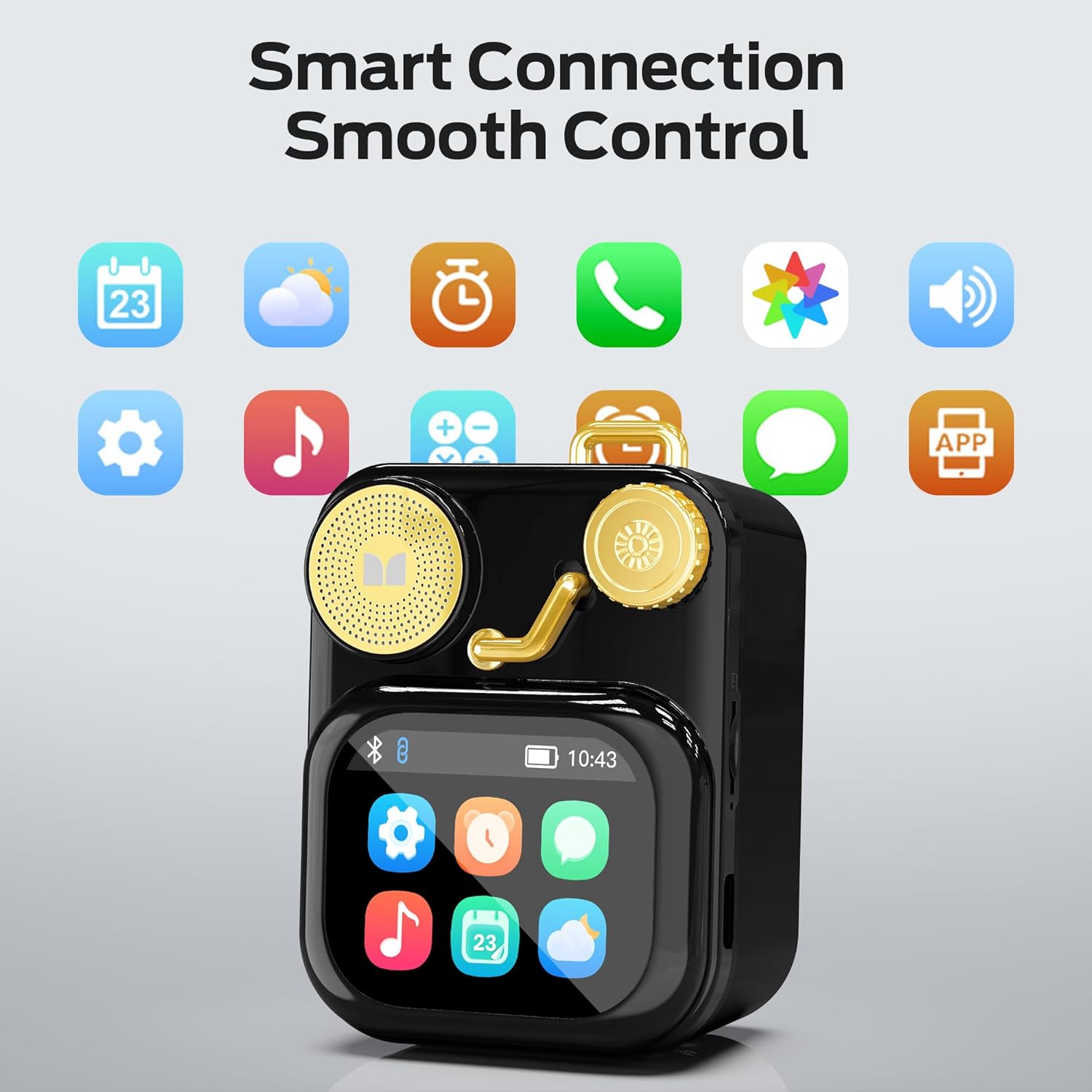
図6.1: The speaker's touch screen displaying various application icons for smart features.
- ナビゲーション: Swipe left/right or up/down to browse through menus and options.
- 選択: アイコンまたはオプションをタップして選択します。
- 設定: Access system settings, Bluetooth options, display preferences, and more through the settings icon.
6.3 スマート機能
When connected to a compatible smartphone via Bluetooth and the companion app (if available), the speaker can display various smart features:

図6.2: Examples of smart features displayed on the speaker's screen, including notifications, weather, lyrics, and Bluetooth call information.
- モバイル通知: メッセージやその他のアプリの通知に関するアラートを受信します。
- 曲情報: Display song titles and artist information during playback.
- アラーム: Set and manage alarms directly from the speaker.
- 天気予報: View リアルタイムの天気情報。
- ホワイトノイズ: Access soothing white noise sounds for relaxation.
7. メンテナンス
7.1 クリーニング
- スピーカーの表面を柔らかく乾いた糸くずの出ない布で拭いてください。
- 研磨剤入りの洗剤、アルコール、化学溶剤は仕上げを傷める恐れがあるので使用しないでください。
- ポートにほこりやごみが付かないようにしてください。
7.2 ストレージ
- スピーカーは直射日光や極端な温度を避け、涼しく乾燥した場所に保管してください。
- If storing for an extended period, charge the battery to approximately 50% every three months to preserve battery life.
8。 トラブルシューティング
If you encounter issues with your Monster S350 speaker, refer to the following solutions:
| 問題 | 考えられる原因 | 解決 |
|---|---|---|
| スピーカーの電源が入りません。 | 電池が消耗しています。 | 付属のUSBケーブルを使用してスピーカーを充電します。 |
| スピーカーから音が出ない。 | 音量が低すぎるかミュートされています。デバイスがペアリングされていません。 | Increase speaker volume. Ensure Bluetooth device is paired and playing audio. |
| Bluetooth経由でペアリングできません。 | Speaker is not in pairing mode. Device is out of range. Interference. | Ensure speaker is on and Bluetooth is enabled. Move devices closer. Turn off other Bluetooth devices. |
| TF カードの音楽が再生されません。 | Card not inserted correctly. Unsupported file format. Corrupted card. | TFカードを再挿入してください。音楽が聞こえることを確認してください。 fileサポートされている形式(例:MP3)です。別のTFカードをお試しください。 |
| Smart features not working. | Not connected to companion app. App issues. | Ensure the speaker is connected to the companion app on your smartphone. Check app permissions and updates. |
9. 仕様
Technical details of the Monster S350 Bluetooth Speaker:
- モデル名: S350
- ブランド: モンスター
- 材料: 金属
- 色: 黒
- 製品寸法: 奥行き12.5cm x 幅10.5cm x 高さ5.4cm(約4.9cm x 4.1cm x 2.1cm)
- 商品の重量: 160グラム(約0.35ポンド)
- 接続技術: ブルートゥース6.0
- スピーカーの最大出力: 10ワット
- オーディオ出力モード: ステレオ
- 取り付けタイプ: テーブルトップ
- バッテリー: リチウムイオン電池1個(付属)
- TFカードのサポート: Yes (up to 32GB, FAT32 format recommended)

図9.1: Diagram illustrating the internal woofer for deep bass and tweeter for crisp highs, contributing to the speaker's audio quality.
10. 保証とサポート
For warranty information or technical support, please refer to the documentation included with your purchase or contact Monster customer service. Keep your proof of purchase for warranty claims.
カスタマーサービスの連絡先: Please visit the official Monster website or refer to your product packaging for the most current support contact information.


