導入
This manual provides detailed instructions for the safe and efficient operation of your Bewinner MP3 Music Player with Camera, Model Bewinner6rb3g52470-11. Please read this manual thoroughly before using the device and retain it for future reference.
製品終了view
The Bewinner MP3 Music Player is a versatile portable device designed for audio playback, photo and video capture, and other multimedia functions. It features a compact design, a responsive touchscreen, and expandable storage.

The Bewinner MP3 Music Player, featuring a digital display and integrated camera, shown alongside its USB-C charging cable.
主な特徴:
- 大容量のストレージ容量: Supports up to 128GB memory card expansion, allowing storage of over 10,000 songs. Compatible with MP3, WMA, WAV, APE, FLAC, AAC LC, M4A, and OGG audio formats.
- Full HD 720P Digital Camera: Integrated camera for recording photos and videos in 720P resolution.
- 長いバッテリー寿命: 500mAh battery provides up to 48 hours of battery life after a 2-hour charge.
- Bluetooth 5.4接続: For wireless pairing with headphones or speakers.
- ユーザーフレンドリーなタッチスクリーンインターフェース: Responsive 2.01-inch touchscreen for effortless navigation.
- 多機能: Includes video playback (requires format conversion), FM radio, photo viewing, e-books, wallpapers, alarms, stopwatch, and voice recorder.
- 内蔵スピーカー: Allows sharing audio without external devices.

This image illustrates the compact size of the Bewinner MP3 Player, easily fitting into a pocket or held in one hand, highlighting its portability.
設定
1. デバイスの充電:
Before first use, fully charge the MP3 player. Connect the included USB-C cable to the device's charging port and the other end to a USB power adapter (not included) or a computer's USB port. The device typically charges in approximately 2 hours.
2. Installing a Memory Card:
The device supports microSD cards up to 128GB (not included with this model). Locate the memory card slot on the side of the player. Gently insert the microSD card with the gold contacts facing down until it clicks into place. To remove, push the card in slightly until it springs out.
3. 電源のオン/オフ:
Press and hold the power button (usually located on the side or top) for a few seconds to turn the device on or off. A short press will typically turn the screen on or off.
操作手順
1. 基本的なナビゲーション:
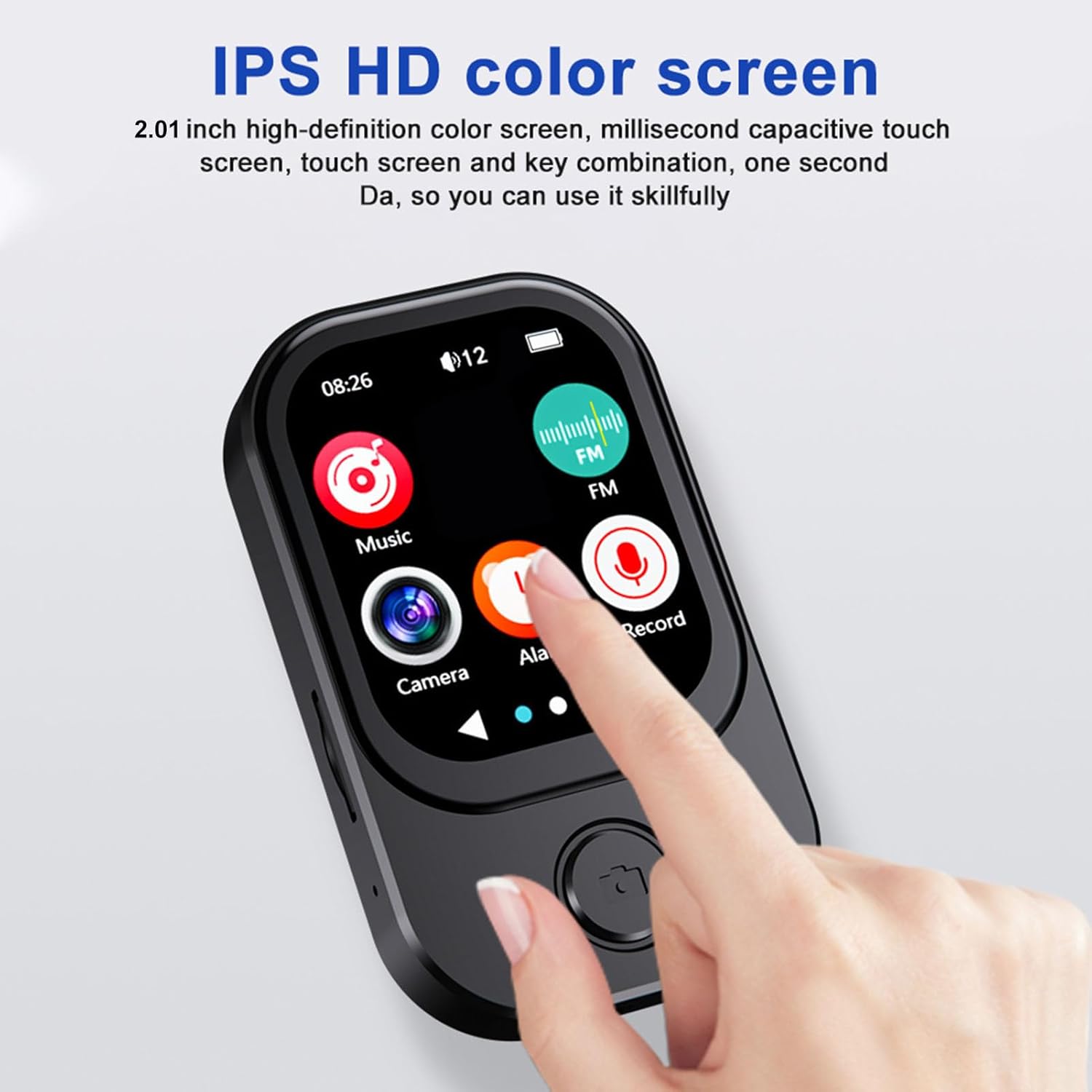
The Bewinner MP3 Player features a 2.01-inch touchscreen. Swipe left or right to navigate between application screens. Tap an icon to open an application. Use the back button (if present) or swipe gestures to return to the previous screen.

この画像は詳細な view of the MP3 player's 2.01-inch IPS HD color screen, showcasing its responsive touchscreen interface and intuitive icon layout for easy navigation.
2. 音楽再生:
- Tap the 'Music' icon on the home screen.
- アーティスト、アルバム、ジャンル、フォルダー別に音楽ライブラリを閲覧します。
- 曲をタップして再生を開始します。
- 再生/一時停止、トラックのスキップ、音量調整には画面上のコントロールを使用します。
Supported audio formats include MP3, WMA, WAV, APE, FLAC, AAC LC, M4A, and OGG.
3. Camera Function:
The device includes a 720P digital camera. The lens can rotate 90 degrees for flexible shooting angles.

Three distinct icons illustrate the versatile capabilities of the MP3 player's integrated camera: recording audio, capturing video, and taking still photographs.
- Tap the 'Camera' icon.
- 写真モードまたはビデオモードを選択します。
- Tap the shutter icon to take a photo or start/stop video recording.
4. Bluetooth接続:
Bluetoothヘッドフォンまたはスピーカーとペアリングするには:
- 「設定」に移動して「Bluetooth」を選択します。
- Bluetoothをオンにします。
- Bluetooth デバイスがペアリング モードになっていることを確認します。
- ペアリング可能なデバイスのリストからデバイスを選択します。
5. その他の機能:
- FMラジオ: Tap the 'FM' icon to access the radio. You may need to connect wired headphones (not included) to act as an antenna.
- プレイバック: The player supports video playback. Note that some video formats may require conversion to AVI (240x288 resolution) for optimal performance.
- ボイスレコーダー: Tap the 'Record' icon to start recording voice memos.
- E-books & Photo Viewえー: Access these functions via their respective icons to view 文章 files or images stored on the device.
A visual representation of the MP3 player's advanced features, including its 720p camera with a 90-degree rotating lens, IPS true retinal display, and icons for music, FM radio, camera, alarm, and record functions.
6. OTG Connection:
The device supports OTG (On-The-Go) connectivity, allowing direct connection to compatible mobile phones for file transfer. Use a suitable OTG cable (not included) to connect the MP3 player to your smartphone.

The MP3 player is shown connected to a mobile phone using an OTG cable, demonstrating its ability to transfer files directly to a smartphone for sharing or backup.
メンテナンス
- クリーニング: デバイスの清掃には、柔らかく乾いた布をご使用ください。液体クリーナーや研磨剤の使用は避けてください。
- ストレージ: MP3 プレーヤーは、直射日光や極端な温度を避け、涼しく乾燥した場所に保管してください。
- バッテリーのケア: バッテリーの寿命を延ばすには、バッテリーを頻繁に完全に放電させないでください。長期間使用しない場合でも、定期的に充電してください。
- 衝撃を避ける: 内部コンポーネントや画面を損傷する可能性のある落下や衝撃からデバイスを保護します。
トラブルシューティング
| 問題 | 考えられる解決策 |
|---|---|
| デバイスの電源が入らない。 | Ensure the battery is charged. Connect to a power source and try again. If unresponsive, perform a hard reset (refer to device specifications for reset method, if available). |
| 音声が聞こえません。 | Check volume levels. Ensure headphones or Bluetooth speakers are properly connected and functioning. Verify audio file フォーマットの互換性。 |
| メモリカードが認識されません。 | Ensure the memory card is inserted correctly. Try reinserting the card. Test with a different compatible memory card. Format the card if necessary (this will erase all data). |
| カメラが機能していません。 | Ensure sufficient storage space on the memory card. Check camera settings. Restart the device. |
| Bluetoothのペアリングの問題。 | 両方のデバイスがペアリングモードになっており、範囲内にあることを確認してください。両方のデバイスのBluetoothをオフにしてからオンにしてください。必要に応じて、以前のペアリングをクリアしてください。 |
仕様
| 特徴 | 詳細 |
|---|---|
| モデル番号 | Bewinner6rb3g52470-11 |
| 寸法 | 約67.5 x 41 x 13.5mm / 2.7 x 1.6 x 0.5インチ |
| 重さ | 3.74オンス |
| 色 | 黒 |
| バッテリー | 500mAhリチウムイオンバッテリー内蔵 |
| 画面 | 2.01インチIPSスクリーン |
| Bluetoothバージョン | BT5.4 |
| 写真解像度 | 1280x720 |
| ビデオ解像度 | 1280x720 |
| ビデオフォーマット | AVI (Resolution 240x288 for playback) |
| 充電ポート | タイプC |
| オーディオポート | 3.5mm |
| メモリカードのサポート | Up to 128GB (microSD, not included) |
保証とサポート
For warranty information or technical support, please refer to the product packaging or contact Bewinner customer service through their official channels. You can also visit the Bewinner Store on Amazon 追加のリソース。


