1. はじめに
This manual provides essential information for the safe and efficient use of your Fujitsu FMVF75K1BA FMV Desktop F 23.8-inch PC. Please read this manual thoroughly before operating the device and retain it for future reference. This desktop PC is designed for general computing tasks, featuring a 23.8-inch Full HD display, an Intel Core i7 processor, 16GB of RAM, and a 512GB storage drive, running Windows 11 Home.
2. 安全情報
製品の損傷を防ぎ、ユーザーの安全を確保するために、次の安全上の注意事項を守ってください。
- 電源: デバイスに付属の電源アダプタのみを使用してください。電源コンセントが適切にアースされていることを確認してください。
- 換気: 通気口を塞がないでください。過熱を防ぐため、PCの周囲に十分なスペースを確保し、適切な空気の流れを確保してください。
- 環境: Avoid exposing the PC to extreme temperatures, humidity, dust, or direct sunlight. Operate in a stable, dry environment.
- 液体および異物: Keep liquids and foreign objects away from the PC. If liquid enters the device, immediately disconnect power and contact support.
- サービス: PCの修理はご自身で行わないでください。修理はすべて資格を持ったサービス担当者にお任せください。
- クリーニング: 清掃する前に電源コードを抜いてください。柔らかく乾いた布を使用してください。液体洗剤やエアゾール洗剤は使用しないでください。
3. パッケージ内容
パッケージにすべてのアイテムが揃っていることを確認します。
- Fujitsu FMVF75K1BA FMV Desktop F 23.8-inch PC
- 電源アダプタと電源コード
- キーボード
- ねずみ
- クイックスタートガイド(付属している場合)
- 保証書(付属している場合)
4.製品オーバーview
The Fujitsu FMVF75K1BA is an all-in-one desktop PC featuring a 23.8-inch display. Key components include the integrated display, CPU, memory, storage, and various input/output ports.
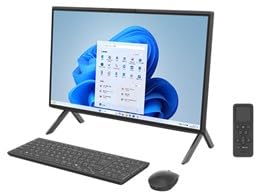
図4.1: 前面 view of the Fujitsu FMVF75K1BA FMV Desktop F PC. This image shows the integrated display and the sleek design of the all-in-one unit.
4.1フロントパネル
- 画面: 23.8インチ フルHD(1920x1080)画面。
- 電源ボタン: Located typically on the bottom right or side of the display bezel.
- Webカム: Integrated at the top center of the display.
4.2 リア/サイドパネル
- USB ポート: For connecting peripherals like keyboard, mouse, external drives.
- HDMIポート: 外部モニターやテレビを接続します。
- LANポート: 有線ネットワーク接続用。
- オーディオジャック: For headphones, microphone, or external speakers.
- 電源入力: 電源アダプタを接続します。
5. セットアップ
初期設定は次の手順で行います。
- 開梱: PC とすべての付属品をパッケージから慎重に取り出します。
- 位置: Place the PC on a stable, flat surface with adequate ventilation space around it.
- キーボードとマウスを接続します。 Plug the USB keyboard and mouse into the available USB ports on the PC.
- 接続電源: Connect the power adapter to the power input port on the PC, then plug the power cord into a grounded electrical outlet.
- 電源オン: 電源ボタンを押してPCの電源を入れます。
- Windowsの初期セットアップ: 画面上の指示に従って、言語、地域、ネットワーク接続、ユーザー アカウントの作成などの Windows 11 Home の初期セットアップを完了します。
6. 操作手順
6.1 電源のオン/オフ
- スイッチをつける: 電源ボタンを押します。
- シャットダウンするには: [スタート] ボタンをクリックし、[電源] をクリックして、[シャットダウン] を選択します。
- 再起動します: [スタート] ボタンをクリックし、[電源] をクリックして、[再起動] を選択します。
- 眠るには: スタートボタンをクリックし、電源をクリックして、「スリープ」を選択します。
6.2 ネットワークへの接続
- 有線接続: Connect an Ethernet cable from your router/modem to the LAN port on the PC.
- ワイヤレス接続(Wi-Fi):
- タスクバーの Wi-Fi アイコンをクリックします。
- リストから希望の Wi-Fi ネットワークを選択します。
- プロンプトが表示されたら、ネットワーク セキュリティ キー (パスワード) を入力します。
- Click "Connect". The PC supports IEEE802.11ax (Wi-Fi 6E) for high-speed wireless connectivity.
6.3 Using Microsoft Office + 365
Your PC comes with Microsoft Office + 365. Follow the on-screen instructions upon first launch of any Office application (e.g., Word, Excel) to activate your subscription. An internet connection and a Microsoft account are typically required for activation.
7. メンテナンス
7.1 クリーニング
- 画面: 電子機器専用の柔らかく糸くずの出ない布を使用してください。頑固な汚れには、軽く拭いてください。ampen the cloth with water or a screen cleaner. Do not spray cleaner directly onto the screen.
- シャーシ: 外装面は柔らかく乾いた布で拭いてください。研磨剤や刺激の強い化学薬品の使用は避けてください。
- 換気: Periodically check and gently clean the ventilation openings to prevent dust buildup, which can impede airflow.
7.2ソフトウェアアップデート
最適なパフォーマンスとセキュリティを確保するために、Windowsオペレーティングシステムとドライバーを定期的に更新してください。Windows Updateは通常自動的に更新されますが、手動で確認することもできます。 設定 > Windows Update.
7.3 データのバックアップ
データの損失を防ぐために、重要なデータを定期的に外付けドライブまたはクラウド ストレージにバックアップすることを強くお勧めします。
8。 トラブルシューティング
| 問題 | 考えられる原因 | 解決 |
|---|---|---|
| PCの電源が入りません。 | Power cable loose, power outlet issue, power adapter fault. | すべての電源接続を確認してください。別のコンセントを試してください。電源アダプターが正常に機能していることを確認してください。 |
| 画面に何も表示されません。 | PC is off, display brightness too low, external monitor not connected (if applicable). | Ensure PC is on. Adjust display brightness. If using an external monitor, check its power and cable connection. |
| Wi-Fiに接続できません。 | Incorrect password, Wi-Fi adapter off, router issue, out of range. | Verify Wi-Fi password. Check if Wi-Fi is enabled in Windows settings. Restart your router. Move closer to the router. |
| PC is running slow. | Too many programs open, low disk space, malware, outdated drivers. | 不要なアプリケーションを閉じてください。ディスク容量を解放してください。ウイルススキャンを実行してください。Windowsとドライバーを更新してください。 |
9. 仕様
| モデル名 | FMVF75K1BA |
| ブランド | 富士通 |
| 画面 | 23.8インチ、1920x1080解像度 |
| プロセッサ | インテル Core i7 |
| ラム | 16GB |
| ストレージ | 512GB |
| オペレーティング·システム | Windows 11 ホーム |
| 無線LAN | IEEE802.11ax (Wi-Fi 6E compatible)/ac/a/b/g/n |
| ポート | USB, HDMI, LAN, Audio Jacks (specific number and type may vary) |
10. 保証とサポート
Your Fujitsu FMVF75K1BA PC is covered by a manufacturer's warranty. Please refer to the warranty card included in your package for specific terms and conditions, including the warranty period and coverage details.
For technical support, service, or warranty claims, please contact Fujitsu customer support through their official website or the contact information provided in your warranty documentation. Have your model number (FMVF75K1BA) and serial number ready when contacting support.
オンラインサポート: 富士通公式サポートをご覧ください webドライバー、FAQ、その他のサポートについては、こちらのサイトをご覧ください。


