1. はじめに
Thank you for choosing the CINMOORE Dummy Camera. This indoor security camera is designed to provide reliable surveillance and peace of mind for your home or office. Featuring advanced AI detection, two-way audio, and clear night vision, it offers comprehensive monitoring capabilities. This manual will guide you through the setup, operation, and maintenance of your device.

画像: 正面 view of the CINMOORE Dummy Camera, a white, spherical camera with a dark lens and a blue indicator light, featuring the CINMOORE logo at its base.
2. 含まれるもの
パッケージの内容をチェックして、すべてのアイテムが揃っていることを確認してください。
- CINMOORE Security Camera × 1
- Mounting Bracket Base × 1
- 電源アダプター×1
- データケーブル × 1
- Screw Anchors × 1
- ユーザーマニュアル×1
3. セットアップ
The CINMOORE Dummy Camera offers flexible installation options for various indoor environments.
3.1取り付けオプション
The camera can be installed using the following methods:
- 天井マウント: Ideal for wide-angle coverage from above.
- 卓上マウント: Simple placement on any flat surface.
- ウォールマウント: Secure installation on a vertical surface.
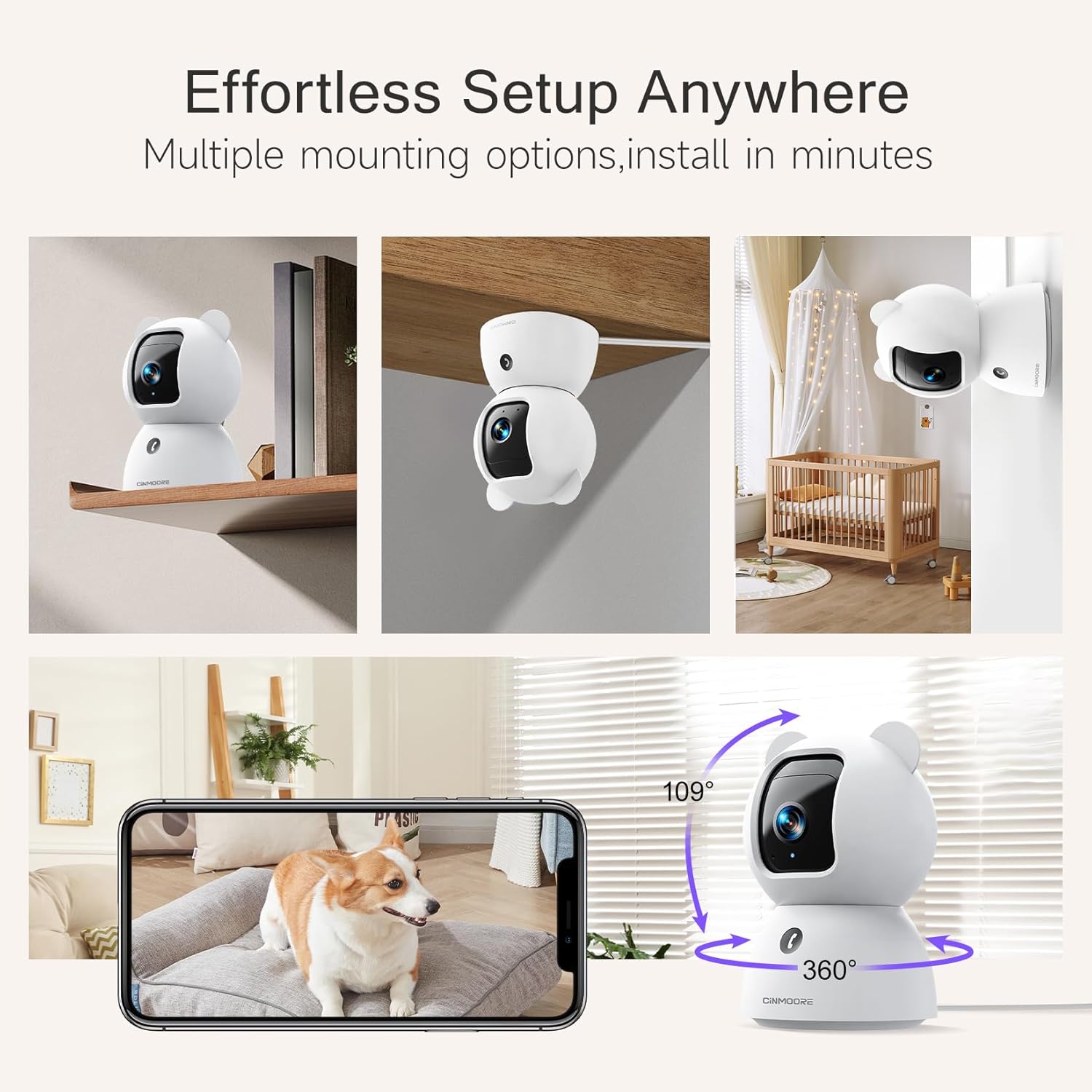
Image: A collage showing the CINMOORE Dummy Camera mounted in various positions: on a shelf, inverted on a ceiling, and on a wall, demonstrating its versatile installation options.
3.2 初期設定手順
- 電源オン: Connect the camera to the power adapter using the provided data cable and plug it into a power outlet.
- アプリをダウンロードする: Download the official CINMOORE app from your smartphone's app store (iOS/Android).
- アカウント登録: アプリを開いて新しいアカウントを登録するか、すでにアカウントをお持ちの場合はログインしてください。
- デバイスを追加: アプリ内の指示に従って新しいカメラを追加します。通常は、カメラのQRコードをスキャンするか、一時的なWi-Fiホットスポットに接続する必要があります。
- Wi-Fi接続: Connect the camera to your home Wi-Fi network (2.4GHz recommended).
- 配置: カメラを希望の場所に置き、クリアな視界を確保してください。 view 監視したいエリアの
4. 操作手順
4.1 Video Quality and Viewing
The camera captures video in 2.5K resolution, providing clear and detailed images. You can view ライブフィードと録画されたfootage through the CINMOORE app.

Image: A side-by-side comparison demonstrating the superior clarity of 2.5K resolution (left, showing a baby) versus 2K resolution (right, showing a puppy).
4.2 Pan & Tilt (PTZ) Functionality
The camera features PTZ (Pan, Tilt, Zoom) technology, allowing for 360-degree coverage. You can remotely control the camera's viewing angle through the app to monitor different areas of a room.

Image: The CINMOORE Dummy Camera surrounded by icons representing its features: Ultra HD 2.5K, Sound/Crying Alerts, Smart Night Vision, Encrypted Local Storage (up to 256GB), Secure Cloud Storage, Full Duplex Audio, Human/Pet Tracking, One-Touch Call, and Pan & Tilt, emphasizing its 360-degree protection.
4.3 双方向オーディオ
Utilize the full-duplex two-way audio feature to communicate with people or pets in the camera's vicinity. This allows for natural, real-time conversations.

Image: A scene depicting a person speaking through a smartphone to a dog via the CINMOORE Dummy Camera, illustrating the two-way audio feature with speech bubbles.
4.4 ナイトビジョン
The camera is equipped with clear IR night vision, providing 2.5K clarity even in low-light or complete darkness, with a range of up to 33 feet.

画像: 人物 viewing a black-and-white night vision feed from the CINMOORE Dummy Camera on their smartphone, showing a baby and a dog in a crib, demonstrating clear IR night vision in a dark room.
4.5 AI Alerts and Detection
The camera supports various AI-powered detection features without monthly fees, including:
- モーション検出: Alerts you to general movement.
- 人の検出: Specifically identifies human figures.
- ペット検出: Recognizes pet activity.
- 泣き声検出: Notifies you of baby crying sounds.

Image: Two children playing near the CINMOORE Dummy Camera, with icons below representing its AI detection capabilities: Person, Pet, Motion, and Crying, highlighting its no-monthly-fee AI alerts.
4.6 ストレージオプション
The camera offers flexible and secure storage solutions:
- SDカードストレージ: Supports local storage via an SD card (not included), expandable up to 512GB. Ensure "SD Card Encryption" is enabled in the app for secure viewing。
- クラウドストレージ: Offers AWS Cloud Storage with a 30-day free trial, providing bank-level encrypted storage for your recordings.

Image: A diagram showing the CINMOORE Dummy Camera with callouts for its storage features: SD card slot (expandable up to 512GB), Reset Button, and AWS Cloud Storage (30-day free trial), emphasizing encrypted and secure flexible storage.
5. メンテナンス
To ensure optimal performance and longevity of your CINMOORE Dummy Camera, follow these maintenance guidelines:
- クリーニング: カメラのレンズと本体は、柔らかく乾いた布で優しく拭いてください。刺激の強い化学薬品や研磨剤の使用は避けてください。
- 配置: カメラは直射日光、極端な温度、高湿度を避け、安定した場所に設置してください。
- ファームウェアの更新: Regularly check for and install firmware updates through the CINMOORE app to ensure your camera has the latest features and security enhancements.
- 電源: カメラに付属の純正電源アダプターのみを使用してください。
6。 トラブルシューティング
If you encounter issues with your CINMOORE Dummy Camera, refer to the following common troubleshooting steps:
- カメラがオフライン: Check your Wi-Fi connection and ensure the camera is within range of your router. Restart the camera by unplugging and re-plugging the power adapter.
- ビデオ品質が悪い: Ensure the lens is clean and free from dust. Check your internet speed; a stable connection is crucial for high-resolution streaming.
- 音声なし: Verify that the microphone and speaker settings are enabled in the app. Ensure there are no obstructions blocking the microphone or speaker on the camera.
- 検出が機能しない: Check the detection sensitivity settings in the app. Ensure the camera's view クリアで遮るものがない。
- アプリに接続できません: Ensure you have the latest version of the CINMOORE app. Try resetting the camera (using the reset button, if available) and re-adding it to the app.
For further assistance, please contact CINMOORE customer support.
7. 仕様
| モデル名 | セキュリティ屋内カメラ |
| 商品型番 | CM-C2LU |
| ブランド | シンムーア |
| 接続技術 | 有線、Wi-Fi |
| ビデオキャプチャ解像度 | 2.5K |
| 屋内/屋外での使用 | 屋内 |
| 特集 | 2 Way Audio, Cry Detection, HD Resolution, PTZ Technology |
| 暗視範囲 | 33フィート |
| 取り付けタイプ | Ceiling Mount / Tabletop Mount / Wall Mount |
| 材料 | アクリロニトリルブタジエンスチレン(ABS) |
| 商品の寸法(長さ x 幅 x 高さ) | 7.6 x 7.6 x 11.4センチメートル |
| アイテム重量 | 340グラム |
| 耐水性レベル | 防水 |
| 推奨用途 | Baby Monitoring, Pet Monitoring, Indoor Home Security, Office Surveillance |
8. 保証とサポート
保証: The CINMOORE Dummy Camera comes with a 1-year warranty from the date of purchase. Please retain your proof of purchase for warranty claims.
サポート: For technical support, troubleshooting assistance, or warranty inquiries, please visit the official CINMOORE website or contact their customer service team. Refer to the product packaging or the CINMOORE app for specific contact details.


