1. はじめに
The Sony RX1R III is a full-frame premium compact camera designed for photographers seeking exceptional image quality in a portable form factor. It features a 61 MP CMOS sensor, a high-quality ZEISS Sonnar T* 35mm F2 lens, the advanced BIONZ XR™ processor, and AI-based subject recognition for precise autofocus and tracking. This manual provides essential information for setting up, operating, and maintaining your camera.
2. セットアップ
2.1. 開梱と初期検査
すべての部品をパッケージから慎重に取り出します。以下のものがすべて揃っていることを確認してください。
- Sony RX1R III Camera Body
- Rechargeable Battery Pack (NP-FW50)
- ACアダプター
- USB Type-Cケーブル
- ショルダーストラップ
- レンズキャップ
- シューキャップ
- 接眼カップ
- 取扱説明書(本書)
カメラと付属品に損傷がないか点検してください。欠品や損傷がある場合は、販売店にご連絡ください。
2.2. ショルダーストラップの取り付け
Attach the provided shoulder strap to the camera's strap lugs for secure handling.

Image: User attaching a wrist strap to the camera, demonstrating how to secure it for carrying.
2.3. バッテリーの充電
Insert the NP-FW50 rechargeable battery pack into the camera. Connect the camera to the AC adaptor using the USB Type-C cable, then plug the AC adaptor into a wall outlet. The charging indicator will light up during charging and turn off when complete. A full charge takes approximately 150 minutes.
Note: The camera is compatible with NP-FW50 rechargeable battery packs, offering up to 300 images on a single charge (CIPA standard, using LCD monitor). Fast charging via USB Power Delivery (PD) is supported with an 18 W (9 V/2 A) or higher output capacity USB Type-C cable.
2.4. メモリーカードの挿入
Open the memory card/battery cover. Insert a compatible SD card (sold separately) into the memory card slot with the label facing the front of the camera until it clicks into place. Close the cover securely.
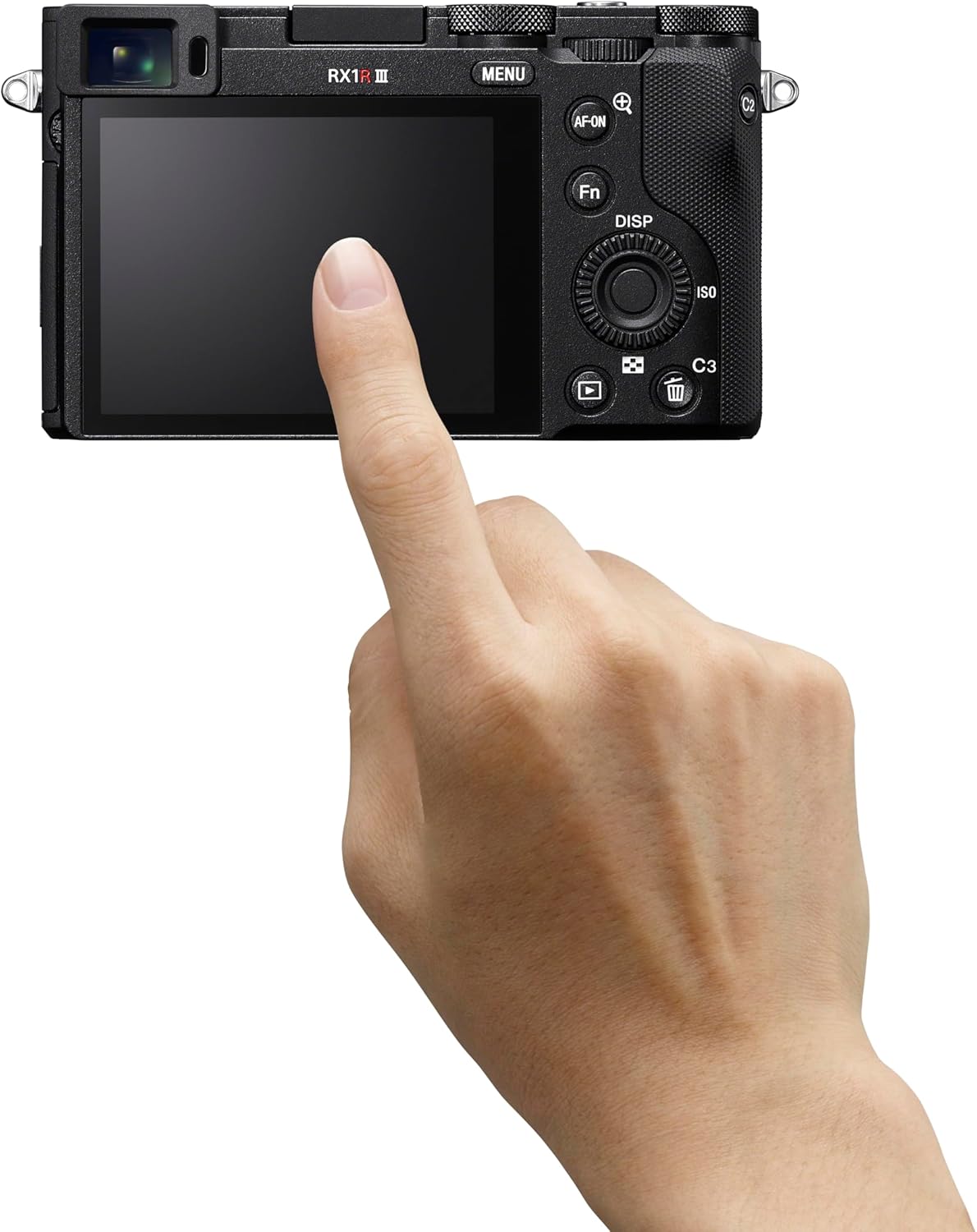
画像: 背面 view of the Sony RX1R III, showing the LCD screen and control buttons. The memory card slot is typically located near the battery compartment on the bottom or side.
2.5. 初回電源投入と設定
Turn the camera on using the ON/OFF switch. Follow the on-screen prompts to set the language, date, time, and time zone. These settings are crucial for proper image metadata.
3. カメラの操作
3.1. 基本的な撮影モード
The RX1R III offers various shooting modes accessible via the mode dial on the top of the camera:
- プログラムオート(P): カメラは最適な露出になるように絞りとシャッタースピードを自動的に設定します。
- 絞り優先(A): 絞りを設定すると、カメラがシャッタースピードを調整します。被写界深度をコントロールするのに最適です。
- シャッター優先(S): シャッタースピードを設定すると、カメラが絞りを調整します。モーションブラーのコントロールに最適です。
- マニュアル露出(M): 絞りとシャッタースピードの両方を制御します。
- Auto (AUTO): Fully automatic mode for quick shooting.
- シーンセレクション: ポートレート、風景、スポーツなどの特定のシーンに合わせたプリセットモード。
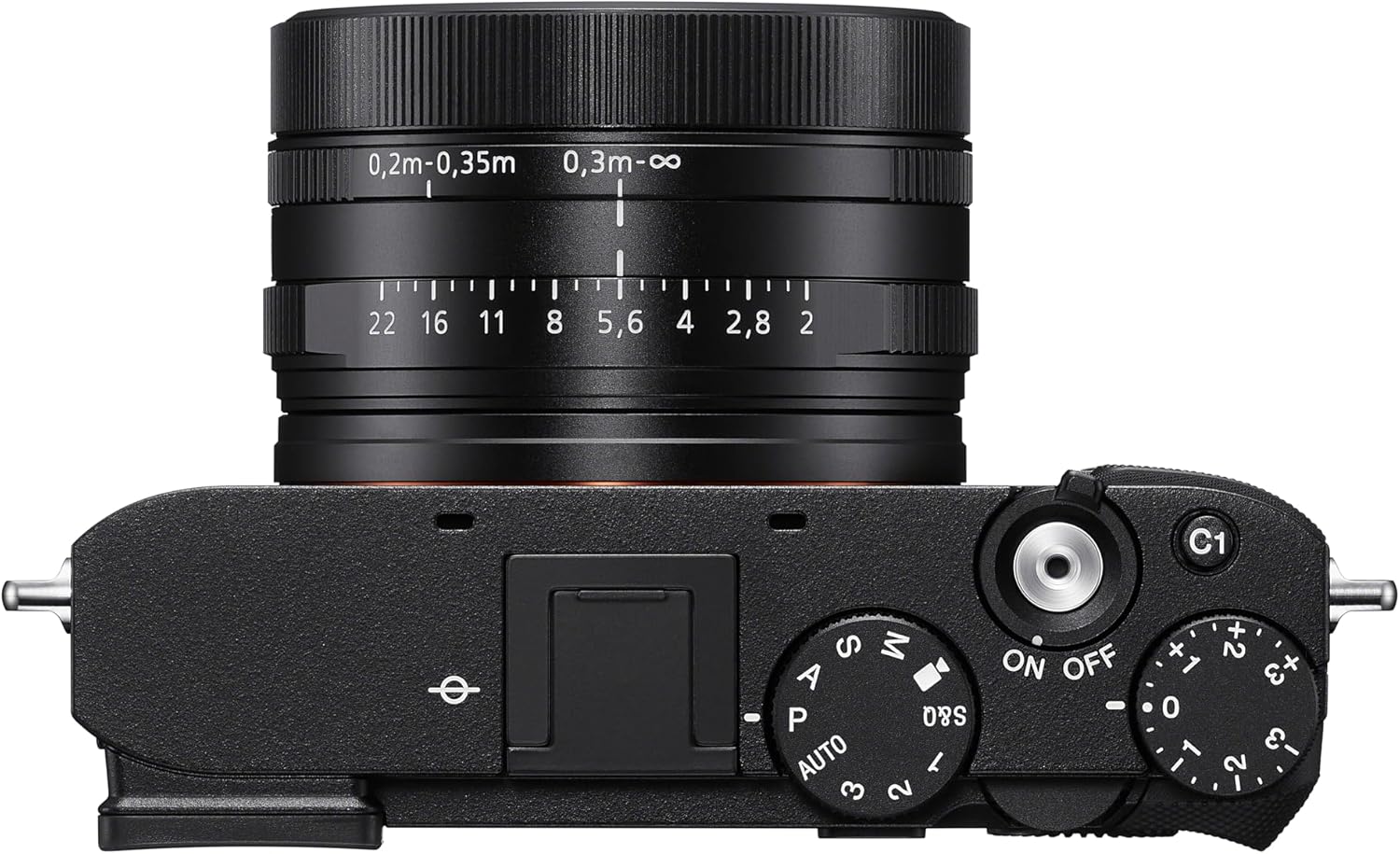
画像: 上 view of the Sony RX1R III, highlighting the mode dial, shutter button, and exposure compensation dial.
3.2. オートフォーカス(AF)システム
The camera features an advanced 693-point phase-detection AF system with AI-based subject recognition and real-time tracking. This allows for fast and precise focusing on a wide range of subjects, including humans, animals, and birds.
- リアルタイム追跡: The camera recognizes color, pattern, and spatial data to track subjects accurately.
- Subject Recognition: Automatically detects and focuses on human eyes/faces, animal eyes/bodies, and bird eyes/bodies.
- AF-ONボタン: Use the dedicated AF-ON button to activate autofocus independently from the shutter button.
Video: Official Sony RX1R III Product Feature Video. This video demonstrates the camera's key features, including its advanced autofocus system and image quality.
3.3. Step Crop Shooting
Leverage the camera's 61 MP sensor with Step Crop Shooting to achieve different focal lengths without changing lenses. This feature allows you to crop images to 50mm equivalent (29 MP) or 70mm equivalent (15 MP) from the native 35mm lens, providing flexibility in composition. This function is not available for movies.
3.4. Creative Look Modes
The RX1R III includes Creative Look modes for expanded in-camera expression. These modes allow you to apply various stylistic effects to your photos directly, such as Standard, Portrait, Neutral, Vivid, Film, Instant, Soft Highkey, Black & White, and Sepia.
3.5.ビデオ録画
カメラは高品質のビデオ録画をサポートしています:
- 4Kビデオ: Record stunning 4K video at 30 frames per second (4K/30p).
- フル HD ビデオ: Capture smooth Full HD video at up to 120 frames per second (1080p/120fps) for slow-motion effects.
- XAVC Format: Videos are recorded in the XAVC format for high quality.
3.6. 接続性
The RX1R III offers versatile connectivity options:
- Wi-FiとBluetooth: Connect wirelessly to your smartphone for remote control, image transfer, and direct upload to Creators' App or Creators' Cloud Web.
- USBタイプC: For fast data transfer and charging.
- HDMI出力: Connect to an external display for video playback.
4. メンテナンス
4.1. カメラのクリーニング
- カメラ本体: カメラ本体は柔らかく乾いた布で拭いてください。頑固な汚れには、布を軽く湿らせてから拭いてください。amp水または中性洗剤で洗浄してください。
- レンズ: レンズブラシで埃を取り除いた後、レンズクリーニングクロスとレンズクリーニング液で優しく拭き取ってください。指でレンズ表面に触れないようにしてください。
- センサー: Cleaning the image sensor should only be performed by authorized service personnel to prevent damage.
4.2. バッテリーのお手入れ
To prolong battery life, avoid exposing the battery to extreme temperatures. Store batteries in a cool, dry place when not in use. Fully charge the battery before extended shooting sessions.
4.3. ストレージ
カメラを長期間保管する場合は、バッテリーとメモリーカードを取り外してください。カビや腐食を防ぐため、乾燥剤を入れたカメラバッグに入れて、乾燥した風通しの良い場所に保管してください。
5。 トラブルシューティング
If you encounter issues with your Sony RX1R III, refer to the following common troubleshooting tips:
- カメラの電源が入らない: バッテリーが完全に充電され、正しく挿入されていることを確認してください。
- 画像がぼやけています: Check your focus mode and ensure the subject is within the camera's focusing range. Verify shutter speed is fast enough to prevent motion blur.
- メモリカードエラー: メモリーカードが正しく挿入されていること、また容量がいっぱいまたは破損していないことを確認してください。カードをフォーマットしてみてください(すべてのデータが消去されます)。
- 接続の問題: Check Wi-Fi/Bluetooth settings on both the camera and your smart device. Ensure the Creators' App is up to date.
より詳しいトラブルシューティングについては、ソニーの公式サポートをご覧ください。 webサイトを参照するか、包括的なオンライン マニュアルを参照してください。
6. 仕様
| 特徴 | 詳細 |
|---|---|
| モデル名 | DSCR1RM3B 型番 |
| フォトセンサー解像度 | 61 MP(有効静止画解像度:60 MP) |
| フォトセンサーサイズ | フルフレーム (35mm) |
| レンズタイプ | ZEISS Sonnar T* 35mm F2 lens (Fixed Focal Length) |
| 最大絞り | F2 |
| 画像安定化 | デジタル |
| プロセッサ | BIONZ XR™ |
| オートフォーカスポイント | 693(位相検出) |
| ビデオ解像度 | 4K (30p), 1080p (120fps) |
| 画面サイズ | 3インチ |
| 接続性 | Bluetooth、Wi-Fi、USB Type-C、HDMI |
| バッテリー | NP-FW50 Rechargeable Battery Pack |
| アイテム重量 | 1 ポンド |
7. 保証とサポート
7.1. 保証情報
This Sony RX1R III camera comes with a 1年間の限定保証 ご購入日から1年間有効です。本保証は、通常の使用状況における材料および製造上の欠陥を対象としています。保証請求の際は、購入証明書を保管してください。
7.2. カスタマーサポート
For further assistance, technical support, or service inquiries, please visit the official Sony Support webサイト:
You can also find additional resources, FAQs, and software updates on the support page.