1. はじめに
Welcome to the user manual for your new DOOGEE Fire3Ultra Rugged Phone 16. This guide provides essential information to help you set up, operate, maintain, and troubleshoot your device. Please read thoroughly to ensure optimal performance and longevity of your rugged smartphone.
箱の中身

Image: Contents of the DOOGEE Fire 3 Ultra retail package.
- 1 x DOOGEE Fire 3 Ultra Rugged Phone
- タイプC USBケーブル x 1
- 充電器 x 1
- 保護フィルム1枚
- カードスロットオープナー x 1
- ユーザーマニュアル x 1
- 1 xサービスカード
開封ビデオ
Video: A detailed unboxing of the DOOGEE Fire 3 Ultra, showing all included accessories.
2.製品オーバーview
The DOOGEE Fire3Ultra is a rugged smartphone designed for durability and performance. It features a compact display, a large battery, and advanced camera capabilities, all powered by the latest Android operating system.
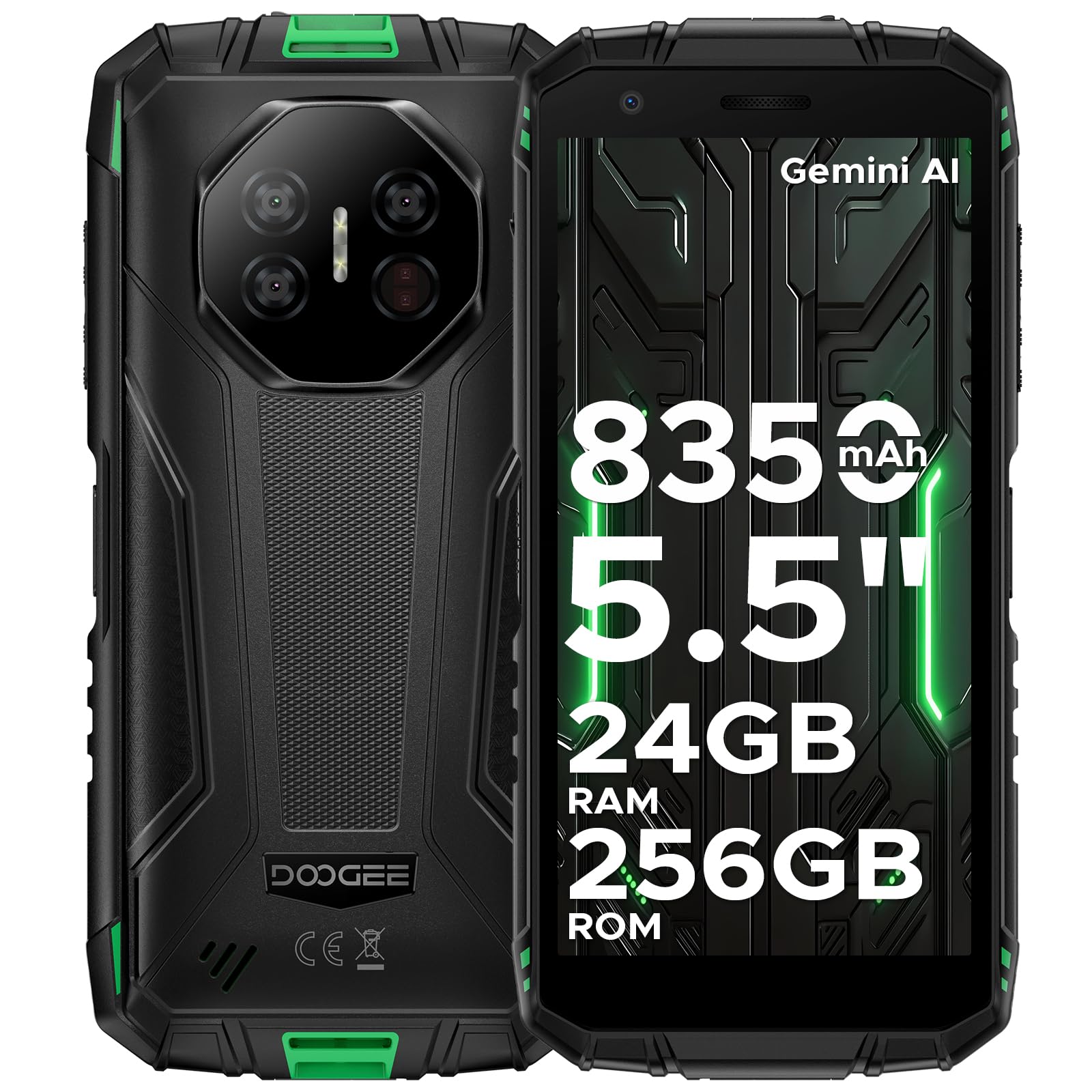
Image: The DOOGEE Fire 3 Ultra rugged phone held in hand, highlighting its compact design and key features.
主な特徴
- 頑丈な設計: IP68/IP69K and MIL-STD-810H certified for water, dust, and drop resistance.
- 画面: 鮮明な映像を実現する 5.5 インチ HD+ IPS ディスプレイ。
- バッテリー: 8350mAh large battery with 18W fast charging and reverse charging support.
- パフォーマンス: Powered by Unisoc T7200 Octa-Core Processor.
- メモリとストレージ: Up to 24GB RAM (6GB basic + 18GB virtual) and 256GB internal storage, expandable up to 2TB.
- カメラ: 16MP AI main camera, 8MP front camera, and 20MP night vision camera.
- オペレーティング·システム: Android 15 OS with built-in Gemini AI.
- 接続性: Supports Wi-Fi, 4G cellular technology, NFC, and accurate navigation systems.
製品終了view ビデオ
ビデオ: オーバーview of the DOOGEE Fire 3 Ultra Rugged Phone, showcasinデザインと機能。
3. セットアップ
初期電源オン
To power on your DOOGEE Fire3Ultra, press and hold the Power button located on the side of the device until the DOOGEE logo appears. Follow the on-screen prompts to complete the initial setup, including language selection and network connection.
SIMカードとMicroSDカードの取り付け
Locate the SIM card tray on the side of your phone. Use the provided card slot opener to eject the tray. Insert your Nano-SIM card(s) and/or MicroSD card into the designated slots. Ensure the cards are correctly oriented before reinserting the tray firmly into the phone.
セキュリティの設定
For enhanced security, set up a screen lock method. Navigate to 設定 > セキュリティ to choose from Pattern, PIN, Password, Fingerprint, or Face Unlock. Follow the on-screen instructions to register your chosen security method. The device supports both fingerprint and face unlock for convenient and secure access.
4. 操作手順
表示機能

Image: The DOOGEE Fire 3 Ultra display showcasing eye care features for reduced strain during long use.
- アイケアモード: Reduces blue light emission to prevent eye strain during prolonged use. Activate this feature in Display Settings.
- ダークモード: Changes the system's color scheme to a darker palette, which can reduce eye fatigue in low-light conditions and save battery.
カメラ機能

Image: Graphic highlighting the 16MP AI Main Camera and 8MP Front Camera of the DOOGEE Fire 3 Ultra.
- 16MP AIメインカメラ: Capture high-quality photos with AI enhancements.
- 8MPフロントカメラ: 鮮明な自撮りやビデオ通話に。
- 20MPナイトビジョンカメラ: 完全な暗闇でもはっきりと見えます。
- AIシーン認識: さまざまなシーンに合わせてカメラ設定を自動的に最適化します。
- 多様な写真撮影機能: Includes Pro Mode, Anti-Flicker, Beauty Mode, Portrait Mode, Panoramic Photography, and Continuous Photography.
AI Features (Gemini AI)

Image: Visual representation of the DOOGEE Fire 3 Ultra's built-in Gemini AI capabilities, including content creation and image analysis.
The DOOGEE Fire3Ultra integrates Gemini AI to assist with various tasks, including content creation, image analysis, code development, language learning, and smart assistance. Access these features through the AI Agent application.
Android 15 OSの機能

Image: Graphic illustrating various features of the Android 15 OS on the DOOGEE Fire 3 Ultra, such as App Cloning and Enhanced Privacy Protection.
Experience a smarter and more secure mobile experience with Android 15. Key features include App Cloning for multiple accounts, Smart Motion Sensing, Super Clipboard, Split Screen multitasking, Enhanced Privacy Protection, Screen Awareness, Live Caption (English only), Glove Mode for touch sensitivity with gloves, and Video Enhancement.
Connectivity & Digital Toolkit

Image: Features of the DOOGEE Fire 3 Ultra as a rugged partner, including Widevine L1 support, accurate navigation, and NFC.

Image: Icons representing the various tools available in the DOOGEE Fire 3 Ultra's Digital Toolkit, such as Compass and Sound Meter.
- Widevine L1 サポート: Enjoy high-definition streaming content from popular platforms.
- 正確なナビゲーションシステム: Reliable GPS for outdoor adventures.
- NFCサポート: 非接触型決済とデータ転送用。
- Side Fingerprint & Face Unlock: 便利で安全な生体認証。
- デジタルツールキット: A suite of practical tools including Compass, Sound Meter, Pic Hanging, Magnifier, Protractor, Plumb Bob, Alarm Bell, Gradienter, and Height Measure.
Special Modes: Underwater Mode
The DOOGEE Fire3Ultra features an Underwater Mode, allowing you to capture photos and videos while submerged. In this mode, the touchscreen functionality is disabled to prevent accidental touches from water, and physical buttons are used for control. Ensure all ports are securely sealed before using the phone underwater.
Video: A demonstration of the Ulefone Armor X32 undergoing a durability test, showcasing its water and drop resistance. (Note: This video features a similar rugged phone model and is for demonstration of ruggedness features).
5. メンテナンス
頑丈さと耐久性

Image: Visuals demonstrating the IP68/IP69K and MIL-STD-810H certifications for the DOOGEE Fire 3 Ultra, highlighting its water, dust, and drop resistance.
The DOOGEE Fire3Ultra is built to withstand harsh environments, certified with IP68, IP69K, and MIL-STD-810H ratings. This means it is water-proof, drop-proof, and dust-proof. Always ensure all port covers are securely closed to maintain its water and dust resistance.
バッテリーの充電と手入れ

Image: Graphic detailing the 8350mAh large battery of the DOOGEE Fire 3 Ultra, including fast charging and reverse charging capabilities.
The device is equipped with an 8350mAh large battery, providing extended usage times. It supports 18W fast charging for quick power-ups and also features reverse charging, allowing you to use your phone as a power bank for other devices like earbuds or smartwatches. Use only the provided charger and cable to ensure optimal charging and battery health.
Battery Features Video
Video: A video highlighting the large battery capacity and charging features of the DOOGEE Fire 3 Rugged Phone.
6。 トラブルシューティング
If you encounter any issues with your DOOGEE Fire3Ultra, please refer to the following common troubleshooting steps:
- デバイスの電源が入っていない: バッテリーが充電されていることを確認してください。携帯電話を充電器に接続し、数分間待ってから再度電源を入れてみてください。
- ネットワーク接続の問題: Verify that your SIM card is correctly inserted and activated. Check your network settings and ensure mobile data is enabled. The DOOGEE Fire3Ultra is unlocked for all carriers, but network compatibility may vary based on your region and carrier's bands.
- タッチスクリーンが反応しない: デバイスを再起動してください。問題が解決しない場合は、工場出荷時設定にリセットしてください(注:これによりすべてのデータが消去されます)。
- アプリがクラッシュ/フリーズする: 問題のあるアプリのキャッシュをクリアするか、再インストールしてください。デバイスのソフトウェアが最新であることを確認してください。
- Water/Dust Damage Concerns: If the device has been exposed to water or dust, ensure all ports are dry and sealed. If functionality is affected, contact customer support.
7. 仕様
| 特徴 | 仕様 |
|---|---|
| アイテム重量 | 1.1 ポンド (499 グラム) |
| ASIN | B0FFH3F761 |
| 商品型番 | Fire 3 Ultra |
| バッテリー | リチウムポリマー電池2個が必要です。(付属) |
| オペレーティング·システム | アンドロイド15 |
| 接続技術 | Wi-Fi, 4G Cellular Technology |
| GPS | False (Note: Accurate Navigation System is mentioned in A+ content, this might refer to a specific GPS chip or feature) |
| その他の表示機能 | 無線 |
| スキャナーの解像度 | 720×1440 |
| フォームファクター | バー |
| 色 | 白 |
| 電話通話時間 | 30時間 |
| メーカー | ドゥージー |
| 初回利用可能日 | 25年2025月XNUMX日 |
| メモリストレージ容量 | 256ギガバイト |
| 立ち画面表示サイズ | 5.5インチ |
| バッテリー容量 | 8350ミリamp 営業時間 |
| 画面サイズ | 5.5インチ |
| 解決 | 720×1440 |
| リフレッシュレート | 90Hz |
| モデル名 | Fire3ultra |
| 無線通信事業者 | すべてのキャリアでロック解除 |
8. 保証とサポート
Your DOOGEE Fire3Ultra Rugged Phone 16 comes with a limited warranty. Please refer to the 'Limited Warranty' card included in your package for specific terms and conditions. For technical support, service inquiries, or further assistance, please visit the official DOOGEE webメーカーのウェブサイトをご覧いただくか、カスタマーサービスに直接お問い合わせください。連絡先は通常、メーカーのウェブサイトに記載されています。 website or in the included service card.


