1. はじめに
This manual provides essential instructions for the safe operation, setup, and maintenance of your Ameta S20 Pro GPS Drone. Please read this manual thoroughly before operating the drone to ensure proper function and to prevent damage or injury.

Image 1.1: The Ameta S20 Pro drone in flight, showcasing its design and operational context.
2. 安全ガイドライン
Adherence to these safety guidelines is crucial for safe operation and to avoid potential hazards.
- 飛行前チェック: Always inspect the drone, remote control, and batteries for any damage before each flight.
- 環境条件: Avoid flying in strong winds, rain, snow, or fog. Maintain a clear line of sight to the drone.
- 飛行エリア: Operate the drone in open areas, away from people, animals, buildings, and power lines. Do not fly over crowds.
- バッテリーの安全性: 指定されたバッテリーと充電器のみを使用してください。バッテリーを過充電したり、穴を開けたりしないでください。バッテリーに膨張や損傷の兆候が見られる場合は使用を中止してください。
- 現地の規制を尊重する: Be aware of and comply with all local aviation laws and regulations regarding drone operation. The Ameta S20 Pro weighs under 249g, which may exempt it from registration requirements in some regions. Always verify local laws.

Image 2.1: The Ameta S20 Pro drone, highlighting its lightweight design (under 249g) and potential exemption from registration in certain jurisdictions. Users should always check local regulations.
3. パッケージ内容
以下にリストされているすべてのアイテムがパッケージに含まれていることを確認してください。
- 4Kカメラ付きGPSドローン
- リモートコントロール
- 2 x Batteries (3000mAh)
- ユーザーマニュアル
- キャリングケース
- 予備プロペラ(8個)
- USB充電ケーブル
- ドライバー

Image 3.1: All components included in the Ameta S20 Pro drone package.
4.製品オーバーview
4.1 ドローンのコンポーネント
Familiarize yourself with the various parts of the Ameta S20 Pro drone.

Image 4.1: The Ameta S20 Pro drone with its arms extended.
- プロペラ: Four propellers for lift and propulsion.
- ブラシレスモーター: 効率的で安定した飛行を実現します。
- 4Kカメラ: Integrated camera with 13MP Sony IMX258 sensor for high-resolution photo and video capture.
- バッテリーコンパートメント: Houses the flight battery.
- LEDインジケーター: 飛行中および操作中のステータス情報を提供します。
4.2リモコン
The remote control allows for precise manipulation of the drone's flight and camera functions.
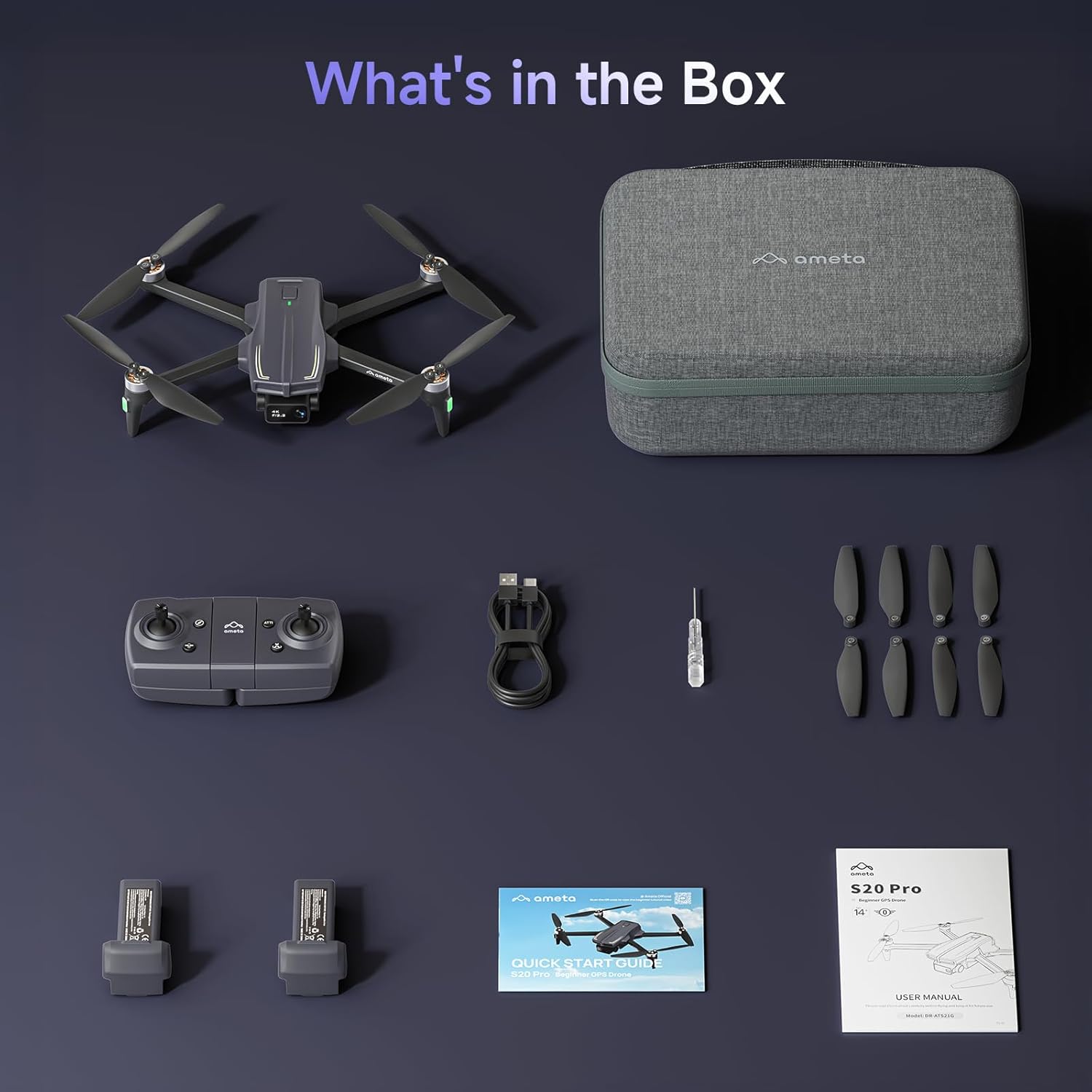
Image 4.2: The remote control with a smartphone holder.
- コントロールスティック: For directional flight and altitude control.
- スマートフォンホルダー: FPV用にスマートフォンをしっかりと固定します viewing とアプリの制御。
- 機能ボタン: Dedicated buttons for takeoff/landing, Return-to-Home, photo/video capture, and speed adjustment.
5. セットアップ
5.1 バッテリーの充電
- Insert the flight battery into the drone's battery compartment.
- Connect the USB charging cable to the drone's charging port and a USB power adapter (not included).
- The LED indicator on the drone will show charging status. A full charge typically takes approximately 2 hours for each 3000mAh battery.
- The drone cannot be flown while the battery is charging.

Image 5.1: Illustration of the drone battery and its extended flight duration.
5.2 プロペラの取り付け
Ensure propellers are correctly installed before flight. Match propellers with corresponding motor arms (A and B markings).
- 「A」と「B」のマークが付いたプロペラを識別します。
- Attach 'A' propellers to motor arms marked 'A', and 'B' propellers to motor arms marked 'B'.
- ドライバーを使用して、付属のネジで各プロペラを固定します。
5.3 リモートコントロールとアプリのセットアップ
- リモコンに単4電池3本(別売)を取り付けます。
- Download the Ameta flight app from your device's app store.
- ドローンの電源を入れ、次にリモコンの電源を入れます。
- Connect your smartphone to the drone's Wi-Fi network (usually named 'Ameta-S20Pro-XXXX').
- Open the Ameta flight app to establish a connection.
5.4 キャリブレーション
Perform compass and gyroscope calibration before the first flight and whenever flying in a new location.
- Follow the on-screen instructions in the Ameta app for compass calibration. This typically involves rotating the drone horizontally and vertically.
- Place the drone on a flat, level surface for gyroscope calibration.
6. 操作手順
6.1 飛行前点検
- Ensure batteries are fully charged in both drone and remote control.
- プロペラはしっかりと取り付けられており、損傷はありません。
- Drone is placed on a flat, open surface.
- GPS signal is acquired (indicated by solid green lights on the drone).
6.2 離陸と着陸
- ワンボタン離陸: Press the one-button takeoff icon on the remote control or in the app. The drone will automatically ascend to a safe altitude and hover.
- 手動離陸: 両方の操縦桿を下向きに押し出すとモーターが始動します。左スティックをゆっくりと上に押し出すと上昇します。
- ワンボタン着陸: Press the one-button landing icon. The drone will descend and land automatically.
- 手動着陸: 左スティックをゆっくりと下に引いて降下します。着陸したら、両方のスティックを下と内側に押し込んでモーターを停止します。

Image 6.1: Key beginner-friendly features of the Ameta S20 Pro drone.
6.3 飛行制御
Use the control sticks on the remote for basic flight maneuvers:
- 左スティック(スロットル/ヨー): Up/Down for altitude, Left/Right for rotation.
- 右スティック(ピッチ/ロール): 上/下で前進/後進、左/右で左右に動きます。
6.4 インテリジェント飛行モード
The Ameta S20 Pro features several intelligent flight modes for enhanced control and creative shots. Note: GPS features are only available when GPS mode is enabled and a strong GPS signal is acquired.
- 帰宅(RTH): Automatically brings the drone back to its takeoff point. Activated by a button press, low battery, or signal loss.

Image 6.2: Visual representation of the Return-to-Home function.
- ウェイポイント飛行: Set custom points on a map, and the drone will follow the designated path.

Image 6.3: The drone executing a Waypoint Flight path.
- サークルフライ: The drone orbits around a selected point, capturing circular footage.

Image 6.4: The drone performing a Circle Fly maneuver.
- GPS フォローミー: The drone automatically follows the remote control (and thus the user), keeping them in the frame.

Image 6.5: The drone utilizing GPS Follow Me mode.
- Other Creative Modes: Rocket, Orbit, Dolly Zoom, Panorama, Time-lapse, and Gesture Selfie are available via the app for diverse shooting options.

画像6.6: 以上view of creative shooting modes.
6.5カメラの操作
The Ameta S20 Pro is equipped with a 4K camera for high-quality imaging.

Image 6.7: Details of the 4K camera with 13MP sensor.
- 写真/ビデオのキャプチャ: リモコンまたはアプリ インターフェースの専用ボタンを使用して、写真を撮ったり、ビデオ録画を開始/停止したりできます。
- FPV(一人称視点) View): The 5G WiFi transmission provides real-time video feed to your connected smartphone.
- 調整可能なレンズ: The camera lens can be adjusted 90 degrees for varied shooting angles.
- ストレージ: Photos and videos are saved to a microSD card (not included) inserted into the drone.
7. メンテナンス
7.1 クリーニング
- 使用後は毎回、ドローンとリモコンを柔らかく乾いた布で拭いてください。
- 過酷な化学薬品や溶剤は使用しないでください。
- Ensure no dust or debris obstructs the camera lens or motor vents.
7.2 プロペラの交換
Replace damaged or bent propellers immediately to ensure stable flight.
- ドローンの電源をオフにします。
- Use the provided screwdriver to remove the screws securing the damaged propeller.
- Carefully remove the damaged propeller.
- Install a new propeller, ensuring it matches the 'A' or 'B' marking of the motor arm.
- Secure the new propeller with screws.
7.3 バッテリーの取り扱いと保管
- 電池は直射日光や極端な温度を避け、涼しく乾燥した場所に保管してください。
- 長期保管する場合は、バッテリーを約 50 ~ 60% の容量まで充電してください。
- Do not store fully charged or fully depleted batteries for extended periods.
8。 トラブルシューティング
| 問題 | 考えられる原因 | 解決 |
|---|---|---|
| ドローンの電源が入らない | 電池残量が少ない;電池が正しく挿入されていない | バッテリーを充電し、バッテリーをしっかりと挿入し直してください |
| No connection to remote control | Remote control battery low; Pairing failed | Replace remote control batteries; Re-pair drone and remote control |
| 不安定な飛行/漂流 | 不適切な調整、プロペラの損傷、強風 | Perform gyroscope and compass calibration; Replace damaged propellers; Fly in calm conditions |
| FPVビデオフィードなし | Phone not connected to drone Wi-Fi; App not open; Weak Wi-Fi signal | Connect to drone Wi-Fi; Open app; Fly closer to drone |
| GPS機能が動作しない | Weak GPS signal; GPS mode not enabled | Fly in an open area with clear sky; Ensure GPS mode is enabled in app |
| Drone lost during flight | Out of range; RTH not activated | Use the 'Find Your Drone' feature in the app (if available and GPS was active). Always fly within visual line of sight. |

Image 8.1: The 'Find Your Drone' feature on the app, useful for locating a lost drone if GPS was active.
9. 仕様
| 特徴 | 詳細 |
|---|---|
| ブランド | アメタ |
| モデル名 | S20プロ |
| ビデオキャプチャ解像度 | 4K |
| 実効静止画解像度 | 13 MP |
| 接続技術 | Wi-Fi(5G) |
| 特集 | 13MP Sensor, 50-Min Flight Time, GPS Drone, One Button Return, Speed Adjustment |
| スキルレベル | 初心者 |
| アイテム重量 | 20.14オンス(約571g) |
| バッテリー容量 | 3000ミリamp 時間(バッテリーあたり) |
| 製品寸法(折りたたんだ状態) | 長さ8.27インチ x 幅10.43インチ x 高さ3.15インチ |
| 材料 | アブソリュート |

Image 9.1: Product dimensions of the Ameta S20 Pro drone.
10. 保証とサポート
The Ameta S20 Pro GPS Drone comes with a standard manufacturer's warranty. For specific warranty terms, duration, and conditions, please refer to the warranty card included in your package or contact Ameta customer support.
For technical assistance, troubleshooting not covered in this manual, or to inquire about replacement parts, please contact Ameta customer support through the contact information provided on the official Ameta webサイトまたは購入プラットフォーム。


