導入
This manual provides detailed instructions for the assembly, operation, and maintenance of your NEEWER NF01 Smart LED Floor Lamp. Please read this manual thoroughly before use to ensure proper functionality and safety. The NF01 lamp offers versatile lighting options with 16 million colors, smart control features, and various scene modes to enhance your living space.

Image: The NEEWER NF01 Smart LED Floor Lamp、ショーasing its sleek design, remote control, and a smartphone displaying the control app interface with various color and brightness settings.
パッケージ内容
組み立てを始める前に、すべてのコンポーネントが揃っていることを確認してください。
- ライトベース
- ライトストリップ
- 3 x Aluminum Lamp ポール
- リモートコントロール
- コネクタ x 2
- アダプタ
- ドライバー
- ネジアクセサリキット
- 梱包箱
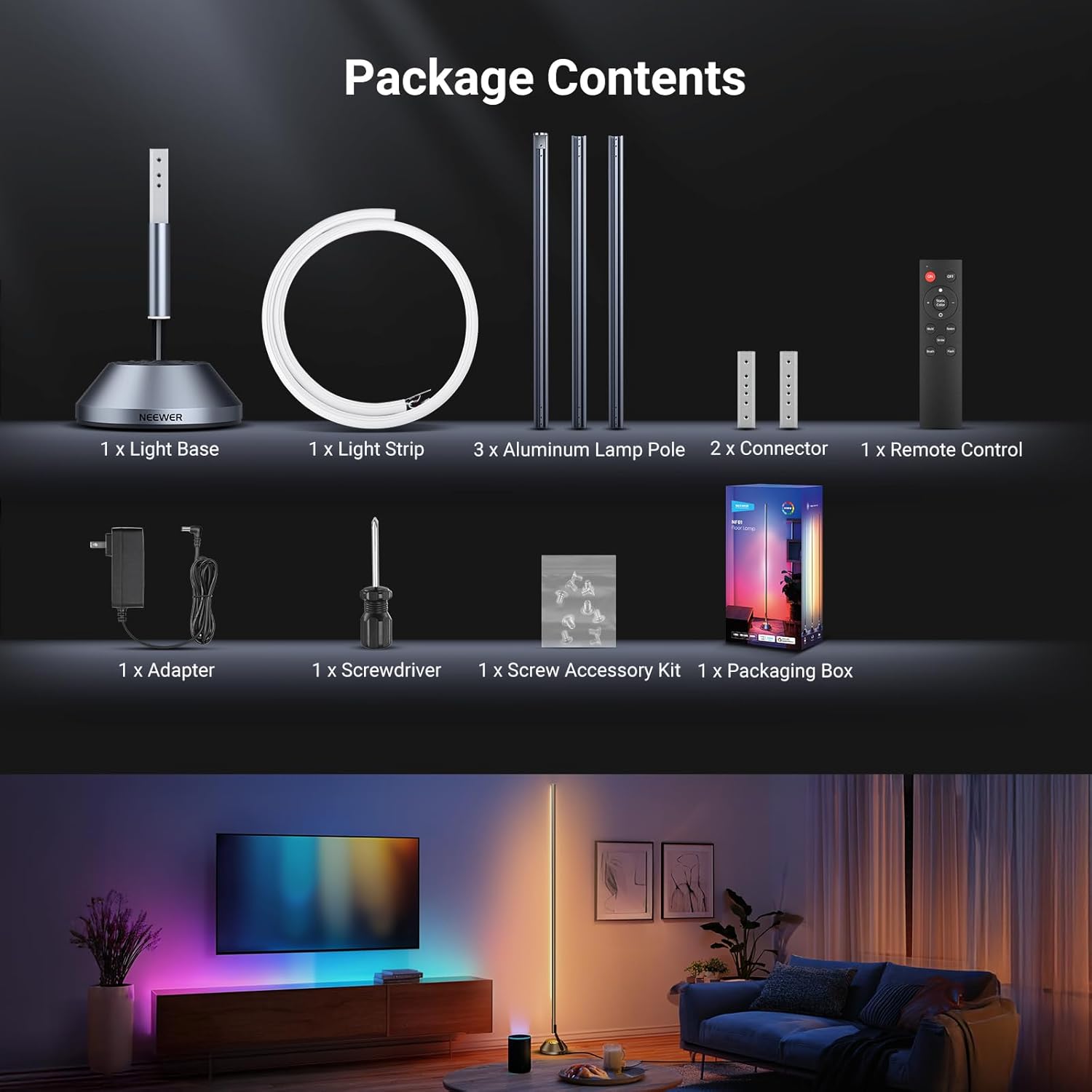
Image: A visual representation of all items included in the NEEWER NF01 Smart LED Floor Lamp package, ensuring users can confirm they have received everything.
セットアップと組み立て
Follow these steps to assemble your NEEWER NF01 Smart LED Floor Lamp:
- Lを接続しますamp ポーランド人: Align the connector holes on the aluminum lamp poles and secure them using the provided screws and screwdriver.
- ライトストリップを取り付ける: Carefully insert the light strip into the assembled lamp poles, ensuring it is seated correctly.
- ベースに接続: Connect the light strip power cable to the power port on the light base.
- セキュアベース: 組み立てたlを取り付けるamp pole to the weighted metal base.
- 電源オン: アダプターをlに接続しますamp そしてコンセントに差し込む。

Image: A visual guide illustrating the simple four-step installation process for the NF01 lamp, ensuring easy and correct assembly.
操作手順
1. APP Control (Neewer Home App)
Download the 'Neewer Home' app (ensure it's not the general 'Neewer' app) from your smartphone's app store. Pair the lamp via Bluetooth to access advanced functions:
- 色の選択: カラーホイールを使用して 16 万色から選択します。
- 明るさ調整: 明るさを1%から100%まで調整します。
- シーンモード: Select from over 50 preset scenes categorized into Daily Life, Holidays, Emotions, and Nature.
- DIYカスタマイズ: Create and save your own personalized lighting effects.
- 音楽同期: Synchronize the light's pulse and shift with music beats or game sound effects.
- AI Lighting Engine: Generate personalized lighting scenes using voice commands, text, or images.

Image: The Neewer Home app interface, demonstrating various control options for the smart floor lamp, including color selection, scene presets, and music synchronization.

Image: The AI Crafted Lightscapes feature in the app, allowing users to create custom lighting effects by providing text or image prompts.
2. リモートコントロール
Use the included remote control for quick adjustments:
- 電源オン/オフ
- Adjust Color Temperature (1800K-6500K)
- 明るさを調整する
- Cycle through Scene Modes
- Activate Music Mode
3. Voice Control (Google Assistant & Alexa)
The NF01 lamp is compatible with Google Assistant and Amazon Alexa. Link your lamp through the respective smart home app to enable voice commands for:
- lを回すamp オン/オフ
- 色を変える
- 明るさの調整
- Activating specific scenes

Image: Demonstrates wireless voice control compatibility with smart home assistants like Alexa, allowing hands-free operation of the lamp.
ビデオ: オーバーview of the NEEWER NF01 Smart LED Floor Lamp, highlighting its various features and dynamic lighting capabilities.
Video: A demonstration of the NEEWER Smart LED Floor Lamp's features, including color changes and smart control options.
4.タイマー機能
Schedule the lamp's on/off times with custom color temperature, brightness, and duration settings. This feature supports:
- 睡眠補助モード: Gradually dims the light until it turns off.
- Wake Up Mode: Gradually brightens the light to simulate a sunrise.

Image: The timer function interface in the app, detailing options for scheduling the lamp's operation, including specific times and lighting parameters.
主な特徴
- 高輝度: Delivers up to 1500 lumens with a wide 180° beam angle.
- 調整可能な色温度: Ranging from 1800K (warm white) to 6500K (cool white).
- 無段階調光: 明るさは1%から100%まで調整可能です。
- 目に優しい照明: Soft light without dazzling or visible flashing for optimal eye comfort.
- モダンなデザイン: Tall, sleek, minimalist design with a sturdy aluminum alloy base.
- Bottom Lighting: Built-in LED at the base creates a floating visual effect.
- Silicone Light Strip: Smooth and delicate surface, easily fitting inside the lamp tube, providing wider light spread and richer colors compared to standard strips.

Image: Illustrates the lamp's high brightness and adjustable color temperature, showing its versatility for different lighting needs.

Image: Details the robust construction of the lamp, featuring a sturdy aluminum alloy base and a modern minimalist metal pole.

Image: A visual comparison demonstrating the superior light diffusion and color vibrancy of the NF01's silicone light strip.
メンテナンス
- クリーニング: 拭くamp 柔らかく乾いた布で拭いてください。研磨剤入りの洗剤や溶剤は使用しないでください。
- 電源切断: 常にlのプラグを抜いてくださいamp 清掃やメンテナンスを行う前に、必ず電源コンセントから抜いてください。
- ストレージ: lを保存する場合amp for an extended period, disassemble it and store it in its original packaging in a dry, cool place.
トラブルシューティング
| 問題 | 考えられる原因 | 解決 |
|---|---|---|
| Lamp オンになりません。 | 差し込まれていない; 電源コンセントの問題; lamp スイッチをオフにします。 | lを確保するamp is securely plugged into a working outlet. Check the power button on the base or remote. |
| Cannot connect to Neewer Home app. | Bluetooth not enabled; incorrect app; 5GHz Wi-Fi network. | Ensure Bluetooth is enabled on your device. Download the 'Neewer Home' app (not the general 'Neewer' app). The lamp only supports 2.4GHz Wi-Fi. |
| リモコンが機能しない。 | 電池が切れました。リモコンが範囲外です。 | Replace the remote control battery. Ensure the remote is within effective range of the lamp. |
| 音声コントロールが応答しません。 | Not linked to smart assistant; Wi-Fi connectivity issue. | lを確認しますamp is correctly linked in your Google Assistant or Alexa app. Check your Wi-Fi connection. |
仕様
| 特徴 | 詳細 |
|---|---|
| ブランド | ニーワー |
| モデル | NF01 |
| Lamp タイプ | L階amp |
| 光源の種類 | 導かれた |
| 最大光出力 | 1500ルーメン |
| 色温度 | 1800K~6500K(温白色、冷白色) |
| 調光範囲 | 1%-100% |
| シェードカラー | マルチカラー(16万色) |
| ビーム角度 | 180° |
| 制御方法 | APP (Neewer Home), Remote, Voice (Google Assistant, Alexa) |
| 材料 | アルミニウム、シリコン |
| 製品寸法 | 17.09 x 7.01 x 8.86インチ |
| アイテム重量 | 6.18ポンド |
| 屋内/屋外での使用 | 屋内 |
| Wi-Fi互換性 | 2.4GHz only (5GHz NOT supported) |
安全情報
次の安全上の注意事項を守ってください。
- lを露出させないでくださいamp 水や過度の湿気。
- lを確保するamp 転倒を防止するために安定した水平な面に設置してください。
- 分解したり修理したりしないでください。amp ご自身で。サポートが必要な場合は、カスタマー サポートにお問い合わせください。
- お子様やペットの手の届かない場所に保管してください。
- 付属の電源アダプターのみを使用してください。
- 光源を長時間直接目に当てないでください。
保証とサポート
NEEWER products come with a standard manufacturer's warranty. For detailed warranty information, technical support, or service inquiries, please refer to the warranty card included in your package or visit the official NEEWER webサイトでご確認ください。保証請求のために購入証明書を保管してください。