1. はじめに
This manual provides detailed instructions for the installation, setup, operation, and maintenance of the ScYWdLi F4V3S Plus Flight Controller Board with BMP280 and M8N PDB. This flight controller is designed for FPV drones and other multirotor applications, offering robust performance and versatile connectivity.
2. 安全情報
Always observe the following safety precautions when working with electronic components, especially those used in unmanned aerial vehicles:
- Ensure all power sources are disconnected before making any connections or performing maintenance.
- Double-check all wiring connections for correct polarity and secure fit to prevent damage to components.
- Avoid short circuits. Use appropriate insulation and heat shrink tubing where necessary.
- Handle the flight controller with care to prevent electrostatic discharge (ESD) damage.
- Keep the flight controller away from moisture, extreme temperatures, and direct sunlight.
- Seek professional assistance if you are unsure about any installation or configuration steps.
3.製品オーバーview
The ScYWdLi F4V3S Plus Flight Controller is a high-performance board featuring an F4 processor and an integrated BMP280 barometer for accurate altitude hold. This variant includes an M8N GPS module and a Power Distribution Board (PDB) for a complete stack solution.
主な特徴:
- 互換性: Works with most FPV drone setups, supporting standard receiver and ESC connections.
- 安定: Integrated BMP280 barometer provides consistent altitude hold for steady flights.
- 耐久性: Robust PCB design withstands vibrations and impacts during aggressive maneuvers.
- 接続性: Multiple UART ports and solder pads allow flexible wiring configurations.
- パフォーマンス: F4 processor delivers responsive handling for racing and freestyle maneuvers.
含まれるコンポーネント:
- F4V3S Plus Flight Controller Board
- M8N GPS Module with QMC5883 Compass
- 分電盤(PDB)
- Connecting cables and mounting hardware

図3.1:以上view of the ScYWdLi F4V3S Plus Flight Controller kit, including the F4V3S Plus board, M8N GPS module, PDB, and connecting wires.
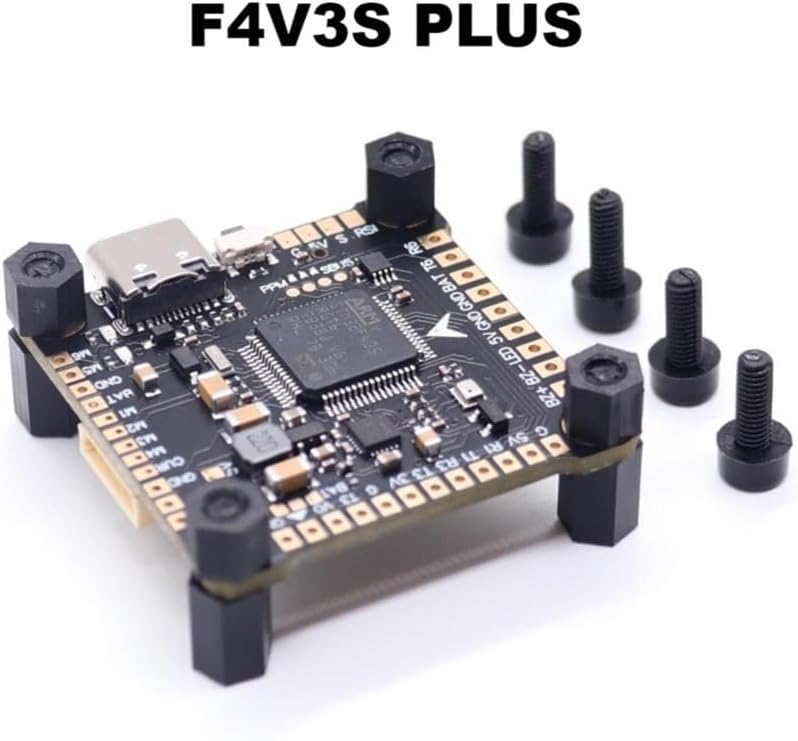
図3.2:詳細 view of the F4V3S Plus Flight Controller board, showing the main processor, USB-C port, and various solder pads.
4. セットアップ
4.1物理的な設置
The F4V3S Plus Flight Controller board has a standard 30.5x30.5mm mounting hole pattern, allowing it to be easily integrated into most FPV drone frames. Ensure proper spacing and vibration dampening using the provided standoffs and grommets.
- Mount the PDB at the bottom of your stack, securing it to the frame.
- Mount the F4V3S Plus Flight Controller board on top of the PDB using the provided standoffs.
- Mount the M8N GPS module on the top plate of your drone or in a location with a clear sky view, away from interference.
4.2 配線図
Refer to the following diagram for connecting your F4V3S Plus Flight Controller to various peripherals such as ESCs, receiver, GPS, VTX, and camera. Pay close attention to voltage requirements and pin assignments.

Figure 4.1: Comprehensive wiring diagram for the F4V3S Plus Flight Controller, showing connections for receiver (SBUS/PPM), ESCs, GPS, VTX, camera, and power distribution. Note that the transmitter and receiver (RX/OSD) can only be used one at a time.
- Power (VBAT): メインバッテリーのボリュームを接続するtage to the VBAT pads on the PDB. The PDB will provide regulated 5V and 9V outputs.
- ESC: Connect the signal wires from your Electronic Speed Controllers (ESCs) to the M1-M6 pads on the flight controller. Connect ESC ground to FC ground.
- 受信者:
- For SBUS receivers, connect the SBUS signal wire to the SBUS pad.
- For PPM receivers, short the PPM pad as indicated in the diagram and connect the PPM signal wire.
- Connect receiver 5V and GND to the corresponding 5V and GND pads.
- GPS (M8N): Connect the GPS module to UART1 (TX1/RX1) for data and I2C (SDA/SCL) for the compass. Ensure 5V and GND connections are correct.
- ビデオ送信機(VTX): Connect VTX video input to the Video Out pad, and VTX power (5-26V) and ground to the PDB.
- カメラ: Connect camera video output to the Video In pad, and camera power (5V) and ground to the FC.
- LEDストリップ: Connect LED strips to the LED pad and 5V/GND.
4.3 ファームウェアのフラッシュ
The F4V3S Plus Flight Controller comes pre-flashed with OMNIBUSF4SD(AIRB) firmware. If you need to update or re-flash the firmware:
- Download the latest Betaflight Configurator or INAV Configurator software.
- USB Type-C ケーブルを使用してフライト コントローラーをコンピューターに接続します。
- In the configurator, select the correct target (OMNIBUSF4SD) and flash the desired firmware version.
- Follow the on-screen instructions for DFU mode if necessary.
4.4ソフトウェア構成
After flashing, configure the flight controller using Betaflight or INAV Configurator:
- Connect to the flight controller via USB.
- Perform initial setup, including accelerometer calibration.
- Configure UARTs for your receiver, GPS, VTX telemetry, etc., according to your wiring.
- Set up your receiver protocol (e.g., SBUS, Crossfire, ELRS).
- Configure ESC protocol (e.g., DShot600).
- Set up modes (Arm, Angle, Acro, GPS Rescue, etc.).
- Verify motor direction and propeller installation.
5.運用
Once the flight controller is fully installed and configured, you can proceed with operation. Always ensure a safe environment for flight.
- 飛行前チェック: Before each flight, verify all connections are secure, propellers are correctly installed, and battery is fully charged.
- 武装: Arm the drone using the configured switch on your remote controller. Ensure the drone is on a level surface for accurate accelerometer calibration at startup.
- フライトモード: Utilize the configured flight modes (e.g., Angle, Acro, GPS Hold) as appropriate for your flying style and conditions.
- GPS機能: For GPS-dependent modes, wait for a sufficient number of satellites to be acquired before arming. The M8N GPS module provides reliable positioning.
- 武装解除: Disarm the drone immediately after landing or in an emergency situation.
6. メンテナンス
定期的なメンテナンスを行うことで、フライト コントローラーの寿命が長くなり、パフォーマンスの信頼性が向上します。
- クリーニング: Periodically inspect the board for dust, dirt, or debris. Use a soft brush or compressed air to gently clean the components. Avoid using liquids.
- 接続チェック: すべてのはんだ接合部とコネクタを定期的に点検し、摩耗、腐食、接続の緩みなどがないか確認してください。必要に応じて再はんだ付けまたは交換してください。
- ファームウェアの更新: Keep your flight controller firmware updated to benefit from new features, bug fixes, and performance improvements. Always back up your configuration before updating.
- 物理検査: Check for any physical damage to the PCB, components, or mounting hardware after crashes or hard landings.
7。 トラブルシューティング
問題が発生した場合は、次の一般的なトラブルシューティング手順を参照してください。
| 問題 | 考えられる原因 | 解決 |
|---|---|---|
| フライトコントローラーの電源が入らない | Incorrect power connection, short circuit, damaged board. | Check VBAT and GND connections. Inspect for shorts. Test with a known good power source. |
| No connection to Betaflight/INAV Configurator | Incorrect USB driver, faulty USB cable, FC not in DFU mode. | Install Zadig for correct DFU drivers. Try a different USB cable. Manually put FC into DFU mode (bootloader button). |
| Motors not spinning or erratic behavior | Incorrect ESC wiring, wrong motor direction, ESC protocol mismatch, calibration issues. | Verify ESC signal and ground connections. Check motor direction in configurator. Ensure ESC protocol (e.g., DShot) is set correctly. Calibrate ESCs if necessary. |
| No GPS lock or inaccurate position | Poor satellite visibility, incorrect UART/GPS settings, interference. | 晴天を確保する view. Verify GPS UART and protocol settings in configurator. Move GPS away from noisy components (VTX, ESCs). |
8. 仕様
| 特徴 | 仕様 |
|---|---|
| アイテム名 | F4V3S PLUS Flight Controller |
| ファームウェア | OMNIBUSF4SD(AIRB) |
| USBポート | タイプC |
| サイズ | 36x36mm |
| 取り付け穴 | 30.5x30.5mm |
| バロメーター | BMP280 |
| GPSモジュール | M8N with QMC5883 Compass |
| アイテム重量 | 1.76 ounces (approx. 50g for the package) |
| メーカー | ScYWdLi |
| 商品型番 | ScYWdLi190101 |
9. 保証とサポート
9.1 保証情報
メーカーの公式 website or your point of purchase for specific warranty terms and conditions. Typically, electronic components like flight controllers come with a limited warranty covering manufacturing defects.
9.2 テクニカルサポート
For technical assistance, firmware updates, or further inquiries, please visit the ScYWdLi official website or contact their customer support channels. Online communities and forums dedicated to FPV drones can also be valuable resources for troubleshooting and configuration advice.


