導入
Thank you for choosing the FEYA M-Y10 Motorcycle Helmet Headset. This device is designed to enhance your riding experience with wireless communication, music playback, and hands-free calling. Please read this manual carefully to ensure proper use and optimal performance of your headset.
パッケージ内容

This image displays the FEYA M-Y10 headset along with its accessories, including speakers, microphones, mounting clips, and charging cable.
- FEYA M-Y10 Headset Unit
- Helmet Speakers and Microphone (soft and hard mic options)
- Velcro Double-sided Tape for Speakers
- Base for Mounting (clip-style)
- USB Type-C充電ケーブル
- ユーザーマニュアル(このドキュメント)
主な特徴
- Wireless V5.3 Technology: Supports simultaneous connection to two smartphones for stable and efficient communication.
- インテリジェントなノイズキャンセリング: Features 40mm graphene diaphragm speakers and dual noise-cancelling microphones (DSP and 8.0 CVC) to reduce engine noise, wind noise, and traffic sounds, ensuring clear audio.
- バッテリー寿命の延長: Equipped with a 1000mAh battery, offering up to 80 hours of music playback and 750 hours of standby time on a 2-hour charge.
- IPX6防水等級: Designed to withstand dust, rain, fog, and snow, operating effectively in temperatures as low as -29°C (-20°F).
- AI音声アシスタントと自動応答: Activate Siri or other voice assistants with a short press. Automatically answers incoming calls after 10 seconds, allowing hands-free operation.
- Easy Installation & Lightweight Design: Simple to install on various helmet types. Weighs only 45g, reducing helmet burden.
設定
1. インストール
The FEYA M-Y10 headset features a detachable mounting design for easy installation on most helmet types. Before installation, measure the available space inside your helmet for the speakers (speaker thickness 15.2mm / width 45mm). If space is insufficient, some internal padding modification may be required.
- Attach the clip-style base to the side of your helmet. Ensure it is securely fastened.
- Insert the headset unit into the base until it clicks into place.
- Peel off the backing from the Velcro double-sided tape and attach it to the back of the speakers.
- Carefully position the speakers inside your helmet, aligning them with your ears for optimal sound.
- Attach the microphone to a suitable position inside the helmet, ensuring it is close to your mouth for clear voice pickup. Choose between the soft mic or hard mic based on your helmet type and preference.
- Connect the speaker and microphone cables to the headset unit.

This image illustrates the detachable mounting design, highlighting how the headset unit can be easily attached and removed from its base on the helmet.
2. 初期充電
Before first use, fully charge the headset. Connect the provided USB Type-C charging cable to the headset's charging port and a suitable USB power source. The charging indicator will show the charging status. A full charge takes approximately 2 hours.

This image shows the headset being charged via its Type-C port, emphasizing its 1000mAh battery and fast charging capability.
3. スマートフォンとのペアリング
The FEYA M-Y10 uses Wireless V5.3 technology for stable connections.
- ヘッドセットの電源がオフになっていることを確認します。
- Press and hold the Power button for approximately 3 seconds until the indicator light flashes, indicating pairing mode.
- On your smartphone, enable Wireless (Bluetooth) and search for "FEYA M-Y10" (or similar device name).
- Select the device to connect. Once paired, the indicator light will change, and you may hear a confirmation tone.
- The headset can connect to two smartphones simultaneously. Repeat the pairing process for a second device if needed.

This image highlights the advanced V5.3 wireless chip, ensuring a stable and efficient connection for your devices.
操作手順
1. 電源のオン/オフ
- 電源オン: インジケータ ライトが点灯するまで、電源ボタンを約 3 秒間押し続けます。
- 電源を切る: インジケータ ライトが消えるまで、電源ボタンを約 5 秒間押し続けます。
2.音楽の再生
- 再生/一時停止: Short press the "M" button.
- 次のトラック: 「+」ボタンを短く押します。
- 前のトラック: 「-」ボタンを短く押します。
- ボリュームアップ: 「+」ボタンを長押しします。
- ボリュームダウン: 「-」ボタンを長押しします。

This image depicts a rider enjoying music through the 40mm speakers, highlighting the lossless stereo sound experience.
3.通話管理
- 通話に応答: The headset will automatically answer incoming calls after 10 seconds.
- 通話終了: Short press the "M" button during a call.
- 通話を拒否: Long press the "M" button when a call comes in.
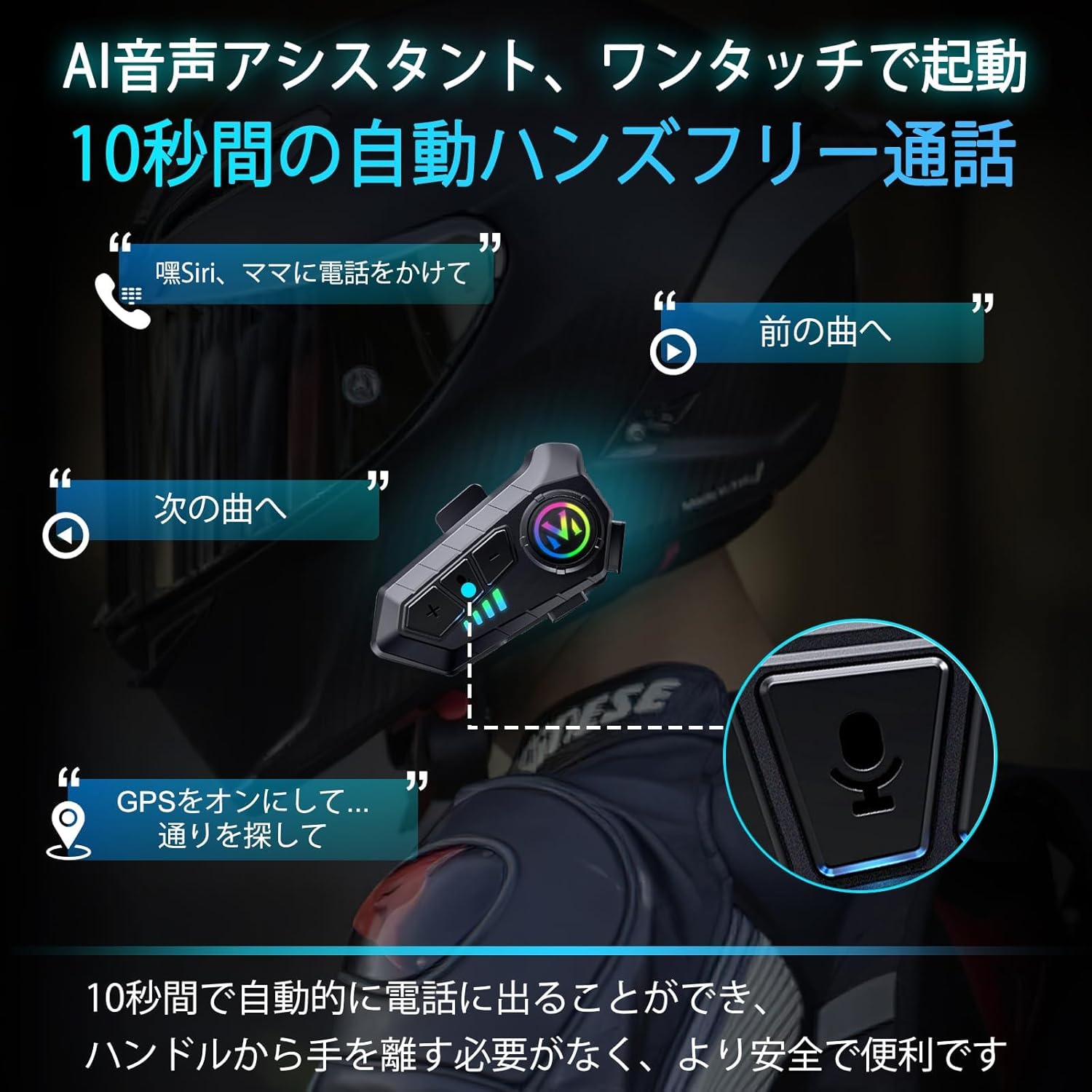
This image demonstrates the AI voice assistant and automatic call answering features, allowing riders to manage calls and navigation hands-free.
4. 音声アシスタントの起動
- Activate Voice Assistant (Siri/AI): Short press the Voice Control button (often the "M" button or a dedicated button, refer to product diagram if available).
5. 言語の切り替え
To switch the voice prompt language:
- Ensure the headset is powered on and disconnected from any smartphone.
- Double-click the "M" button to cycle through available languages.
メンテナンス
1. 充電
Charge the headset using the provided Type-C cable. A full charge takes approximately 2 hours and provides up to 80 hours of music playback or 18 months of standby time. The battery level can be displayed on your smartphone.
2.クリーニングと保管
- ヘッドセット本体は柔らかく乾いた布で拭いてください。刺激の強い化学薬品や研磨剤入りの洗剤は使用しないでください。
- The headset is IPX6 waterproof, meaning it is protected against high-pressure water jets. However, avoid submerging it in water.
- ヘッドセットは、直射日光や極端な温度を避け、涼しく乾燥した場所に保管してください。

This image demonstrates the IPX6 dust and waterproof performance of the headset, ensuring durability in various weather conditions.
トラブルシューティング
| 問題 | 考えられる原因 | 解決 |
|---|---|---|
| デバイスの電源が入りません。 | バッテリー残量が少なくなりました。 | ヘッドセットを完全に充電します。 |
| スマートフォンとペアリングできません。 | Headset not in pairing mode; smartphone Wireless (Bluetooth) off; too far from device. | Ensure headset is in pairing mode (flashing indicator). Turn on smartphone Wireless. Keep devices within 1 meter. |
| 音が出ない、または音量が低い。 | 音量が低すぎる、スピーカーの位置が正しくない、接続が悪い。 | Increase volume on headset and smartphone. Adjust speaker position. Re-pair the device. |
| 通話品質が悪い。 | マイクの位置が正しくない、環境ノイズが多すぎる。 | Adjust microphone closer to mouth. Ensure noise cancelling features are active. |
| 自動シャットダウン。 | No smartphone connection for 5 minutes. | This is a power-saving feature. Reconnect to your smartphone to resume use. |
仕様
| 特徴 | 詳細 |
|---|---|
| モデル名 | M-Y10 (Internal Model: B35S) |
| ワイヤレステクノロジー | ワイヤレスV5.3 |
| スピーカーサイズ | 40mm |
| バッテリー容量 | 1000mAh |
| 充電ポート | USBタイプC |
| 充電時間 | 約2時間 |
| 音楽再生時間 | 最大80時間 |
| 待機時間 | 最大750時間(18か月) |
| 防水等級 | IPX6 |
| 騒音制御 | Active Noise Cancellation (DSP & CVC 8.0) |
| インピーダンス | 32オーム |
| 動作温度 | Effective down to -29°C (-20°F) |
| 重さ | 約45g |
| 材料 | プラスチック |
保証とサポート
FEYA products are designed for durability and performance. For warranty information, please refer to the product packaging or contact your retailer. If you encounter any issues or have questions regarding your FEYA M-Y10 headset, please contact FEYA customer support through the official website or your purchase platform for assistance.
Each product is verified with a unique code before shipment to ensure authenticity and quality.


