導入
Thank you for choosing the GOBOULT Soniq Over Ear Bluetooth Headphones. These headphones are designed to provide a superior audio experience with features like 70 hours of playtime, 40mm bass drivers, Zen™ ENC microphone, Type-C fast charging, and dual device pairing. This manual will guide you through the setup, operation, and maintenance of your new headphones to ensure optimal performance.
箱の中身
パッケージの内容をチェックして、すべてのアイテムが揃っていることを確認してください。
- Soniq Headphone
- タイプC充電ケーブル
- ユーザーマニュアル
- イヤークッション(プリインストール)
- 保証書
製品の特徴 以上view
The GOBOULT Soniq headphones come equipped with several advanced features:
- 延長プレイタイム: 1 回の充電で最大 70 時間のオーディオ再生が可能です。
- カスタマイズ可能なEQモード: サウンドプロを調整するfiles for bass boost, balanced audio, or vocal clarity.
- 環境ノイズキャンセリング (ENC): 背景ノイズを低減して通話の明瞭度を向上させます。
- デュアルデバイスペアリング: Seamlessly connect and switch between two devices simultaneously.
- Powerful Audio Drivers: 40mm bass-boosted drivers for rich sound.
- 最新の Bluetooth テクノロジー: Bluetooth 5.4 for faster pairing and stable connections.
- 快適なデザイン: Lightweight build with cushioned earcups for prolonged wear.
- 耐水性: IPX5 rating for splash, rain, and sweat protection.
- 触覚コントロール: Easy-to-use physical buttons for volume, playback, and mode switching.
- AI音声アシスタントのサポート: Compatible with Google Assistant and Siri.

画像: 上view of key features including 70H battery, EQ modes, ENC, dual pairing, 40mm drivers, and Bluetooth 5.4.

Image: Close-up of the GOBOULT Soniq headphone earcup highlighting the 40mm power-packed bass neodymium drivers with BoomX™ Technology and Memory Foam.
セットアップガイド
1. ヘッドフォンを充電する
Before first use, fully charge your GOBOULT Soniq headphones. Use the provided Type-C charging cable to connect the headphones to a compatible USB power source.
- フル充電すると最大 70 時間の再生が可能です。
- Fast charging feature: 10 minutes of charge provides approximately 8 hours of playtime.
- LED インジケーターは充電状態を示し、完全に充電されると消灯するか色が変わります。

Image: GOBOULT Soniq headphones connected via Type-C cable, illustrating 70 hours playtime and fast charging capability.
2.電源のオン/オフ
To power on, press and hold the Power button for approximately 3 seconds until the LED indicator lights up. To power off, press and hold the Power button again for 3 seconds until the LED indicator turns off.
3.Bluetoothペアリング
ヘッドフォンを Bluetooth 対応デバイスとペアリングするには、次の手順に従います。
- ヘッドフォンが完全に充電され、電源がオフになっていることを確認します。
- LED インジケーターが赤と青に交互に点滅し、ペアリング モードを示すまで、電源ボタンを 5 ~ 7 秒間押し続けます。
- デバイス(スマートフォン、タブレット、ラップトップ)で Bluetooth を有効にし、利用可能なデバイスを検索します。
- Select "GOBOULT Soniq" from the list of found devices.
- 接続されると、LED インジケーターが青色にゆっくり点滅するか、青色に点灯したままになります。

Image: GOBOULT Soniq headphones highlighting Bluetooth 5.4 for fast and stable connection.
操作手順
1. 基本的な操作
The headphones feature tactile buttons for easy control:
- 電源ボタン: 長押しで電源のオン/オフ、短く押すと再生/一時停止になります。
- ボリュームアップ(+): 短く押すと音量が上がります。長押しすると次のトラックに進みます。
- ボリュームダウン (-): 短く押すと音量が下がります。長押しすると前のトラックに戻ります。
- Multi-function Button (often combined with Power or a dedicated button): Answer/End calls, activate voice assistant.

Image: Close-up of the right earcup showing tactile button controls for volume and play/pause.
2. EQモード
Customize your audio experience with multiple EQ modes. Press the dedicated EQ button (or a specific combination, refer to quick start guide if available) to cycle through modes:
- 低音ブーストモード: Enhances low frequencies for a deeper bass sound.
- バランスモード: ニュートラルなサウンドプロを提供file suitable for various genres.
- ボーカルモード: 中音域の周波数を最適化して、よりクリアなボーカルを実現します。
- ゲームモード: Reduces latency for a more synchronized gaming audio experience (60ms ultra-low latency).
- 音楽モード: 標準オーディオプロfile 一般的な音楽鑑賞用。
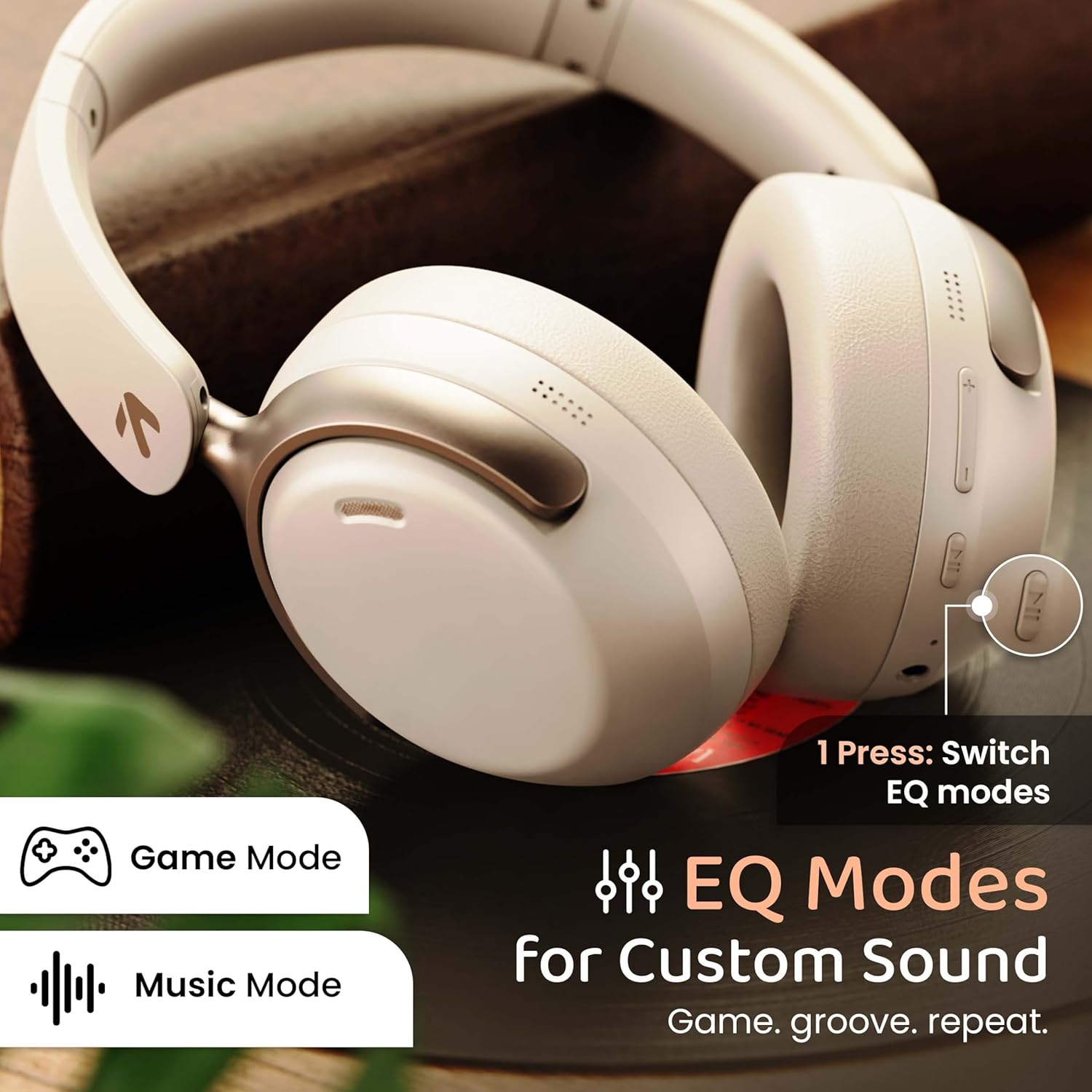
Image: GOBOULT Soniq headphones illustrating the EQ modes for custom sound, including Game Mode and Music Mode.

Image: GOBOULT Soniq headphones highlighting Combat™ Gaming Mode with 60ms ultra-low latency, tailored for mobile gaming and real-time sound accuracy.
3. デュアルデバイスのペアリング
The headphones support dual device pairing, allowing you to connect to two devices simultaneously and switch between them seamlessly.
- 「Bluetooth ペアリング」セクションの説明に従って、ヘッドフォンを最初のデバイスとペアリングします。
- 最初のデバイスで Bluetooth を無効にします。
- ヘッドフォンをXNUMX番目のデバイスとペアリングします。
- 最初のデバイスでBluetoothを再度有効にします。ヘッドフォンは両方のデバイスに自動的に接続されます。
- Audio will play from the device currently active. To switch, pause audio on the first device and start playing on the second.

Image: GOBOULT Soniq headphones demonstrating dual device connectivity with a laptop and a smartphone.
4. 有線モード(AUX)
For a wired connection, use a standard 3.5mm AUX cable (not included) to connect the headphones to your audio source. In wired mode, the headphones operate passively, and the built-in microphone will not function.

Image: GOBOULT Soniq headphones showing the option for wireless mode and an optional wired mode via AUX cable, noting that the mic is off in wired mode.
5. 通話時の環境ノイズ除去(ENC)
The Zen™ ENC microphone technology helps reduce ambient noise during calls, ensuring clearer conversations. This feature is automatically active during phone calls.

Image: Close-up of the GOBOULT Soniq headphone earcup highlighting the Zen™ ENC Mic for processed calling, ambient noise isolation, enhanced call experience, and sharper voice clarity.
6. 音声アシスタント
Activate your device's voice assistant (Google Assistant or Siri) by pressing the multi-function button (or specific button, refer to quick start guide) for approximately 2 seconds.

Image: GOBOULT Soniq headphones with icons for Google Assistant and Siri, indicating personalized AI assistant support.
メンテナンスとケア
- クリーニング: ヘッドホンは柔らかく乾いた布で拭いてください。研磨剤入りの洗剤や溶剤は使用しないでください。
- 耐水性: The headphones are IPX5 water resistant, meaning they are protected against splashes, rain, and sweat. Do not submerge them in water or expose them to strong jets of water.
- ストレージ: 使用しない時は、直射日光や極端な温度を避け、涼しく乾燥した場所に保管してください。折りたたみ式なので、コンパクトに収納できます。
- バッテリーのケア: バッテリー寿命を延ばすには、ヘッドフォンを頻繁に完全に放電させないでください。頻繁に使用しない場合でも、定期的に充電してください。
Image: GOBOULT Soniq headphones illustrating IPX5 water resistance, indicating protection against splash, rain, and sweat.

Image: GOBOULT Soniq headphones showcasing their adjustable headband, foldable design, and movable earcups for maximum comfort and portability.
トラブルシューティング
| 問題 | 考えられる解決策 |
|---|---|
| ヘッドホンの電源が入りません。 | ヘッドホンが充電されていることを確認してください。Type-Cケーブルを使って電源に接続してください。 |
| デバイスとペアリングできません。 |
|
| 音が出ない、または音量が低い。 |
|
| 有線モードではマイクが動作しません。 | The built-in microphone is not active when using the AUX wired connection. This is normal operation. |
| 接続が断続的です。 |
|
仕様
| 特徴 | 詳細 |
|---|---|
| モデル名 | エアバス |
| 接続技術 | Bluetooth、有線、無線 |
| 無線通信技術 | ブルートゥース5.4 |
| Bluetooth範囲 | 10メートル |
| オーディオドライバーのサイズ | 40ミリメートル |
| オーディオドライバータイプ | ダイナミックドライバ |
| バッテリー寿命 | 40時間 |
| 充電ポート | Type-C急速充電ジャック |
| 騒音制御 | 環境ノイズキャンセル(ENC) |
| 耐水性レベル | IPX5 (Splash, Rain, Sweat Proof) |
| 音声遅延 | 60ミリ秒(ゲームモード) |
| イヤーピースの形状 | オーバーイヤー |
| 材料 | Memory Foam (Ear Cushions) |
| アイテム重量 | 227グラム |
| 製品寸法(長さx幅x高さ) | 17 x 5.5 x 19 センチメートル |
| コントローラータイプ | Button, Google Assistant |
| インピーダンス | 32オーム |
| 感度 | 118デシベル |
保証とサポート
Your GOBOULT Soniq Over Ear Bluetooth Headphones come with a 1年間のメーカー保証 from the date of purchase. This warranty covers manufacturing defects and ensures the reliability of your product.
For warranty claims, technical support, or any inquiries, please refer to the contact information provided on the warranty card included in your package or visit the official GOBOULT support webサイト。
保証を有効にするために、購入証明として購入領収書を保管してください。


