1. はじめに
This manual provides detailed instructions for setting up, operating, maintaining, and troubleshooting your ASUS TUF Gaming VG27AQ5A 27-inch QHD Gaming Monitor. Please read this manual thoroughly before using the product to ensure proper and safe operation.
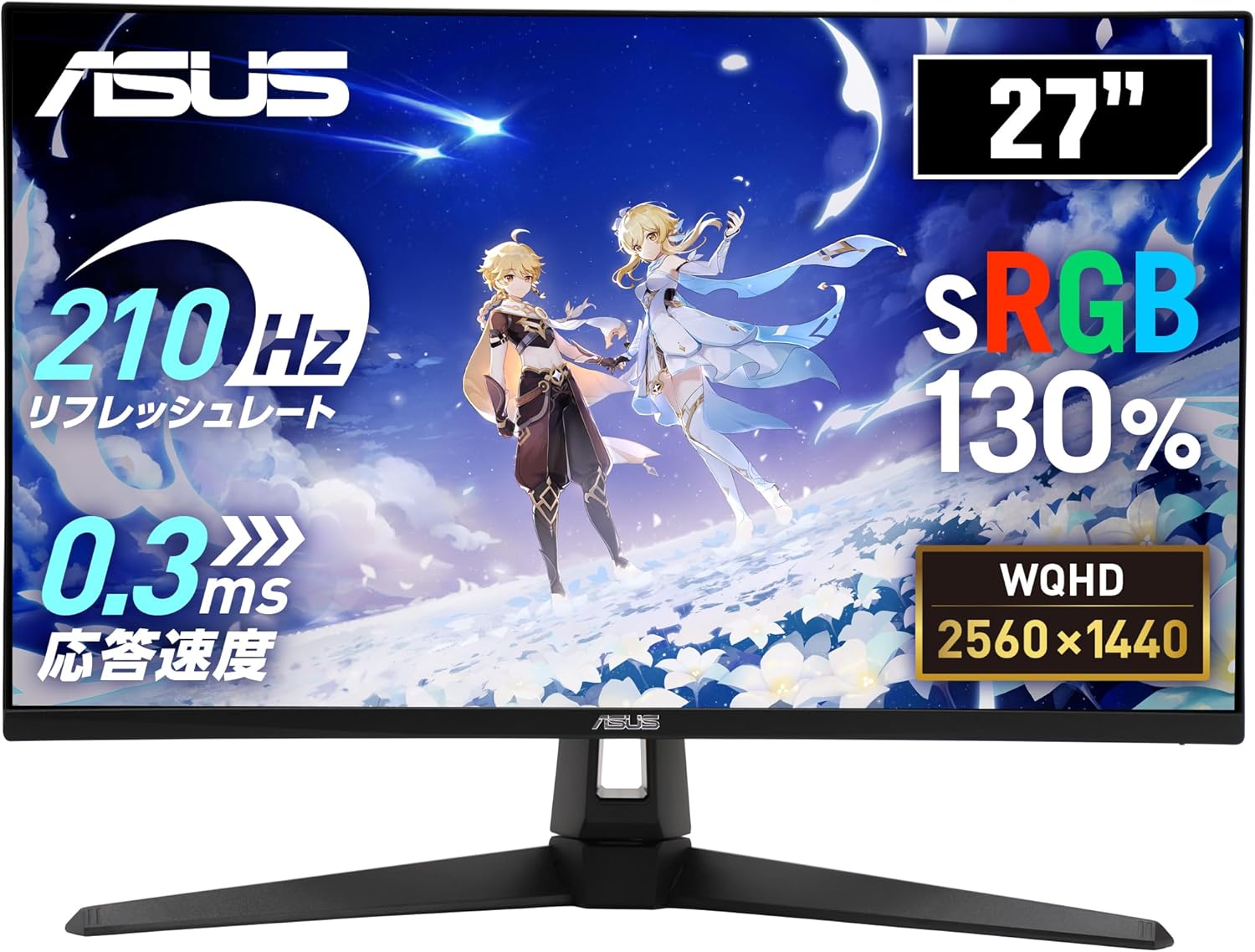
Figure 1: ASUS TUF Gaming VG27AQ5A Monitor Overview
2. パッケージ内容
Verify that all items listed below are present in your product package. If any item is missing or damaged, contact your retailer immediately.
- DisplayPortケーブル
- 電源コード
- クイックスタートガイド
- 保証書
3. セットアップ
3.1 モニタースタンドの組み立て
スタンドをモニターに取り付けるには、次の手順に従います。
- 傷がつかないように、モニターを柔らかくて清潔な表面の上に下向きに置いてください。
- スタンドベースをスタンドネックに合わせて、付属のネジで固定します。
- 組み立てたスタンドをモニターの背面にカチッと音がするまで取り付けます。
3.2 モニターの接続
適切なケーブルを使用して、モニターをコンピューターまたはその他のデバイスに接続します。
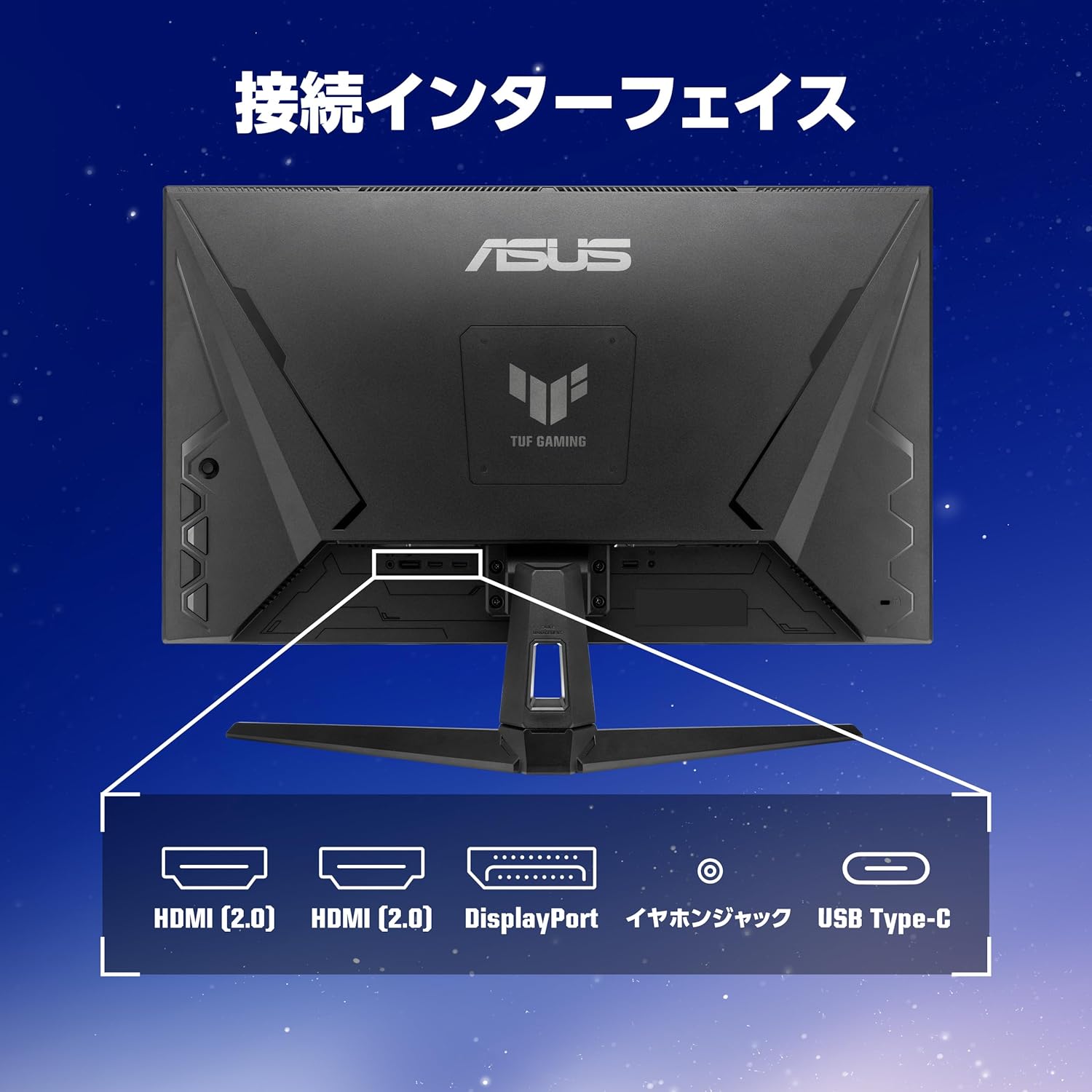
Figure 2: Monitor Connection Interfaces
- DisplayPort接続: Connect one end of the DisplayPort cable to the monitor's DisplayPort 1.4 input and the other end to your computer's DisplayPort output.
- HDMI接続: Connect one end of an HDMI cable to one of the monitor's HDMI (v2.0) inputs and the other end to your computer's HDMI output.
- USB Type-C接続: Connect a USB 3.2 Gen 1 Type-C cable for video signal (if supported by your device) and power delivery.
- オーディオ接続: Connect headphones or external speakers to the 3.5mm stereo mini jack.
- 電源接続: 電源コードをモニターの電源入力に接続し、次に電源コンセントに接続します。
4. モニターの操作
4.1 電源オン/オフ
モニターの電源ボタンを押して、電源をオンまたはオフにします。
4.2 オンスクリーンディスプレイ(OSD)メニュー
Use the joystick and buttons on the back or bottom of the monitor to navigate the OSD menu and adjust settings.
主な機能と設定:
- Refresh Rate (210Hz OC): This monitor supports a high refresh rate of up to 210Hz (overclocked) for smoother visuals, especially in fast-paced gaming.
- 高速IPSパネル: ワイドに提供します viewing angles and excellent color reproduction.
- ELMB Sync (Extreme Low Motion Blur Sync): Reduces motion blur and ghosting for clearer fast-moving images.
- Adaptive-Sync (VRR Technology): モニターのリフレッシュ レートを GPU のフレーム レートと同期して、画面のティアリングやスタッタリングを排除します。
- GameVisual: Offers various display modes optimized for different content types (e.g., Scenery, Racing, Cinema, RTS/RPG, FPS, sRGB, MOBA, User Mode).
- GamePlus: Provides in-game enhancements like crosshair overlays, timer, FPS counter, and display alignment tools.
- シャドウブースト: Enhances details in dark areas without overexposing bright areas.
- ディスプレイウィジェットセンター: Software utility for easy adjustment of monitor settings via your PC.
- ブルーライトの軽減: Filters out harmful blue light to protect your eyes during extended use.
- Trace Free Technology: Improves response time to eliminate ghosting and motion blur.
- GameFast Input Technology: 入力遅延を最小限に抑え、より応答性の高いゲーム体験を実現します。
- ASUSパワーシンク: Manages power consumption efficiently.

Figure 3: Smooth Visuals with High Refresh Rate

Figure 4: Adaptive-Sync Technology

Figure 5: GameVisual Feature

Figure 6: Shadow Boost Levels

Figure 7: DisplayWidget Center Interface
4.3 人間工学的調整
モニタースタンドは、傾きを調整して、 viewing の経験。
- 画面の角度を+20°から-5°に調整します。

図8: 傾斜調整範囲
5. メンテナンス
5.1 モニターの掃除
- 清掃する前に必ずモニターのプラグを抜いてください。
- 柔らかく糸くずの出ない布を使用して、画面と外部の表面を優しく拭いてください。
- 頑固な汚れには、軽くampen the cloth with water or a mild, non-abrasive cleaner specifically designed for monitors.
- Avoid using alcohol, ammonia, or abrasive cleaners, as they can damage the screen or casing.
5.2一般的なケア
- モニターを直射日光の当たる場所や熱源の近くに置かないでください。
- 過熱を防ぐために、モニターの周囲に十分な換気を確保してください。
- モニターやそのケーブルの上に重い物を置かないでください。
- モニターを過度のほこりや湿気から保護してください。
6。 トラブルシューティング
| 問題 | 考えられる原因 | 解決 |
|---|---|---|
| 画面に画像がありません | 電源ケーブルが外れています。ビデオ ケーブルが外れています。入力ソースが正しく選択されていません。 | Check power and video cable connections. Press the OSD menu button to select the correct input source. |
| 画像がぼやけたり歪んだりする | Incorrect resolution; Video cable issues. | ディスプレイの解像度を2560x1440に設定します。ビデオケーブルがしっかりと接続され、損傷していないことを確認してください。 |
| 画面のティアリングやスタッター | Adaptive-Sync が有効になっていません。リフレッシュ レートが一致しません。 | Enable Adaptive-Sync in the monitor's OSD menu and your graphics card settings. Ensure your system's refresh rate is set to 210Hz (OC) or lower, matching the monitor's capabilities. |
| スピーカー/ヘッドホンから音が出ない | オーディオ ケーブルが外れている、音量が低すぎる、PC で間違ったオーディオ出力が選択されている。 | Check audio cable connection. Adjust monitor and PC volume. Select the monitor as the default audio output device on your PC. |
7. 仕様
| 特徴 | 説明 |
|---|---|
| ブランド | エイスース |
| モデル番号 | VG27AQ5A |
| 画面サイズ | 27インチ |
| パネルタイプ | ほぼIPS |
| 解決 | QHD (2560 x 1440) |
| アスペクト比 | 16:9 |
| リフレッシュレート | 210Hz(オーバークロック) |
| 応答時間 | 0.3ms GTG (minimum), 1ms GTG |
| 輝度 | 300 cd/m² |
| コントラスト比 | 1,300:1 (標準) |
| View角度 | 178° (水平) / 178° (垂直) |
| ピクセルピッチ | 0.233mm |
| 接続性 | DisplayPort 1.4 x 1 (HBR2), HDMI (v2.0) x 2, USB 3.2 Gen 1 Type-C x 1 (Service Port), 3.5mm Stereo Mini Jack x 1 |
| 傾斜調整 | +20° ~ -5° |
| VESAマウントの互換性 | 100mm×100mm |
| ケンジントンロック | サポート |
| 寸法(幅x高さx奥行き) | 61.50 x 45.50 x 21.40 cm(スタンド付き) |
| 重さ | 約5.0kg |

図9: 製品寸法
8. 保証とサポート
8.1製品保証
This product comes with a 3-year domestic warranty from the date of purchase.
8.2 ASUS Customer Support
For technical support or inquiries, please contact the ASUS Call Center:
- フリーダイヤル番号: 0800-123-2787 (Available from landlines)
- Paid Number: 0570-783-886 (Charges apply for mobile phones, PHS, public phones, and calls from overseas)
- 営業時間: 9:00 - 19:00, 365 days a year.
Additional information can be found on the official ASUS webサイト。