1. はじめに
Thank you for choosing the SMSL DS200 Headphone Amp DAC. This device is designed to provide high-fidelity audio playback and amplification for a variety of audio sources and headphones. Please read this manual thoroughly to ensure proper setup and optimal performance.

図1: 前面 view of the SMSL DS200 Headphone Amp DAC。
2.製品オーバーview および主な機能
The SMSL DS200 combines a high-performance Digital-to-Analog Converter (DAC) with a powerful headphone amplifier, offering versatile connectivity and exceptional audio quality. Key features include:
- Dual CS43131 Chips: Equipped with two Cirrus Logic CS43131 audio decoding chips, achieving ultra-low distortion of 0.00019% (-114dB) for accurate sound reproduction.
- New Third-Generation XMOS XU-316: Features the latest XMOS XU-316 USB audio processing chip, supporting PCM up to 32bit/768kHz and DSD up to DSD256 for high-resolution audio.
- MQA/MQA-CD サポート: Full MQA decoding capabilities for studio-grade master quality audio playback, including MQA-CD.
- Bluetooth 5.1接続: Provides stable and high-resolution wireless audio transmission with extended range.
- Balanced and Single-Ended Headphone Outputs: Includes 3.5mm single-ended and 4.4mm balanced headphone outputs.
- High and Low Gain Adjustment: Supports high and low gain modes to accommodate various headphone impedances and sensitivities.
- 複数の入力オプション: Offers USB, Optical, Coaxial, and Bluetooth inputs for broad compatibility with different audio sources.

図2:以上view of DS200 key features.

Figure 3: Dual CS43131 decoding chips for extreme distortion control.

Figure 4: New third-generation XMOS XU-316 USB audio processing chip.
3. パッケージ内容
The SMSL DS200 package includes the following items:
- SMSL DS200 ヘッドフォン Amp DAC
- Bluetoothアンテナ
- USBケーブル
- ユーザーマニュアル
- サービスカード

Figure 5: Multiple connection methods for the DS200.
4. コントロールとインターフェース
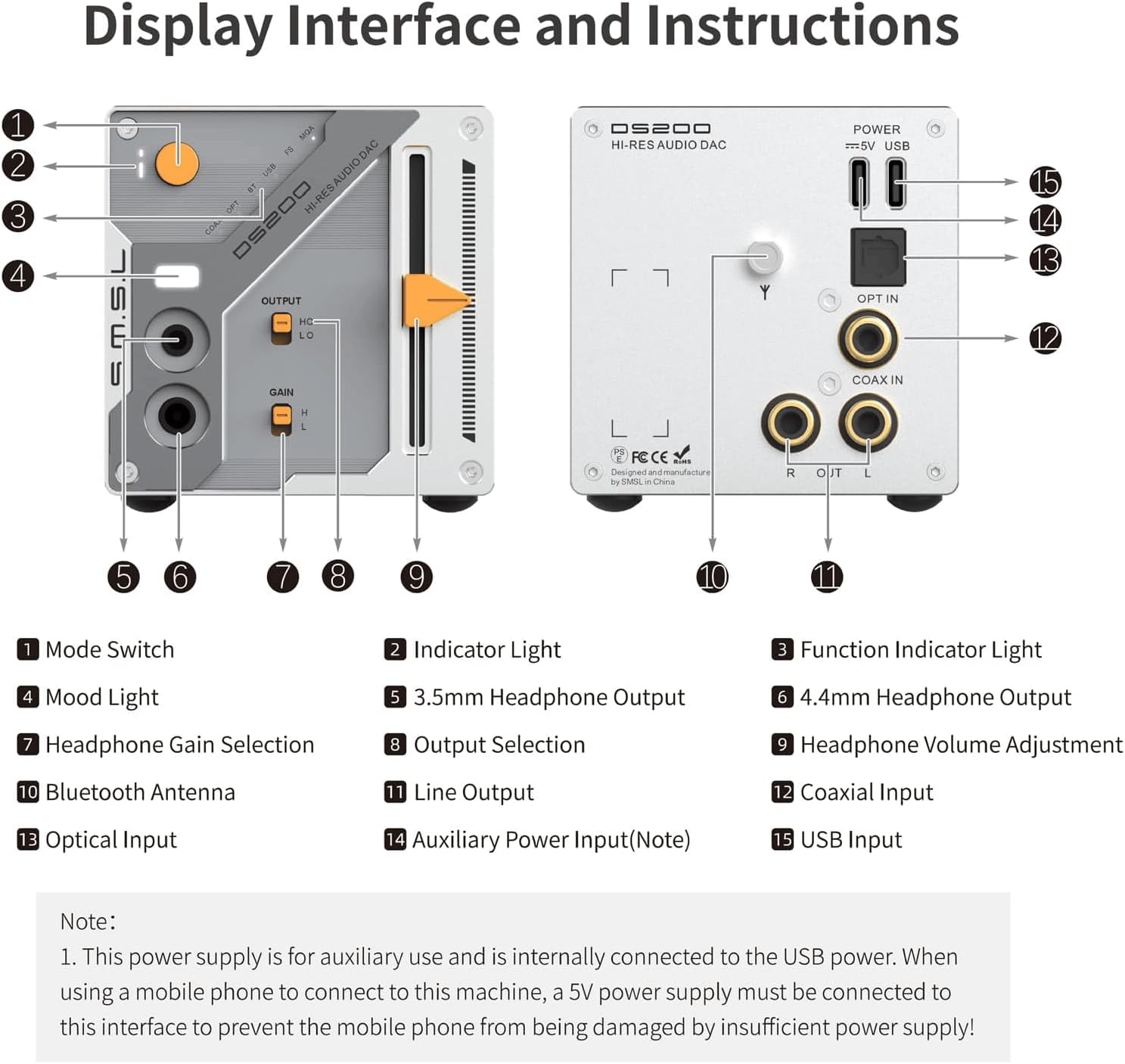
Figure 6: DS200 Display Interface and Instructions.
フロントパネル
- モードスイッチ: 入力ソースを選択します。
- インジケーターライト: 現在の動作状態を表示します。
- 機能表示ライト: Indicates specific functions or modes.
- ムードライト: 美しい照明機能。
- 3.5mmヘッドフォン出力: Single-ended headphone jack.
- 4.4mmヘッドフォン出力: バランス型ヘッドフォンジャック。
- Headphone Gain Selection: Toggles between high (H) and low (L) gain for headphones.
- 出力の選択: Selects between headphone output (HO) and line output (LO).
- ヘッドホンの音量調整: Slider control for headphone volume.
背面パネル
- ライン出力: 外部接続用のRCA出力 ampライブ配信者またはアクティブスピーカー。
- 同軸入力: デジタルオーディオ入力。
- 光入力: デジタルオーディオ入力。
- ブルートゥースアンテナ: Bluetoothアンテナの接続ポイント。
- Auxiliary Power Input (Note): This power supply is for auxiliary use and is internally connected to the USB power. When using a mobile phone to connect to this machine, a 5V power supply must be connected to this interface to prevent the mobile phone from being damaged by insufficient power supply!
- USB入力: コンピューターまたはその他の USB オーディオ ソースに接続するための USB-C ポート。
5. セットアップ
5.1 電源の接続
- Connect the provided USB cable to the USB Input (15) on the rear panel of the DS200.
- Connect the other end of the USB cable to a power source (e.g., a computer USB port or a 5V USB power adapter).
- If connecting a mobile phone, ensure a dedicated 5V power supply is connected to the Auxiliary Power Input (14) to prevent damage to the phone.
5.2 オーディオソースの接続
- USB入力: Connect a USB cable from your computer or digital player to the USB Input (15).
- 光入力: Connect an optical cable from your audio source to the Optical Input (13).
- 同軸入力: Connect a coaxial cable from your audio source to the Coaxial Input (12).
- Bluetooth入力: Screw the Bluetooth antenna (11) onto its connector on the rear panel.
5.3 オーディオ出力の接続
- ヘッドフォン: Connect your headphones to either the 3.5mm Headphone Output (5) or the 4.4mm Headphone Output (6) on the front panel.
- ライン出力: Use RCA cables to connect the Line Output (10) to an external ampライファまたはアクティブスピーカー。
6. 操作手順
6.1 電源オン/オフ
The DS200 powers on automatically when connected to a power source. To turn off, disconnect the power cable.
6.2入力の選択
Press the Mode Switch (1) on the front panel to cycle through available input sources: USB, Optical, Coaxial, and Bluetooth. The selected input will be indicated by the Indicator Light (2) and Function Indicator Light (3).
6.3 ボリュームコントロール
Adjust the Headphone Volume Adjustment (9) slider on the front panel to control the output volume for connected headphones.
6.4 Headphone Gain Adjustment
When the Output Selection (8) is set to 'HO' (Headphone Output), use the Headphone Gain Selection (7) switch to choose between 'H' (High Gain) for high-impedance headphones or 'L' (Low Gain) for low-sensitivity earplugs.

Figure 7: Headphone High and Low Gain Modes.
6.5 MQA/MQA-CD再生
The DS200 supports MQA and MQA-CD decoding. When playing MQA content, the device will automatically detect and process the MQA stream, indicated by the Function Indicator Light (3).

Figure 8: MQA CD Support.
6.6Bluetoothペアリング
- Ensure the Bluetooth antenna (11) is securely attached.
- Select Bluetooth as the input source using the Mode Switch (1).
- On your mobile device, search for available Bluetooth devices and select 'SMSL DS200' to pair.
- The Function Indicator Light (3) will confirm successful pairing.

Figure 9: Bluetooth 5.1 Digital Audio Input.
7. 仕様
| 特徴 | 仕様 |
|---|---|
| 製品寸法 | 6.3 x 3.94 x 3.94インチ |
| アイテム重量 | 1.21ポンド |
| 商品型番 | DS200 |
| 入力 | USB/Optical/Coaxial/Bluetooth |
| 出力 | 3.5mm headphone/4.4mm headphone/Line |
| 出力レベル | 2.0Vrms |
| THD+N (Unweighted) | 0.00019% (-114dB) |
| Dynamic Range (Unweighted) | 127デシベル |
| SNR (Unweighted) | 127デシベル |
| Bluetooth仕様 | BT 5.1 (Supports SBC) |
| USBモード | 非同期 |
| 消費電力 | 3W |
| スタンバイ電力 | <0.1W |
| サイズ(幅×高さ×奥行) | 70x70x113mm |
| 重さ | 346グラム |
| USB互換性 | Windows 7 / 8.1 / 10 / 11, Android, iOS, Mac OSX, Linux |
| USB Sampリンレート | PCM 44.1-768kHz, DSD 2.8224-11.2896MHz |
| 光/同軸Sampリンレート | PCM 44.1-192kHz, DSD64(DoP) |
| USB Bit Depth | 1ビット、16~32ビット |
| 光/同軸ビット深度 | 16-24ビット |
Figure 10: Detailed specifications of the SMSL DS200.
8。 トラブルシューティング
- 音が出ない:
- 電源ケーブルがしっかりと接続されていることを確認してください。
- Verify the correct input source is selected on the DS200.
- すべてのオーディオ ケーブルの接続を確認します。
- Adjust the volume slider to an audible level.
- Confirm your headphones or speakers are properly connected and functioning.
- 歪んだ音:
- オーディオソースに歪みがないか確認してください。
- Ensure audio cables are not damaged or loosely connected.
- Reduce the volume level on both the DS200 and your audio source.
- Verify the correct gain setting (High/Low) for your headphones.
- Bluetooth接続の問題:
- Bluetoothアンテナが正しく取り付けられていることを確認してください。
- Confirm Bluetooth input is selected on the DS200.
- Delete previous pairing records on your mobile device and re-pair.
- Ensure your mobile device is within range of the DS200.
9. メンテナンス
- Keep the device away from heat sources, direct sunlight, and moisture.
- 柔らかく乾いた布でデバイスを拭いてください。液体クリーナーやエアゾールは使用しないでください。
- 落としたり、強い衝撃を与えないでください。
- 過熱を防ぐために、デバイスの周囲に適切な換気を確保してください。
10. 保証とサポート
The SMSL DS200 comes with a 1-year warranty from the date of purchase. For technical support, warranty claims, or any inquiries, please refer to the contact information provided on the Service Card included in your package or visit the official S.M.S.L webサイト。


