
1. はじめに
Novodesk AZ5130 6-in-1 自動真空シーラーをお選びいただき、ありがとうございます。この取扱説明書には、この新しい機器の安全かつ効率的な操作、メンテナンス、およびトラブルシューティングに必要な情報が記載されています。初めてご使用になる前に、この取扱説明書をよくお読みになり、今後の参考のために保管してください。

画像 1.1: Novodesk AZ5130 真空シーラーが稼働しており、食品を密封して保存しています。
2. 重要な安全上の注意事項
電気製品を使用するときは、火災、感電、人への傷害のリスクを軽減するために、次のような基本的な安全上の注意事項に常に従う必要があります。
- この機器を使用する前にすべての説明書をお読みください。
- 電源コードまたはプラグが損傷している状態で本製品を操作しないでください。コードまたはプラグが損傷している場合は、カスタマーサポートにお問い合わせください。
- 機器、電源コード、プラグを水やその他の液体に浸さないでください。
- この機器は、安全に責任を負う人物による機器の使用に関する監督または指示がない限り、身体的、感覚的、または精神的能力が低下している人、あるいは経験と知識が不足している人(子供を含む)による使用を想定していません。
- いかなる機器も、子供が使用したり、子供の近くで使用したりする場合には、厳重な監視が必要です。
- 使用していないときや清掃する前には、コンセントからプラグを抜いてください。部品の取り付けや取り外し、および機器の清掃を行う前には、機器が冷めるまで待ってください。
- メーカーが推奨していないアタッチメントは使用しないでください。
- 屋外では使用しないでください。
- 高温のガスバーナーや電気バーナーの上や近く、または加熱されたオーブンの中に置かないでください。
- 操作する前に必ず蓋がきちんと閉まっていることを確認してください。
- 真空シール用に設計された真空シーラーバッグのみを使用してください。
3. パッケージ内容
Novodesk AZ5130 真空シーラーを丁寧に開梱し、すべての付属品が揃っていて良好な状態であることを確認してください。不足品や破損品がある場合は、カスタマーサポートまでご連絡ください。
- Novodesk AZ5130 真空シーラーマシン 1台
- 1 x電源コード
- 1 x 掃除機ホース(外部掃除機用)
- シーリングフォームガスケット(交換用)2個
- カット済み真空バッグ 6枚 (3.9インチ x 7.8インチ)
- カット済み真空バッグ 6枚 (7.8インチ x 11.8インチ)

画像 3.1: Novodesk AZ5130 真空シーラー パッケージに含まれるすべてのコンポーネント。
4.製品オーバーview
真空シーラーのさまざまな部品と機能について理解しておきましょう。

画像 4.1: 真空シーラーのコントロール パネルと機能ボタン。
コントロールパネルの機能:
- プロセスインジケーターライト: 動作状態を示すために点灯します。
- ドライモード: ナッツや穀物などの乾燥食品を真空密封します。
- モイストモード: 少量の液体を含む食品を真空密封します。
- パルス機能: 真空プロセスを手動で制御できるため、壊れやすい食品に最適です。
- シール機能: 真空にすることなく袋を密封します。
- 停止ボタン: 現在の操作を停止します。
画像 4.2: 真空シーラーの内部コンポーネント。
主要コンポーネント:
- 真空室: 袋から空気を抜く部分。
- シリコンストリップ: しっかりとした密閉を実現します。
- シーリングストリップ: 加熱して袋のシール(幅4mm)を作ります。
- フォームシールリング: 適切な真空を確保します。
- カバースラップ: 真空バッグが真空チャンバーから出るのを防ぎます。
- 外部スライドカッター: カスタムバッグサイズ用の一体型カッター。
- 外部VACポート: 真空ホースを瓶や容器に接続します。
5. セットアップ
初めてご使用になる前に、本製品が清潔で乾燥していることを確認してください。真空シーラーは平らで安定した場所に置いてください。
初期設定手順:
- 電源コードを機器に接続し、適切な電源コンセントに接続します。
- 真空パックに食品を入れ、開口部が清潔で乾燥していることを確認してください。食品とパックの上部の間には、少なくとも2~3cmの隙間を開けてください。
6. 操作手順
6.1. 基本的な真空シール(ドライモードとモイストモード)
食品袋の標準的な真空シールを行うには、次の手順に従ってください。
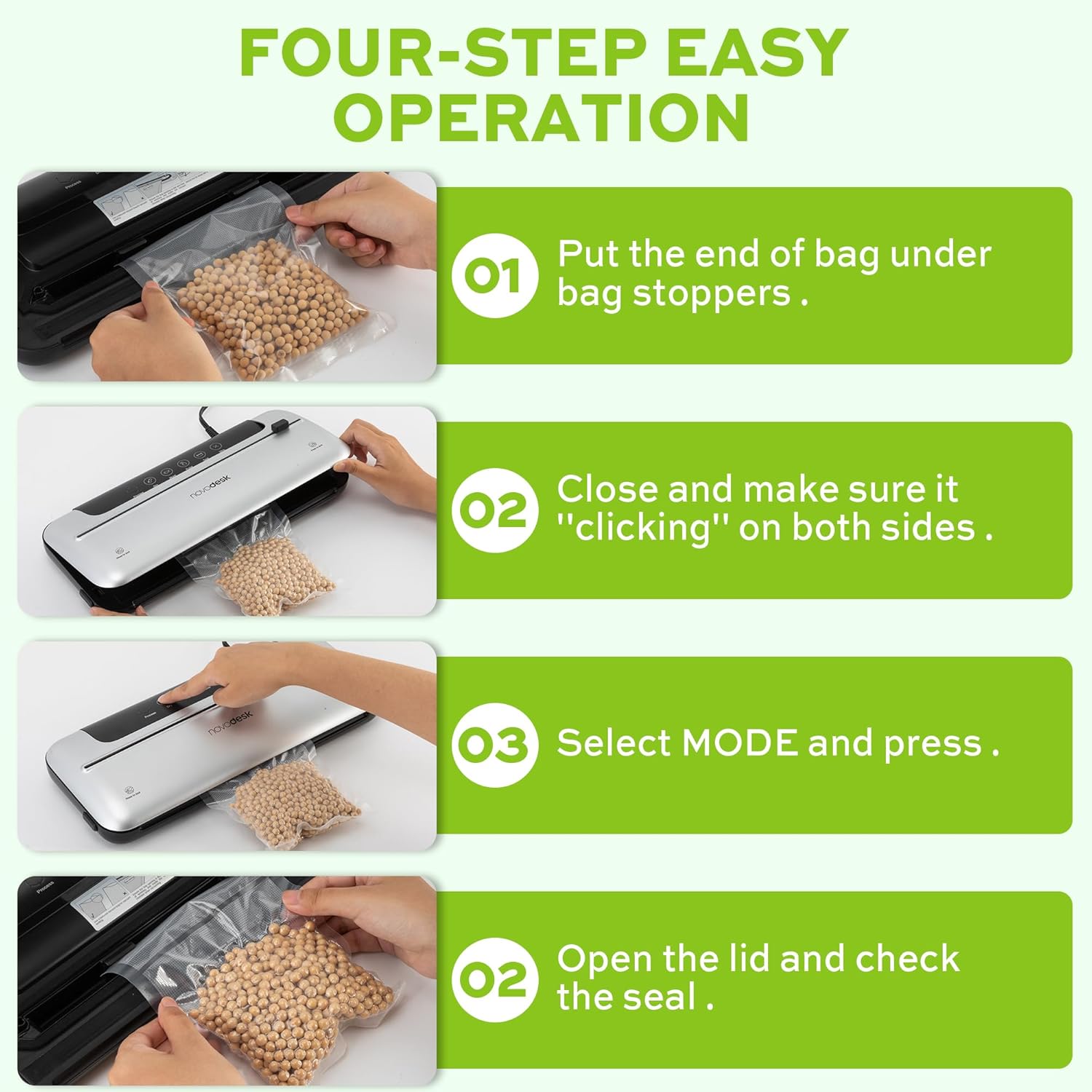
画像 6.1: 真空シールのための 4 ステップの簡単な操作。
- バッグを準備する: 真空バッグの開いた端をバッグストッパーの下に置き、真空チャンバー内で平らかつ中央にあることを確認します。
- 蓋を閉めます: 真空シーラーの蓋をしっかりと閉めます。「カチッ」という音が聞こえるまで両側を押し下げると、蓋がしっかりと閉まります。
- モードの選択: 食べ物に適したモードを選択してください:
- を押す ドライ 乾燥食品用のボタン。
- を押す しっとり 湿った食品用のボタン。
- シールを確認してください: 処理が完了し、インジケーターライトが消えたら、蓋を開けて密封された袋を取り出します。密封状態を点検し、気密性を確認してください。
6.2. パルス機能
パルス機能は真空プロセスを手動で制御できるため、完全な真空圧で潰れてしまう可能性のある繊細で壊れやすい食品に最適です。
- 「6.1. 基本的な真空シール」の手順 1 と 2 に従います。
- を押し続けます 脈 ボタンを押します。掃除機が掃除を始めます。
- リリース 脈 希望の真空レベルに達したらボタンを押します。
- を押す シール 袋を密封するボタン。
- 蓋を開けて密封された袋を取り出します。
6.3. シールのみの機能
シール機能を使用すると、真空にすることなくシールを作成できます。これは、ロールからカスタムサイズのバッグを作ったり、スナック バッグを再密封したりするのに便利です。
- 袋の開いた端をシーリングストリップの上に置きます。
- カチッと音がするまでしっかりと蓋を閉めてください。
- を押す シール ボタンを押してください。機械が袋を加熱して密封します。
- 密封が完了したら、蓋を開けて密封された袋を取り出します。
6.4. 外部真空機能(瓶/容器用)
真空シーラーには、互換性のある真空シール可能な瓶、容器、ワインストッパーに使用するための外部真空ホースが付属しています。

図 6.2: さまざまな容器で外部真空システムを使用する。
- 真空密閉できる瓶や容器に食品を入れ、蓋がきちんと閉まっていることを確認してください。
- 真空ホースの一方の端を真空シーラーの外部 VAC ポートに挿入します。
- 真空ホースのもう一方の端を真空密封可能な瓶または容器のポートに挿入します。
- 真空シーラーの蓋を閉めます(中に袋は必要ありません)。
- を押す 外部VAC ボタン(ある場合、ない場合はドライ/モイストモードを使用して真空ポンプを起動します)を押します。機械が容器内の空気を除去し始めます。
- 真空引きが完了したら、ホースを取り外します。これで容器は密閉されます。
6.5. 外スライドカッターの使用
一体型のスライドカッターを使用すると、真空シーラー材料のロールからカスタムサイズのバッグを作成できます。
- 真空バッグロールを切断領域全体に置きます。
- カッターブレードをバッグ素材上でスライドさせて、希望の長さにします。
7. メンテナンスと清掃
定期的な清掃とメンテナンスにより、真空シーラーの寿命が長くなり、最適なパフォーマンスが確保されます。
クリーニング手順:
- 清掃する前に必ず電源プラグを抜いてください。
- 機械の外側を柔らかい布で拭きます。amp 布で拭いてください。研磨剤や溶剤は使用しないでください。
- 真空チャンバーとシールストリップエリアを洗浄します。amp 布で拭いてください。食べ物の破片や液体が残っていないことを確認してください。
- フォームシールリングは必要に応じて取り外して洗浄できます。中性洗剤と水で洗い、よくすすいでから、完全に自然乾燥させてから再度取り付けてください。
- 機器を保管したり再び使用したりする前に、すべての部品が完全に乾いていることを確認してください。
ストレージ:
真空シーラーは清潔で乾燥した場所に保管してください。最良の結果を得るには、蓋を開けたまま保管してください。フォームシールリングが圧縮されると、時間の経過とともに密封性能が低下する可能性があるため、蓋を開けたまま保管してください。
8。 トラブルシューティング
真空シーラーで問題が発生した場合は、次の一般的な問題と解決策を参照してください。
| 問題 | 考えられる原因 | 解決 |
|---|---|---|
| マシンの電源が入らない。 | 電源がありません。 | 電源コードがコンセントと本機にしっかりと差し込まれていることを確認してください。別の電化製品でコンセントの電圧をテストしてください。 |
| 機械は真空状態になりますが、密閉はされません。 | シーリングストリップまたはフォームガスケットが汚れている、または破損しています。バッグが正しく配置されていません。 | シーリングストリップと発泡スチロール製のガスケットを清掃してください。袋が平らで、シーリングストリップの中央に位置していることを確認してください。ガスケットが損傷している場合は交換してください。 |
| 機械は密封しますが、真空にはなりません。 | 蓋がきちんと閉まっていない。発泡スチロール製のガスケットが汚れているか摩耗している。袋に穴が開いているか、適合していない。 | 蓋がしっかりと閉まり、両側がロックされていることを確認してください。発泡スチロール製のガスケットは清掃または交換してください。適切な真空シーラーバッグを使用し、破損がないか確認してください。 |
| 真空が弱いか不安定です。 | フォームガスケットが汚れているか摩耗しています。バッグ内の液体が多すぎます(ドライモードの場合)。 | フォームガスケットを清掃または交換してください。液体を含む食品、または液体を事前に冷凍する場合は、モイストモードを使用してください。 |
| 密封中に袋が溶けます。 | シール時間が長すぎる(自動モデルでは起こりにくい)。 | 適切な真空シーラーバッグを使用していることを確認してください。問題が解決しない場合は、カスタマーサポートにお問い合わせください。 |
これらの解決策を試しても問題が解決しない場合は、Novodesk カスタマー サポートに連絡して、さらにサポートを受けてください。
9. 仕様
| ブランド | ノボデスク |
| モデル番号 | AZ5130 |
| 電力/ワットtage | 120ワット |
| 巻tage | 120V |
| 材料 | アクリロニトリルブタジエンスチレン(ABS) |
| アイテム重量 | 980 g (2.16 ポンド) |
| 色 | 銀色 |
| 操作モード | 自動 |
| 最大吸引力 | 75KPa |
| シールストリップ幅 | 4mm |
10. 保証とサポート
Novodesk製品は高品質基準に基づいて製造されています。保証範囲、製品サポート、交換部品のご購入については、製品に付属の保証書を参照するか、Novodeskの公式ウェブサイトをご覧ください。 webご質問やサポートが必要な場合は、Novodeskカスタマーサービスまでお問い合わせください。