1. はじめに
This manual provides comprehensive instructions for the Inateck AceTouch N0064 Keyboard Case, designed to enhance your tablet experience. Please read this manual carefully before use to ensure proper operation and maintenance.
1.1 製品終了view
The Inateck AceTouch N0064 is a versatile keyboard case featuring a magnetic removable design, adjustable stand modes, a precision touchpad, and comfortable typing keys. It is engineered for productivity and convenience.
1.2 互換性
This keyboard case is exclusively designed for the following Samsung Galaxy Tab models:
- Samsung Galaxy Tab S10 FE 10.9 inch 2025 (Models: SM-X520, SM-X526, SM-X526B)
- Samsung Galaxy Tab S9 FE 10.9 inch 2023 (Models: SM-X510, SM-X516B, SM-X518U)
- Samsung Galaxy Tab S9 11 inch 2023 (Models: SM-X710, SM-X716B, SM-X718U)

Image: Visual representation of compatible Samsung Galaxy Tab models and their respective sizes.
2. セットアップ
2.1 キーボードの充電
初めて使用する前に、キーボードを完全に充電してください。付属のUSB-C充電ケーブルをキーボードの充電ポートと電源に接続してください。充電インジケーターライトが充電状態を示します。
2.2Bluetoothペアリング
- キーボードが充電され、電源がオンになっていることを確認します。
- On your Samsung Galaxy Tab, navigate to Settings > Connected devices > Bluetooth.
- Bluetoothをオンにします。
- The keyboard will appear in the list of available devices (e.g., "Inateck Keyboard"). Select it to pair.
- A confirmation message may appear on your tablet. Confirm the pairing.
3. 操作手順
3.1 Magnetic Removable Design
The keyboard attaches magnetically to the case, allowing for quick attachment and detachment. This design enables seamless transitions between typing and tablet-only use. Simply align the keyboard with the magnetic contacts on the case for secure attachment.

Image: Illustration of the strong magnetic connection between the keyboard and the case.
3.2 Stand Modes
The case supports both portrait and landscape orientations, with an adjustable stand angle ranging from 0 to 160 degrees. This flexibility accommodates various activities such as reading, watching videos, working, or handwriting.
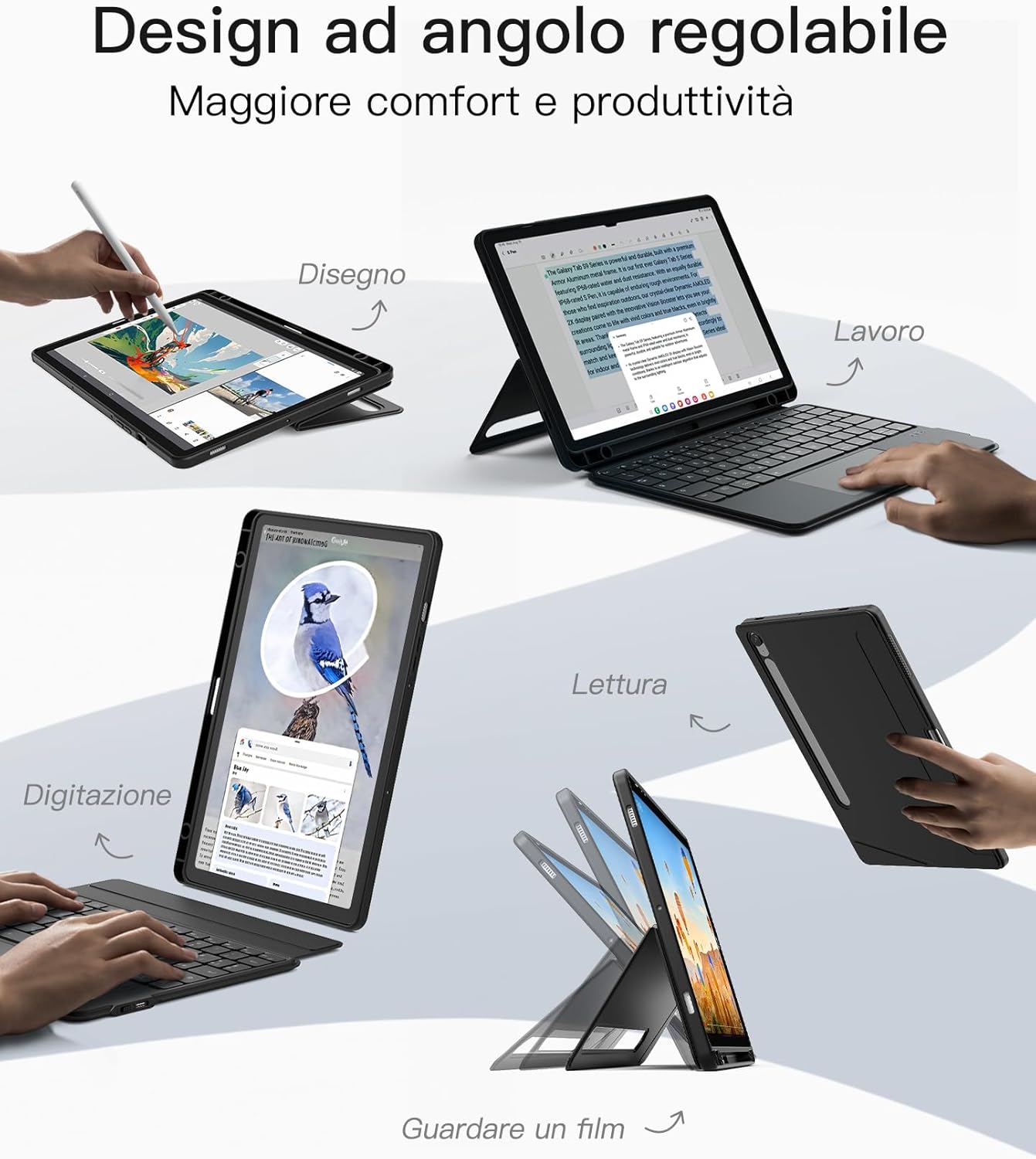
Image: Demonstrates the adjustable angle design for different usage scenarios like drawing, working, reading, and watching movies.

Image: Shows the tablet case configured for a comfortable typing angle, suitable for extended use.
3.3 タッチパッドの機能
The integrated touchpad supports Samsung's Precision Touch function, offering precise and lag-free operation. It also supports multi-finger gestures for efficient navigation, clicking, and switching between applications.

Image: Illustrates the touchpad's high reactivity and support for multi-touch gestures on Samsung devices.
3.4 キーボードの機能
The keyboard features 15x15mm keycaps designed for a comfortable touch and fit, reducing hand fatigue during prolonged typing. Independent shortcut keys allow for quick multitasking and efficient workflow.

Image: Close-up of the keyboard's key design, highlighting dedicated shortcut keys, scissor structure, and 1mm key travel for precise typing.
3.5 Sペンホルダー
The case includes two S Pen holders: one on the side for quick access and another on the back. The back holder features a cutout that supports both storage and charging of your Samsung S Pen, ensuring it is always secure and ready for use.

Image: Depicts the seamless storage solution for the S Pen, including its charging capability within the case.
4. メンテナンス
4.1 クリーニング
キーボードとケースを掃除するには、柔らかくてamp cloth. Avoid using harsh chemicals or abrasive materials, as these may damage the surfaces. Ensure the keyboard is powered off and disconnected from any power source before cleaning.
4.2 ストレージ
When not in use, store the keyboard case in a cool, dry place away from direct sunlight and extreme temperatures. Avoid placing heavy objects on the case to prevent deformation.
5。 トラブルシューティング
5.1 キーボードが反応しない
- キーボードの電源がオンになっていて、完全に充電されていることを確認します。
- Check Bluetooth connection: Go to your tablet's Bluetooth settings and ensure the keyboard is connected. If not, try re-pairing.
- タブレットとキーボードの両方を再起動します。
5.2 タッチパッドが動作しない
- Verify the keyboard is properly connected via Bluetooth.
- Ensure the touchpad is not accidentally disabled (check for a function key combination on the keyboard).
- タッチパッドの表面を清掃して、汚れやゴミを取り除きます。
5.3 接続の問題
- Move the tablet and keyboard closer to each other to ensure they are within Bluetooth range.
- 他の無線デバイスからの干渉を避けてください。
- Forget the device in your tablet's Bluetooth settings and re-pair.
6. 仕様
| 特徴 | 詳細 |
|---|---|
| ブランド | イナテック |
| モデル番号 | 0064円 |
| 接続技術 | ブルートゥース5.3 |
| バッテリー容量 | 500mAh(リチウムイオン) |
| 材料 | シリコン、金属 |
| 色 | 黒 |
| 特集 | Portrait/Landscape Stand, Removable Keyboard, Touchpad, Dual S Pen Holder |
| キーボードの説明 | Flexible, Scissor-switch mechanism |
| キートラベル | 1ミリメートル |
| 寸法(パッケージ) | 26.9 x 19.5 x 2.9 cm |
| 重量(パッケージ) | 603グラム |
7. 保証と顧客サポート
Inateck products come with a standard manufacturer's warranty. For detailed warranty information, product support, or to report any issues, please visit the official Inateck webご購入の際は、ウェブサイトをご覧いただくか、カスタマーサービスに直接お問い合わせください。保証請求の際は、購入証明書を保管してください。


