1.製品オーバーview
The JUSTONE A1 is an 11.3-inch portable touch screen designed to bring wireless CarPlay and Android Auto functionality to your vehicle. It features an in-Cell fully laminated display, 1920x720 resolution, and supports up to 60 frames per second for a smooth user experience. Control is available via the capacitive touchscreen or a wireless button knob. It also includes a BT Display Only Mode for audio streaming and offers multiple mounting options.
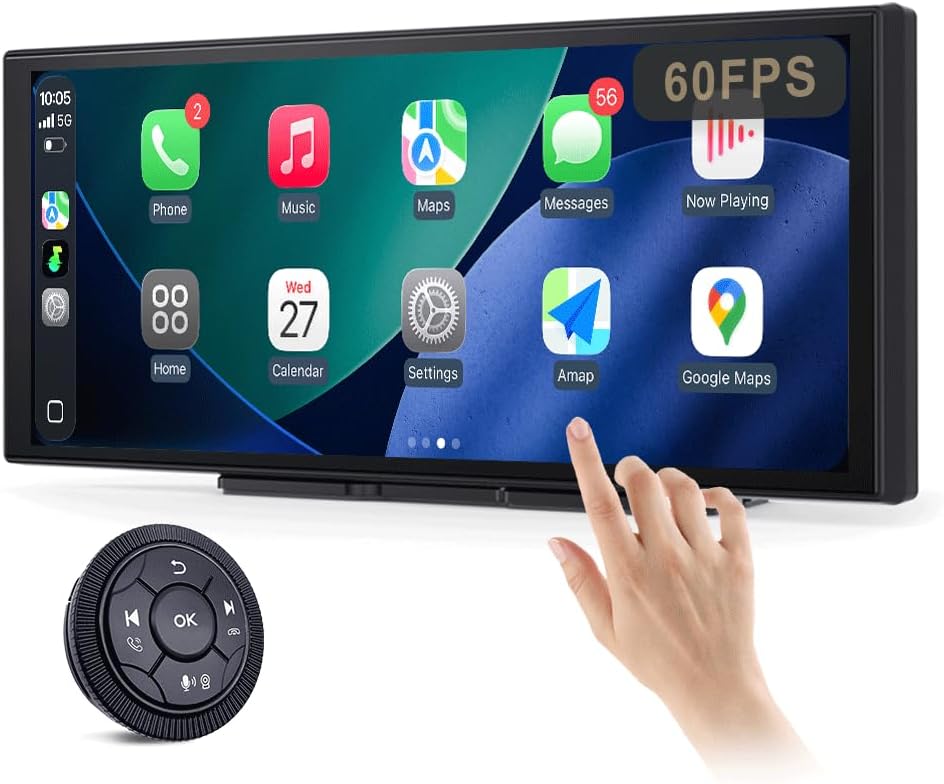
Figure 1: JUSTONE A1 Portable Touch Screen with CarPlay interface and wireless control knob.
2. パッケージ内容
下記のすべての品目がパッケージに含まれていることをご確認ください。不足または破損している品目がある場合は、カスタマーサポートまでご連絡ください。

Figure 2: Included accessories for the JUSTONE A1.
- Screen Host
- 4 Clip Bracket
- 両面テープ
- 吸盤ブラケット
- Control Button (Wireless Knob)
- カーパワーアダプター
- Ball Shaped Bracket Converter
- TYPE-C Power Cable
- AUXオーディオケーブル
- Base for Suction Cup
- Camera Input Cable (Camera optional)
- ユーザーマニュアル
3. セットアップ
3.1取り付けオプション
The JUSTONE A1 offers two primary mounting methods to suit various vehicle dashboards. Ensure the screen is securely mounted and does not obstruct your view 道路の。

図3:例amples of suction cup and dashboard mounting.
- 4-Clip Vertical Base: Use this bracket to rest the bottom of the screen directly on your dashboard. Secure it with the provided double-sided tape for stability.
- 17mm Ball-Joint Extendable Arm Mount (Suction Cup Bracket): This option allows for more flexible positioning, typically on the windshield or a smooth dashboard surface. Ensure the suction cup is firmly attached.
注記: Always ensure the chosen mounting location complies with local traffic laws regarding windshield obstructions.
3.2電源接続
- Connect the TYPE-C Power Cable to the screen host.
- Plug the Car Power Adapter into your vehicle's 12V power outlet (cigarette lighter socket).
- The screen will power on automatically when the vehicle's ignition is turned on.
3.3 初期ワイヤレス接続(CarPlay/Android Auto)
- スマートフォンで Bluetooth と Wi-Fi が有効になっていることを確認します。
- On the JUSTONE A1 screen, select either 'CarPlay' or 'Android Auto' from the main menu.
- 画面上の指示に従って、Bluetooth 経由で携帯電話をペアリングします。
- Once Bluetooth is paired, the system will automatically establish a Wi-Fi connection for wireless CarPlay or Android Auto.
- The device is designed to auto-connect to your paired phone when you start your car after the initial setup.
4. 操作手順
4.1 表示機能

Figure 4: Display features including 11.3-inch size and in-cell full lamination.
- 11.3" In-Cell Full-Laminated Display: Provides a premium look and feel, appearing darker when off compared to standard lamination. The actual panel size is approximately 10.5" x 4.13".
- 1920x720 解像度: Delivers clear and sharp visuals.
- 60Hzリフレッシュレート: Ensures smoother performance, especially for CarPlay.
4.2制御方法
The device offers two ways to interact with its interface:

Figure 5: Touchscreen and wireless knob control options.
- 静電容量式タッチスクリーン: Directly interact with the display by touching icons and swiping.
- Wireless Button Knob: For safer operation while driving, especially if the screen is difficult to reach. This knob allows navigation, volume control, and other functions without direct screen interaction.
4.3 接続機能

Figure 6: Supported phone connectivity options.
- ワイヤレスカープレイ: Access navigation, music, messages, and more from your iPhone.
- ワイヤレスAndroidAuto: Access navigation, music, and communication features from your Android phone.
- エアプレイ: Mirror content from your Apple devices.
- MiraCast: Mirror content from compatible Android devices.
4.4 オーディオ出力モード
The JUSTONE A1 supports multiple ways to output audio to your vehicle's sound system:
- BT Display Only Mode: When your phone is connected to the JUSTONE A1, audio streams directly from your phone to your vehicle's built-in Bluetooth audio system. This requires your vehicle to have its own Bluetooth audio input.
- AUX出力: Connect the provided AUX Audio Cable from the JUSTONE A1 to your vehicle's AUX input port.
- FMトランスミッター: The device can transmit audio via an FM frequency. Tune your car radio to the same frequency set on the JUSTONE A1.
4.5 Automatic Day/Night Mode

Figure 7: Automatic brightness adjustment for day and night conditions.
The built-in light sensor automatically detects ambient light conditions and switches between dark and light themes, adjusting screen brightness for optimal visibility and glare resistance during both day and night driving.
5. メンテナンス
- クリーニング: 画面を拭くときは、柔らかく糸くずの出ない布を使用してください。頑固な汚れには、軽く拭いてください。amp布を水またはスクリーンに安全なクリーナーで拭いてください。刺激の強い化学薬品や研磨剤は使用しないでください。
- 温度: デバイスを長時間、高温や低温などの極端な温度にさらさないでください。
- ストレージ: デバイスを長期間保管する場合は、電源を外して涼しく乾燥した場所に保管してください。
- ケーブル: Regularly check power and audio cables for any signs of wear or damage. Replace if necessary.
6。 トラブルシューティング
- デバイスの電源が入らない:
- Ensure the car power adapter is securely plugged into the vehicle's 12V outlet and the TYPE-C cable is firmly connected to the screen.
- 車両の 12V コンセントに電力が供給されているかどうかを確認します (別のデバイスでテストするなど)。
- Wireless CarPlay/Android Auto fails to connect:
- スマートフォンで Bluetooth と Wi-Fi が有効になっていることを確認します。
- Ensure your phone is not connected to another CarPlay/Android Auto device.
- 携帯電話の Bluetooth 設定でデバイスを削除し、再度ペアリングしてみてください。
- Restart both your phone and the JUSTONE A1 device.
- オーディオ出力なし:
- If using BT Display Only Mode, ensure your phone is connected to your car's native Bluetooth audio system.
- If using AUX, check that the AUX cable is properly connected to both the JUSTONE A1 and your car's AUX input, and your car's audio source is set to AUX.
- If using FM transmitter, ensure the frequency on the JUSTONE A1 matches your car radio's frequency and there is no strong interference on that frequency.
- Check the volume levels on both the JUSTONE A1 and your car's audio system.
- 画面が反応しない、またはフリーズしている:
- Disconnect the power cable from the JUSTONE A1 for 10 seconds, then reconnect it to perform a restart.
- Wireless control knob is not working:
- Ensure the knob's battery is not depleted. Replace if necessary.
- Re-pair the knob with the main unit if it has become disconnected.
7. 仕様
| 特徴 | 仕様 |
|---|---|
| モデル名 | A1 |
| ブランド | JUSTONE |
| 表示サイズ | 11.3 Inches (10.5" x 4.13" actual panel) |
| 表示タイプ | In-Cell Full-Laminated Touch Screen |
| 解決 | 1920x720 |
| リフレッシュレート | Up to 60Hz (for CarPlay) |
| 接続技術 | Bluetooth、Wi-Fi(ワイヤレスCarPlay/Android Auto用) |
| オーディオ出力モード | BT Display Only, AUX, FM Transmitter |
| 制御インターフェース | Touchscreen, Wireless Button Knob |
| 取り付けタイプ | Panel Mount (4-clip vertical base), Dashboard Mount (17mm ball-joint extendable arm) |
| 特集 | Portable, Auto Day/Night Mode (Light Sensor) |
| アイテム重量 | 14.8オンス(420グラム) |
| パッケージ寸法 | 12.01 x 5.51 x 3.98インチ |
8. 保証とサポート
8.1 保証情報
The JUSTONE A1 portable touch screen comes with a 1年間のメーカー保証 ご購入日から1年間有効です。本保証は、通常の使用における材料および製造上の欠陥を対象とします。誤用、事故、不正な改造、または不適切な取り付けによる損傷は保証の対象外となります。
保証請求のために購入証明書を保管してください。
8.2 カスタマーサポート
For technical assistance, troubleshooting, or warranty inquiries, please contact JUSTONE customer support through the retailer's platform where the product was purchased or visit the official JUSTONE web連絡先情報のサイト。
When contacting support, please have your product model (A1) and purchase details ready.


