1. はじめに
The ChunHee WT42 Wireless Intercom System provides reliable two-way communication for homes, offices, and businesses. Designed for clear sound and extended range, this system facilitates easy room-to-room communication without the need for Wi-Fi. This manual provides essential instructions for setup, operation, and maintenance to ensure optimal performance of your intercom units.
2. 箱の中身
- Intercom Unit x 2
- USB-C充電ケーブルx2
- 電源アダプター x 2
- Belt Clip x 2 (pre-attached)
- ストラップx 2
3.製品オーバーview
The ChunHee WT42 intercom units are compact and designed for ease of use. Each unit features an antenna for extended range, a speaker, a microphone, and several control buttons.
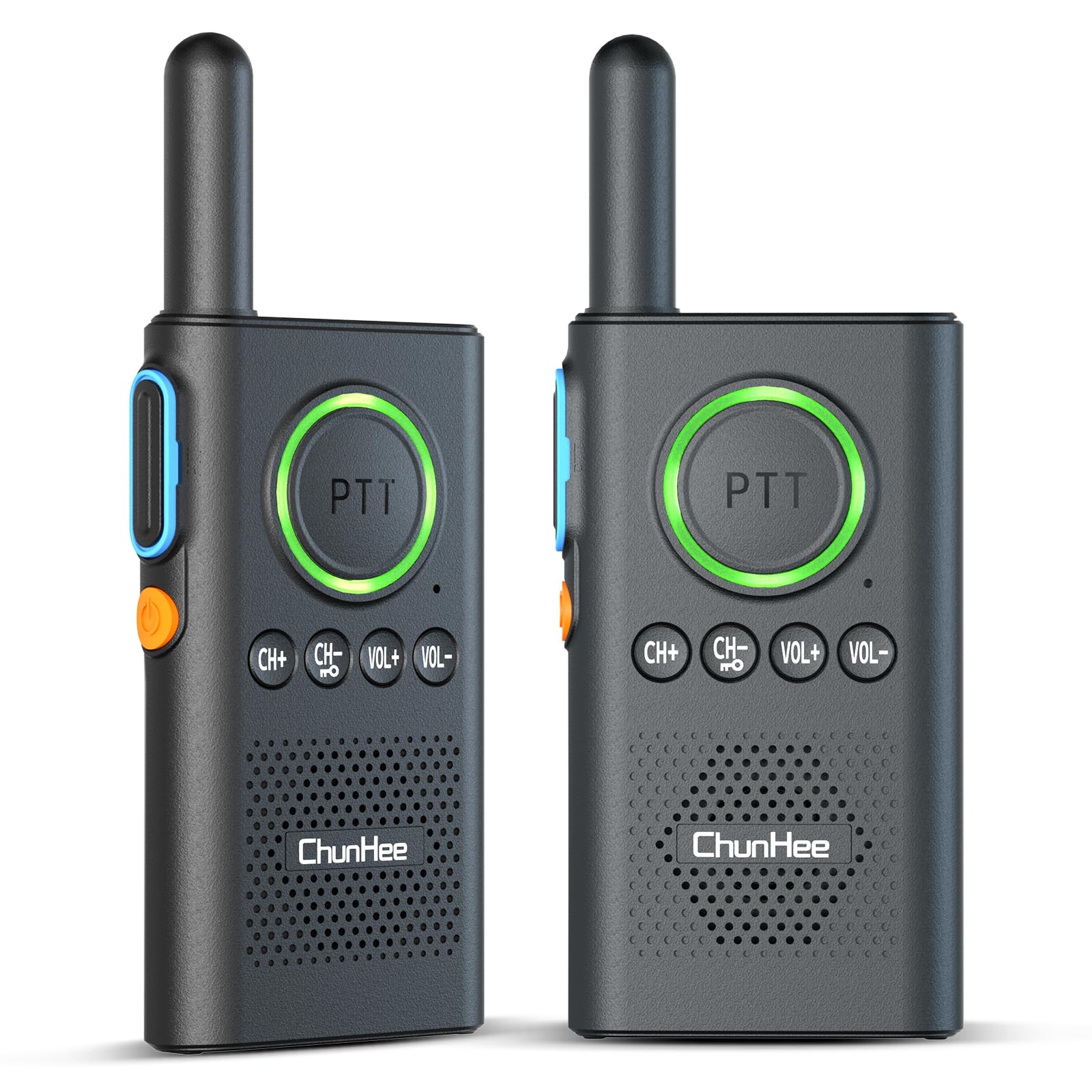
Figure 1: ChunHee WT42 Wireless Intercom Unit
コントロールとインジケーター
- PTT ボタン (プッシュ ツー トーク): Large central button for transmitting voice. Lights up red when transmitting, green when receiving.
- 電源ボタン: Orange button on the side. Hold for 3 seconds to power on/off.
- CH+ / CH-ボタン: Adjust communication channels.
- VOL+ / VOL- ボタン: スピーカーの音量を調整します。
- Channel Confirmation Button: Blue button on the side, above the power button. Press to confirm the current channel.
- USB-Cポート: Located at the bottom for charging.
- ヘッドフォンジャック: Located at the top for private listening.
4. セットアップ
4.1 Charging the Intercom Units
Before first use, fully charge both intercom units. The units feature a 1000mAh battery, providing 70-80 hours of use and 2-3 hours for a full charge. A voice alert "Please charge" will sound when power is low.
- Connect the provided USB-C charging cable to the charging port at the bottom of each intercom unit.
- Plug the other end of the cable into a power adapter, laptop, or power bank.
- The indicator light will show charging status (e.g., red for charging).
- Once fully charged, disconnect the units.

図2: バッテリーと充電情報

Figure 3: Indicator Light Alerts
4.2 電源のオン/オフ
- 電源を入れるには: Hold the orange Power Button on the side for approximately 3 seconds until you hear a voice prompt.
- 電源を切るには: Hold the orange Power Button on the side for approximately 3 seconds until you hear a voice prompt.
Video 1: Demonstrates how to power on/off the intercom units and adjust volume.
4.3 インターコムのペアリング
For two intercom units to communicate, they must be set to the same channel.
- 両方のインターホンユニットの電源がオンになっていることを確認します。
- 使用 CH+ or CH- buttons to select the desired channel for both units. Ensure both units display the same channel number.
- Once both units are on the same channel, they are paired and ready for communication.
Video 2: Instructions on how to pair two intercom units by setting them to the same channel.
5. 操作手順
5.1 音量の調整
音量を調整するには、 巻+ 増加するボタンまたは vol- button to decrease the volume level. A voice prompt will indicate the current volume level.
5.2 Speaking (PTT Function)
To speak, press and hold the large PTT (プッシュ・トゥ・トーク) button. The PTT button will light up red, indicating transmission. Release the button to listen. For clear communication, speak directly into the microphone located below the PTT button.
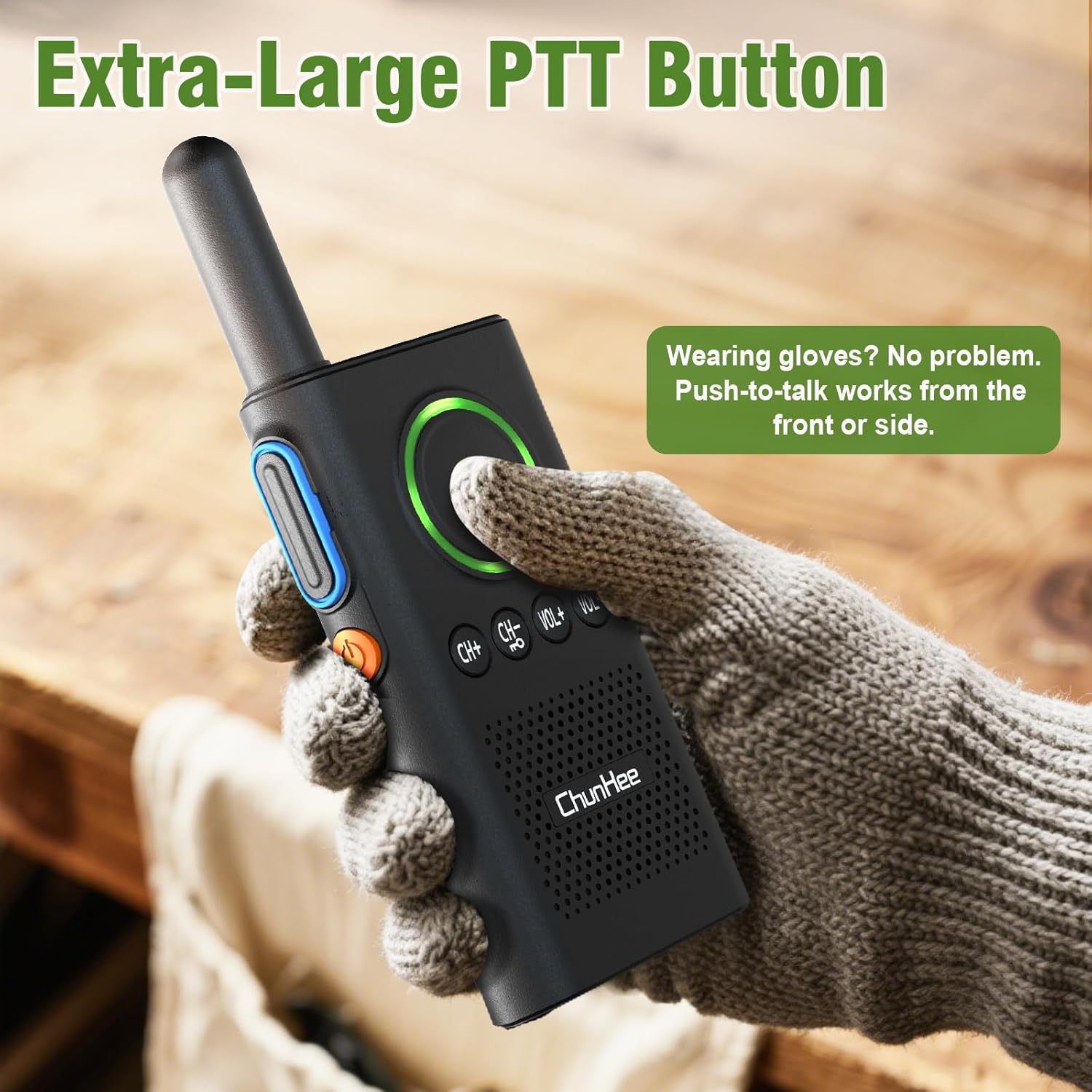
Figure 4: Extra-Large PTT Button for easy use.
5.3 VOX (Voice Operated Exchange) Hands-Free Function
The VOX function allows for hands-free communication, automatically transmitting your voice when you speak, without needing to press the PTT button. This is ideal for multitasking.
- To Enable VOX: With the device powered off, hold the CH+ ボタンと 電源ボタン simultaneously. Release when you hear a "beep" and see the flashing light, indicating VOX is ON.
- To Disable VOX: With the device powered off, hold the CH+ ボタンと 電源ボタン simultaneously. Release when you hear a "beep beep" and see the flashing light, indicating VOX is OFF.
Video 3: Detailed guide on how to enable and disable the VOX function.

Figure 5: Hands-Free VOX Function in use.
5.4 チャンネルロック
The channel lock feature prevents accidental channel changes and cross-talk, ensuring stable communication.
- To Lock Channel: 保持する CH- button until you hear a "DI" sound. The keyboard is now locked.
- To Unlock Channel: 保持する CH- button again until you hear a "DIDI" sound. The keyboard is now unlocked.
Video 4: Explains how to lock and unlock the intercom keyboard to prevent accidental changes.

Figure 6: Channel Lock ensures stable communication.
6. メンテナンス
- Keep the intercom units clean by wiping them with a soft, dry cloth.
- ユニットを極端な温度、直射日光、湿気にさらさないでください。
- 保証が無効になるため、ユニットを自分で分解または修理しないでください。
- 使用していないときは、ユニットを涼しく乾燥した場所に保管してください。
7。 トラブルシューティング
| 問題 | 考えられる原因 | 解決 |
|---|---|---|
| 電源なし | バッテリー残量が少ない | Charge the intercom unit fully. |
| 通信できません | Units on different channels | 両方のユニットが同じチャネルに設定されていることを確認します。 |
| 音質が悪い | Out of range, obstacles, or low battery | Move closer, reduce obstacles, or charge battery. |
| Accidental button presses | Keyboard not locked | Activate the channel lock function. |
8. 仕様
- 製品寸法: 1.26 x 6.3 x 9インチ
- 商品の重量: 10.8オンス
- チャンネル数: 16
- 特集: Half-duplex with VOX
- 通話範囲最大: 3300フィート(オープンエリア)
- 巻tage: 5ボルト
- バッテリー: リチウムポリマー電池1個必要(付属)、1000mAh
- 耐水性レベル: 耐水性はありません
9.保証とサポート
For warranty information, technical support, or any inquiries regarding your ChunHee WT42 Wireless Intercom System, please contact the manufacturer directly through their official website or the contact information provided with your purchase. Keep your purchase receipt for warranty claims.


