1。 オーバーview
The ChunHee Wireless Emergency Call Button System (Model CC19) is designed to provide reliable assistance and enhance safety for seniors and individuals requiring care. This system ensures quick connectivity for assistance, improving safety within the home environment.
主な機能は次のとおりです。
- Reliable Assistance: Caregivers do not need to be constantly present; a simple button press alerts them.
- 広範囲: Up to 100 meters indoors for the pendant button and 60 meters for the wristband, overcoming distances and noise in multi-story homes.
- 調整可能な音量と着信音: Five volume settings (0-110 dB) and 55 distinct ringtones.
- 低バッテリー警告: Transmitters flash continuously 5 times when battery levels are low.
- IP55防水性能: Splash-proof design allows use in bathrooms and showers (do not immerse in water).
- 使いやすい: Simple operation, even for individuals with reduced hand functionality.
- 拡張可能なシステム: Supports pairing with multiple receivers and transmitters to suit specific needs.

Figure 1: Providing support for elderly care and safety. The image illustrates the benefit of the ChunHee system, showing an elderly person comfortably pressing a call button for assistance, contrasted with scenarios of an elderly person falling or experiencing distress without immediate help.
2. パッケージ内容
Your ChunHee Wireless Emergency Call Button System package includes the following components:
- 2 x Receivers (Plug-in units)
- 2 x Transmitters (Call Buttons, wearable as pendant or attachable)
- 1 x Bracelet Transmitter (Wearable wristband call button)
- ユーザーマニュアル(このドキュメント)
- Adhesive pads for mounting transmitters
- Lanyards for pendant transmitters
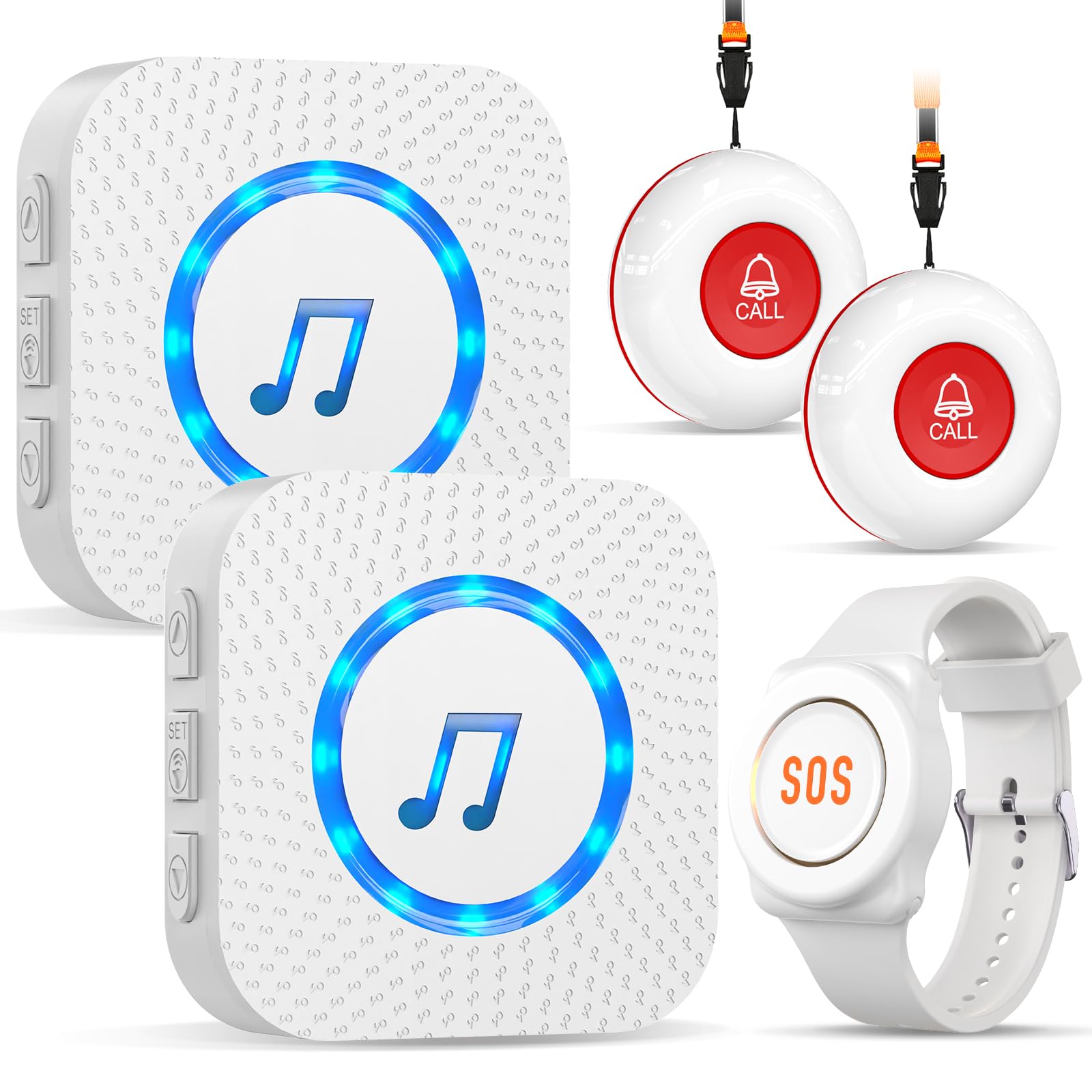
Figure 2: All components included in the ChunHee Wireless Emergency Call Button System. This image displays the two plug-in receivers, two red call buttons (transmitters) with lanyards, and one white SOS wristband (bracelet transmitter).
3. セットアップ手順
The ChunHee system is designed for easy plug-and-play setup. Most units come pre-configured. Follow these steps to set up your system:
3.1レシーバーの取り付け
- Identify suitable locations for your receivers. Place them in areas where the alert sound needs to be heard, such as a caregiver's bedroom, living room, or kitchen.
- Plug each receiver directly into a standard electrical wall outlet. The receiver will power on automatically.
3.2 Transmitter (Call Button & Bracelet) Placement
- Pendant/Clip-on Transmitters:
- Attach the provided lanyard to the transmitter for wearing around the neck.
- Alternatively, use the included adhesive pads to mount the transmitter on a flat surface, such as a bedside table, bathroom wall, or near a chair. Ensure it is within easy reach.
- Bracelet Transmitter:
- Wear the bracelet transmitter comfortably on the wrist. Ensure it is not too tight or too loose.

Figure 3: Simple and easy to operate. This diagram illustrates the main components: the plug-in receiver with its speaker, LED indicator, ringtone selection buttons, and volume control, alongside the SOS bracelet and a call button.

図4:例ample setup for a single-floor home. This image shows a receiver plugged into a wall outlet in a central area and a call button placed in a bedroom, demonstrating how the system provides coverage.

図5:例ample setup for a multi-floor home. This image demonstrates how two receivers can be strategically placed on different floors to ensure comprehensive coverage throughout a larger residence.
3.3 Pairing Additional Transmitters (If Needed)
If you purchase additional transmitters or need to re-pair a device, follow these general steps:
- レシーバーを接続します。
- Press and hold the volume button on the receiver for approximately 3-5 seconds until the LED indicator flashes. This puts the receiver into pairing mode.
- Within 10 seconds, press the call button on the transmitter you wish to pair. The receiver will emit a sound or flash to confirm successful pairing.
- Repeat for any other transmitters.
- To exit pairing mode, press the volume button again or wait for 10 seconds.
4. 操作手順
4.1 Making an Emergency Call
To activate the emergency alert, simply press the large call button on any of the transmitters (pendant, clip-on, or bracelet). The receiver(s) will immediately sound an alarm and flash its LED indicator.

Figure 6: Senior Emergency Call Bracelet. This image shows an elderly man pressing the SOS button on his wristband, highlighting its ease of use and precise activation.

Figure 7: Emergency Call Button for Seniors. This image illustrates diverse applications of the call button, such as in the bathroom, bedroom, during night duty, and for individuals with disabilities or maternity care, emphasizing 24/7 monitoring.
4.2 音量と着信音の調整
The receiver features buttons to customize the alert sound:
- 音量コントロール: Use the dedicated volume button on the receiver to cycle through 5 different volume levels, from silent to 110 dB.
- 着信音の選択: Use the "Ringtone Forward" and "Ringtone Backward" buttons to choose from 55 available melodies.

Figure 8: Loud 110-dB Alarms - Unmistakable. This diagram visually represents the system's effective range (100m from room to room, 50m from floor to floor) and the powerful 110 dB alarm sound.
4.3 低電池警告
When the battery level of a transmitter (call button or bracelet) is low, the device's indicator light will flash continuously 5 times to remind you to replace the battery. This ensures the system remains operational.
5. メンテナンス
5.1 耐水性
The transmitters are rated IP55 waterproof, meaning they are protected against water splashes from all directions. They can be used in the shower or mounted on a bathroom wall. Do not immerse the transmitters in water.
5.2 電池の交換
The transmitters (call buttons and bracelet) operate on replaceable batteries. When the low battery alert is triggered, replace the battery promptly to ensure continuous functionality. The specific battery type is typically a common alkaline button cell, easily found for replacement.

Figure 9: Button Update. This image highlights the extended battery life of ChunHee buttons, lasting up to two years or 10,000 presses, and shows the visual indicator for a low battery warning.
6。 トラブルシューティング
| 問題 | 考えられる原因 | 解決 |
|---|---|---|
| Receiver does not sound alarm when button is pressed. |
|
|
| アラーム音が小さすぎるか、または大きすぎます。 | 音量設定を調整する必要があります。 | Use the volume control button on the receiver to adjust to the desired level. |
| Transmitter indicator light flashes 5 times. | 送信機の電池残量が少なくなっています。 | Replace the battery in the transmitter immediately. |
| 着信音を変更できません。 | ボタンの使い方が間違っています。 | Ensure you are using the "Ringtone Forward" or "Ringtone Backward" buttons on the receiver. |
7. 製品仕様
| 特徴 | 詳細 |
|---|---|
| モデル番号 | CC19 |
| ブランド | チョニ |
| 電源(受信機) | Wired Electric (Plug-in) |
| Battery Type (Transmitters) | Alkaline (button cell, user replaceable) |
| 制御方法 | Touch (button press) |
| 騒音レベル(アラーム) | 最大110デシベル |
| 音量設定 | 5レベル |
| 着信音 | 55メロディー |
| Indoor Range (Pendant Transmitter) | 最大100メートル(約328フィート) |
| Indoor Range (Bracelet Transmitter) | 最大60メートル(約197フィート) |
| Water Resistance (Transmitters) | IP55(防滴) |
| 製品寸法(受信機) | 約5 x 5 x 3 cm (2 x 2 x 1.2インチ) |
| アイテム重量 | 320 g(約0.7ポンド) |
8. 保証とサポート
For warranty information, technical support, or any questions regarding your ChunHee Wireless Emergency Call Button System, please contact ChunHee customer service. Refer to the product packaging or the seller's information on the purchase platform for specific contact details.
サポート情報は、多くの場合、 ChunHee Store on Amazon.


