1. はじめに
ご購入ありがとうございますasing the iFFALCON 40S55T 40-inch Full HD Google TV. This manual provides essential information for the safe and efficient use of your television. Please read it thoroughly before operating the device and retain it for future reference.
The iFFALCON 40S55T is a tunerless smart TV designed for streaming content, offering a Full HD display, Google TV operating system, Chromecast built-in, and Dolby Audio for an immersive entertainment experience.
2. 安全情報
火災、感電、けがのリスクを軽減するために、このテレビを使用するときは常に基本的な安全上の注意事項に従ってください。
- テレビを雨や湿気にさらさないでください。
- テレビを開けないでくださいasing; すべてのサービスは資格を持った担当者に依頼してください。
- テレビの周囲に適切な換気を確保してください。
- テレビを直射日光、熱源、強い磁場から遠ざけてください。
- Use only the power cord and accessories supplied by the manufacturer.
- 雷雨のときや長期間使用しない場合は、テレビの電源プラグを抜いてください。
3. パッケージ内容
箱の中にすべてのアイテムが揃っていることを確認します。
- iFFALCON 40S55T 40-inch Full HD Google TV
- リモートコントロール
- テレビ台(2台)
- テレビスタンド用ネジ
- 電源ケーブル
- 保証書
- 取扱説明書(本書)
4. セットアップ
4.1 テレビスタンドの取り付け
- 画面の損傷を防ぐため、テレビを画面を下にして柔らかく平らな面に慎重に置いてください。
- 各スタンド部分をテレビの下部にある対応するスロットに合わせます。
- 付属のネジを使用してスタンドを固定します。しっかりと締め付けてください。
4.2 電源の接続
Connect the power cable to the TV's power input and then plug it into a wall outlet. The TV will enter standby mode.
4.3 Initial Setup (Google TV & Network)
初めてテレビの電源を入れると、Google TVの初期設定手順が案内されます。設定内容は以下のとおりです。
- 言語選択。
- Wi-Fiネットワークに接続しています。
- Signing in with your Google account to access personalized content and apps.
- 利用規約に同意します。
4.4 接続性
The iFFALCON 40S55T offers various connection options for external devices.

画像: 上view of the TV's connectivity options, including HDMI, USB, Bluetooth, and Wi-Fi.
- HDMI ポート: Connect external devices like gaming consoles, Blu-ray players, or set-top boxes.
- USBポート: USBストレージデバイスを接続してメディアを再生します files.
- Wi-Fi: For wireless internet connection to access streaming services and online features.
- ブルートゥース: For connecting wireless headphones, speakers, or other Bluetooth-enabled accessories.
4.5 Tunerless Operation
This TV is designed as a tunerless model, meaning it does not have a built-in tuner for terrestrial (over-the-air) broadcasts. To watch terrestrial, BS, or CS broadcasts, an external tuner is required and must be purchased separately.

Image: The iFFALCON 40S55T TV showcasing its smart features, highlighting its tunerless design and ability to enjoy internet video content without an antenna connection.
5. テレビの操作
5.1 リモートコントロールオーバーview
The remote control provides access to all TV functions, including power, volume, channel navigation, and smart TV features. It also supports voice search via 'Hey Google'.

Image: The TV remote control, featuring quick access buttons for popular streaming services and a dedicated microphone button for voice commands.
- 電源ボタン: テレビの電源をオンまたはオフにします。
- ナビゲーションボタン: メニューを移動するには、方向パッドと OK ボタンを使用します。
- 音量/チャンネルボタン: Adjust volume and change channels (if an external tuner is connected).
- アプリのショートカットボタン: Direct access to popular streaming services like Netflix, YouTube, etc.
- マイクボタン: Press and hold to activate 'Hey Google' voice search.
5.2 Google TVの機能
Your iFFALCON TV runs on Google TV, providing a personalized and integrated entertainment experience.
- コンテンツの集約: Google TV organizes movies, shows, and live TV from all your apps and subscriptions into one place.
- パーソナライズされた推奨事項: あなたの viewing history and preferences, Google AI suggests content you might enjoy.
- 音声検索: Use the 'Hey Google' feature on your remote to quickly find content, get information, or control smart home devices.
- Chromecastビルトイン: Easily cast content from your smartphone, tablet, or computer directly to your TV screen.

Image: A smartphone screen mirroring content to the iFFALCON TV, demonstrating the Chromecast built-in feature for enjoying mobile content on a larger display.
5.3画像設定
The TV incorporates advanced image processing technologies to deliver a superior viewing の経験。
- AI PQ Processor: TCL's proprietary AiPQ Processor intelligently adjusts image quality at the pixel level, enhancing clarity, color, and contrast for a vivid and realistic picture.
- Full HD (FHD): Experience sharp and detailed images with Full High Definition resolution, offering 200% more detail than standard HD screens.

Image: A visual comparison illustrating the enhanced detail and clarity provided by Full HD resolution compared to standard HD.
- HDR10/HLG Support: Enjoy a wider range of colors and contrast with HDR10 and HLG compatibility, revealing stunning detail in both bright and dark scenes.

Image: The TV screen showcasing the vibrant and detailed picture quality achieved with HDR10/HLG technology.
- マイクロ調光: This technology analyzes the image in hundreds of separate zones to adjust brightness and darkness independently, enhancing contrast and picture quality.

Image: A visual representation of Micro Dimming technology, illustrating how it enhances contrast and picture depth by adjusting brightness in specific areas of the screen.
5.4 Sound Settings (Dolby Audio)
The TV features Dolby Audio for clear, rich, and immersive sound.
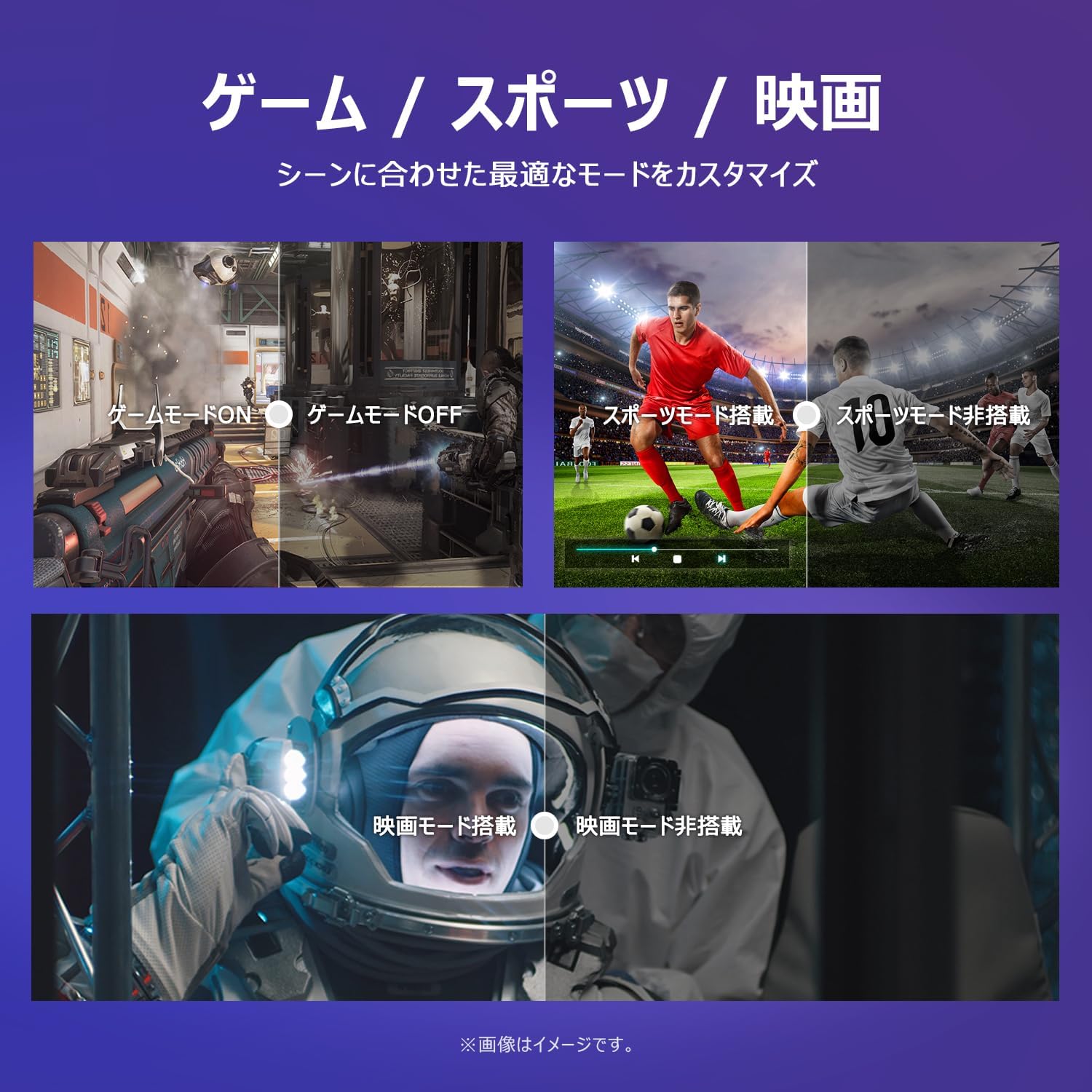
Image: The TV screen with a visual representation of sound, highlighting the immersive audio experience provided by Dolby Audio.
Access the sound settings menu to adjust modes like Standard, Music, Movie, or Custom to suit your preferences.
5.5 ゲームモード
Activate Game Mode for an optimized gaming experience with reduced input lag.
Image: Visual comparisons demonstrating the optimized settings for Game Mode, Sports Mode, and Movie Mode, adapting the TV's performance to different content types.
The TV also offers dedicated Sports Mode and Movie Mode to enhance viewing for specific content types.
5.6 システム設定
The quick settings menu allows you to customize frequently used system settings and rearrange their order for intuitive and convenient access.

画像: view of the TV's quick system settings interface, illustrating how users can easily access and customize various functions like brightness, picture mode, and network settings.
6. メンテナンス
適切な手入れとメンテナンスを行うと、テレビの寿命が延びます。
- 画面の掃除: 柔らかく糸くずの出ない布で画面を優しく拭いてください。頑固な汚れには、テレビ専用のクリーナーを布に含ませて使用してください。画面に直接拭き取るのではなく、布に含ませてください。
- Cのクリーニングasing: テレビの表面を拭くときは、柔らかく乾いた布を使用してください。asing. 研磨剤入りの洗剤や溶剤は使用しないでください。
- 換気: 過熱を防ぐため、テレビ背面の通気口が塞がれていないことを確認してください。
- 電源コード: 電源コードに損傷がないか定期的にご確認ください。損傷している場合は、カスタマーサポートにご連絡の上、交換をご依頼ください。
7。 トラブルシューティング
テレビに問題が発生した場合は、以下のよくある問題と解決策をご参照ください。問題が解決しない場合は、カスタマーサポートにお問い合わせください。
| 問題 | 考えられる原因 | 解決 |
|---|---|---|
| 電源なし | 電源ケーブルが接続されていない、電源コンセントが機能していない | Ensure power cable is securely plugged in; Test outlet with another device |
| 映像はないが、音声はある | 入力ソースが正しくありません。外部デバイスの問題です。 | リモコンの「入力」ボタンを押して正しいソースを選択します。外部機器の接続を確認してください。 |
| 音はないが、映像は表示される | 音量がミュートされているか低すぎる; 外部オーディオシステムの問題 | Unmute or increase volume; Check audio cable connections to external sound system |
| リモコンが動作しない | 電池切れ;リモコンとテレビの間に障害物がある | 電池を交換してください。障害物を取り除き、リモコンがテレビの赤外線センサーに向けられていることを確認してください。 |
| Wi-Fiに接続できません | パスワードが間違っている;ルーターの問題;テレビがルーターから離れすぎている | Wi-Fiパスワードを確認する; ルーターを再起動する; テレビをルーターに近づけるかWi-Fiエクステンダーを使用する |
8. 仕様
Detailed technical specifications for the iFFALCON 40S55T TV:

Image: Dimensional drawing of the iFFALCON 40S55T TV, indicating its physical measurements.
| 特徴 | 仕様 |
|---|---|
| 画面サイズ | 40インチ |
| 表示タイプ | VA液晶 |
| 解決 | フルHD(1920×1080) |
| リフレッシュレート | 60Hz |
| アスペクト比 | 16:9 |
| コントラスト比 | 1000:1 |
| オペレーティング·システム | Google TV |
| オーディオ出力 | 20 Watts (2.1 channels) |
| HDMIポート | 2 |
| USBポート | 1 |
| ワイヤレス接続 | Wi-Fi、ブルートゥース |
| 製品の寸法(W x H x D) | 89.2 x 55.8 x 18.4 cm(スタンド付き) |
| 製品重量 | 4.63キロ |
| 壁掛け対応 | はい |
| 付属アクセサリ | Stand, Remote Control, Warranty Card, Power Cable |
9. 保証とサポート
Your iFFALCON 40S55T TV comes with a manufacturer's warranty. Please refer to the included warranty card for specific terms, conditions, and duration of coverage.
For technical support, troubleshooting assistance beyond this manual, or warranty claims, please contact iFFALCON customer service. Contact information can typically be found on the warranty card or the official iFFALCON webサイト。
Please have your model number (40S55T) and purchase date ready when contacting support.


