導入
This manual provides essential information for the safe and effective use of your Husky 500-Lumens Flip Light, Model K40517. Please read these instructions thoroughly before operating the device and retain them for future reference.
製品終了view
主な特徴
- 多用途照明: Offers 500, 250, and 100 Lumens work light modes, a 100 Lumens torch light, and an SOS function.
- 調整可能なデザイン: The light panel features 180° left and right adjustment and the entire light can swing 360° for optimal positioning.
- 複数の取り付けオプション: Equipped with a strong magnetic base for attachment to metal surfaces and a built-in hook for hanging.
- 充電式バッテリー: Integrated 2000mAh capacity battery with a convenient Type-C charging port.
- 耐久性のある構造: Made from aluminum with a painted finish.
パッケージ内容
- Husky 500-Lumens Flip Light (K40517)
- 充電ケーブル(Type-C)
- クリップ
コンポーネントの識別
Familiarize yourself with the various parts of your Husky Flip Light:

図1: The Husky Flip Light in its compact, folded position. This view shows the main body, the foldable light panel, and the power button.
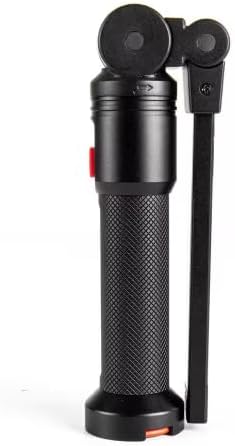
図2: 側 view of the light, highlighting the magnetic base at the bottom and the integrated hook for hanging.

図3: The light panel extended horizontally, demonstrating its 180° adjustable range from the main body.

図4: The light panel extended and angled, showcasing the flexibility for directing illumination and the top spotlight feature.
設定
デバイスの充電
- デバイスの Type-C 充電ポートを見つけます。
- 付属の Type-C 充電ケーブルをライトに接続し、もう一方の端を互換性のある USB 電源 (壁のアダプター、コンピューターの USB ポートなど) に差し込みます。
- 充電インジケータライトが点灯し、充電状態を示します。
- Allow the device to charge fully before first use. A full charge ensures optimal battery performance.
操作手順
電源オン/オフ
Press the power button once to turn the light on. Press and hold the power button for approximately 2 seconds to turn the light off from any mode.
ライトモード
With the light on, press the power button repeatedly to cycle through the available light modes:
- 500ルーメン: High brightness work light.
- 250ルーメン: Medium brightness work light.
- 100ルーメン: Low brightness work light.
- Torch Light (100 Lumens): Activates the top spotlight.
- SOS モード: Flashing signal for emergencies.
The light will cycle back to 500 Lumens after SOS mode.
Adjusting the Light Panel
- Panel Rotation: The main light panel can be rotated 180° left or right relative to the handle. This allows for directional lighting.
- Body Swing: The entire light head, including the panel, can swing 360° around the base, providing comprehensive area illumination.
取り付けオプション
- 磁気ベース: The strong magnet located at the base allows the light to be securely attached to any ferrous metal surface, such as car hoods, metal beams, or toolboxes.
- 一体型フック: Extend the hook from the base of the light to hang it from ropes, tent poles, or other suitable fixtures for overhead lighting.
メンテナンス
クリーニング
ライトを掃除するには、柔らかくて乾いた布で拭いてください。amp cloth. Do not use abrasive cleaners or solvents, as these may damage the finish or internal components. Ensure the charging port cover is closed before cleaning to prevent moisture ingress.
ストレージ
Store the Husky Flip Light in a cool, dry place away from direct sunlight and extreme temperatures. If storing for extended periods, charge the battery periodically (e.g., every 3-6 months) to maintain battery health.
トラブルシューティング
| 問題 | 考えられる原因 | 解決 |
|---|---|---|
| ライトが点灯しません。 | 電池が消耗しています。 | 付属のType-Cケーブルを使用してデバイスを充電します。 |
| 光出力が暗いです。 | バッテリーの充電量が少ない。 | バッテリーを完全に充電してください。 |
| ライトが充電されません。 | 充電ケーブルまたはアダプタに障害がある、または充電ポートが塞がれている。 | Try a different Type-C cable and USB adapter. Ensure the charging port is clean and free of debris. |
仕様
| 特徴 | 詳細 |
|---|---|
| モデル番号 | K40517 |
| ブランド | ハスキー |
| 輝度 | 最大500ルーメン |
| ライトモード | 500 Lumens, 250 Lumens, 100 Lumens, Torch (100 Lumens), SOS |
| バッテリー容量 | 2000mAh(内蔵) |
| 充電ポート | タイプC |
| 巻tage | 5ボルト |
| 材料 | アルミニウム |
| 色 | 黒 |
| 製品寸法 | 長さ3インチ x 幅2.21インチ x 高さ3インチ |
| Beam Angle (Torch) | 30度 |
| 特集 | 360° swing, 180° foldable light panel, Magnetic base, Integrated hook |
| 欧州連合 | 820909914006 |
保証とサポート
For warranty information or technical support, please refer to the documentation included with your purchase or contact Husky customer service directly. Keep your proof of purchase for warranty claims.


