導入
The SUNLU Filament Dryer Box E2 is an advanced solution designed for optimal 3D printing filament care. It integrates drying, annealing, and storage functionalities, specifically engineered for high-performance and engineering-grade 3D printing materials. This manual provides essential information for setting up, operating, and maintaining your FilaDryer E2 to ensure consistent and high-quality 3D prints.
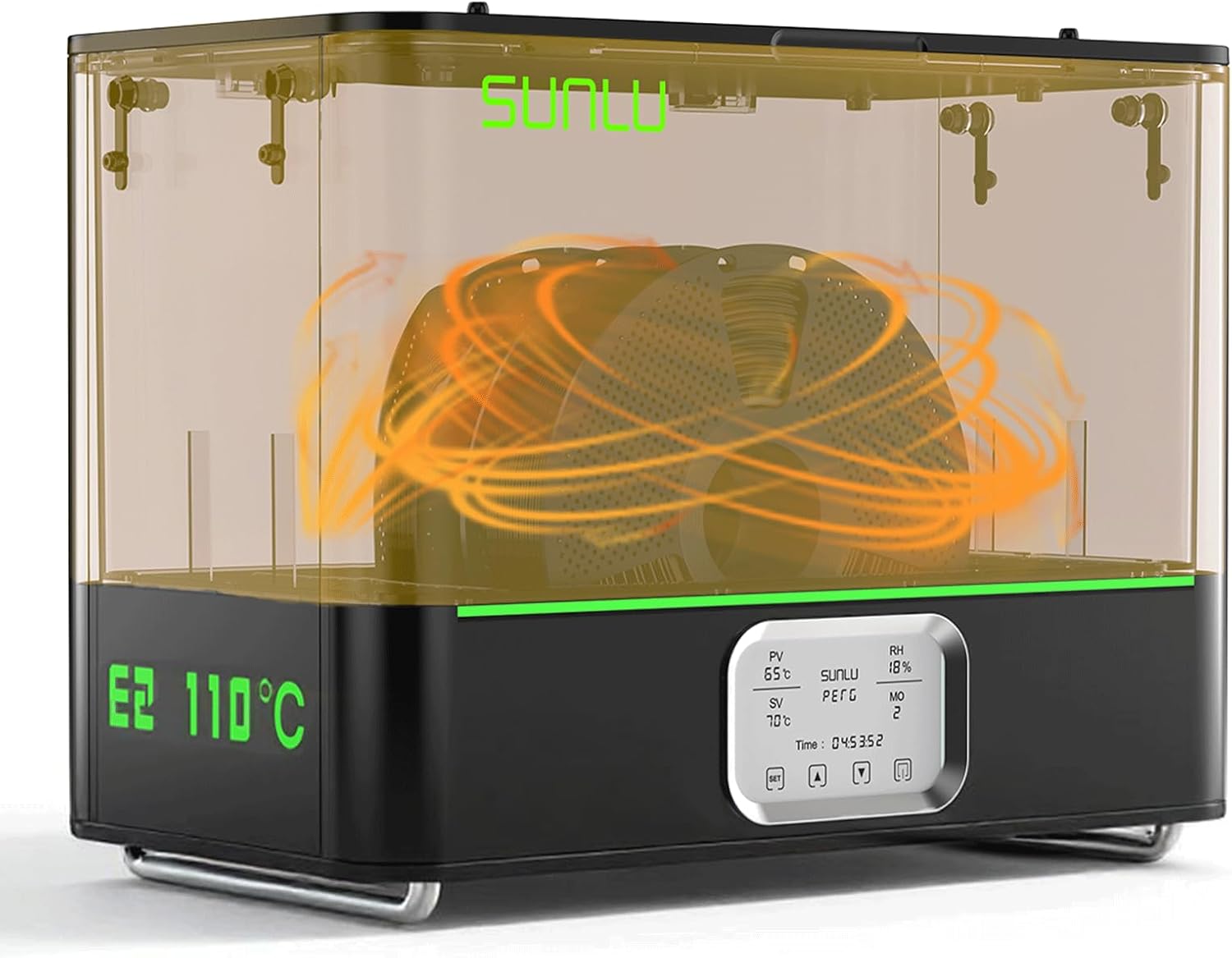
Figure 1: The SUNLU Filament Dryer Box E2, designed for efficient filament drying and annealing.
箱の中身
Upon opening your SUNLU Filament Dryer Box E2 package, please verify that all the following components are included:
- SUNLU FilaDryer E2 Unit
- Annealing Tray
- 耐熱手袋
- PTFE Tube 1m*2
- PTFE Tube 8cm*2
- 電源ケーブル
- ユーザーマニュアル

Figure 2: All components included in the SUNLU Filament Dryer Box E2 package.
Unboxing Guide Video
For a visual guide on unboxing and identifying the components, please watch the official unboxing video:
Video 1: Official SUNLU E2 Filament Dryer Box Unboxing Guide. This video demonstrates the unboxing process and shows all included accessories.
製品終了view および機能
The SUNLU Filament Dryer Box E2 is engineered to provide comprehensive care for your 3D printing filaments, ensuring optimal print quality and material longevity. Key features include:
- オールインワンソリューション: Integrates drying, annealing, and storage for engineering-grade 3D printing materials.
- 高温対応能力: Achieves a maximum temperature of 110°C for effective drying and annealing.
- Efficient Annealing: Designed for 99.99% effective annealing, enhancing material properties like impact resistance.
- Rapid Drying: Features 500W PTC heating, reducing drying time significantly (e.g., 50°C in 20 mins, 70°C in 30 mins from room temperature).
- Professional Sealing & Insulation: Triple protection against moisture with silicone-sealed ports, magnetic suction lid, and dual-chamber insulation. Maintains stable internal temperatures while keeping the exterior surface below 60°C for safety.
- 幅広い互換性: Supports a wide range of engineering and conventional filaments (PLA, PETG, ABS, ASA, PC, PA, etc.) and accommodates spools up to Φ250×153mm (2x1KG/2x2KG or 1x3KG).
- インテリジェントセーフティ: Dual-layer safety system with alarm for over-temperature and fireproof grade materials.

図3:以上view of the SUNLU Filament Dryer E2's core functionalities.

Figure 4: The large capacity of the FilaDryer E2, accommodating various spool sizes.
設定
Setting up your SUNLU Filament Dryer Box E2 is straightforward:
- Unpack all components from the box as detailed in the "What's in the Box" section.
- Place the FilaDryer E2 on a stable, flat, and heat-resistant surface.
- Ensure the power switch on the back of the unit is in the 'Off' position.
- Connect the provided power cable to the unit's power input and then to a suitable power outlet.
- Press the power switch to the 'On' position. The display will illuminate.
- Familiarize yourself with the control panel on the front of the unit.
操作手順
Drying Filaments
Drying removes excess moisture from filaments, preventing common print defects like bubbling, stringing, and poor layer adhesion. The FilaDryer E2 offers precise temperature control for efficient drying.
- Open the lid of the FilaDryer E2.
- Place your filament spool(s) inside the chamber. Ensure the spool fits within the maximum dimensions (Φ250×153mm).
- 蓋をしっかりと閉めてください。
- On the control panel, select the appropriate drying temperature and time based on your filament type. The unit heats rapidly, reaching 50°C in 20 minutes and 70°C in 30 minutes from room temperature.
- Start the drying process. Monitor the display for current temperature and humidity readings.
- Once drying is complete, the unit will notify you. Carefully remove the filament spool(s) using the provided heat-resistant gloves if the unit is still warm.

Figure 5: Illustrates the importance of drying and its effect on filament moisture.
Annealing Filaments and Printed Models
Annealing is a heat treatment process that relieves internal stress in materials, improving their mechanical properties such as impact resistance, durability, and dimensional stability. This is particularly beneficial for engineering-grade filaments and printed parts.

Figure 6: Explanation of the annealing process and its benefits.
To anneal a filament or printed model:
- Place the filament spool or printed model on the annealing tray inside the FilaDryer E2.
- 蓋を閉めてください。
- Select the annealing mode and set the temperature and duration according to the specific material's requirements. Refer to the filament manufacturer's recommendations or common annealing profiles for your material (e.g., PA, PC).
- Start the annealing process. The FilaDryer E2 will heat the chamber to the set temperature and maintain it for the specified duration.
- After the heating phase, allow the material to cool gradually inside the closed chamber. This controlled cooling is crucial for effective stress relief and property enhancement.
- Once cooled, carefully remove the annealed material.

Figure 7: Recommended temperatures for various filament spool types.

Figure 8: Data demonstrating the enhanced mechanical properties of SUNLU PA and Easy PA after annealing.
フィラメントストレージ
The FilaDryer E2 also serves as an excellent storage solution, protecting your filaments from moisture re-absorption. Its dual-chamber insulated design and silicone seals ensure a dry environment.
- After drying or annealing, you can leave the filament inside the FilaDryer E2 with the lid closed to maintain its dry state.
- For printing directly from the dryer, utilize the silicone-sealed filament ports and PTFE tubing to feed the filament to your 3D printer, minimizing exposure to ambient humidity.

Figure 9: The sealed insulation design for effective moisture protection.
フィラメントの互換性
The SUNLU Filament Dryer Box E2 is highly compatible with a wide range of 3D printing filaments, including both standard and engineering materials. It supports wire diameters of Φ1.75mm and Φ2.85mm.
Engineering Filaments Compatible:
- ASA
- PVB
- PA(ナイロン)
- PC(ポリカーボネート)
- PA6-GF (Glass Fiber Reinforced PA6)
- PA12
- PA-CF (Carbon Fiber Reinforced PA)
- PA-GF (Glass Fiber Reinforced PA)
- 難燃性PC
- PC-ABS
- PC-PBT
- コパ
- PA6-CF
- PA12-CF
- PA612-CF
Standard Filaments Compatible:
- 人民解放軍
- PLA+
- PETG
- ポリビニルアルコール
- PCL
- アブソリュート
- TPU
- EASY-PA
Note: Always pay attention to the temperature resistance of your filament spool to avoid deformation during high-temperature drying or annealing.

Figure 10: Detailed compatibility information for various filament types and sizes.
メンテナンス
Proper maintenance ensures the longevity and optimal performance of your SUNLU Filament Dryer Box E2.
- クリーニング: Regularly wipe the interior and exterior surfaces with a soft, dry cloth. Ensure the unit is unplugged and completely cooled before cleaning. Do not use abrasive cleaners or solvents.
- 通気口: Keep the air vents clear of dust and debris to ensure proper airflow and prevent overheating.
- シール: Periodically inspect the silicone seals around the lid and filament ports for any signs of wear or damage. Intact seals are crucial for maintaining a dry environment.
- ストレージ: 長期間使用しない場合は、直射日光を避けて涼しく乾燥した場所に保管してください。

Figure 11: Internal design features contributing to the durability and ease of maintenance.
トラブルシューティング
If you encounter issues with your SUNLU Filament Dryer Box E2, refer to the following common troubleshooting steps:
| 問題 | 考えられる原因 | 解決 |
|---|---|---|
| ユニットの電源が入りません。 | 電源ケーブルが接続されていない、電源スイッチがオフになっている、電源コンセントに問題がある。 | Ensure power cable is securely plugged in. Turn power switch to 'On'. Test power outlet with another device. |
| 温度が設定値に達しません。 | Lid not properly closed; Ambient temperature too low; Faulty heating element. | Ensure lid is fully closed and sealed. Allow more time for heating in cold environments. Contact support if issue persists. |
| Filament still moist after drying. | Insufficient drying time/temperature; Filament heavily saturated; Seals compromised. | Increase drying time or temperature. Pre-dry heavily saturated filaments for longer. Check lid and port seals for integrity. |
| 動作中に異常な音がする。 | ファンの障害、緩んだコンポーネント。 | Ensure air vents are clear. If noise persists, discontinue use and contact support. |
If these steps do not resolve your issue, please contact SUNLU customer support for further assistance.
仕様
Detailed specifications for the SUNLU Filament Dryer Box E2:
| 属性 | 価値 |
|---|---|
| ブランド | サンル |
| モデル番号 | E2 |
| アイテム重量 | 15.4ポンド |
| パッケージ寸法 | 18 x 14.4 x 11インチ |
| 色 | 黒 |
| 材質タイプ | SUNLU Official Filament Dryer Box E2 |
| アイテム数 | 1 |
| サイズ | 特大 |
| 欧州連合 | 850074112006 |
| Max Drying Temperature | 110℃ |
| 火力 | 500W PTC |
| 最大スプールサイズ | Φ250mm × 153mm |
| フィラメント径の互換性 | Φ1.75mm、Φ2.85mm |
保証とサポート
SUNLU offers a one-year free replacement service for the Filament Dryer Box E2. If the product you received has quality issues or is damaged during use, please contact SUNLU customer support for a free replacement.
For further assistance, technical support, or warranty claims, please visit the official SUNLU website or contact their customer service team directly. Keep your purchase receipt as proof of purchase for warranty purposes.


