1. はじめに
This manual provides essential information for the safe and efficient operation of the INVT GD10-0R7G-S2-B Single-Phase 230V 0.75KW VFD Frequency AC Drive. The GD10 series min-economy inverters are designed for small power OEM applications, offering advanced features such as vectorization V/F control, PID function, multi-step speed control, DC braking, and Modbus communication, all within a compact design. Please read this manual thoroughly before installation, operation, or maintenance.
2. 安全情報
⚠ WARNING: Risk of electric shock.
- Read this manual completely before installing or operating the device.
- Wait at least 5 minutes after disconnecting power before proceeding with any work on the unit to allow capacitors to discharge.
⚠ WARNING: Hot surfaces.
- The surfaces of the base are hot during and after operation. Do not touch the device during operation or immediately after power-off.
Only qualified personnel should perform installation, wiring, and maintenance. Ensure all local and national electrical codes are followed.
3.製品オーバーview
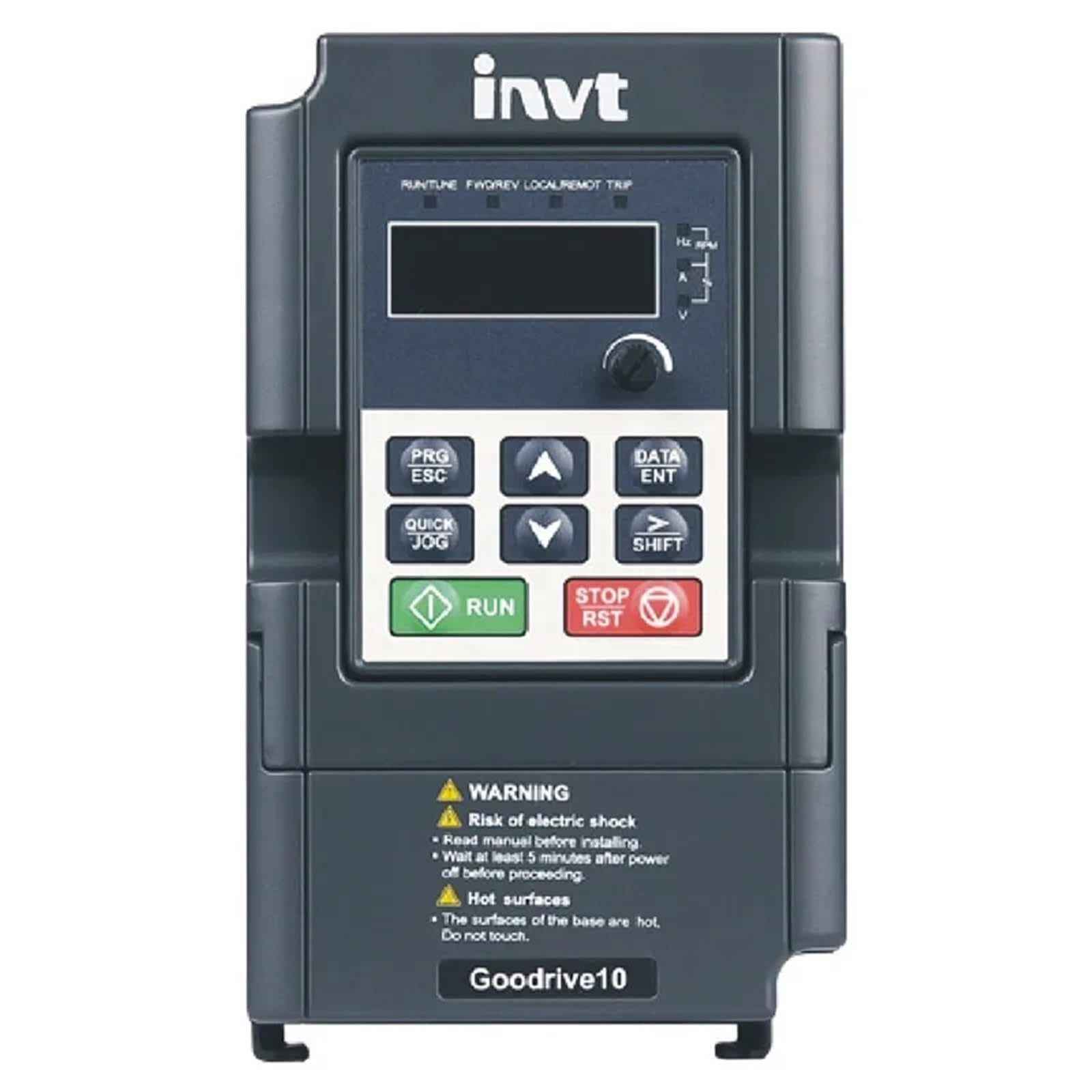
Figure 3.1: INVT GD10-0R7G-S2-B VFD Front Panel
The image displays the front panel of the INVT GD10-0R7G-S2-B VFD. It features a digital display for operational data, navigation buttons (PRG/ESC, DATA/ENT, QUICK JOG, SHIFT, UP, DOWN arrows), and dedicated RUN and STOP/RST buttons for direct control. Below the control interface, important safety warnings regarding electric shock and hot surfaces are clearly visible. The device is labeled "Goodrive10" at the bottom.
主な特徴:
- V/F control mode for versatile motor speed regulation.
- Natural cooling design, suitable for environments with cotton and dust, reducing maintenance needs.
- Compact, mini structure for less installation space.
- Advanced functions including vectorization V/F control, PID function, multi-step speed control, DC braking, and Modbus communication.
4. セットアップとインストール
Proper installation is critical for the safe and reliable operation of the VFD.
4.1. 取り付け:
Mount the VFD in a vertical position on a flat, non-flammable surface, ensuring adequate ventilation. Maintain sufficient clearance around the unit for heat dissipation, especially given its natural cooling design.
4.2. 配線:
Connect the input power to the designated terminals. For the GD10-0R7G-S2-B model, ensure a single-phase 230V AC power supply. Connect the motor to the output terminals. All wiring must comply with local electrical codes and standards. Use appropriate wire gauges for the rated current.
- 入力ボリュームtage: Single-phase 230V (±10%)
- 入力周波数: 50Hz or 60Hz (Allowed range: 47~63Hz)
- 出力巻tage: 入力ボリュームに等しいtage with deviation less than 5%
- 出力周波数: 50Hz/60Hz (Fluctuation range: 5%)
Refer to the detailed wiring diagrams in the complete product manual for specific terminal connections and safety grounding instructions.
5. 操作手順
The VFD features an intuitive control panel for easy operation.
5.1. コントロールパネルの機能:
- 画面: Shows operational parameters such as frequency, current, voltage, and RPM.
- PRG/ESC: Enters/exits programming mode, or cancels current operation.
- データ/ENT: Confirms parameter settings or enters data.
- ▲ (Up) / ▼ (Down): Navigates menus, adjusts parameter values.
- QUICK JOG: Initiates a quick jog operation (specific function depends on parameter settings).
- シフト: パラメータ編集中にカーソルの位置を移動します。
- 実行: モーターを始動します。
- 停止/RST: モーターを停止するか、障害状態をリセットします。
5.2.基本操作:
- Ensure the VFD is properly wired and powered on.
- The display will show the current operating status or default frequency.
- を押す 走る モーターを始動するボタン。
- 使用 ▲ そして ▼ buttons to adjust the output frequency (and thus motor speed) if configured for panel control.
- を押す 停止/RST モーターを停止するボタン。
For advanced settings, such as PID control, multi-step speed, or Modbus communication, refer to the detailed programming section of the full INVT GD10 series manual.
6. メンテナンス
定期的なメンテナンスにより、VFD の寿命が長くなり、最適なパフォーマンスが確保されます。
- クリーニング: VFDを清潔に保ち、ほこりやゴミが付かないようにしてください。清掃には柔らかく乾いた布を使用してください。液体クリーナーは使用しないでください。
- 換気: Ensure that the ventilation openings are not obstructed to allow for proper natural cooling.
- 接続: Periodically check all electrical connections for tightness. Loose connections can cause overheating and malfunction.
- 環境: Operate the VFD within its specified environmental conditions (temperature, humidity, dust level).
- 検査: ユニットに損傷、変色、または異臭の兆候がないか目視で検査します。
Always disconnect power and wait for at least 5 minutes before performing any maintenance.
7。 トラブルシューティング
If you encounter issues with your VFD, consider the following basic troubleshooting steps:
- 電源なし: Check the input power supply and all circuit breakers. Ensure connections are secure.
- モーターが作動しない: Verify that the RUN command is active. Check motor wiring and ensure the motor is not overloaded.
- Overload Trip: Reduce the load on the motor. Check for mechanical issues with the motor or driven equipment. The VFD has an overload capability of 150% of rated current for 1 minute.
- 異常な騒音/振動: Check motor mounting, coupling, and VFD installation.
- 表示エラー: If the display shows an error code, consult the comprehensive INVT GD10 series manual for specific fault code definitions and corrective actions.
If the problem persists after basic troubleshooting, contact qualified technical support. Do not attempt to repair the unit yourself.
8. 仕様
8.1. Rated Specifications (Single-Phase 230V GD10 Series)
| モデル | 出力電力(kW) | 入力電流 (A) | 出力電流(A) |
|---|---|---|---|
| GD10-0R2G-S2-B | 0.2 | 4.9 | 1.6 |
| GD10-0R4G-S2-B | 0.4 | 6.5 | 2.5 |
| GD10-0R7G-S2-B | 0.75 | 9.3 | 4.2 |
| GD10-1R5G-S2-B | 1.5 | 15.7 | 7.5 |
| GD10-2R2G-S2-B | 2.2 | 24 | 11 |
8.2. 技術仕様
- 制御モード: V / fコントロール
- 最大出力周波数: 200Hz
- Adjustable-Speed Ratio: 0.111111111
- 過負荷機能: 定格電流の150%を1分間
- Analog Input Resolution: <= 20mV
- Digital Input Resolution: <= 2ms
- アナログ入力/出力: Input 0-10V or 0-20mA, Output 0-10V
8.3.物理的仕様
- パッケージ寸法: 1.18 x 0.79 x 0.39インチ
- 商品の重量: 1.76オンス(50グラム)
- モデル名: EFZRZYJ
- メーカー: EFZRZYJ
9. 保証とサポート
For information regarding product warranty, please refer to the warranty card included with your purchase or contact the seller directly.
For technical support, troubleshooting assistance beyond this manual, or spare parts inquiries, please contact the manufacturer or your authorized distributor. Provide your product model number (GD10-0R7G-S2-B) and serial number (if applicable) when seeking support.


