1. はじめに
Welcome to the Audio Pro A10 MKII Wireless Multiroom Speaker. This speaker is designed to deliver high-fidelity audio with versatile connectivity options, including Wi-Fi, Bluetooth, and a 3.5 mm audio input. It supports multiroom audio, AirPlay2, Spotify Connect, and Google Cast, allowing for flexible audio streaming throughout your home.
2. 安全情報
- スピーカーを雨や湿気にさらさないでください。
- スピーカーをラジエーター、暖房口、ストーブ、その他の機器(電気製品を含む)などの熱源の近くに置かないでください。 amp熱を発生する装置。
- メーカー指定のアタッチメント/アクセサリのみを使用してください。
- すべてのサービスを資格のあるサービス担当者に依頼してください。 装置が何らかの形で損傷した場合は、修理が必要です。
- 適切な換気を確保し、換気口を塞がないようにしてください。
3. パッケージ内容
すべての項目が揃っていることを確認してください:
- Audio Pro A10 MKII Speaker
- 電源ケーブル
- クイックスタートガイド
- 安全と保証に関する情報
4.製品オーバーview
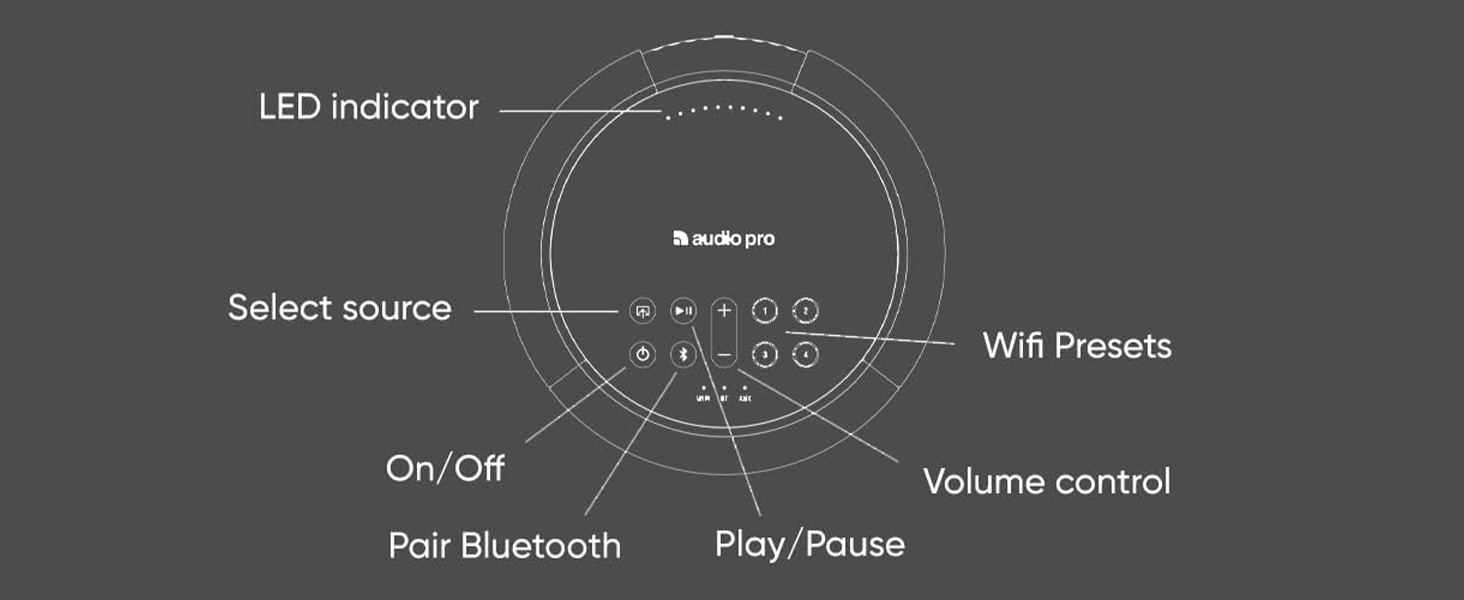
The Audio Pro A10 MKII features a compact, rounded design with a fabric front, making it suitable for various room aesthetics. The top panel houses all primary controls and indicators.
4.1 スピーカーコンポーネント

4.2 トップパネルのコントロール

- LEDインジケーター: Displays status (e.g., power, connectivity).
- ソース選択: Buttons to switch between Wi-Fi, Bluetooth, and AUX inputs.
- オン/オフ: 電源ボタン。
- Bluetooth のペアリング: Bluetoothペアリングモードを開始します。
- 再生/一時停止: オーディオの再生を制御します。
- 音量コントロール: オーディオ出力レベルを調整します。
- Wi-Fiプリセット(1~4): お気に入りのラジオ局やプレイリストにすばやくアクセスできるプログラム可能なボタン。
5. セットアップ
5.1 初回電源投入
- Connect the power cable to the speaker and a wall outlet.
- Press the On/Off button on the top panel to power on the speaker.
5.2 Connecting to Wi-Fi (Audio Pro Control App)
For full functionality, including multiroom audio and streaming services, connect your speaker to your Wi-Fi network using the Audio Pro Control app.

- Download the 'Audio Pro Control' app from the Apple Appストア or Google Playストア.
- Open the app and follow the on-screen instructions to connect your A10 MKII to your home Wi-Fi network. The speaker supports both 2.4GHz and 5GHz bands.
5.3Bluetoothペアリング
- Press the Bluetooth pairing button on the top panel of the speaker. The LED indicator will flash to show it's in pairing mode.
- On your device (smartphone, tablet, computer), go to Bluetooth settings and select 'Audio Pro A10 MKII' from the list of available devices.
- 接続されると、LED インジケーターが点灯します。
5.4 3.5 mm Audio Cable Input (AUX)
Connect any audio source with a 3.5 mm output directly to the AUX input on the speaker using a standard 3.5 mm audio cable.
5.5 壁面への取り付け
The Audio Pro A10 MKII is designed to be wall-mountable. Ensure you use appropriate wall mounts (sold separately) and follow their installation instructions for secure placement.

6.運用
6.1 マルチルーム機能
With the Audio Pro Control app, you can group multiple Audio Pro speakers to play the same music in different rooms or play different music on each speaker. This creates a flexible multiroom audio system.

6.2 Wi-Fi Presets
The A10 MKII features programmable preset buttons (1-4) on its top panel. These allow you to quickly access your favorite radio stations or playlists without needing to use your phone.
How to save presets on the speaker:
- Play any streamed audio.
- Press and hold a preset button (1-4) for 3 seconds. The preset is now saved.
Video 1: Demonstrates how to save presets directly on the Audio Pro speaker by playing audio and holding a preset button.
How to save presets in the Audio Pro app:
- Play any streamed audio and open the player window in the app.
- Click on the options menu, then click on 'Preset'.
- Click on an empty preset slot to save your current audio as a preset.
Video 2: Illustrates the process of saving presets within the Audio Pro mobile application.
6.3 Spotify コネクト
Use Spotify Connect to play music directly from the Spotify app to your A10 MKII speaker over Wi-Fi.
- Start the Spotify app on your device.
- Press the Spotify Connect icon (speaker icon with Wi-Fi waves).
- Choose your A10 MKII speaker from the list.
- Press Play to start streaming.
Video 3: A guide on how to use Spotify Connect to stream music to your Audio Pro speaker.
Additional Spotify Connect Features:
- Use any of your devices (phone, tablet, computer) as a remote to control playback.
- Join a group session with friends on the same Wi-Fi network to collaboratively add songs to the queue.
- Save Spotify playlists as presets on your Audio Pro speaker or remote for quick access.
Video 4: Explores three additional functionalities available when using Spotify Connect with Audio Pro speakers.
6.4 AirPlay2
Stream audio from your Apple devices to the A10 MKII using AirPlay2.
- On your iPhone, swipe down from the top-right corner to open Control Center.
- Tap the AirPlay symbol (concentric circles with a triangle).
- Choose your A10 MKII speaker from the list to play audio.
Video 5: Demonstrates how to use AirPlay for audio streaming from an Apple device to the speaker.
6.5Googleキャスト
Cast audio from compatible apps on your Android device, Chromebook, or Google Chrome browser to your A10 MKII speaker.
- On your Android device, swipe down from the top to access quick settings.
- Tap the Google Cast symbol (a screen with Wi-Fi waves).
- Choose your A10 MKII speaker from the list to play audio.
Video 6: Explains how to use Google Cast for audio streaming to the speaker.
6.6 Connecting a Turntable
You can connect a turntable to your Audio Pro speaker. If using cables, your turntable needs a built-in or external RIAA amplifier. If your speaker has Wi-Fi, you can re-stream the turntable audio to other speakers in your multiroom system.
Video 7: Provides instructions on how to connect a turntable to an Audio Pro speaker.
6.7 Wi-Fi vs. Bluetooth
Understanding the differences between Wi-Fi and Bluetooth connectivity can optimize your listening experience. Wi-Fi unlocks advanced features like multiroom audio and presets, while Bluetooth offers direct, convenient connection for individual devices.
Video 8: Compares Wi-Fi and Bluetooth connectivity options for Audio Pro speakers, highlighting their respective benefits.
7. メンテナンス
To ensure the longevity and optimal performance of your Audio Pro A10 MKII speaker, follow these maintenance guidelines:
- クリーニング: Use a soft, dry cloth to wipe the speaker's surfaces. Avoid abrasive cleaners or solvents that could damage the finish or fabric.
- ほこり: Regularly dust the speaker, especially the fabric grille, to prevent dust buildup from affecting sound quality.
- 配置: Place the speaker on a stable surface or securely mount it to a wall. Avoid placing it in direct sunlight or in areas with extreme temperatures or humidity.
- ケーブル: Periodically check all cable connections for any signs of wear or damage.
8。 トラブルシューティング
If you encounter issues with your Audio Pro A10 MKII, refer to the following common problems and solutions:
8.1 音が出ない
- 力: スピーカーの電源がオンになっており、電源ケーブルがしっかりと接続されていることを確認してください。
- 音量: Check that the volume on both the speaker and your audio source is turned up.
- ソースの選択: Verify that the correct input source (Wi-Fi, Bluetooth, AUX) is selected on the speaker.
- ミュート: Confirm that neither the speaker nor the audio source is muted.
8.2 接続の問題(Wi-Fi/Bluetooth)
- Wi-Fi信号: Ensure your speaker is within range of your Wi-Fi router and has a strong signal.
- ルーターの再起動: Wi-Fiルーターを再起動してみてください。
- Bluetoothのペアリング: For Bluetooth, ensure the speaker is in pairing mode and your device's Bluetooth is enabled and searching for devices. Try unpairing and re-pairing.
- 干渉: 干渉を引き起こす可能性のある他の電子機器からスピーカーを離してください。
8.3 App Not Responding
- アプリの更新: Ensure your Audio Pro Control app is updated to the latest version.
- アプリ/デバイスを再起動します: アプリを閉じて再度開くか、モバイルデバイスを再起動してください。
- ネットワーク: Confirm your mobile device is connected to the same Wi-Fi network as the speaker.
8.4 音の歪み
- 音量レベル: Reduce the volume on both the speaker and the audio source to prevent clipping.
- オーディオソースの品質: 音源を確認する file またはストリーミング品質が高い。
- ケーブル接続: If using AUX, check the cable for damage and ensure it's fully inserted.
9. 仕様
| モデル名 | Audio Pro A10 MKII Wireless Multiroom Speaker |
| スピーカータイプ | マルチルーム |
| 特集 | ブルートゥース |
| 推奨用途 | 屋内 |
| 色 | MKII Black |
| 製品寸法 | 奥行き7.5インチ x 幅5.5インチ x 高さ5.5インチ |
| アイテム重量 | 5.32 ポンド (2.42 キログラム) |
| 商品型番 | A10 MKII |
| ブランド | オーディオプロ |
| スピーカー最大出力 | 52ワット |
| 接続技術 | Auxiliary, Bluetooth, Wi-Fi (2.4GHz & 5GHz) |
| 取り付けタイプ | Tabletop Mount (Wall mountable with separate accessories) |
| 材料 | 布地、プラスチック |
10. 保証
Audio Pro products are covered by a limited warranty against defects in materials and workmanship. The specific terms and duration of your warranty may vary by region and retailer. Please retain your proof of purchase for warranty claims. For detailed warranty information, refer to the documentation included with your product or visit the official Audio Pro webサイト。
11. サポート
For further assistance, technical support, or to access additional resources, please visit the official Audio Pro webサイトにアクセスするか、カスタマー サポートにお問い合わせください。
- オーディオプロ Webサイト: www.audiopro.com
- Audio Pro Store on Amazon: Visit the Audio Pro Store


