導入
The VTech Dora Got Your Back Learning Backpack is an interactive bilingual toy designed to engage children aged 3 years and up in educational activities. This manual provides essential information for setting up, operating, maintaining, and troubleshooting your learning backpack. It features 12 interactive games and quizzes in both English and Spanish, focusing on key learning milestones such as letter writing, shape drawing, emotions, numbers, and words.
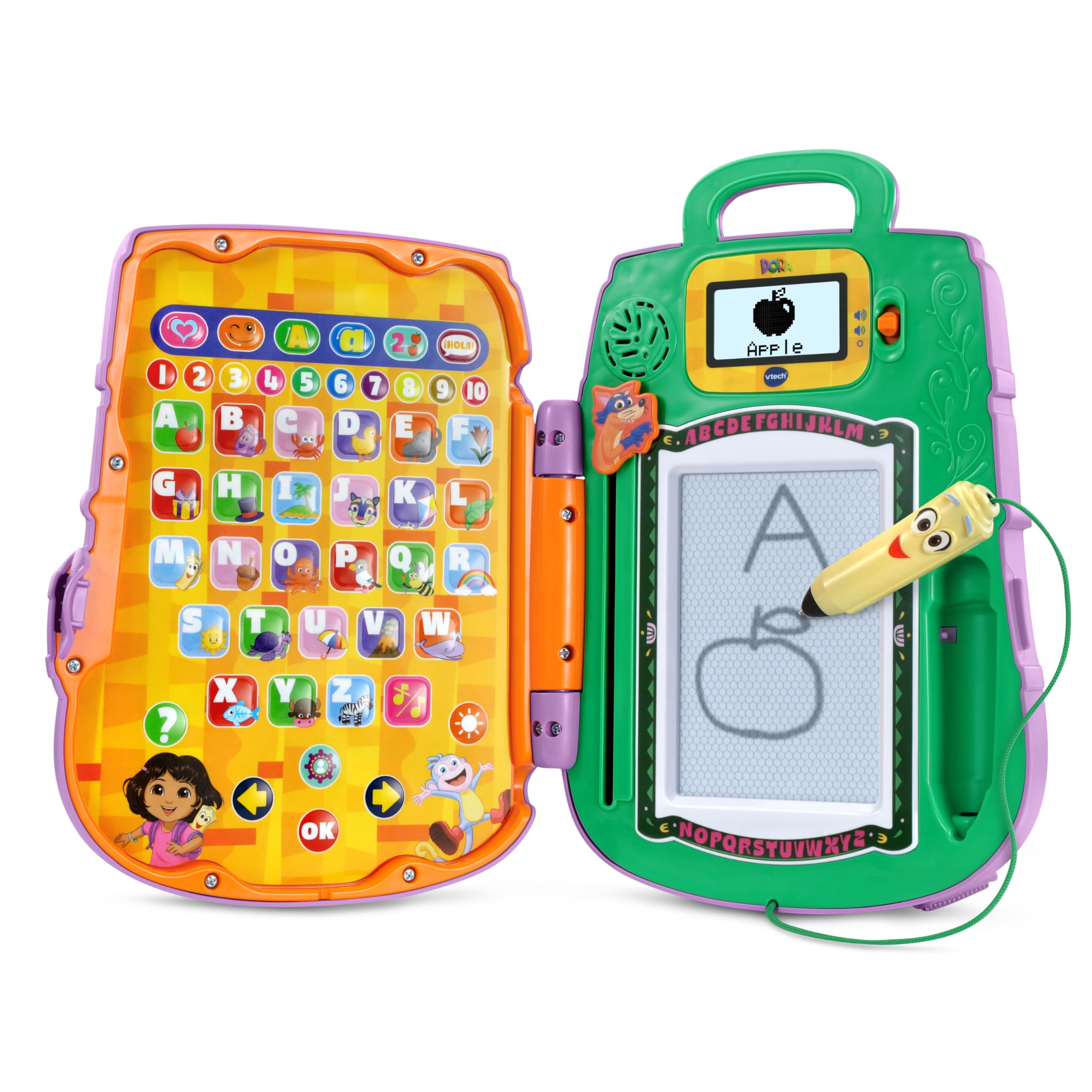
Image: The VTech Dora Got Your Back Learning Backpack in its closed, backpack form.
含まれるもの
パッケージを開封したら、すべてのコンポーネントが揃っていることを確認してください。
- 1 x Dora Got Your Back Learning Backpack
- クイックスタートガイド x 1

Image: The learning backpack opened, showing the interactive button panel on the left and the drawing board with screen on the right.
設定
- バッテリーの取り付け: The toy requires 2 AA batteries. Batteries are included for demonstration purposes only. For regular use, new batteries are recommended. To install, locate the battery compartment on the back of the unit, open it with a screwdriver, insert the batteries according to the polarity markings, and close the compartment securely.
- Attaching Straps: The backpack straps are typically included separately in the packaging. Attach them to the designated loops on the top and bottom of the backpack to enable wearing the toy.
- 初回電源オン: 電源ボタンを押してデバイスの電源を入れます。
- パーソナライゼーション: The toy allows for personalization. Follow the on-screen prompts or refer to the Quick Start Guide to enter a child's name. This enables personalized greetings from Dora's friends during play.

Image: The toy's screen displaying a prompt to enter a name for personalization.
操作手順
The Dora Got Your Back Learning Backpack features two main interactive areas when opened: a button panel on the left and a drawing board with a small screen on the right.
- 電源オン/オフ: Press the orange power button located on the right side of the unit to turn the toy on or off.
- 音量コントロール: Use the volume buttons (usually located near the screen) to adjust the sound level.
- 言語の選択: The toy supports both English and Spanish. Look for a dedicated language button or follow initial setup prompts to select your preferred language.
- アクティビティの選択: The left panel contains various buttons representing different games and learning activities. Press a button to select an activity.
- スタイラスの使用法: The Map-shaped stylus is attached to the unit by a string. Use it to interact with the drawing board for writing and drawing activities.
- Swiper Eraser: To clear the drawing board, slide the Swiper character down the designated slot.

Image: A child actively engaging with the open learning backpack, pressing buttons on the left panel and using the stylus on the right drawing board.
ゲームとアクティビティ
The learning backpack offers 12 interactive games and quizzes designed to promote early learning skills:
- 手紙の書き方: Follow step-by-step animations on the screen to practice writing uppercase and lowercase letters using the stylus.
- Shape Drawing: Learn to draw various shapes by tracing guided animations.
- 数字認識: Identify and learn numbers through interactive games.
- Object Identification: Match objects with their corresponding letters or words.
- Emotion Exploration: Learn about different emotions through engaging activities.
- Bilingual Quizzes: Participate in quizzes that reinforce learning in both English and Spanish.

Image: A child using the stylus to draw on the learning backpack's screen, following animated instructions.

Image: A child operating the Swiper slider to clear the drawing board, preparing for a new activity.
Video: An official VTech video demonstrating the features and interactive play of the Dora Got Your Back Learning Backpack.
メンテナンス
- クリーニング: おもちゃを軽く拭きますamp 布で拭いてください。水に浸したり、強力な洗浄剤を使用したりしないでください。
- ストレージ: おもちゃを使用しないときは、直射日光を避け、涼しく乾燥した場所に保管してください。
- バッテリーのケア: おもちゃを長期間使用しない場合は、液漏れを防ぐために電池を取り外してください。
トラブルシューティング
| 問題 | 解決 |
|---|---|
| Toy does not turn on. | 電池の取り付けを確認してください。電池が新品で、正しく挿入されていることを確認してください。 |
| Sound is not working or is too low. | Adjust the volume using the volume buttons. Replace batteries if sound remains low or absent. |
| Drawing board is not clearing. | Ensure the Swiper eraser is slid completely across the board. |
| Stylus is not making marks. | Ensure the stylus tip is making firm contact with the drawing surface. The drawing board is magnetic, not electronic. |
仕様
- 製品寸法: 11.02 x 8.27 x 2.8インチ
- 商品の重量: 1.7ポンド
- 商品モデル番号: 80-573300
- メーカー推奨年齢: 3歳以上
- 電池: 単三電池2本が必要です(デモ用に付属)
- メーカー: VTech
- 発売日: 5年2025月XNUMX日
保証とサポート
For warranty information, product support, or to purchase replacement parts, please visit the official VTech website or contact their customer service department. Details can typically be found in the Quick Start Guide or on the VTech product page.


