1. はじめに
This user manual provides essential information for the safe and efficient operation of your iFFALCON 65U85 4K Mini LED Google TV. Please read this manual thoroughly before using the product and retain it for future reference.
2. 安全情報
火災、感電、けがのリスクを軽減するために、このテレビを使用するときは常に基本的な安全上の注意事項に従ってください。
- テレビを雨や湿気にさらさないでください。
- テレビを開けないでくださいasing; すべてのサービスは資格を持った担当者に依頼してください。
- 適切な換気を確保し、換気口を塞がないようにしてください。
- 製造元が指定した電源コードと付属品のみを使用してください。
- テレビを熱源や直射日光から遠ざけてください。
3. パッケージ内容
パッケージにすべてのアイテムが揃っていることを確認します。
- iFFALCON 65U85 4K Mini LED Google TV
- リモートコントロール
- 電源ケーブル
- ユーザーマニュアル(このドキュメント)
- 保証書
- Wall Bracket (if included)
4. セットアップ
4.1開梱と配置
Carefully remove the TV from its packaging. Place the TV on a stable, flat surface or mount it on a wall using a VESA-compatible bracket. Ensure adequate space around the TV for ventilation.
4.2 電源とデバイスの接続
- 電源ケーブルをテレビに接続し、次に電源コンセントに接続します。
- Connect external devices (e.g., gaming consoles, Blu-ray players) to the HDMI 2.1 ports.
- インターネットにアクセスするには、イーサネット ケーブルを LAN ポートに接続するか、Wi-Fi セットアップを準備します。
4.3 Initial Setup and Remote Pairing
Upon first power-on, the TV will guide you through the initial setup process. This includes language selection, network connection, and Google account login.
To pair the Bluetooth remote control:
- リモコンをテレビに向けます。
- を押し続けます 設定 ボタンと 家 同時に4秒間ボタンを押します。
- The TV will display a pairing confirmation message once successful.
4.4ネットワーク接続
Connect your TV to the internet via Wi-Fi or Ethernet to access Google TV features and streaming services.
- Wi-Fi: Select your network from the list and enter the password.
- イーサネット: ルーターからのイーサネット ケーブルをテレビの LAN ポートに接続します。
5. テレビの操作
5.1 Google TV インターフェース
Your iFFALCON 65U85 features Google TV, providing a personalized experience with access to a vast library of content and apps.

5.2 Googleアシスタントによる音声コントロール
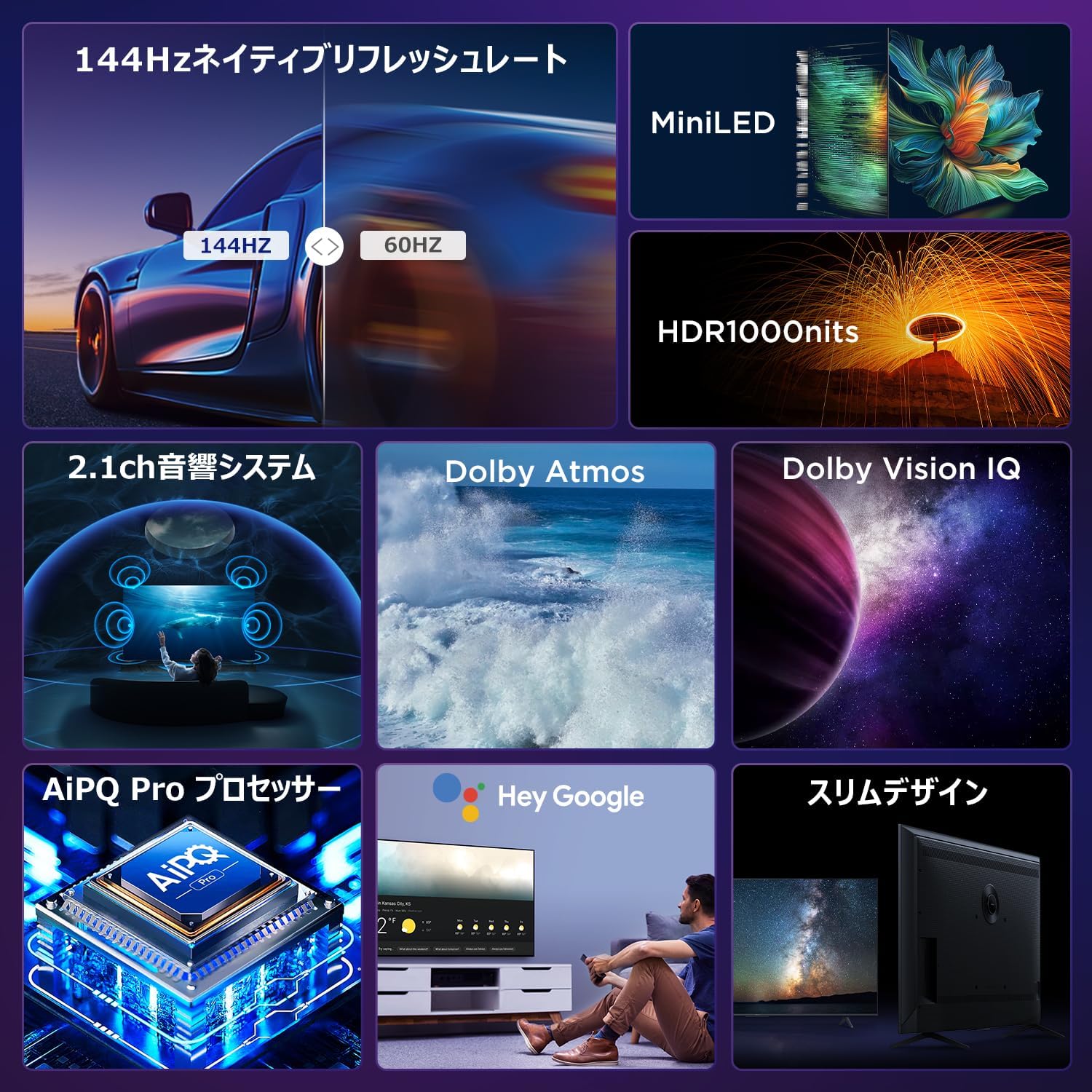
Use the built-in Google Assistant for hands-free control. Press the Google Assistant button on your remote and speak your commands.
- 検索する 映画や番組。
- スマートホームデバイスを制御します。
- 質問への回答を取得します。

5.3 Casting Content (AirPlay2 & Chromecast)
Easily share content from your smartphone or tablet to the TV screen.
- エアプレイ2: For Apple devices, use AirPlay2 to stream videos, photos, and music.
- クロームキャスト: For Android devices and Chrome browser, use Chromecast built-in to cast content.

6. 主な特徴
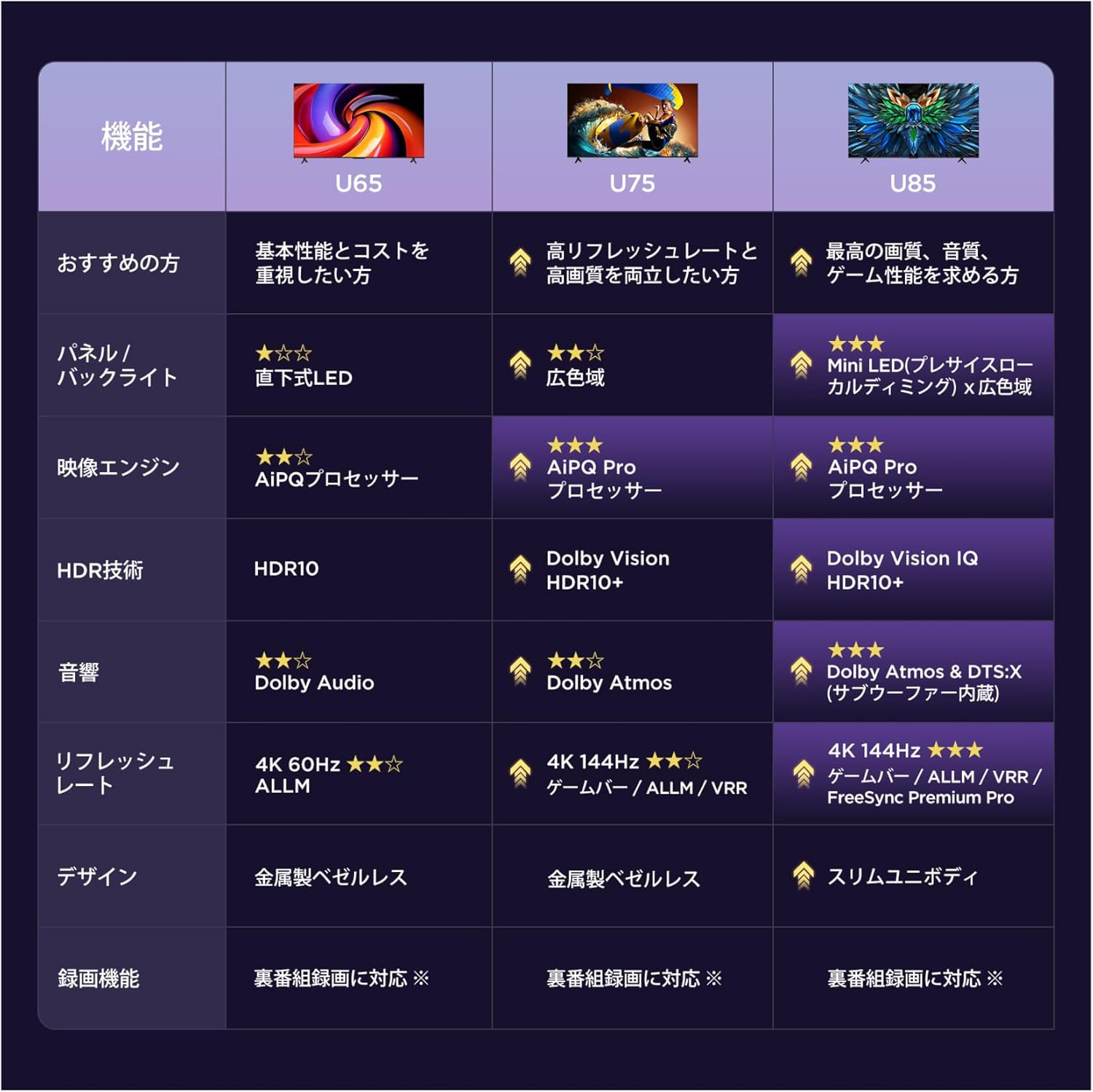
6.1 Display Technology: Mini LED & 4K HDR
Experience stunning visuals with Mini LED backlight technology, delivering 1000 nits peak brightness and enhanced contrast. Combined with 4K resolution, Dolby Vision IQ, and HDR10+, you get precise brightness, vibrant colors, and deep blacks.


6.2 Immersive Audio: Dolby Atmos & DTS Virtual:X
Enjoy a captivating audio experience with Dolby Atmos and DTS Virtual:X, delivering multi-dimensional sound that fills your room. The 2.1ch speaker system provides powerful bass and clear audio.


6.3 Gaming Features: 144Hz VRR & Game Master
Designed for gamers, the 65U85 offers a native 144Hz refresh rate, Variable Refresh Rate (VRR), Auto Low Latency Mode (ALLM), and FreeSync Premium Pro for smooth, tear-free gameplay.


6.4 AiPQ Pro Processor
The AiPQ Pro processor intelligently optimizes color, contrast, and motion for every scene, delivering a visually stunning and immersive viewing の経験。

6.5 Slim Metal Bezel-less Design
The TV features a sleek, metal bezel-less design that blends seamlessly into any living space, offering a premium aesthetic.

7. 仕様
| 特徴 | 説明 |
|---|---|
| 画面サイズ | 65インチ |
| 表示タイプ | VA Panel, Mini LED |
| 解決 | 4K (3840 x 2160) |
| リフレッシュレート | 144 Hz(ネイティブ) |
| HDR サポート | ドルビービジョンIQ、HDR10+ |
| オーディオ | 2.1ch Speaker System, Dolby Atmos, DTS Virtual:X |
| スマートTVプラットフォーム | Google TV |
| 音声アシスタント | Googleアシスタント |
| 接続性 | 3x HDMI 2.1, 2x USB, Wi-Fi, Bluetooth |
| 寸法(幅×奥行き×高さ) | 144.8 x 32.4 x 89.5 cm(スタンド付き) |
| 重さ | 19キロ |
| VESA互換性 | はい |

8。 トラブルシューティング
テレビで問題が発生した場合は、次の一般的な解決策を参照してください。
- 電源なし: 電源ケーブルがしっかりと接続され、電源コンセントが機能していることを確認してください。
- 画像/音声なし: Check all cable connections (HDMI, audio). Verify the correct input source is selected.
- リモコンが機能しない: Replace batteries. Re-pair the remote control as described in Section 4.3.
- インターネット接続なし: ルーターとモデムを確認してください。Wi-Fiネットワークに再接続するか、イーサネットケーブルが正しく接続されていることを確認してください。
- 画質の問題: Adjust picture settings (brightness, contrast, color). Ensure content source is high quality.
問題が解決しない場合は、カスタマー サポートにお問い合わせください。
9. メンテナンス
Proper maintenance ensures the longevity of your iFFALCON TV:
- 画面の掃除: Gently wipe the screen with a soft, dry, lint-free cloth. Do not use harsh chemicals or abrasive cleaners.
- Cのクリーニングasing: 柔らかくてamp cloth to wipe the TV casing.
- 換気: 通気口にほこりや障害物が入らないようにしてください。
- 電源を切る: 雷雨のときや長期間放置するときは、テレビを電源コンセントから抜いてください。
10. 保証とサポート
Your iFFALCON 65U85 TV comes with a manufacturer's warranty. Please refer to the included warranty card for details on coverage, terms, and conditions.
For technical support, service inquiries, or further assistance, please visit the official iFFALCON website or contact their customer service hotline. Contact information can be found on the warranty card or the official product page.
11. 製品ビデオ
11.1 Mini LED Quantum Dot 144Hz 65-inch TV
This video showcases the Mini LED and Quantum Dot display technology of the 65-inch iFFALCON TV, highlighting its 144Hz refresh rate for smooth visuals.


