導入
This manual provides essential information for the setup, operation, maintenance, and troubleshooting of your Onn 22 inch 1080P 100 Hz FHD LED Monitor. Please read this guide thoroughly before using the product to ensure optimal performance and safety.
The Onn 22 inch FHD LED Monitor is designed for a variety of applications, offering a vivid 1920x1080 resolution, a 100Hz refresh rate, and a 6.5ms response time for efficient performance. Its slim profile and T-shaped base are ideal for saving desk space.
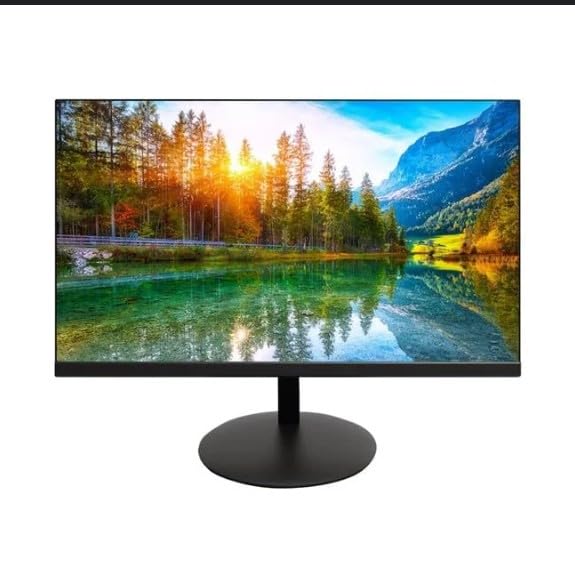
The image shows the Onn 22 inch FHD LED Monitor, highlighting its 100Hz refresh rate and 1080p resolution. The monitor features a slim design and a T-shaped base.
セットアップ手順
- 開梱: Carefully remove the monitor and all accessories from the packaging. Ensure all components are present: monitor, T-shaped base, HDMI cable, and power adapter.
- スタンドの組み立て: Attach the T-shaped base to the monitor. The design is screw-less for easy assembly. Ensure it is securely fastened.
- デバイスに接続する:
The monitor supports both HDMI and VGA inputs. Connect the provided HDMI cable from your computer's HDMI output to the HDMI IN port on the monitor. Alternatively, use a VGA cable for VGA input.

This image displays the rear panel of the Onn monitor, illustrating the available input ports: HDMI IN, VGA IN, and the DC 12V power input. These ports are essential for connecting the monitor to a computer or other devices.
- 電源接続: 電源アダプタをモニターの DC 12V 入力ポートに接続し、アダプタを電源コンセントに差し込みます。
- モニターの調整: The monitor is capable of swivel, tilt, rotation, and height adjustment. Adjust the screen to your preferred view人間工学に基づいた快適性を実現する角度。
- デュアルモニターのセットアップ: This monitor is suitable for a fully functioning dual monitor setup. Connect a second monitor using the appropriate cables and configure your operating system's display settings.
操作手順
- 電源オン/オフ: Press the power button, usually located on the bottom or back of the monitor, to turn it on or off.
- 入力選択: If the monitor does not automatically detect the input source, use the On-Screen Display (OSD) menu buttons to manually select between HDMI and VGA inputs.
- OSDメニューナビゲーション: Use the physical buttons on the monitor (typically on the back or bottom edge) to navigate the OSD menu. This allows you to adjust settings such as brightness, contrast, color temperature, and input source.
- 解像度とリフレッシュレート: The monitor supports a native resolution of 1920x1080 at a 100Hz refresh rate. Ensure your computer's display settings are configured to these specifications for the best visual experience.
- アダプティブ シンク: The monitor features Adaptive Sync for gaming, which helps to reduce screen tearing and stuttering. Ensure this feature is enabled in your graphics card settings if supported.
メンテナンス
- 画面の掃除: 柔らかく糸くずの出ない布で画面を優しく拭いてください。頑固な汚れには、軽くampen the cloth with water or a non-abrasive, monitor-specific cleaning solution. Avoid spraying liquids directly onto the screen.
- Cのクリーニングasing: モニターを清掃するには、柔らかく乾いた布を使用してください。asing. Do not use strong detergents or solvents, as they may damage the finish.
- 換気: 過熱を防ぐために、モニターの通気口が塞がれていないことを確認してください。
- ストレージ: 長期間使用しない場合は、モニターを直射日光や極端な温度を避け、涼しく乾燥した場所に保管してください。
トラブルシューティング
- 電源なし:
- 電源ケーブルがモニターと電源コンセントの両方にしっかりと接続されているかどうかを確認してください。
- 電源コンセントが正しく機能していることを確認してください。
- 信号なし:
- Ensure the video cable (HDMI or VGA) is firmly connected to both the monitor and the computer.
- モニターの OSD メニューを使用して正しい入力ソースを選択します。
- コンピュータの電源がオンになっていて、スリープ モードになっていないかどうかを確認します。
- 画面のちらつきや画質の低下:
- ビデオ ケーブルに損傷や接続の緩みがないか確認してください。
- コンピューターの解像度とリフレッシュ レートの設定を、モニターの仕様 (1920x1080、100Hz) に合わせて調整します。
- OSD メニューからモニターの設定を工場出荷時の状態にリセットします。
- ボタンが反応しない:
- Unplug the monitor from the power outlet, wait for 30 seconds, and then plug it back in.
If problems persist, please refer to the support information provided in the "Support and Warranty" section.
仕様
| ブランド | オン |
| モデル番号 | 100140681 |
| モデル名 | オットー |
| 画面サイズ | 21.5インチ |
| 表示タイプ | LED、液晶 |
| 解決 | 1920 x 1080 (FHD 1080p) |
| リフレッシュレート | 100Hz |
| 応答時間 | 6.5ミリ秒 |
| ハードウェアインターフェイス | HDMI、VGA |
| 特集 | 高さ調整 |
| View角度 | 160度 |
| アスペクト比 | 16:9 |
| 製品寸法 | 49.2 x 20 x 37.2 cm; 3.24 kg |
サポートと保証
For technical support, product inquiries, or warranty information, please visit the official Onn support webサイトにアクセスするか、カスタマーサービスにお問い合わせください。
- 公式サポート Webサイト: onnsupport.ca
- 保証: Specific warranty details may vary by region and purchase date. Please refer to the documentation included with your product or visit the support web最新の保証情報については、こちらのサイトをご覧ください。


