導入
The RadioMaster GX12 is a state-of-the-art radio controller designed for advanced remote control applications, featuring ExpressLRS Gemini-XROSSBAND (GEM-X) technology. This manual provides essential information for the safe and effective operation, setup, and maintenance of your GX12 radio controller.

画像: 正面 view of the RadioMaster GX12 radio controller, showcasing its dual antennas, central display, gimbals, and various control switches and buttons.

Image: A promotional graphic for the GX12, emphasizing its advanced features such as dual 1W RF output, dual-band antenna, Gemini Xrossband technology, and high-precision gimbals.
安全情報
Please read the user instructions carefully before operating the device.
- Always ensure the radio controller is fully charged before use.
- Operate the device in a safe environment, away from obstacles and other radio interference sources.
- デバイスを極端な温度、湿気、直射日光にさらさないでください。
- お子様の手の届かない場所に保管してください。
- Only use approved batteries and charging methods.
箱の中身
パッケージを開封したら、以下にリストされているすべてのコンポーネントが揃っていることを確認してください。
- GX12 Radio Controller
- キャリーケース
- Battery Tray (Battery Cells Not Included)
- Replacement Switch Panels
- タイプCケーブル
- アクセサリー
- User Instructions (Quick Start Guide)

Image: All items included in the GX12 Radio Controller package, neatly laid out, showing the controller, its grey carry case, battery tray, USB-C cable, and other small accessories.
設定
1. バッテリーの取り付け
The GX12 Radio Controller requires a 7.4V 2-cell Lithium-Polymer battery, two 3.7V 18650 Lithium-Ion cells, or a 21700 5000mAh battery (batteries not included). Locate the battery compartment on the back of the controller.

画像: 背面 view of the GX12 radio controller, highlighting the battery compartment cover with a "PUSH" indicator and the RadioMaster strap.
- 電池ボックスのカバーを開きます。
- Insert the compatible battery into the tray, ensuring correct polarity.
- 電池カバーをしっかりと閉じてください。
2. 充電
The GX12 supports 2S Smart Balance Charging via its USB-C port.
- Connect the supplied Type-C cable to the USB-C port on the controller and to a suitable USB power source.
- OLEDディスプレイに充電状態が表示されます。
3. アンテナの設定
The GX12 features dual folding 2.4GHz/Sub-G 900MHz omnidirectional antennas.
- For optimal performance, unfold the antennas to an upright position before operation.
- Fold them down for compact storage and transport.

画像: 正面 view of the GX12 radio controller with its dual antennas folded down, demonstrating its compact form factor for storage.
4. Gimbal Sticks
The GX01 gimbals feature folding sticks for easy transport.
- To fold, gently push the stick downwards and then fold it into the gimbal housing.
- To unfold, pull the stick out until it locks into the upright position.

画像: 爆発した view diagram showing how the gimbal sticks on the GX12 can be folded for transport, highlighting the mechanism for compact storage.
操作手順
1.電源のオン/オフ
- To power on, press and hold the power button until the OLED display illuminates.
- To power off, press and hold the power button until the display shuts down.
2. コントロールview
The GX12 features a comprehensive set of controls for precise operation:
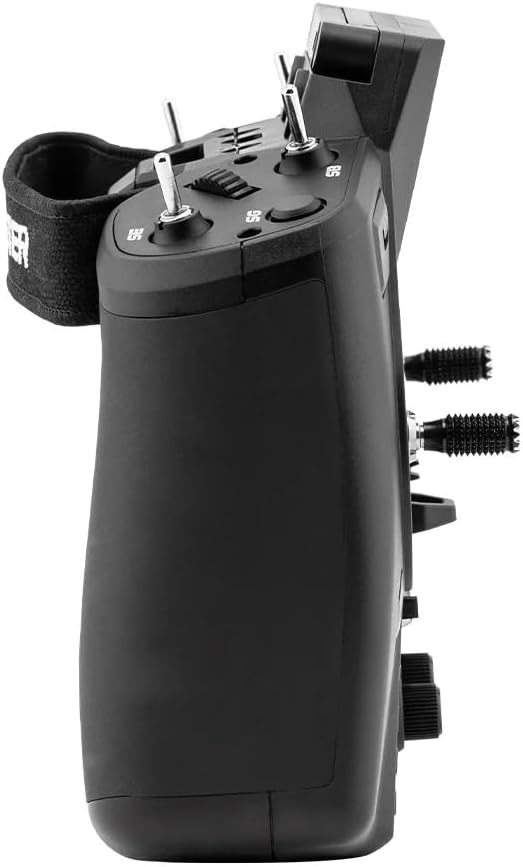
画像: サイドプロfile of the GX12 radio controller, illustrating its ergonomic design and the placement of additional switches and controls on the side.
- GX01 1000Hz, 3D Digital CNC Hall Effect Gimbals: Provide precise control inputs.
- Switches (SA, SD, T1-T6): さまざまな機能に設定可能。
- Buttons (SYS, RTN, PAGE, TELE): For navigating the EdgeTX firmware menu.
- Pots (P1, P2): Rotary potentiometers for fine adjustments.
- 128*64 Monochrome OLED Display: Shows telemetry data, menu options, and settings.

画像: 詳細な断面図 view of the GX01 Digital 1000Hz 12-bit Gimbal, highlighting its CNC aluminum construction, quad ball bearings, and 3D Digital Hall Effect Sensors for exceptional precision.
3. ExpressLRS Gemini-XROSSBAND (GEM-X)
The GX12 is the first radio to feature ExpressLRS Gemini-XROSSBAND (GEM-X), allowing for simultaneous transmission on both 2.4GHz and 915MHz. This ensures unmatched interference rejection and extended range.
- The internal RF module supports ELRS 2.4GHz / Sub-G 900MHz.
- It is compatible with all current 2.4GHz and 900MHz ExpressLRS receivers, as well as the new generation of Gemini Xrossband (Gem-X) receivers.
4. EdgeTX Firmware
The radio operates on EdgeTX firmware, providing a highly customizable and powerful user interface. Refer to the official EdgeTX documentation for detailed instructions on model setup, binding, and advanced configurations.
- Channels: Max 16 channels (Receiver dependent).
- Upgrade Method: USB / EdgeTX Companion PC software.
メンテナンス
- クリーニング: Use a soft, dry cloth to clean the exterior of the radio. Avoid using harsh chemicals or abrasive materials.
- 冷却ファン: The GX12 includes a cooling fan to manage heat during operation. Ensure the fan vents are clear of obstructions.
- ストレージ: When not in use, store the radio controller in its carry case in a cool, dry place, away from direct sunlight and extreme temperatures.
- ジンバルケア: The GX01 gimbals are precision components. Avoid applying excessive force or exposing them to dust and debris.
トラブルシューティング
- ラジオの電源が入らない:
- バッテリーの充電レベルを確認してください。
- バッテリーが正しい極性で正しく取り付けられていることを確認してください。
- 信号なし/バインディングの問題:
- Verify that the receiver is compatible with ExpressLRS.
- Ensure both radio and receiver are in binding mode.
- Check antenna orientation on both devices.
- ディスプレイが動作しない:
- ラジオの電源が入っていることを確認します。
- 問題が解決しない場合は、サポートにお問い合わせください。
- ファームウェアアップデートの問題:
- USB ケーブルがしっかりと接続されていることを確認してください。
- Use the official EdgeTX Companion PC software for updates.
- Refer to EdgeTX documentation for detailed update procedures.
仕様
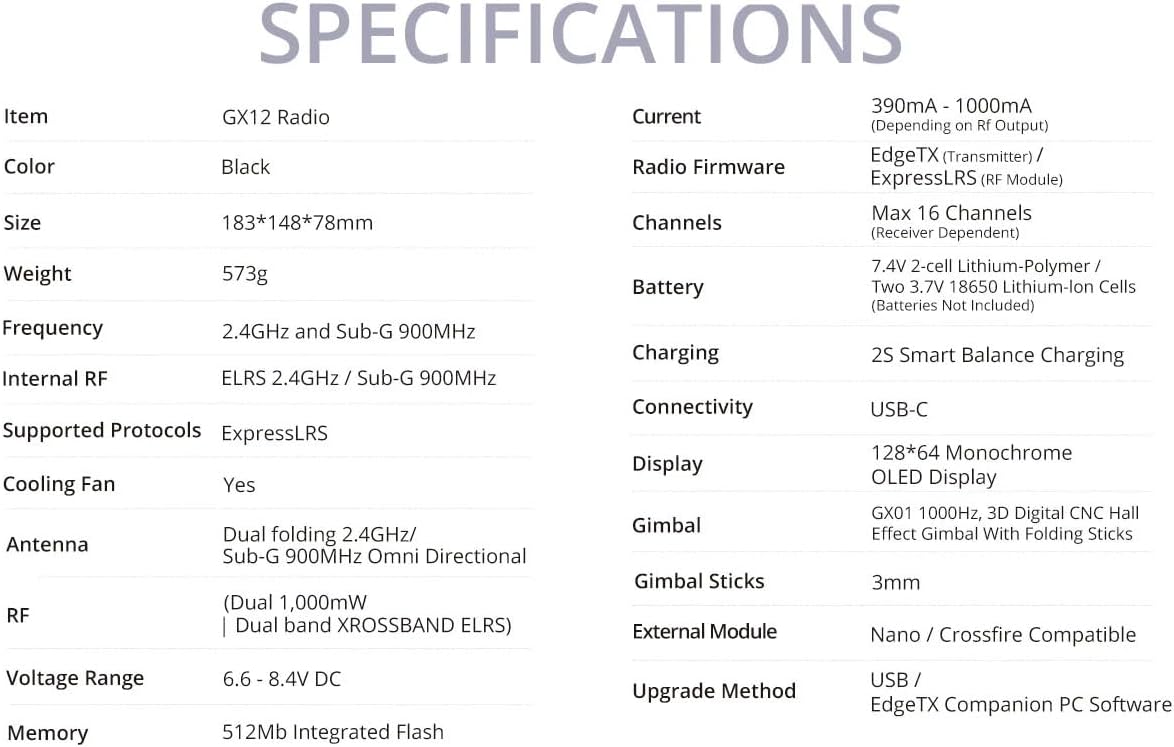
Image: A comprehensive table detailing the specifications of the GX12 Radio, including dimensions, weight, frequency, internal RF, battery, and display type.
| 特徴 | 詳細 |
|---|---|
| 頻度 | 2.400GHzおよびサブG 900MHz |
| 内部RF | ELRS 2.4GHz / サブG 900MHz |
| サポートされているプロトコル | エクスプレスLRS |
| 冷却ファン | はい |
| アンテナ | Dual folding 2.4GHz/ Sub-G 900MHz Omni directional |
| RF | Dual 1,000mW | Dual band XROSSBAND ELRS |
| 巻tage範囲 | 6.6~8.4V DC |
| 現在 | 390mA - 1000mA (Depending on Rf output) |
| 無線ファームウェア | EdgeTX (Transmitter) / ELRS (RF module) |
| チャンネル | 最大 16 チャネル (受信機に依存) |
| バッテリー | 7.4V 2セル リチウムポリマー / 3.7V 18650 リチウムイオンセル 2個 / 21700 5000mAh バッテリー (電池は付属しません) |
| 充電 | 2S Smart Balance Charging |
| 接続性 | USB-C |
| 画面 | 128*64 モノクロ OLED ディスプレイ |
| ジンバル | GX01 1000Hz、折りたたみスティック付き3DデジタルCNCホール効果ジンバル |
| ジンバルスティック | 3mm |
| 外部モジュール | ナノ/クロスファイア対応 |
| アップグレード方法 | USB / EdgeTX Companion PC software |
| メモリ | 512Mb 統合フラッシュ |
| 製品寸法 | 7.2 x 5.8 x 3インチ |
| アイテム重量 | 1.26ポンド |
| 原産国 | 中国 |
| メーカー | ラジオマスター |


