1. はじめに
This manual provides essential information for the installation, operation, and maintenance of your new Vetroo 850W 80 Plus Gold Full Modular ATX 3.1 Power Supply. Please read this manual thoroughly before installation and keep it for future reference.

Figure 1: Vetroo 850W Power Supply (White)
2 製品の特徴
- PCIe Gen 5.1対応: Meets the latest PCIE 5.1 standards for improved performance and efficiency. Backward compatible with both PCIE 4.0 and 3.0.
- ATX 3.1に完全準拠: Designed to meet the newest, most advanced power supply standards.
- プレミアム105°Cコンデンサ: High-quality materials and construction ensure stable, low-temperature operation.
- 80 Plusゴールド認証: Meets high standards for quality and efficiency, ensuring reliable performance and energy savings.
- 完全モジュール設計: Allows for easy cable management and customization, reducing cable clutter by only installing necessary cables.
- 静かな動作: Features a 120mm FDB (Fluid Dynamic Bearing) fan for quiet cooling.
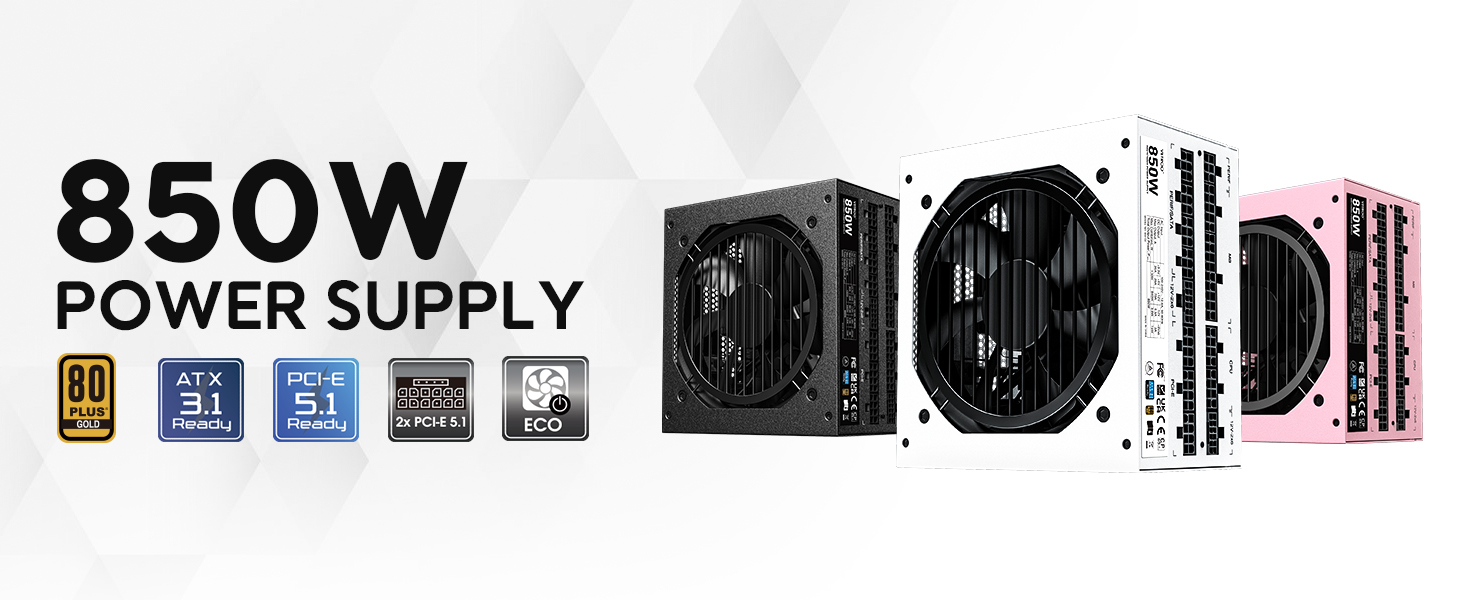
図2:以上view of Vetroo 850W Power Supply features
3. パッケージ内容
パッケージにすべてのコンポーネントが含まれていることを確認します。
- Vetroo 850W 電源ユニット
- Modular Cable Set (including 24-pin ATX, CPU, PCIe, SATA, Molex, FDD connectors)
- AC電源コード
- 取り付けネジ
- ケーブル管理タイ
- Storage Bag for Unused Cables
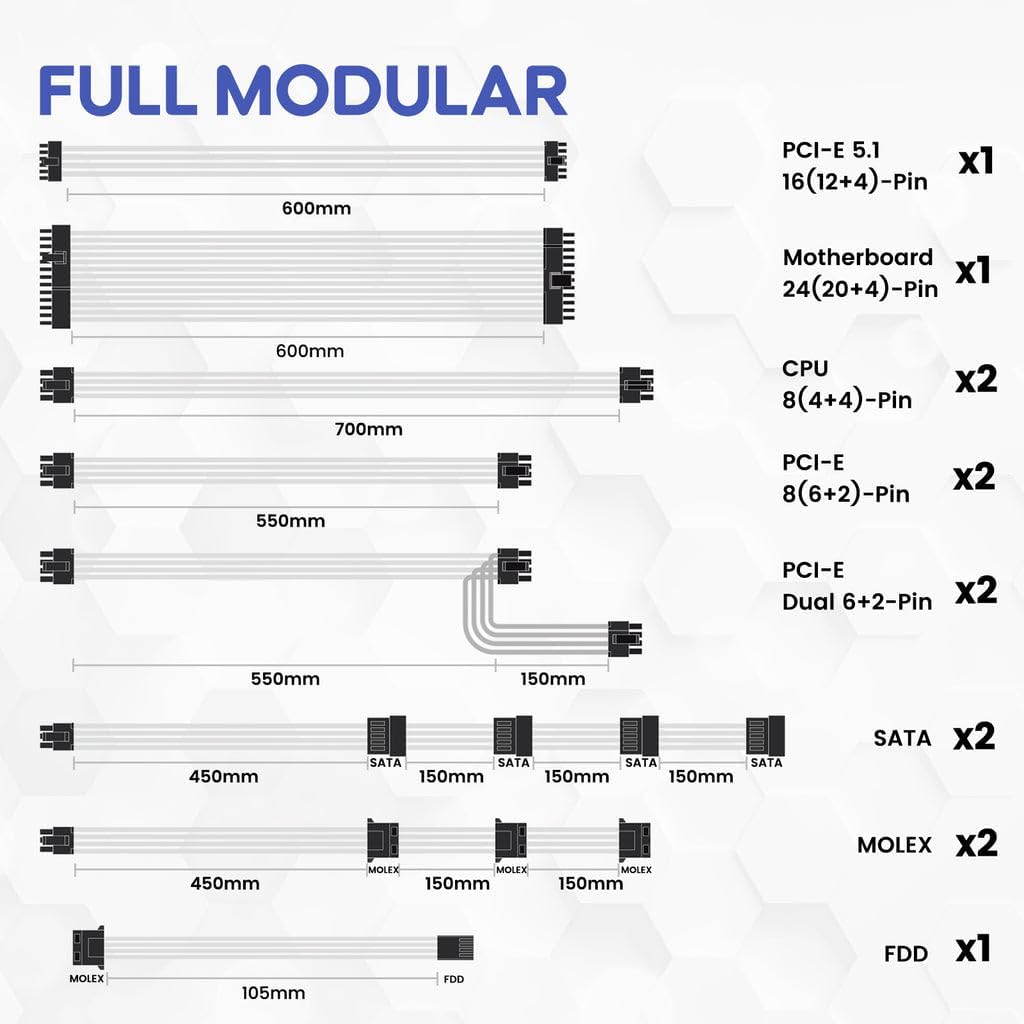
図3: 付属のモジュラーケーブル
4. 安全情報
WARNING: Improper installation or use can result in serious injury or damage to your system.
- Always disconnect the AC power cord from the wall outlet before installing or removing the power supply.
- 電源ユニットを開けないでください。高電圧tag切断されている場合でも、内部に es が存在します。
- Ensure all cables are securely plugged into their respective ports. Loose connections can cause damage.
- Use only the modular cables provided with this power supply. Third-party cables may not be compatible and could cause serious damage.
- Install the power supply in a well-ventilated area, away from high humidity and extreme temperatures.
5. セットアップとインストール
Follow these general steps for installing your power supply. Refer to your PC case and motherboard manuals for specific instructions.
- システムを準備する: コンピュータの電源がオフになっており、壁のコンセントからプラグが抜かれていることを確認してください。
- 電源装置を取り付けます。 Secure the power supply unit into the designated bay in your PC case using the provided mounting screws.
- 主電源ケーブルを接続します。 24 ピン ATX ケーブルをマザーボードに接続します。
- CPU電源ケーブルを接続します。 8 ピン (4+4) CPU 電源ケーブルをマザーボードに接続します。
- PCIe電源ケーブルを接続します。 Connect the necessary PCIe power cables (e.g., 12V-2x6 for PCIe 5.1 GPUs, or 8-pin (6+2) for older GPUs) to your graphics card(s).

Figure 4: Dual PCIe 5.1 Connectors
- 周辺ケーブルを接続します。 Connect SATA, Molex, and FDD cables to your storage drives and other peripherals as needed.
- ケーブル管理 Utilize the fully modular design and included cable ties to route cables neatly, improving airflow and aesthetics.
- 最終チェック: Double-check all connections to ensure they are secure before closing your PC case.
Video 1: Vetroo Power Supply Installation Guide. This video demonstrates the process of installing a Vetroo power supply into a PC case, including cable connections.
6. 操作手順
After successful installation, you can power on your system.
- 電源オン: Connect the AC power cord to the power supply and a wall outlet. Flip the main power switch on the power supply to the 'ON' position.
- エコモード: The power supply features an ECO mode switch. When 'ON', the fan will stop spinning unless the load is above approximately 50% of the rated capacity, ensuring silent operation at low loads. When 'OFF', the fan will spin continuously.

Figure 5: Power Switch and ECO Mode
7. メンテナンス
適切なメンテナンスを行うことで、電源装置の寿命が長くなり、最適なパフォーマンスが確保されます。
- クリーニング: Periodically clean the exterior of the power supply and the fan grille to prevent dust buildup, which can impede airflow and cooling. Use compressed air or a soft brush. Ensure the power supply is off and unplugged before cleaning.
- ファン操作: The 120mm Fluid Dynamic Bearing fan is designed for durability and quiet operation. In ECO mode, the fan may not spin at low loads; this is normal.
8。 トラブルシューティング
電源に問題が発生した場合は、次の点を考慮してください。
- 電源なし: Ensure the AC power cord is securely connected to both the power supply and the wall outlet. Verify the main power switch on the power supply is in the 'ON' position. Check your wall outlet with another device.
- システムの不安定性/シャットダウン: This power supply includes multiple protection features (OVP, OCP, OPP, SCP, UVP, OTP) to safeguard your components. If your system is unstable or shuts down unexpectedly, it could indicate an issue with power delivery or another component. Ensure all power connections are firm.
- ファンが回転しない: If the ECO mode is enabled, the fan will not spin until the power supply reaches approximately 50% load. This is normal operation for quiet performance. If the fan does not spin under heavy load, contact support.
- 異常な音: If you hear unusual noises (e.g., coil whine, grinding), power down your system immediately and contact support.
9. 仕様
| 特徴 | 詳細 |
|---|---|
| モデル名 | 850 G5 |
| 出力ワットtage | 850ワット |
| 効率認証 | 80プラスゴールド |
| ATX規格 | ATX 3.1準拠 |
| PCIe規格 | PCIe Gen 5.1 Ready |
| フォームファクター | ATTX |
| 冷却方法 | エア(120mm FDBファン) |
| モジュラータイプ | フルモジュラー |
| コンデンサ | Premium 105°C |
| 製品寸法(長さ x 幅 x 高さ) | 5.9 x 5.5 x 3.4インチ |
| アイテム重量 | 5.7 ポンド (2.59 キログラム) |
| 対応デバイス | パソコン |
| 保護機能 | OVP(オーバーボリュームtage Protection), OCP (Over Current Protection), OPP (Over Power Protection), SCP (Short Circuit Protection), UVP (Under Voltage Protection), OTP (Over Temperature Protection) |
10. 保証とサポート
The Vetroo 850W Power Supply comes with a 10年間保証, ensuring long-term reliability and peace of mind. For technical support, warranty claims, or any questions regarding your product, please visit the official Vetroo webサイトまたは顧客サービス部門に連絡してください。
Video 2: Vetroo 850W Power Supply - White Product Overviewこのビデオでは、view of the white Vetroo 850W Power Supply.


