1. はじめにview
This manual provides essential information for the safe and effective use of your Sharp Humidifying Air Purifier, model KI-TS50-W. This appliance combines air purification with humidification, featuring Sharp's unique Plasmacluster 25000 technology and an efficient Coanda airflow system. Its slim design is suitable for various room sizes, including single rooms and bedrooms.

Image: The Sharp KI-TS50-W Humidifying Air Purifier positioned in a modern living space, highlighting its slim profile.
2. 安全情報
怪我や損傷を防ぐため、機器を操作する前にすべての安全に関する指示をよくお読みください。このマニュアルは、今後の参考のために保管してください。
- Always connect the appliance to a power outlet with the specified voltage.
- 吸気口や排気口を塞がないでください。適切な空気の流れを確保するために、ユニットの周囲に十分なスペースを確保してください。
- Do not insert fingers or objects into any openings.
- 可燃性ガスや可燃性物質の近くで機器を使用しないでください。
- Unplug the power cord before cleaning, maintenance, or when not in use for extended periods.
- 本製品を子供やペットの手の届かない場所に保管してください。
- Use only clean tap water in the water tank. Do not add chemicals or aromatic substances.
3.製品コンポーネント
空気清浄機の主な部品について理解しておきましょう。
- 本体: ファン、モーター、コントロール パネルを収納します。
- 水タンク: Removable tank for humidification.
- プレフィルター: Captures large dust particles. Located on the rear panel.
- Electrostatic HEPA Filter: Captures fine particles.
- Double Deodorizing Filter: Absorbs various odors.
- 加湿フィルター: Used for humidification.

画像: 正面 view of the Sharp KI-TS50-W Humidifying Air Purifier, showing the main unit and control panel.

画像: 背面 view of the Sharp KI-TS50-W Humidifying Air Purifier, showing the air intake and pre-filter location.

画像: 分解図 view of the internal filter assembly, showing the pre-filter, electrostatic HEPA filter, and double deodorizing filter.
4. セットアップ
空気清浄機をセットアップするには、次の手順に従ってください。
- 開梱: ユニットを梱包から慎重に取り出してください。梱包は将来の輸送や保管のために保管しておいてください。
- フィルターのインストール: Open the rear panel. Ensure all filters (pre-filter, HEPA filter, deodorizing filter) are correctly installed and any protective plastic bags are removed. Close the rear panel securely.
- 配置: Place the unit on a stable, flat surface. Ensure there is at least 20 cm of space from walls or furniture to allow for optimal airflow. Avoid placing it in direct sunlight or near heat sources.
- Fill Water Tank (for humidification): Remove the water tank from the side of the unit. Fill it with clean tap water up to the maximum fill line. Reinsert the tank firmly into the unit.
- 電源接続: 電源コードをアース付きコンセントに差し込みます。
5. 操作手順
The control panel on top of the unit allows you to manage various functions.

Image: Close-up of the top control panel with various buttons and indicators.
- 電源オン/オフ: 電源ボタンを押して、ユニットの電源をオンまたはオフにします。
- モード選択: Cycle through available modes such as Air Purification Only, Humidifying Air Purification, and various fan speed settings.
- ファン速度: Adjust the fan speed (e.g., Silent, Medium, High, Auto). The 'Silent' mode operates at a low noise level, ideal for bedrooms.
- Plasmacluster Operation: The Plasmacluster 25000 function operates automatically in most modes to release ions into the air, helping to purify and deodorize.
- Coanda Airflow: The unit utilizes Coanda airflow to efficiently draw in dust and particles from a wide area, enhancing air purification performance.

Image: Diagram showing the Coanda airflow pattern, where air is circulated to draw in dust from a wide area, combined with Plasmacluster ion release.
The unit is designed for low-noise operation, achieving approximately 43dB even during strong humidification, ensuring a comfortable environment.

Image: Visual representation of humidification mist being released from the top of the unit, emphasizing quiet operation.
6. メンテナンス
定期的なメンテナンスにより、空気清浄機の最適なパフォーマンスと寿命が確保されます。
- プレフィルタークリーニング: The large pre-filter on the rear panel can be easily cleaned by vacuuming directly without removing the panel. Clean approximately once a month or as needed.

Image: A person demonstrating how to clean the pre-filter on the rear of the air purifier using a vacuum cleaner attachment.
- 水タンクのクリーニング: Clean the water tank regularly to prevent mold and bacteria growth. Rinse with clean water and wipe dry.
- Humidifying Filter Cleaning: The humidifying filter should be cleaned periodically. Refer to the detailed instructions in the full manual for specific cleaning methods and frequency.
- Electrostatic HEPA Filter & Double Deodorizing Filter: These filters are not washable and should be replaced according to the recommended schedule (typically every 10 years, depending on usage and environment).

Image: Diagram showing the three filter layers: the pre-filter, the double deodorizing filter, and the electrostatic HEPA filter.

Image: Illustration of the double deodorizing filter and various odors it is designed to absorb, such as tobacco smoke, pet odors, cooking smells, and VOCs.
7。 トラブルシューティング
空気清浄機に問題が発生した場合は、次の一般的な問題と解決策を参照してください。
- ユニットの電源が入らない: Check if the power cord is securely plugged into the outlet. Ensure the rear panel and water tank are correctly installed.
- No humidification: Check if the water tank is filled with water and correctly inserted. Ensure the humidification mode is selected.
- 異常なノイズ: Check for any foreign objects in the air inlets or outlets. Ensure filters are properly seated. If the noise persists, contact customer support.
- 空気の流れまたは浄化の低下: Clean the pre-filter. Check if other filters need replacement.
- Indicator lights flashing: Refer to the full instruction manual for specific error codes or indicator light patterns. This often indicates a need for cleaning or water refill.
これらの解決策を試しても問題が解決しない場合は、シャープのカスタマー サポートにお問い合わせください。
8. 仕様
| 特徴 | 仕様 |
|---|---|
| モデル番号 | KI-TS50-W |
| ブランド | シャープ |
| Recommended Plasmacluster Area (approx.) | 13 tatami mats (approx. 21.5 m²) |
| Recommended Air Purification Area (approx.) | 23 tatami mats (approx. 38 m²) |
| Maximum Humidification Capacity | 600 mL / h |
| Air Purification Time (8 tatami mats) | 12 minutes |
| 動作音レベル | 17~51デシベル |
| 寸法(幅×奥行き×高さ) | 38.4 x 23 x 61.9 cm |
| 製品重量 | 7.9キロ |
| 電源 | AC電源コード |
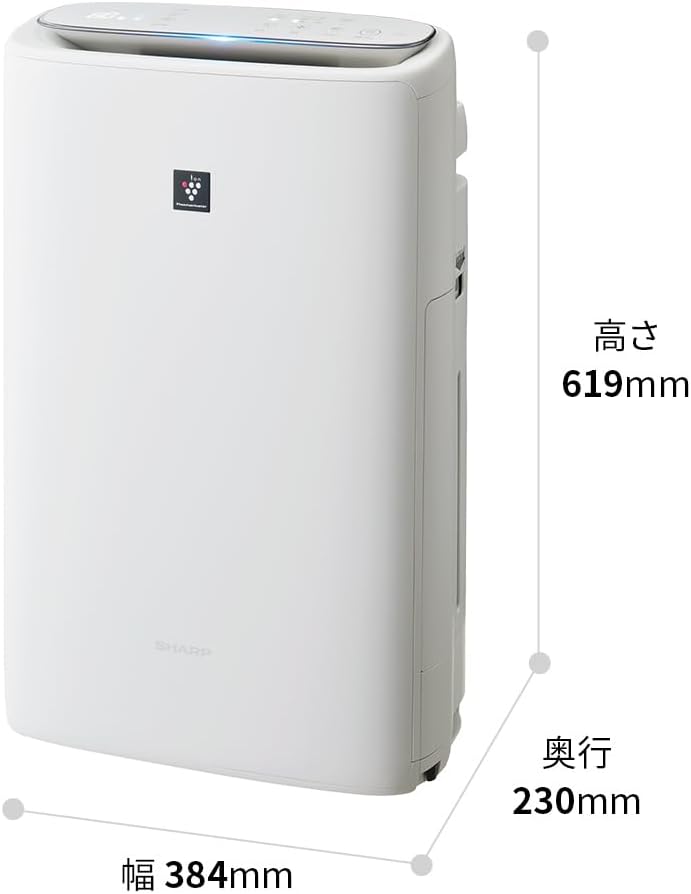
Image: Diagram illustrating the width (384mm), depth (230mm), and height (619mm) of the Sharp KI-TS50-W unit.
9. 保証とサポート
For warranty information, please refer to the separate warranty card included with your product. For technical support, replacement parts, or further assistance, please contact Sharp customer service. Contact details can typically be found on the manufacturer's webサイトまたは保証書に記載されています。


