1. はじめに
This manual provides essential information for the safe and efficient operation of your WOLFBOX EV Charger Level 2 50 Amp. Please read this manual thoroughly before installation and use, and retain it for future reference. The WOLFBOX EV Charger is designed to provide fast and reliable charging for your electric vehicle, featuring smart controls, a user-friendly display, and robust safety features.

Image 1.1: WOLFBOX EV Charger Level 2 50 Amp, showing the unit, charging cable, and a smartphone displaying the charging app.
2. 安全情報
Your safety is paramount. This device is designed with multiple safety features, but proper installation and usage are critical. Please adhere to the following guidelines:
- 専門家による設置: For your safety, the WOLFBOX EV Charger must be installed by a qualified and licensed electrician in accordance with all local and national electrical codes.
- 遮断器: The Level 2 EV Charger 50 Amp requires installation on a dedicated circuit breaker rated at 70A or greater.
- 認定: The EV charger is CSA certified and meets UL safety standards (UL2594 standard), ensuring compliance with rigorous safety requirements.
- 環境保護: The charger features NEMA 4X waterproof protective housing, making it suitable for both indoor and outdoor use and resilient to various weather conditions.
- 電気保護: The unit includes Ground Fault Protection, Over-Current Protection, Leakage Current Protection, Thermal Protection, High Voltage保護、低ボラティリティtage Protection, Over Charge Protection, and Lightning Protection.

Image 2.1: Visual representation of the superior electrical protection features, including ground fault, over-current, leakage current, thermal, high/low voltage, overcharge, and lightning protection.

Image 2.2: The WOLFBOX EV Charger shown in various environmental conditions, highlighting its NEMA 4X waterproof, dustproof, cold-resistant (-22°F), and heat-resistant (122°F) capabilities for outdoor use.
3. 箱の中身
Carefully unpack your WOLFBOX EV Charger and ensure all items are present. If any items are missing or damaged, please contact customer support.
- Level 2 EV Charger Unit
- コネクタホルダー
- 壁掛けブラケット
- 1 Management Card and 2 RFID Charging Cards
- ユーザーマニュアル(このドキュメント)
- Amp時代レーベル
- セルフタッピングネジ(x11)
- プラスチック製拡張チューブ(11本)
- Machine Screw (x2)
- Anti-theft Locking Piece

Image 3.1: An illustration of all components included in the WOLFBOX EV Charger package, such as the charger unit, cables, mounting hardware, RFID cards, and documentation.
4.インストールガイド
The WOLFBOX EV Charger is designed for hardwired installation. Due to the electrical requirements and safety considerations, professional installation by a certified electrician is mandatory.
4.1インストール前のチェックリスト
- Ensure you have a dedicated 240V circuit with a 70A or greater circuit breaker.
- Select a suitable indoor or outdoor location for mounting, considering cable reach (25ft cable provided).
- パッケージの内容物がすべて揃っており、損傷がないことを確認してください。
4.2 充電器の取り付け
- 付属の壁取り付けブラケットをテンプレートとして使用し、壁に穴あけポイントをマークします。
- Drill holes and insert plastic expansion tubes.
- Secure the wall mount bracket using the self-tapping screws.
- 充電器ユニットをブラケットに取り付けます。
- Install the connector holder nearby for convenient cable management.
4.3 Electrical Wiring (Professional Electrician Only)
The hardwired connection involves connecting the charger's input wires directly to your home's electrical panel. This process requires specialized knowledge and tools. Your electrician will:
- Turn off power at the main breaker.
- Route the electrical conduit and wiring to the charger's location.
- Connect the charger's wires (L1, L2, Ground) to the appropriate terminals in the electrical panel.
- Ensure all connections are secure and meet local electrical codes.
- Restore power and test the installation.
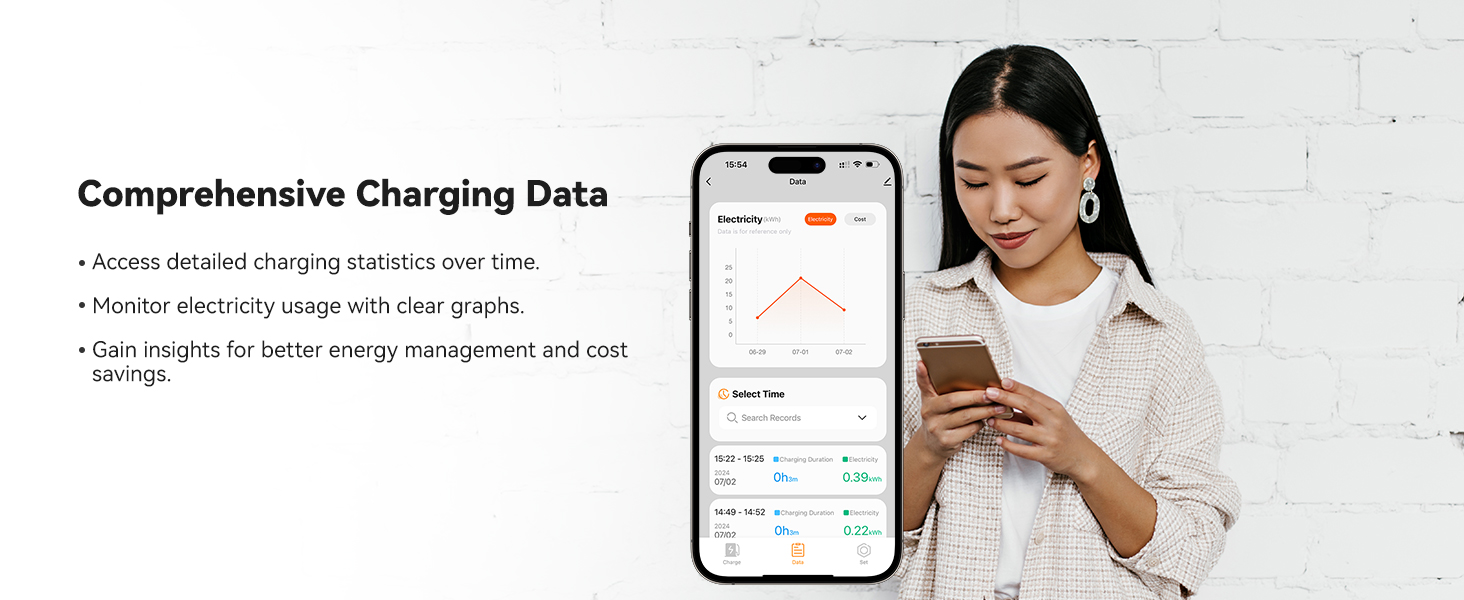
Image 4.1: A professional electrician performing the hardwired installation of an EV charger, emphasizing the need for expert service.
5. 操作手順
The WOLFBOX EV Charger offers multiple ways to manage your charging sessions.
5.1 Smart Display Overview
The 4.3-inch LCD screen on the charger displays real-time charging information, including:
- Charging Rate (kW)
- 充電時間
- 巻tage(V)
- 電流(A)
- Charged Amount (kWh)
- 温度

画像5.1: 詳細な view of the WOLFBOX EV Charger's 4.3-inch smart LCD display showing charging status, and an RFID card being used for authentication.
5.2充電方法
You can initiate and manage charging using the following methods:
- プラグアンドチャージ: Simply connect the J1772 connector to your EV, and charging will begin automatically.
- RFIDカード: Tap one of the provided RFID cards on the charger's sensor to start or stop a charging session. This prevents unauthorized use.
- モバイルアプリコントロール: Connect the charger to your home Wi-Fi network and download the WOLFBOX app to unlock advanced features.
5.3 モバイルアプリの機能
The WOLFBOX mobile app provides comprehensive control and monitoring capabilities:
- Real-time Charge Monitoring: View live charging data, including power, voltage、電流、温度。
- 定期充電: Set specific start and end times for charging sessions, ideal for utilizing off-peak electricity rates.
- Adjustable Charge Power: Customize the current intensity (e.g., 16A to 50A) to suit your needs or optimize battery life.
- Remote Charging Control: どこからでも充電セッションを開始または停止できます。
- Multi-user Access Management: Share device control with multiple users in your household.
- 音声コントロール: Integrate with Alexa and Google Assistant for convenient voice commands.
- 包括的な充電データ: Access historical charging statistics and monitor electricity usage with graphs.
- パーソナライズされた設定: Customize temperature and cost units, input vehicle details, and control the indicator light.

Image 5.2: A visual breakdown of the smart app's functionalities, including real-time monitoring, scheduled charging, adjustable power, remote control, multi-user access, and integration with voice assistants.
6. 互換性
The WOLFBOX EV Charger is universally compatible with all electric vehicle models that use the SAE J1772 charging standard.
- J1772 Standard: Compatible with the vast majority of EVs in North America.
- Tesla Vehicles: Tesla EVs require a specific adapter to be compatible with the J1772 connector. Please contact WOLFBOX customer service to inquire about obtaining a Tesla adapter.

Image 6.1: The WOLFBOX EV Charger installed and connected to a white electric vehicle, demonstrating its compatibility with various EV models, including Tesla with an adapter.
7. メンテナンス
To ensure the longevity and optimal performance of your WOLFBOX EV Charger, follow these simple maintenance guidelines:
- 定期清掃: Periodically wipe down the charger unit and cable with a soft, damp 布。 刺激の強い化学薬品や研磨剤の入ったクリーナーの使用は避けてください。
- Inspect Cable and Connector: Regularly check the charging cable and J1772 connector for any signs of wear, damage, or fraying. If damage is observed, discontinue use and contact customer support.
- クリアに保つ: Ensure the area around the charger is free from obstructions to allow for proper ventilation.
- ソフトウェアアップデート: The charger supports OTA (Over-The-Air) updates. Ensure your charger's firmware is up-to-date via the mobile app for the best performance and latest features.
8。 トラブルシューティング
If you encounter any issues with your WOLFBOX EV Charger, please refer to the following common troubleshooting steps. If the problem persists, contact customer support.
8.1 一般的な問題と解決策
- 充電器の電源が入らない:
- Check the circuit breaker in your electrical panel to ensure it hasn't tripped.
- Verify that the charger is securely hardwired. If unsure, consult your electrician. - 充電が開始されない:
- Ensure the J1772 connector is fully and securely plugged into your EV's charging port.
- If using RFID, ensure the card is correctly tapped and recognized.
- Check the mobile app for any error messages or paused charging schedules.
- For Tesla vehicles, confirm the adapter is correctly seated and functional. - 充電速度が遅い:
- Verify the current setting in the mobile app; ensure it's set to your desired amperage。
- Check your vehicle's charging settings, as some EVs allow you to limit charging speed.
- Ensure your home's electrical system can deliver the full 50 Amp 容量。 - アプリの接続の問題:
- Ensure your charger is within range of your Wi-Fi router.
- Restart your Wi-Fi router and the charger.
- Check for app updates on your smartphone. - 表示されるエラーメッセージ:
- Note down the specific error code or message displayed.
- Refer to the full user manual (PDF) for a detailed list of error codes and their solutions.
- If the issue is not resolved, contact customer support with the error details.
9. 仕様
Technical details for the WOLFBOX EV Charger Level 2 50 Amp (Model E50).
| 特徴 | 詳細 |
|---|---|
| モデル | E50 |
| 出力 | 最大12kW |
| 電流出力 | 16A/24A/32A/40A/48A/50A (Adjustable) |
| 入力ボリュームtage | 200-240 V AC |
| サーキットブレーカの定格 | 70A or Greater (Required) |
| ケーブル長さ | 25フィート |
| コネクタタイプ | 国際標準化機構(ISO) |
| インストールタイプ | ハードワイヤード |
| 取り付けタイプ | 壁掛け |
| 保護等級 | NEMA 4, IP66 (Waterproof, Dustproof) |
| 動作温度 | -22°F ~ 122°F (-30°C ~ 50°C) |
| 接続性 | Wi-Fi (2.4 GHz 802.11 b/g/n), Bluetooth |
| 画面 | 4.3-inch Smart LCD |
| 安全認証 | CSA、FCC、エネルギースター |
| 寸法 | 12.68インチ x 7.46インチ x 4.76インチ |
| アイテム重量 | 13.45ポンド |
| アップグレード機能 | OTA (Over-The-Air) updates |

Image 9.1: A comprehensive table outlining the technical specifications of the WOLFBOX EV Charger, including power, voltage、電流、および寸法。

Image 9.2: A visual representation of the WOLFBOX EV Charger's dimensions, including width, height, and depth.
10.保証とサポート
WOLFBOX は、高品質の製品と優れた顧客サービスの提供に尽力しています。
10.1 保証情報
Your WOLFBOX EV Charger comes with a 36ヶ月保証 ご購入日から製造上の欠陥が保証対象となります。保証請求の際は、購入証明書を保管してください。
10.2 カスタマーサポート
For any questions, technical assistance, or warranty claims, please contact WOLFBOX customer support:
- 24時間年中無休のカスタマーサポート: Dedicated assistance is available anytime you need it.
- 生涯サポート: WOLFBOX is committed to supporting you for the life of your product.
Refer to the official WOLFBOX website or your purchase documentation for specific contact methods (email, phone, etc.).

Image 10.1: Highlighting WOLFBOX's commitment to customer support, including 24/7 assistance, lifetime product support, and OTA updates for continued reliability.


