1. はじめに
Thank you for choosing the MAXSafes Model 10002V Drop Down Biometric Handgun Safe. This safe is designed to provide secure storage and quick access to your firearm using advanced finger vein recognition, a digital keypad, or a mechanical key. Please read this manual thoroughly before installation and operation to ensure proper use and maximum security.

Figure 1: MAXSafes Model 10002V Drop Down Biometric Handgun Safe
2. 安全情報
警告: Always store firearms unloaded and separate from ammunition. Keep the safe locked and out of reach of children and unauthorized individuals. Never store the mechanical override keys inside the safe. Familiarize yourself with all local and federal laws regarding firearm storage.
- 不正な取り外しを防止するために、金庫がしっかりと取り付けられていることを確認してください。
- Do not leave the safe open or unattended.
- Test all access methods periodically to ensure proper function.
- 電池残量低下のインジケーターが表示されたら、すぐに電池を交換してください。
3. パッケージ内容
パッケージにすべてのアイテムが揃っていることを確認します。
- MAXSafes Model 10002V Handgun Safe
- Mechanical Override Keys (2)
- 取り付け金具(ネジ、アンカー)
- 取扱説明書(本書)
4.製品オーバーview
The MAXSafes 10002V features a robust design with multiple access options for enhanced security and convenience.

Figure 2: Key Features of the MAXSafes 10002V
コンポーネント:
- Finger Vein Scanner: For advanced biometric access.
- デジタルキーパッド: For 4-6 digit combination code entry.
- 鍵穴: For mechanical override key access.
- バッテリーコンパートメント: Located on the underside or rear of the unit.
- 室内LEDライト: Illuminates the safe's interior upon opening.
- 取り付けポイント: For securing the safe to a wall or desk.

Figure 3: Access Methods - Vein Recognition, Digital Keypad, Mechanical Key
5. セットアップ
5.1 バッテリーの取り付け
- Locate the battery compartment, typically on the underside or rear of the safe.
- コンパートメントカバーを開きます。
- 単三電池 4 本 (別売) を挿入し、極性 (+/-) が正しいことを確認します。
- 電池カバーをしっかりと閉じてください。
- The safe will emit a beep, indicating successful power-up.
5.2 Initial Access and Programming
Upon first use, access the safe using the mechanical override key.
- Insert the mechanical key into the keyhole and turn it to unlock the safe.
- 安全ドアを開きます。
5.2.1 Setting a Digital Combination Code
- With the safe door open, locate the internal programming button (usually a small red or green button).
- Press the programming button. The indicator light on the keypad will illuminate.
- キーパッドで希望する 4 ~ 6 桁のコードを入力します。
- Press the programming button again to confirm. The safe will beep to confirm the new code.
- ドアを閉める前に、ドアを開いた状態で新しいコードをテストします。
5.2.2 Registering Finger Vein IDs
The safe can store up to 50 finger vein IDs.
- With the safe door open, press the programming button. The indicator light will illuminate.
- Place your finger firmly on the vein scanner. The scanner will light up and beep.
- Lift and reposition your finger slightly, then place it on the scanner again. Repeat this process 3-5 times from different angles to ensure a comprehensive scan.
- A successful registration will be indicated by a series of beeps.
- Repeat for additional fingers or users (up to 50).
- Test registered finger veins with the door open before closing it.

Figure 4: Finger Vein Recognition Technology
5.3 金庫の取り付け
The safe can be mounted to a wall or desk. Choose a secure location that is out of sight and reach of unauthorized persons.
- Select a suitable mounting location (e.g., under a desk, inside a cabinet, on a wall stud).
- Position the safe in the desired location and mark the mounting points through the pre-drilled holes on the safe's back or bottom.
- Drill pilot holes into the mounting surface using an appropriate drill bit size for the provided hardware.
- Align the safe with the drilled holes and secure it using the provided screws and anchors. Ensure the safe is firmly attached and does not wobble.

図5:例amples of Wall and Desk Mounting Options
6. 操作手順
6.1 Opening with Finger Vein Recognition
- Place a registered finger firmly on the vein scanner.
- The scanner will light up, and the safe will emit a confirmation beep if the vein pattern is recognized.
- The safe door will automatically drop down, providing quick access.
6.2 デジタルキーパッドで開く
- Enter your programmed 4-6 digit combination code on the keypad.
- The safe will emit a confirmation beep if the code is correct.
- The safe door will automatically drop down.
6.3 Opening with Mechanical Key
Use the mechanical key as a backup in case of battery failure or forgotten codes.
- Locate the keyhole cover (if present) and remove it.
- Insert the mechanical key into the keyhole and turn it to unlock the safe.
- The safe door will open.
6.4 サイレントモード
The safe features a silent mode for discreet access. Refer to the safe's specific button layout for activating/deactivating silent mode (often a dedicated button or a combination press).
6.5 アラームモード
The safe is equipped with an audible alarm. This alarm may activate if multiple incorrect access attempts are made or if the safe is tampered with. Consult the safe's interface for specific alarm settings or deactivation procedures.
6.6 インテリア LED ライト
The interior LED light automatically illuminates when the safe door opens, providing visibility in low-light conditions.
7. メンテナンス
7.1 電池の交換
When the low battery indicator (usually a flashing light or specific beep pattern) appears, replace all 4 AA batteries promptly. Use high-quality alkaline batteries for optimal performance.
7.2 クリーニング
金庫の外側を柔らかくて乾いた布で拭いてください。amp cloth. Avoid using abrasive cleaners or solvents that could damage the finish or electronic components. Keep the finger vein scanner clean and free of debris.
7.3 Regular Function Check
Periodically test all access methods (finger vein, keypad, mechanical key) to ensure they are functioning correctly. This helps identify potential issues before they become critical.
8。 トラブルシューティング
If you encounter issues with your MAXSafes 10002V, refer to the following common problems and solutions:
| 問題 | 考えられる原因 | 解決 |
|---|---|---|
| Finger vein not recognized | Improper finger placement, unregistered finger, dirty scanner, skin conditions (e.g., very dry, damaged). | Ensure firm and consistent finger placement. Re-register the finger, trying different angles. Clean the scanner. Try another registered finger or access method. |
| キーパッドが反応しない | 電池残量が少ない、コードが間違っている、キーパッドが故障している。 | Replace batteries. Re-enter code carefully. Use mechanical key if necessary. |
| 金庫が開かない | Low batteries, incorrect access, mechanical obstruction. | Replace batteries. Try all access methods. Check for any obstructions preventing the door from dropping. |
| 低バッテリーインジケーター | 電池残量が少なくなっています。 | すぐに単三電池 4 本すべてを交換してください。 |
9. 仕様
Detailed specifications for the MAXSafes Model 10002V:
- ブランド: マックスセーフ
- モデル番号: 10002V
- 製品寸法: 奥行き11.1インチ x 幅3.8インチ x 高さ13.8インチ
- 商品の重量: 9.55ポンド
- ロックタイプ: Biometric (Finger Vein), Electronic Combination Lock, Key
- 色: 黒
- 容量: 8.7 ポンド
- 材料: Carbon Steel (16 gauge)
- 特集: Sensor Light, Audible Alarm
- 取り付けタイプ: 壁掛け、デスクマウント
- 国際コード: 762736839353
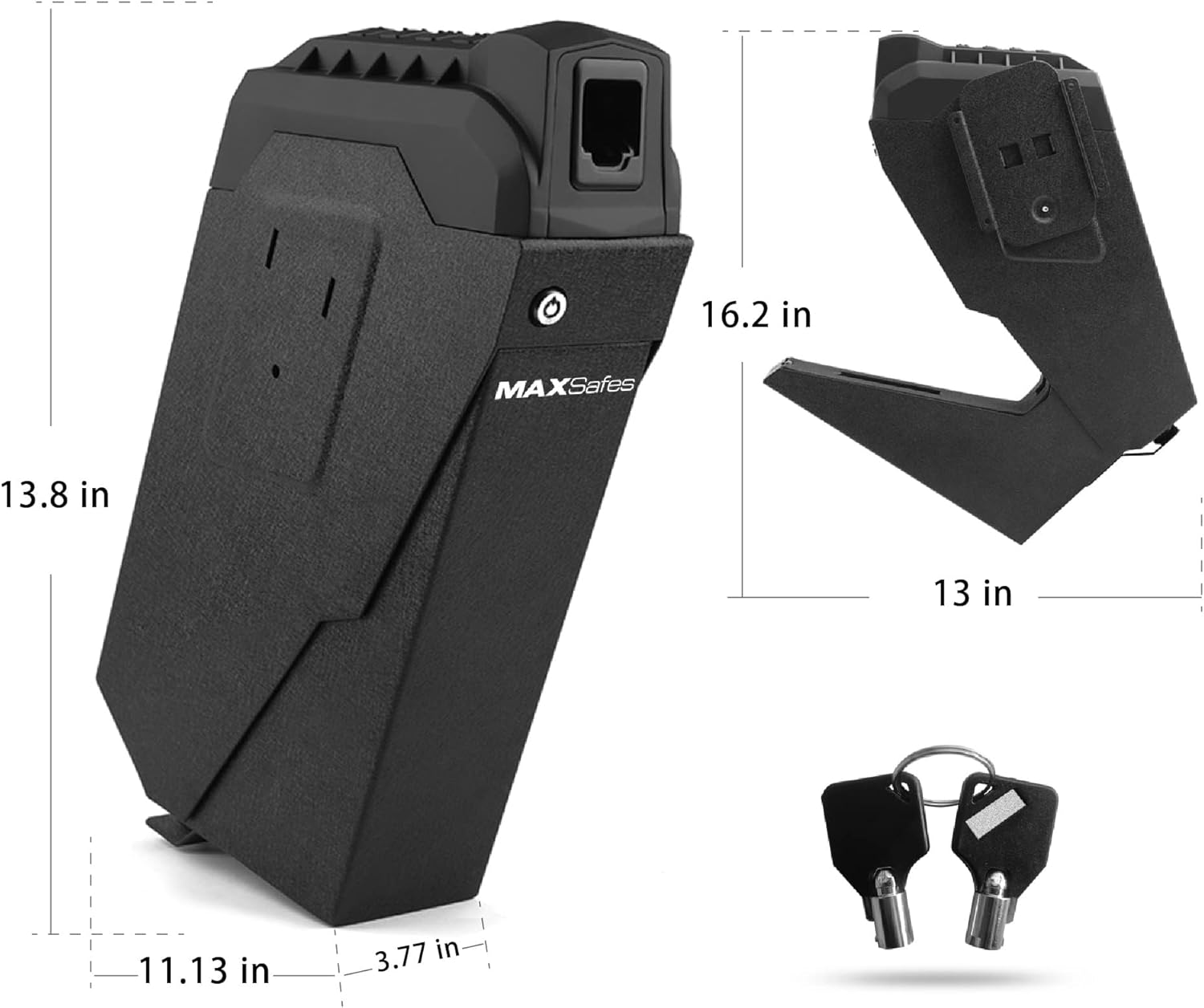
Figure 6: Product Dimensions and Included Keys
10. 保証とサポート
MAXSafes products are manufactured to high-quality standards. For warranty information or technical support, please refer to the contact details provided with your purchase documentation or visit the official MAXSafes webサイトでご確認ください。保証請求の際は購入証明として領収書を保管してください。


