1.製品オーバーview
The MiBOXER Y3 RGB+CCT Vertical Remote provides comprehensive control over compatible RGB+CCT LED lighting systems. This remote allows for precise adjustments of RGB colors, color temperature (CCT), and brightness. Utilizing 2.4GHz wireless technology, it ensures reliable communication with your lighting devices. Its ergonomic vertical design and intuitive interface are designed for ease of use, enabling users to effortlessly customize lighting for various environments.
主な特徴:
- RGB, CCT, and Brightness Control: Adjust colors, color temperature, and brightness with ease.
- 2.4GHzワイヤレステクノロジー: 信頼性の高い長距離接続を保証します。
- 垂直デザイン: Ergonomic and easy-to-use layout for quick adjustments.
- Multi-Color and Dimmable: Create customized lighting scenes with vibrant colors and dimming options.
- 多彩な互換性: Works with MiBOXER RGB+CCT lighting products.
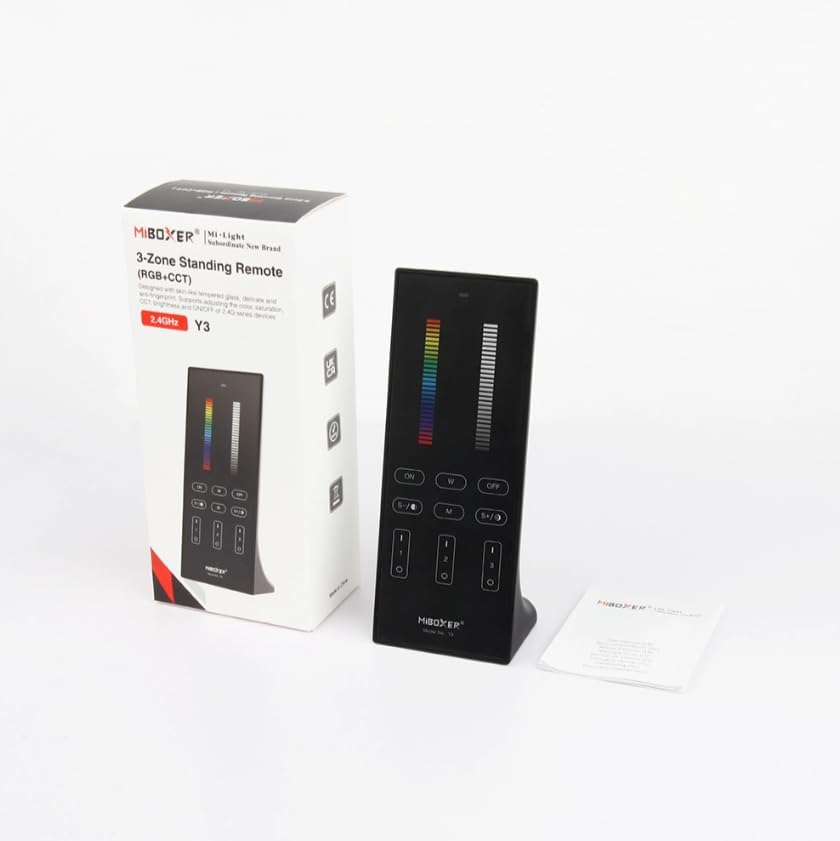
Figure 1: MiBOXER Y3 RGB+CCT Vertical Remote with its retail packaging.
2. セットアップ手順
2.1 バッテリーの取り付け
The MiBOXER Y3 remote requires two AAA batteries (not included). To install:
- リモコンの背面にある電池ケースのカバーを見つけます。
- カバーを下方向にスライドさせて開きます。
- 正しい極性 (+ と -) を確認して、単 4 電池 2 本を挿入します。
- カチッと音がしてしっかりと音がするまでカバーをスライドさせて元の位置に戻します。
2.2 Linking the Remote to Lighting Devices
To control your MiBOXER RGB+CCT lighting devices, the remote must be linked to them. This process typically involves a specific sequence of actions on both the remote and the lighting device. Refer to your specific MiBOXER lighting product's manual for detailed linking instructions, as the procedure may vary slightly between different light models. A common linking procedure is as follows:
- Ensure the lighting device is powered off.
- Power on the lighting device.
- Within 3 seconds of powering on the light, press the "Zone ON" button (labeled "I" or "1") on the remote for the desired zone.
- The light should flash several times, indicating successful linking.
- If linking fails, repeat the process.
To unlink a device from a zone, power on the light and within 3 seconds, press the "Zone ON" button (labeled "I" or "1") five times rapidly for the corresponding zone. The light should flash multiple times to confirm unlinking.
3. 操作手順
The MiBOXER Y3 remote features an intuitive layout for controlling various lighting parameters. Familiarize yourself with the buttons and sliders as shown in Figure 2.

Figure 2: MiBOXER Y3 Remote Control button layout and functions.
3.1 ボタンの機能:
| ボタン/コントロール | 関数 |
|---|---|
| インジケーターライト | Flashes to confirm button presses. |
| RGBスライダー | Slide to select desired RGB color. |
| 明るさスライダー | Slide to adjust light brightness (0-100%). |
| Master ON (I/ON) | Turns all linked lights ON. |
| Master OFF (O/OFF) | Turns all linked lights OFF. |
| White Light (W) | 純白色光モードを有効にします。 |
| Speed-/CCT-/Saturation- | Decreases speed in dynamic mode, decreases color temperature (warmer white), or decreases color saturation. |
| Speed+/CCT+/Saturation+ | Increases speed in dynamic mode, increases color temperature (cooler white), or increases color saturation. |
| Dynamic Mode (M) | Cycles through various dynamic lighting effects. Press repeatedly to change effects. |
| Zone ON (1, 2, 3 - "I") | Turns ON lights linked to the specific zone. Used for linking/unlinking. |
| Zone OFF (1, 2, 3 - "O") | Turns OFF lights linked to the specific zone. |
3.2一般的な操作:
- ライトのオン/オフ: Use the "Master ON" or "Master OFF" buttons for all lights, or "Zone ON" / "Zone OFF" for specific zones.
- 色の調整: Slide your finger along the "RGB Slider" to select your desired color.
- 明るさの調整: Slide your finger along the "Brightness Slider" to increase or decrease the light intensity.
- 色温度(CCT)の調整: In white light mode, use the "CCT-" and "CCT+" buttons to make the white light warmer or cooler.
- ダイナミックモード: Press the "M" button to activate dynamic lighting modes. Use "Speed-" and "Speed+" to adjust the speed of the current dynamic effect.
- 彩度調整: In RGB mode, use "Saturation-" and "Saturation+" to adjust the intensity of the color.
4. メンテナンス
Proper maintenance ensures the longevity and optimal performance of your MiBOXER Y3 remote.
- クリーニング: Wipe the remote with a soft, dry cloth. Do not use abrasive cleaners, solvents, or wet cloths, as these can damage the surface or internal components.
- バッテリー交換: Replace batteries when the indicator light becomes dim or the remote's response becomes inconsistent. Always use new AAA batteries and dispose of old batteries responsibly.
- ストレージ: リモコンは、直射日光や極端な温度を避け、涼しく乾燥した場所に保管してください。長期間保管する場合は、液漏れを防ぐため、電池を取り外してください。
- 湿気を避ける: This remote is not waterproof. Keep it away from water and high humidity environments.
5。 トラブルシューティング
If you encounter issues with your MiBOXER Y3 remote, refer to the following troubleshooting steps:
| 問題 | 考えられる原因 | 解決 |
|---|---|---|
| Remote not responding to button presses. | 電池切れまたは電池残量が少ない。 リモコンがライトにリンクされていません。 範囲外です。 | 電池を交換してください。 Re-link the remote to the lighting devices (refer to Section 2.2). Move closer to the lighting devices. |
| ライトの色/明るさが変化しません。 | 間違ったモードが選択されました。 Remote not linked to the specific zone. | Ensure you are in the correct mode (e.g., RGB for color, CCT for white temperature). Verify the remote is linked to the correct zone. |
| Indicator light not flashing. | 電池切れ。 内部障害。 | 電池を交換してください。 バッテリーを交換しても問題が解決しない場合は、カスタマー サポートにお問い合わせください。 |
| Interference with other 2.4GHz devices. | 他のワイヤレスデバイスとの近接性。 | Move the remote or other 2.4GHz devices further apart. |
6. 仕様
Technical specifications for the MiBOXER Y3 RGB+CCT Vertical Remote.
| 特徴 | 詳細 |
|---|---|
| モデル番号 | Y3 |
| ブランド | ミボクサー |
| コントロールタイプ | RGB+CCT Vertical Remote |
| ワイヤレステクノロジー | 2.4GHz |
| 電源 | 2x AAA 電池 (別売) |
| 特集 | RGB/CCT/brightness dimmable |
| アイテム重量 | 4.8オンス(約136グラム) |
| パッケージ寸法 | 6.5 x 3 x 2インチ(約16.5 x 7.6 x 5.1 cm) |


Figure 3: Dimensions of the MiBOXER Y3 Remote Control and its packaging.
7. 保証とサポート
For warranty information, please refer to the documentation provided with your specific MiBOXER lighting product or contact the retailer where the product was purchased. MiBOXER products typically come with a manufacturer's warranty covering defects in materials and workmanship.
技術サポートやさらなる支援については、MiBOXERの公式ウェブサイトをご覧ください。 web販売店のウェブサイトをご覧いただくか、カスタマーサービス部門にお問い合わせください。連絡先は通常、製品のパッケージまたはブランドの公式ウェブサイトに記載されています。


