1. はじめに
This manual provides detailed instructions for the HOU Keyboard Case designed for the iPad Pro 13-inch M5/M4 models. Please read this manual carefully before use to ensure proper operation and to maximize the product's lifespan.
1.1 互換性
このキーボードケースは、 iPad Pro 13-inch M5/M4 (2025 models). Compatible iPad models include: A2925、A2926、A3007.
Important: This case is NOT compatible with iPad Air 13 (M2) 2024 (models A2898, A2899, A2900) or iPad Pro 12.9-inch (2017-2022) (6th/5th/4th/3rd/2nd/1st generation).
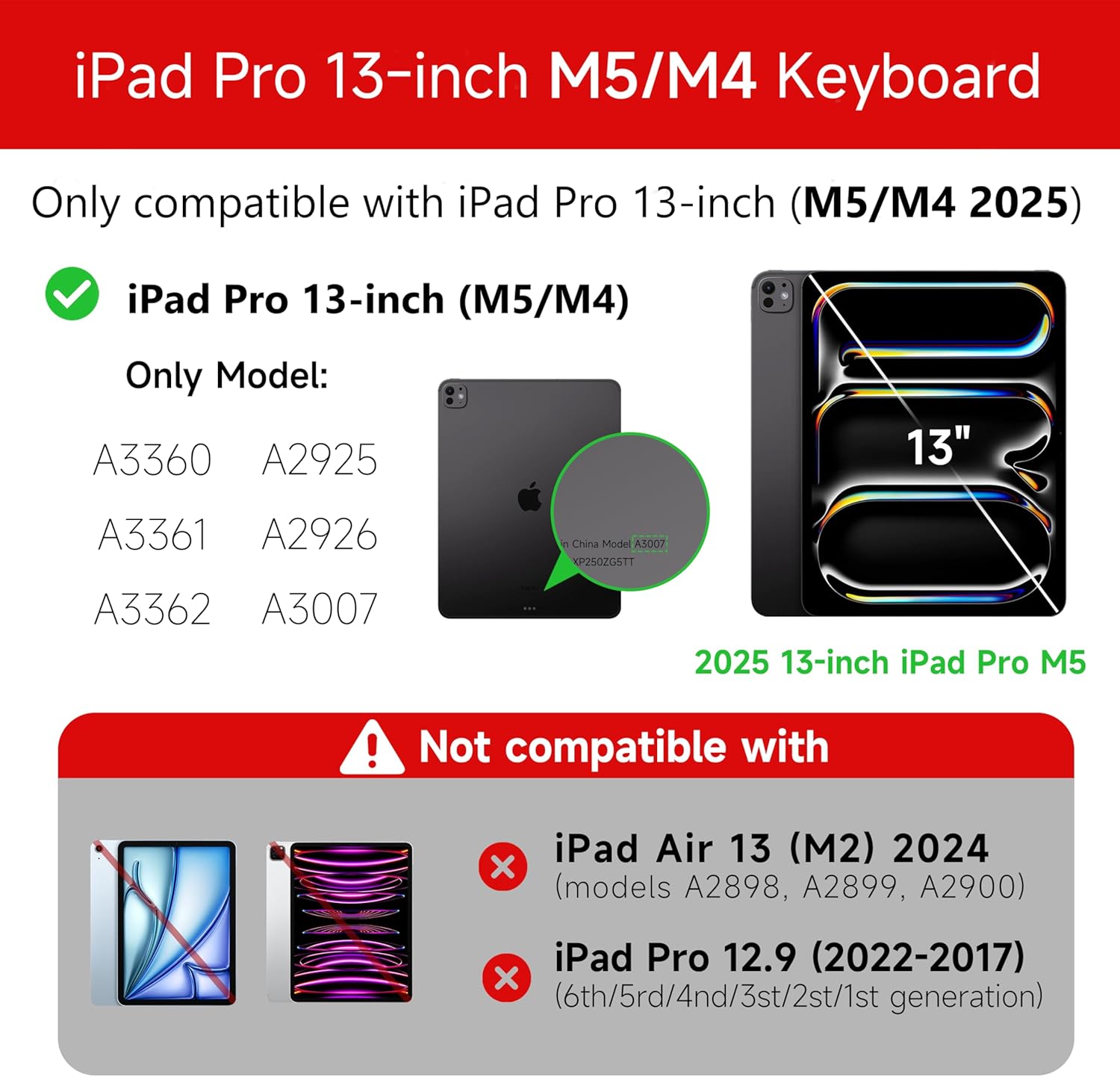
Figure 1: Compatibility details for the HOU iPad Pro 13-inch Keyboard Case.
2. セットアップ
2.1 キーボードの充電
Before initial use, fully charge the keyboard. Connect the provided USB-C cable to the charging port on the keyboard and to a power source. The charging indicator light will show the charging status.
- 充電ポート: タイプC
- 充電時間: Approximately <2 hours
- バッテリー容量: 500mAh
2.2 Attaching Your iPad Pro
The keyboard case features a magnetic design for secure attachment. Align your iPad Pro 13-inch with the magnetic back panel of the case. The strong magnets will securely hold your iPad in place, providing stability.

Figure 2: Magnetic attachment for secure iPad placement.
2.3 Bluetooth接続
To connect the keyboard to your iPad Pro via Bluetooth:
- キーボードが充電され、電源がオンになっていることを確認します。
- iPadで、 設定 > Bluetooth Bluetoothをオンにします。
- キーボードで長押し Fn + Control + R for 3 seconds until the indicator light flashes, indicating pairing mode.
- On your iPad, select the keyboard from the list of available devices (e.g., "HOU Keyboard").
- 接続されると、キーボードのインジケーター ライトの点滅が停止します。
After the initial connection, the keyboard should automatically reconnect to your iPad when both devices are powered on and Bluetooth is enabled.
3. 操作手順
3.1調整可能 View角度を変える
The keyboard case features a floating design that allows for angle adjustment up to 135 degrees. The keyboard base opens at a 45-degree angle, providing enhanced stability for various viewing および typeing の位置。
図3: 調整可能 viewing angle up to 135 degrees.
3.2 バックライト機能
The keyboard features an adaptive backlight with 7 different colors and 3 adjustable brightness levels. This allows for comfortable typing in various lighting conditions, including low-light environments.

Figure 4: Keyboard backlight in use for typing at night.
3.3 マルチタッチトラックパッド
The integrated multi-touch trackpad supports full-area press and various swipe gestures, transforming your iPad into a laptop-like experience. It provides responsive controls for scrolling, dragging, input, and media control.
Adjusting Trackpad Sensitivity: You can adjust the trackpad sensitivity directly from your iPad's settings to match your personal preference.
- へ移動 設定 iPadで。
- 移動 アクセシビリティ.
- Find and adjust 追跡感度.

Figure 5: Multi-touch trackpad functionality and sensitivity adjustment.
3.4つのショートカットキー
The keyboard includes a series of shortcut keys to boost productivity. Refer to the keyboard layout for specific functions.
4. メンテナンス
The exterior of the keyboard case is made from a semi-silicone material, which is wear-resistant and designed to resist fingerprints and stains, making it easy to clean.
- 清掃するには、表面を柔らかくて柔らかい布で優しく拭いてください。amp 布。
- 仕上げにダメージを与える可能性があるため、刺激の強い化学薬品や研磨材の使用は避けてください。
- Ensure the charging port and keys are free from dust and debris.
5。 トラブルシューティング
5.1 キーボードが Bluetooth 経由で接続されない
- キーボードが完全に充電されていることを確認してください。
- iPad で Bluetooth が有効になっていることを確認してください。
- Re-enter pairing mode on the keyboard by pressing and holding Fn + Control + R 3秒間。
- iPad の Bluetooth 設定でデバイスを削除し、再度ペアリングを試みます。
- iPadとキーボードの両方を再起動します。
5.2 トラックパッドの遅延または無反応
- This can sometimes occur due to Bluetooth connectivity. Try turning the keyboard off and then back on.
- Ensure there are no obstructions between the keyboard and the iPad that might interfere with the Bluetooth signal.
- Check for any available iPadOS updates, as software improvements can sometimes resolve connectivity issues.
5.3 バックライトが機能しない
- キーボードのバッテリー残量が十分であることを確認してください。
- Check the keyboard's function keys for backlight control (usually a dedicated key or Fn combination).
6. 仕様
| 特徴 | 詳細 |
|---|---|
| ブランド | ハウ |
| 対応デバイス | 2025 (M4/M5) iPad Pro 13-inch (A2925/A2926/A3007) |
| 接続技術 | ブルートゥース5.2 |
| キーボードの説明 | Multi-functional with Trackpad |
| 推奨用途 | 個人的 |
| 特集 | Trackpad, Backlit, Hot Keys & Media Keys, Rechargeable, Lightweight |
| 色 | 白 |
| バックライトの色 | 7 RGB カラー |
| 製品寸法(長さ x 幅 x 高さ) | 32 x 24.2 x 2.7 cm |
| 材料 | Aluminum, Metal, ABS, Polyurethane (PU), Semi-silicone |
| アイテム重量 | 1.1キログラム |
| 電源 | 電池駆動 |
| バッテリー容量 | 約500mAh |
| 動作電流 | <10mA |
| 待機時間 | ≥ 30日 |
| 動作距離 | ≤10m |
7. サポート
For any questions or further assistance, please contact the seller directly through your Amazon account:
- Amazonアカウントにログインします。
- 「注文履歴」へ進みます。
- Locate your order for the HOU iPad Pro 13-inch Keyboard Case.
- 「販売者に連絡」をクリックします。


