1. はじめに
This manual provides essential instructions for the safe and efficient use of your DALI IO-8 Wireless/Wired Hi-Fi Headphones. Please read this manual thoroughly before using the product and retain it for future reference. The DALI IO-8 headphones are designed to deliver a high-fidelity audio experience with advanced features such as Active Noise Cancellation (ANC), Bluetooth AptX Adaptive connectivity, and a long-lasting battery.
2.製品オーバーview
Familiarize yourself with the components and controls of your DALI IO-8 headphones.

図2.1: フロント view of the DALI IO-8 headphones, showcasing the caramel and white color scheme and overall design.

図2.2: トップダウン view of the DALI IO-8 headphones, highlighting the earcups and visible control buttons on the side.
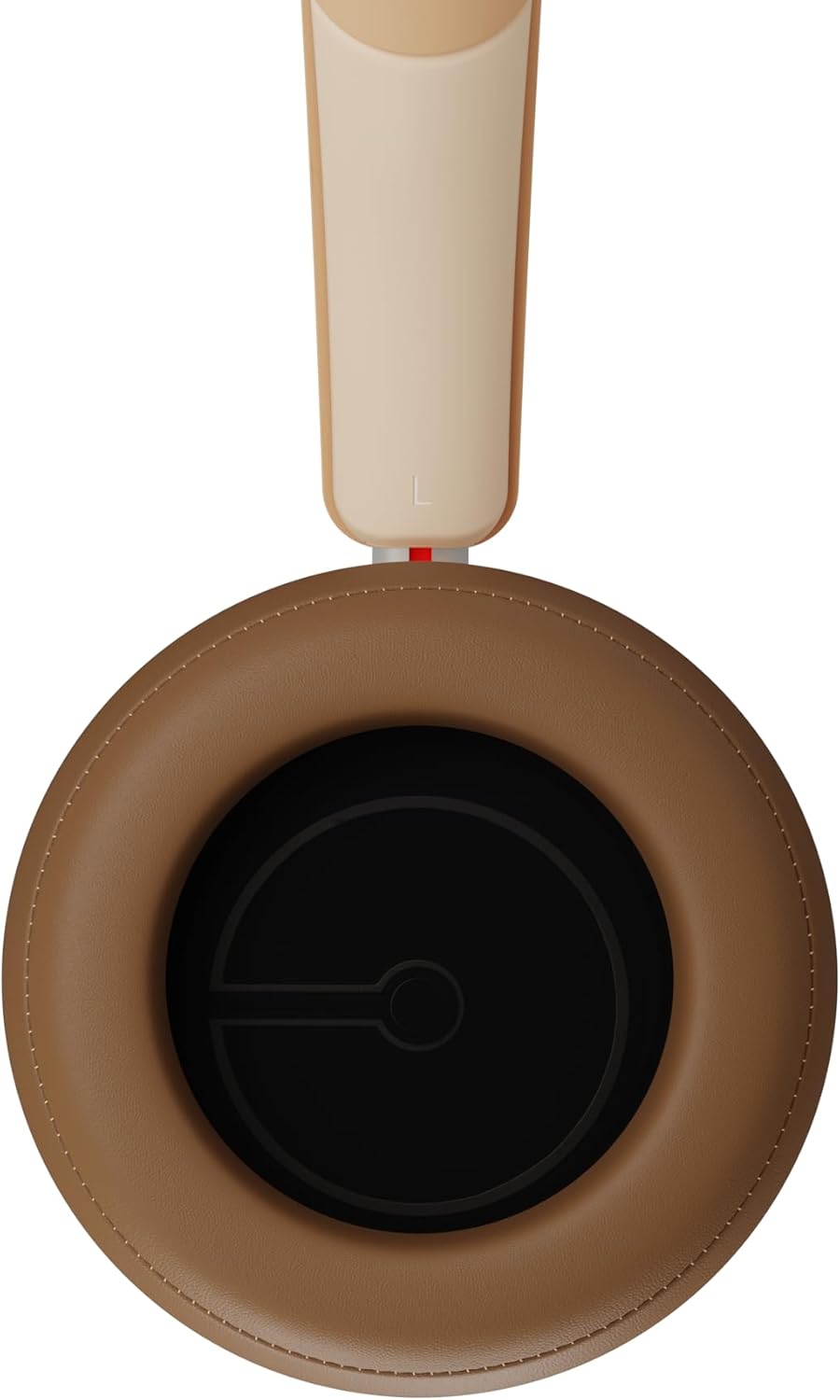
図2.3: インテリア view of a DALI IO-8 earcup, showing the soft padding and driver grille, designed for comfort and sound delivery.

図2.4: 閉じる view of the DALI IO-8 earcup, showing the USB-C charging port and other control buttons.
2.1 パッケージ内容
- DALI IO-8 ヘッドフォン
- USB-C充電ケーブル
- 3.5mmオーディオケーブル
- Travel Case (if included)
- ユーザーマニュアル(このドキュメント)
2.2 ヘッドホンコンポーネント

図2.5: 爆発した view illustrating the internal components of the DALI IO-8 headphones, including the 50mm driver, circuitry, and earcup structure.
- Headband (Adjustable)
- Earcups (Over-ear design with genuine leather)
- 50mm Driver (SMC Driver Technology)
- Control Buttons (Power, Volume, ANC, Multifunction)
- USB-C Port (Charging and Wired Audio)
- 3.5mm Audio Jack (Wired Audio)
- Microphones (for ANC and calls)
3. セットアップ
3.1 ヘッドホンの充電
Before initial use, fully charge your DALI IO-8 headphones.
- Connect the supplied USB-C cable to the USB-C port on the headphone earcup.
- USB-C ケーブルのもう一方の端を互換性のある USB 電源 (コンピューターの USB ポート、USB 壁アダプターなど) に接続します。
- The LED indicator will show charging status. A full charge provides up to 35 hours of playback with ANC enabled.
- 完全に充電されたら、ケーブルを外します。
3.2 電源オン/オフ
- 電源を入れるには: LED インジケーターが点灯するまで、電源ボタンを約 2 秒間押し続けます。
- 電源を切るには: LED インジケーターが消えるまで、電源ボタンを約 3 秒間押し続けます。
3.3Bluetoothペアリング
The DALI IO-8 supports Bluetooth AptX Adaptive for high-quality wireless audio.
- ヘッドフォンの電源がオフになっていることを確認してください。
- Press and hold the Power button for approximately 5 seconds until the LED indicator flashes blue rapidly. This indicates pairing mode.
- オーディオ デバイス (スマートフォン、タブレット、コンピューター) で Bluetooth を有効にし、利用可能なデバイスを検索します。
- Select "DALI IO-8" from the list of found devices.
- Once paired, the LED indicator will glow solid blue or flash slowly.
- ヘッドフォンは、電源を入れると、最後にペアリングしたデバイスに自動的に再接続しようとします。
3.4 有線接続
The DALI IO-8 can be used with a wired connection via the 3.5mm audio jack or USB-C.
- 3.5mmオーディオケーブル: Connect one end of the supplied 3.5mm audio cable to the headphone's 3.5mm jack and the other end to your audio source's headphone output. The headphones can be used passively in this mode, or actively with ANC and amplification if powered on.
- USB-Cオーディオ: Connect the supplied USB-C cable to the headphone's USB-C port and the other end to a compatible USB audio output on your computer or device. This mode allows for digital audio transmission and charging simultaneously.
4. ヘッドホンの操作
4.1 アクティブノイズキャンセレーション(ANC)
The DALI IO-8 features three distinct ANC modes and wind noise suppression.
- Press the dedicated ANC button to cycle through the available modes:
- ANCオン: 最大限のノイズキャンセル。
- 透明モード: 状況認識のために周囲の音を通過させます。
- ANC オフ: Active noise cancellation is disabled.
- Wind noise suppression is automatically engaged in ANC modes to reduce interference from wind.
4.2つのサウンドモード
Customize your listening experience with two sound profiles.
- Press the Sound Mode button (if available, or refer to specific button on device) to switch between:
- Hi-Fiモード: Delivers a balanced and neutral sound signature.
- 低音モード: Enhances low-frequency response for a more impactful bass.
4.3 Playback and Volume Control
Use the control buttons on the earcup for media playback and volume adjustments.
- ボリュームアップ: 「+」ボタンを押します。
- ボリュームダウン: 「-」ボタンを押します。
- 再生/一時停止: 多機能ボタンをXNUMX回押します。
- 次のトラック: マルチファンクションボタンを2回押します。
- 前のトラック: Triple-press the Multifunction button.
4.4 通話管理
Manage phone calls when connected via Bluetooth.
- 通話の応答/終了: 多機能ボタンをXNUMX回押します。
- 通話を拒否: 多機能ボタンを2秒間押し続けます。
- 音声アシスタントを有効にする: Press and hold the Multifunction button for 2 seconds (when not on a call).
5. メンテナンス
5.1 クリーニング
- 柔らかく、乾いた、糸くずの出ない布でヘッドフォンを拭いてください。
- 研磨剤入りの洗剤、溶剤、化学スプレーは使用しないでください。
- イヤーカップは、軽く絞った布で優しく拭いてください。amp 必要に応じて布で拭き、すぐに乾燥させてください。
- ポートや開口部に湿気が入らないようにしてください。
5.2 ストレージ
- When not in use, store the headphones in their protective travel case to prevent damage.
- ヘッドフォンを極端な温度、湿度、直射日光にさらさないでください。
6。 トラブルシューティング
| 問題 | 考えられる原因 | 解決 |
|---|---|---|
| 電源なし | 電池が消耗しています。 | 付属のUSB-Cケーブルを使用してヘッドフォンを充電します。 |
| Bluetoothでペアリングできない | ヘッドフォンがペアリングモードになっていない、デバイスの Bluetooth がオフになっている、デバイスから遠すぎる。 | Ensure headphones are in pairing mode (rapid blue LED flash). Turn on Bluetooth on your device. Move headphones closer to the device. Forget "DALI IO-8" on your device and re-pair. |
| 音が出ない | Volume too low; incorrect input source; headphones not connected. | Increase volume on headphones and source device. Check Bluetooth connection or wired cable. Ensure the correct audio output is selected on your device. |
| ANCが効果的に機能していない | ANC mode off; poor earcup seal. | Ensure ANC is enabled. Adjust headphones for a proper seal around your ears. |
7. 仕様
| 特徴 | 詳細 |
|---|---|
| モデル名 | DALI IO-8 |
| ブランド | ダリ |
| 接続技術 | 有線、無線(Bluetooth) |
| 無線通信技術 | Bluetooth (AptX Adaptive) |
| ノイズキャンセリング | Active Noise Suppression (ANC) with Wind Noise Suppression |
| 耳の位置 | オーバーイヤー |
| ドライバーサイズ | 50mm (SMC Driver Technology) |
| インピーダンス | 25オーム |
| ヘッドホンジャック | 3.5ミリメートル |
| バッテリー寿命 | 最大35時間(ANC使用時) |
| 材料 | Genuine Leather (earcups) |
8. 安全情報
Please observe the following safety guidelines to ensure safe operation and prevent damage to your headphones or injury to yourself.
- Do not expose the headphones to water, rain, or moisture.
- 極端な温度を避けてください。
- Do not disassemble, repair, or modify the headphones. This voids the warranty.
- 聴覚障害を防ぐために、適度な音量で聴いてください。
- お子様の手の届かない場所に保管してください。
- 製品は地域の規制に従って責任を持って廃棄してください。
9. 保証とサポート
DALI products are manufactured to high standards and are covered by a limited warranty. For specific warranty terms and conditions, please refer to the warranty card included with your product or visit the official DALI website. For technical support, troubleshooting assistance, or service inquiries, please contact your authorized DALI dealer or DALI customer support.

図9.1: A person wearing the DALI IO-8 headphones, demonstrating their comfortable fit and use in a real-world environment.


