1. はじめに
Thank you for choosing the OFFNOVA Hat Heat Press Machine. This manual provides essential information for the safe and efficient operation, maintenance, and troubleshooting of your new heat press. Designed for both sublimation and HTV iron-on projects, this machine offers precise temperature and time control, ensuring consistent and professional results for various cap styles.
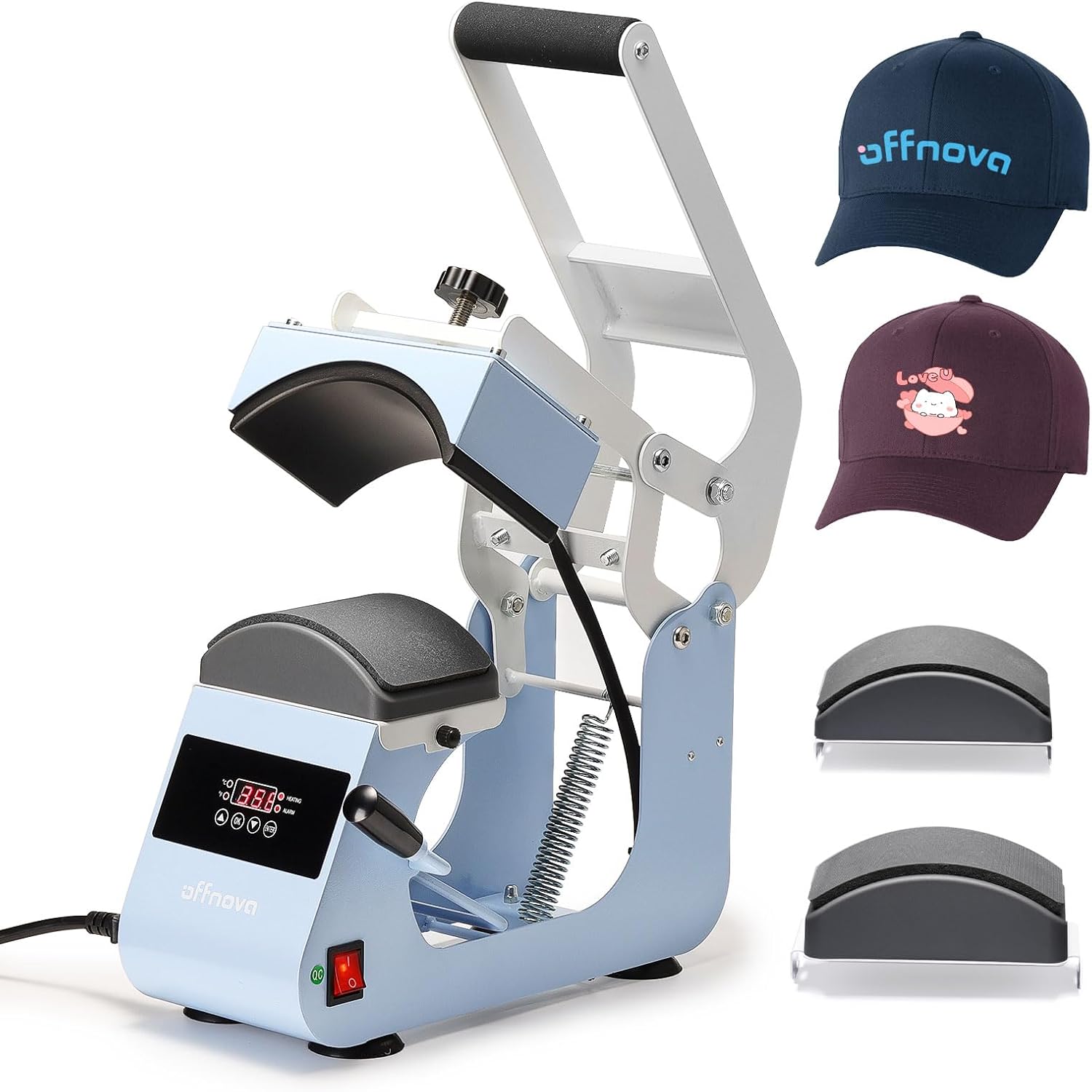
Figure 1.1: OFFNOVA Hat Heat Press Machine (Handle-Blue) with example hats.
主な特徴:
- Rapid & Even Heating: One-piece cast aluminum heating plate with Teflon coating for uniform heat distribution up to 400°F (204°C).
- Easy & Stable Operation: Ergonomic handle and four-bar linkage system, combined with anti-slip silicone suction cups for stability.
- Dual Cap Platens: Includes 2 interchangeable hat bases with different curvatures to fit 99% of cap styles, plus a built-in hat stretcher.
- 調整可能な圧力制御: Easy-to-turn pressure knob for fine-tuning pressing force.
- Smart Auto Countdown: Automatic timing initiation upon handle pull-down and audible alert upon completion.
2. Components and Setup
2.1 開梱と検査
Carefully remove all components from the packaging. Inspect the machine for any signs of damage during transit. Retain the original packaging for future storage or shipping.
2.2 コンポーネントの識別
Familiarize yourself with the main parts of your heat press machine:
- Heating Platen (Upper)
- Lower Platen (Interchangeable)
- Control Panel (Digital Display, Temp/Time Buttons)
- 圧力調整ノブ
- 操作ハンドル
- 電源スイッチ
- 電源コード差込口
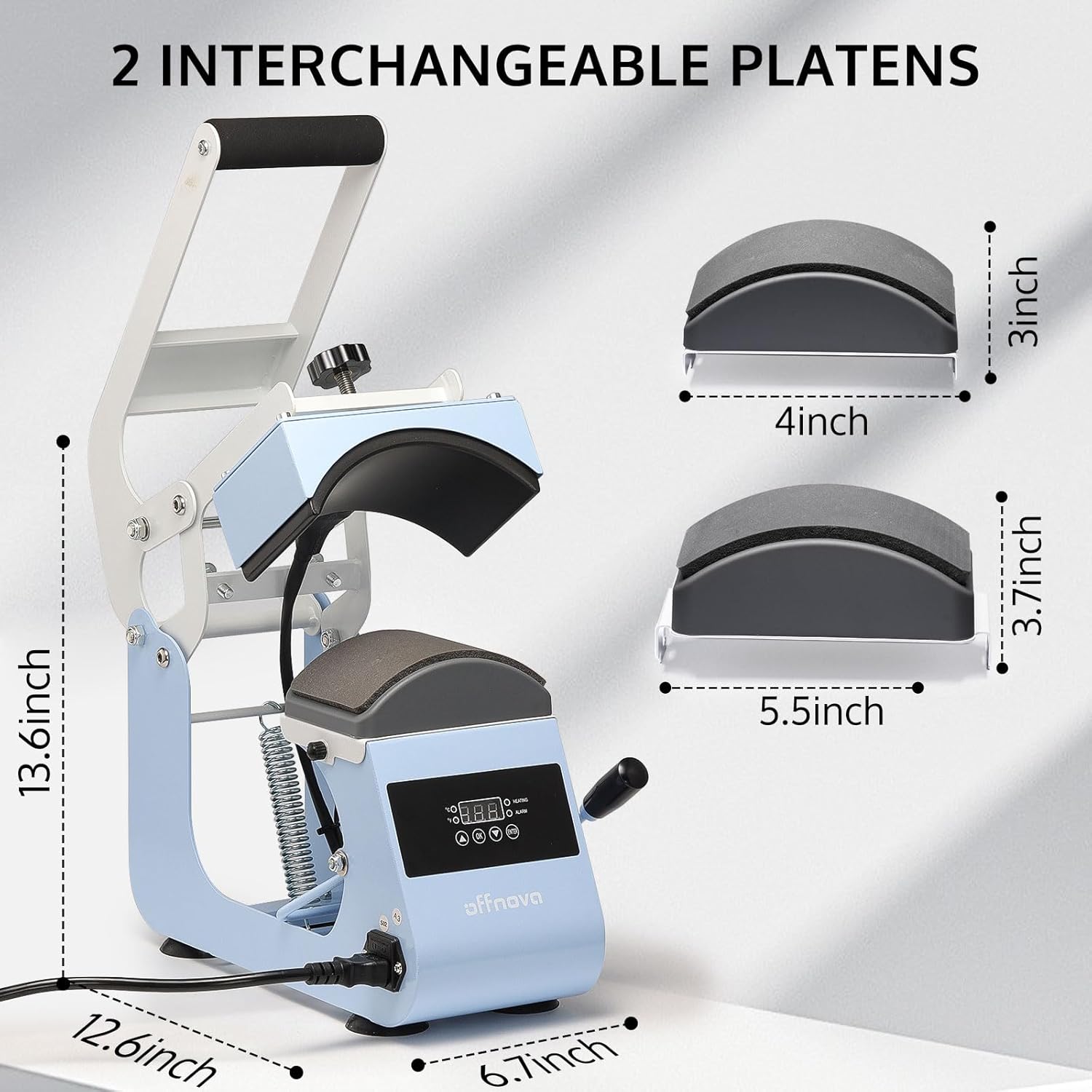
Figure 2.1: Machine dimensions and interchangeable platens (4x3 inch and 5.5x3.7 inch).
2.3 初期設定
- Place the heat press on a stable, heat-resistant surface. Ensure adequate ventilation around the machine.
- Connect the power cord to the machine's power inlet and then to a grounded electrical outlet (AC110V/60Hz).
- プラグを差し込む前に、電源スイッチがオフになっていることを確認してください。
- Select and install the appropriate lower platen for your cap size. The machine comes with two interchangeable platens to accommodate various cap styles.
3. 操作手順
3.1コントロールパネルオーバーview

Figure 3.1: Digital Control Panel for Temperature and Time.
- デジタルディスプレイ: 現在の温度と設定時刻を表示します。
- 温度制御: Adjustable from 0-400°F (0-204°C).
- 時間制御: Adjustable from 0-999 seconds.
- 力: 500W。
- 巻tage: AC110V/60Hz。
- Time Up Alarm: Alerts when the set time is complete.
- 自動カウントダウン: Initiates automatically when the handle is pressed down.
3.2 圧力の調整
The pressure adjustment knob, located on top of the heating platen, allows you to fine-tune the pressing force. Turn clockwise to increase pressure and counter-clockwise to decrease pressure. Adjust based on the thickness of the cap and transfer material for optimal results.
3.3 Step-by-Step Operation
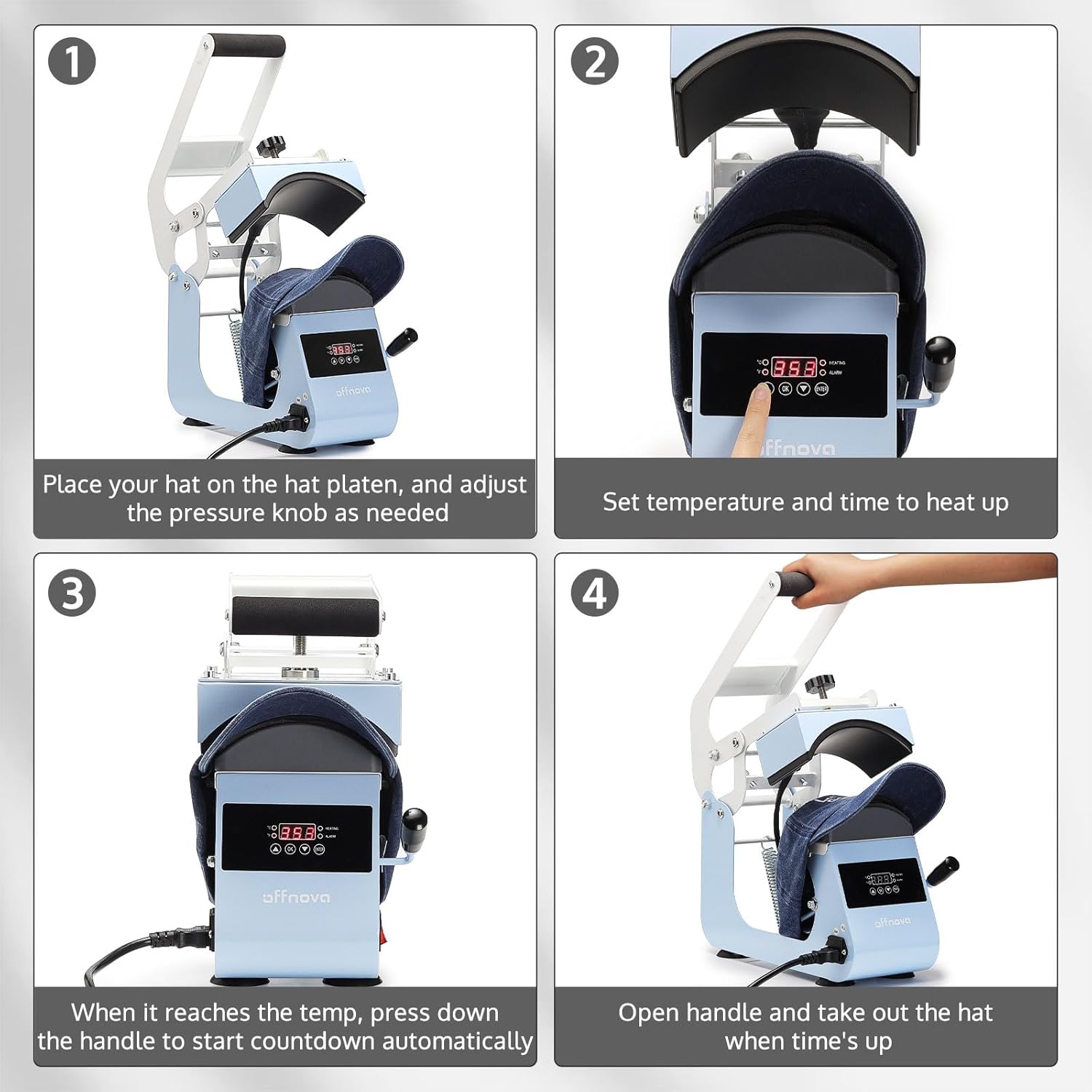
Figure 3.2: Four-step operation guide.
- Prepare the Hat: Place your hat on the lower platen. Adjust the pressure knob as needed to ensure a snug fit and even contact.
- 温度と時間を設定します: Turn on the power switch. Use the control panel to set your desired temperature and time according to your transfer material's specifications. The machine will begin to heat up.
- Initiate Pressing: Once the machine reaches the set temperature, place your transfer design on the hat. Pull the operating handle down firmly to engage the heating platen. The automatic countdown will begin.
- 転送完了: When the set time expires, an alarm will sound. Release the handle and carefully remove the hat. Allow the transfer to cool if required by the material's instructions.

Figure 3.3: Machine in use, demonstrating versatile application.
4. メンテナンス
4.1 クリーニング
- 清掃する前に必ず機械の電源プラグを抜き、完全に冷めるまで待ってください。
- テフロン加工された加熱プレートを柔らかくて乾いた布で拭いてください。amp cloth. Do not use abrasive cleaners or harsh chemicals, as they can damage the coating.
- Clean the lower platen and exterior surfaces with a damp 布。
- Ensure no liquids enter the control panel or electrical components.
4.2 ストレージ
Store the heat press in a dry, dust-free environment. If possible, use the original packaging for protection. Keep out of reach of children.
5。 トラブルシューティング
このセクションでは、発生する可能性のある一般的な問題について説明します。ここに記載されていない問題については、カスタマーサポートにお問い合わせください。
| 問題 | 考えられる原因 | 解決 |
|---|---|---|
| マシンの電源が入りません。 | 電源コードが接続されていない、電源スイッチがオフ、コンセントに問題がある。 | Ensure power cord is securely plugged in. Turn power switch ON. Test outlet with another device. |
| 温度が設定値に達しません。 | 温度設定が正しくありません。加熱要素に問題があります。 | Verify temperature setting. Allow sufficient time for preheating. If issue persists, contact support. |
| Uneven heat transfer or poor adhesion. | Uneven pressure; Incorrect temperature/time; Material not suitable. | Adjust pressure knob for even contact. Verify temperature and time settings for your material. Ensure material is compatible with heat pressing. |
| Automatic countdown not starting. | Handle not fully pressed down. | Ensure the operating handle is fully depressed to activate the sensor for the automatic countdown. |
6. 仕様
| 特徴 | 詳細 |
|---|---|
| モデル番号 | HPM-H0 |
| ブランド | オフノバ |
| 上限温度定格 | 400°F (204°C) |
| 力 | 500W |
| 巻tage | AC110V/60Hz |
| 製品寸法 | 長さ12.6インチ x 幅6.7インチ x 高さ13.6インチ |
| アイテム重量 | 15.57ポンド |
| 材料 | アルミニウム |
| 推奨用途 | キャップ、帽子 |
7. 保証情報
The OFFNOVA Hat Heat Press Machine (Model HPM-H0) comes with a 1年間保証 ご購入日から1年間有効です。本保証は、通常の使用における製造上の欠陥および故障を対象としています。保証請求の際は、購入証明書を保管してください。
For detailed warranty terms and conditions, please refer to the warranty card included with your product or visit the official OFFNOVA webサイト。
8. カスタマーサポート
If you have any questions, require technical assistance, or need to report an issue with your OFFNOVA Hat Heat Press Machine, please contact our customer support team.
Please have your model number (HPM-H0) and purchase information ready when contacting support to expedite assistance.
For more information and resources, you may visit the OFFNOVA Store on Amazon.


