導入
Thank you for choosing the KLIM K7 Cassette Tape Player and MP3 Converter. This device allows you to enjoy your classic cassette tapes and convert them into digital MP3 files for modern playback. It features a built-in microphone for recording, an integrated speaker, and a rechargeable battery for portability. This manual provides detailed instructions for setup, operation, and maintenance of your KLIM K7.
製品終了view
主な特徴
- Cassette to MP3 Converter: Effortlessly convert cassette tapes to digital MP3 files directly onto an SD card.
- ポータブルデザイン: Lightweight and compact for on-the-go listening.
- 内蔵マイク: Record audio directly to the SD card.
- 内蔵スピーカー: Share your audio without external devices.
- 充電式バッテリー: Integrated 1000mAh battery provides extended playback.
- SD Card Player: MP3を再生 file■SDカードに保存されています。
- 3.5mmイヤホンジャック: For private listening with included earphones.
デバイスのコンポーネントとコントロール
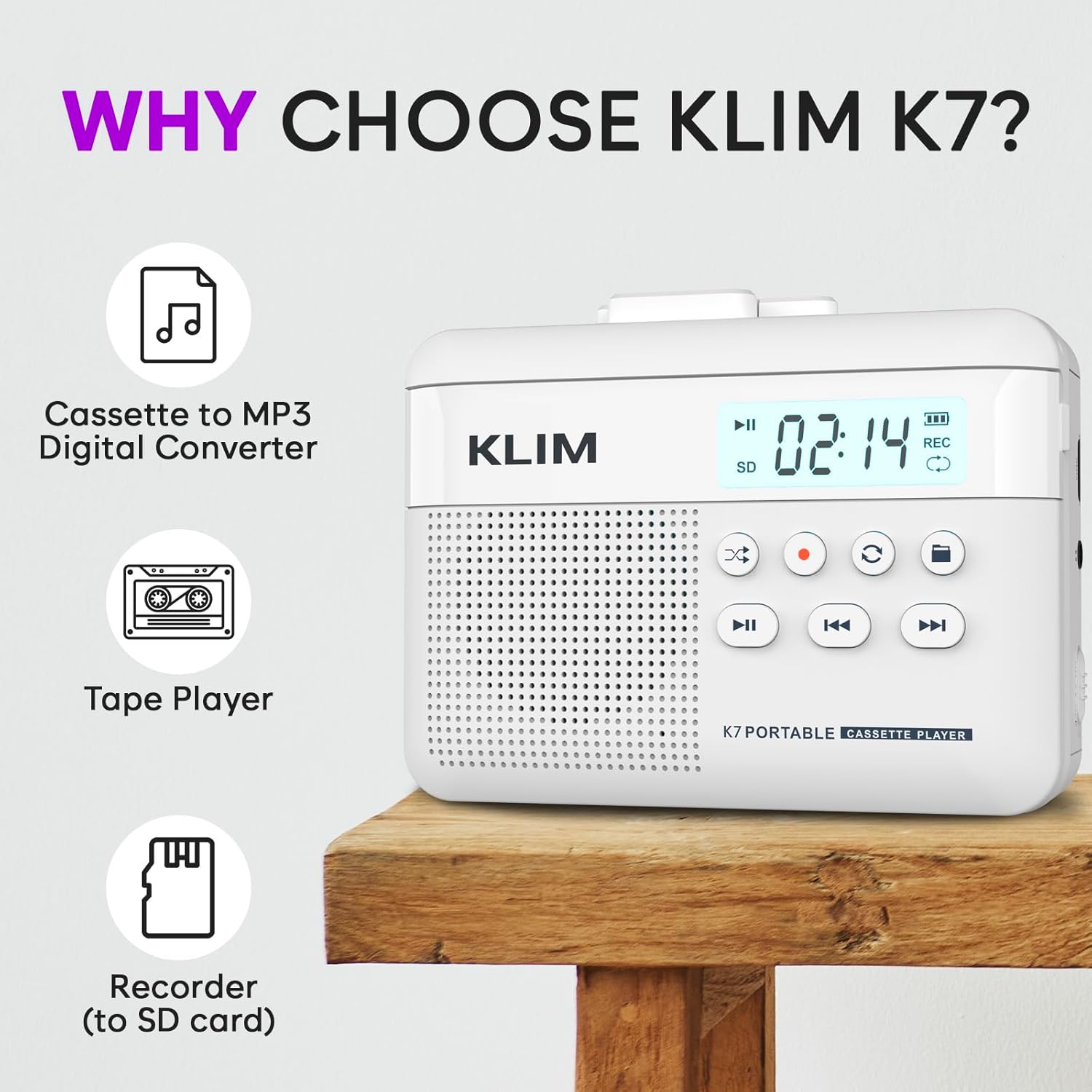
図1: フロント view of the KLIM K7 Cassette Player, showing the speaker grille, LCD display, and control buttons (Play/Pause, Rewind, Fast Forward, Stop, Record, Mode, Folder, Loop).
- LCDディスプレイ: Shows track number, recording status, and battery level.
- スピーカー: オーディオ再生用の内蔵スピーカー。
- 再生/一時停止ボタン (►▮): 再生を開始または一時停止します。
- Rewind Button (◀◀): Rewinds the cassette tape or navigates backward through MP3 tracks.
- Fast Forward Button (►►): Fast forwards the cassette tape or navigates forward through MP3 tracks.
- 停止ボタン(■): 再生または録音を停止します。
- Record Button (●): 録画を開始または停止します。
- モードボタン (↻): Switches between cassette playback and SD card MP3 playback.
- Folder Button (🖿): Navigates through folders on the SD card.
- Loop Button (⟳): 現在のトラックまたはすべてのトラックを繰り返します。

図2: 側 view of the KLIM K7 Cassette Player, highlighting the SD card slot, 3.5mm headphone jack, and On/Off switch.
- SDカードスロット: Insert your Micro SD card here for recording and MP3 playback.
- 3.5mmヘッドフォンジャック: Connect the included earphones or other standard headphones.
- オン/オフスイッチ: デバイスの電源をオンまたはオフにします。
- 音量コントロール: 音声出力レベルを調整します。

図3: トップ view of the KLIM K7 Cassette Player with the cassette compartment open, showing the tape mechanism.
- カセットコンパートメント: Insert your cassette tapes here.
- Cassette Door Release: カセットコンパートメントを開きます。
設定
1. バッテリーの充電
Before first use, fully charge the KLIM K7. The device comes with a 1000mAh rechargeable battery.
- Locate the Type-C USB charging port on the side of the device.
- Connect the included Type-C USB cable to the charging port and the other end to a USB power adapter (not included) or a computer's USB port.
- The charging indicator on the LCD display will show charging status. A full charge typically takes approximately 2 hours.

図4: The KLIM K7 connected to a Type-C USB cable for charging.
2. SDカードの挿入
An SD card (16GB included) is required for converting tapes to MP3 and for recording with the built-in microphone.
- Locate the SD card slot on the side of the device (refer to Figure 2).
- 金色の接点を下に向けて、カチッと音がするまで Micro SD カードをスロットにゆっくりと挿入します。
- To remove, push the SD card inward until it clicks, then release, and it will eject.

図5: Inserting the Micro SD card into the KLIM K7.
3. カセットテープの挿入
- Press the Cassette Door Release button to open the cassette compartment.
- Insert your cassette tape with the open side facing upwards and the tape reels aligned with the player's mechanism.
- カセットコンパートメントのドアをカチッと音がするまでしっかりと閉じます。
操作手順
1. カセットテープを再生する
- Ensure the device is powered on using the On/Off switch.
- Insert a cassette tape as described in the Setup section.
- を押す 再生/一時停止 (►▮) ボタンをクリックして再生を開始します。
- 音量コントロールを使用して音量を調整します。
- 使用 巻き戻す (◀◀) そして 早送り (►►) テープをナビゲートするためのボタン。
- を押す 停止(■) 再生を終了するボタン。
2. Converting Cassette Tapes to MP3
The KLIM K7 allows direct conversion of cassette audio to MP3 files on the inserted SD card, without needing a computer or additional software.
- Ensure an SD card is inserted and the device is powered on.
- 変換したいカセットテープを挿入します。
- を押す 再生/一時停止 (►▮) ボタンを押してテープ再生を開始します。
- 長押し の Record (●) button. The 'REC' indicator on the LCD display will illuminate, indicating that recording has started.
- 録音を停止するには、を押します Record (●) button again. The 'REC' indicator will turn off. The recorded audio will be saved as an MP3 file SDカードに。
- You can then remove the SD card and use the included SD card reader to transfer the MP3 fileをコンピューターまたは他のデバイスに送信します。

図6: Visual guide for converting cassette audio to MP3 files.
3. Using the Built-in Microphone for Recording
The KLIM K7 can also record audio directly from its built-in microphone to the SD card.
- Ensure an SD card is inserted and the device is powered on.
- を押す Mode (↻) button until the device is in SD card mode (no cassette playing).
- 長押し の Record (●) button. The 'REC' indicator will light up, and the device will start recording audio from its microphone.
- 録音を停止するには、を押します Record (●) button again. The 'REC' indicator will turn off, and the recording will be saved as an MP3 file.

図7: Using the KLIM K7's built-in microphone for recording.
4. MP3の再生 FileSDカードから
- Ensure an SD card with MP3 files is inserted and the device is powered on.
- を押す Mode (↻) button to switch to SD card playback mode. The LCD display will show track information.
- を押す 再生/一時停止 (►▮) ボタンをクリックして再生を開始します。
- 使用 巻き戻す (◀◀) そして 早送り (►►) トラックをスキップするためのボタン。
- の Folder (🖿) button allows navigation through different folders on the SD card.
- の Loop (⟳) button can be used to repeat the current track or all tracks.
- 音量コントロールを使用して音量を調整します。
- を押す 停止(■) 再生を終了するボタン。

図8: Enjoying audio with the KLIM K7 and included earphones.
メンテナンス
Proper maintenance ensures the longevity and optimal performance of your KLIM K7.
- クリーニング: デバイスの外装を清掃する際は、柔らかく乾いた布をご使用ください。液体クリーナーや溶剤は使用しないでください。
- カセットコンパートメント: 定期的にテープヘッドとピンチローラーを綿棒で軽く拭いてください。ampened with isopropyl alcohol to prevent audio quality degradation. Ensure the device is off and dry before use.
- ストレージ: デバイスは直射日光や極端な温度を避け、涼しく乾燥した場所に保管してください。
- バッテリーのケア: 長期保管の場合は、バッテリーの状態を維持するために、数か月ごとにバッテリーを約 50% まで充電してください。
トラブルシューティング
If you encounter any issues with your KLIM K7, please refer to the following common solutions:
| 問題 | 考えられる原因 | 解決 |
|---|---|---|
| デバイスの電源が入りません。 | 電池が消耗しています。 | Charge the device using the provided Type-C USB cable. |
| カセット再生時に音が出ません。 | 音量が低すぎるか、ヘッドホンが正しく接続されていません。 | Increase the volume. Ensure headphones are fully plugged into the 3.5mm jack. |
| Recording to MP3 fails or produces no file. | SD card is full, not inserted correctly, or corrupted. | Check SD card insertion. Ensure sufficient space on the SD card. Try reformatting the SD card (this will erase all data). |
| カセットのオーディオ品質が悪い。 | Dirty tape heads or worn-out cassette tape. | Clean the tape heads and pinch rollers. Try a different cassette tape to determine if the issue is with the tape itself. |
| デバイスがフリーズしたり、応答しなくなったりします。 | 一時的なソフトウェアの不具合。 | Turn the device off and then on again. If the issue persists, allow the battery to fully discharge and then recharge. |
仕様
- 製品寸法: 4.76 x 3.61 x 1.56インチ
- 商品の重量: 9.9オンス
- バッテリー: リチウムイオン電池1個(付属)、1000mAh
- 充電時間: 約2時間
- ストレージ: Micro SD カードをサポート(16GB 付属)
- オーディオ出力: 内蔵スピーカー、3.5mmヘッドフォンジャック
- 録音フォーマット: MP3

図9: Dimensions of the KLIM K7 Cassette Player.
保証とサポート
KLIM is committed to producing quality electronics. The KLIM K7 Cassette Tape Player comes with a 5年間の保証. If you encounter any problems with your device, please contact KLIM customer support for assistance.
追加の保護プランを購入できる場合があります:
- 2年間の保護プラン: 3.99ドル(1回限り)
- 3年間の保護プラン: 5.99ドル(1回限り)
- NEW Complete Protect: $16.99 (monthly)
さらにサポートが必要な場合は、 AmazonのKLIMストア.


