1. はじめに
This manual provides detailed instructions for the installation, operation, and maintenance of the Aigo B760L D4 Motherboard. Please read this manual thoroughly before installing or using the product to ensure proper functionality and to prevent damage.
2. 安全情報
以下の安全上の注意事項を常に守ってください。
- Disconnect power before installing or removing any components.
- 敏感なコンポーネントに触れないように、マザーボードの端を持ってください。
- 静電放電 (ESD) による損傷を防ぐために、静電気防止リスト ストラップを使用してください。
- 過熱を防ぐために、コンピューターケース内の換気が適切であることを確認してください。
- マザーボードを湿気や極端な温度にさらさないでください。
3. パッケージ内容
パッケージにすべてのアイテムが揃っていることを確認します。
- Aigo B760L D4 Motherboard
- ユーザーマニュアル(このドキュメント)
- SATAケーブル(数量は異なる場合があります)
- I / Oシールド
- ドライバーCD/USB(付属している場合)
4.製品オーバーview
The Aigo B760L D4 is an M-ATX motherboard designed for Intel LGA 1700 processors, featuring the Intel B760 chipset. It supports DDR4 memory and offers a range of connectivity options.
4.1マザーボードのレイアウト
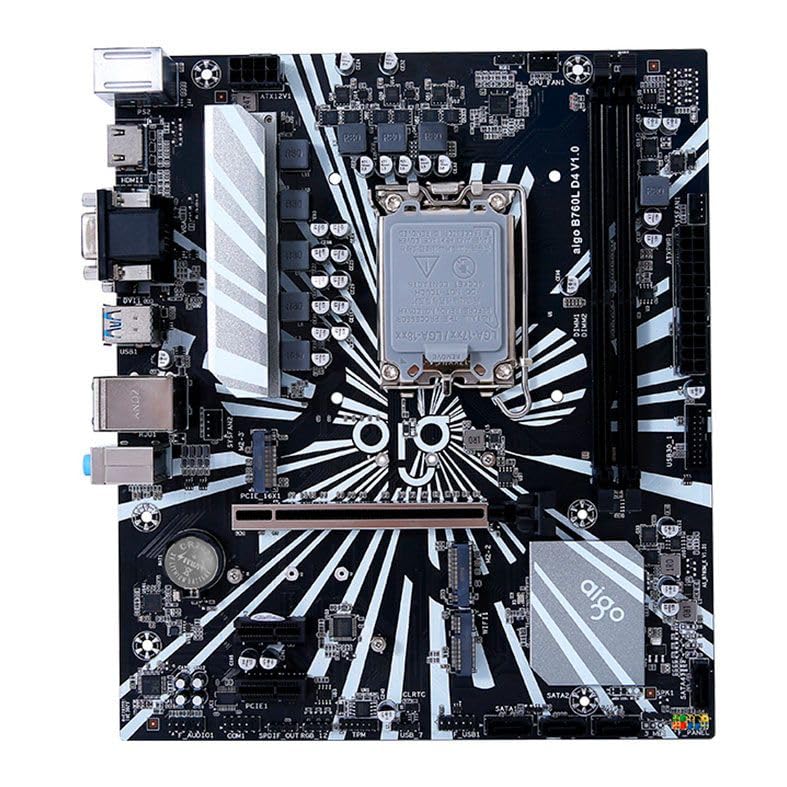
図1:以上view of the Aigo B760L D4 Motherboard alongside its retail packaging.

図2: トップダウン view of the Aigo B760L D4 Motherboard, highlighting component placement.

図3: 角度付き view of the Aigo B760L D4 Motherboard, showing the CPU socket and memory slots.
4.2 背面I/Oパネル

Figure 4: Rear I/O panel of the Aigo B760L D4 Motherboard, displaying various connectivity ports.
背面 I/O パネルには次のものが含まれます。
- 1 x PS/2 Keyboard and Mouse port
- USB 2 ポート x 2.0
- USB 4 ポート x 3.0
- HDMIポート x 1
- 2 x DVI ports
- VGA ポート x 1
- 1 x RJ45 LAN port
- Audio jacks (Line In, Line Out, Mic In)
5. セットアップ
5.1CPUのインストール
- マザーボード上の LGA 1700 CPU ソケットを見つけます。
- CPU ソケット レバーを開き、ロード プレートを持ち上げます。
- CPU をソケットに慎重に位置合わせし、CPU の三角形のマークがソケットのマークと一致していることを確認します。
- 無理に力を入れずに、CPU をソケットにゆっくりと差し込みます。
- ロードプレートを閉じてレバーで固定します。
5.2 Installing DDR4 Memory
The motherboard supports up to 64GB of DDR4 memory across two slots, with speeds from 2133 MHz to 3200 MHz in dual-channel configuration.
- DIMM スロットの両端のクリップを開きます。
- メモリ モジュールをスロットに合わせて、モジュールの切り込みがスロットのキーと一致していることを確認します。
- クリップがカチッと音がするまで、メモリ モジュールの両端をしっかりと押し下げます。
5.3 ストレージデバイスのインストール
The motherboard features 4 x SATA 3.0 ports and 2 x M.2 NVME Dual-Protocol slots.
5.3.1 SATAドライブ
- SATA データ ケーブルの一方の端をマザーボードの SATA ポートに接続します。
- SATA データ ケーブルのもう一方の端を SATA ハード ドライブまたは SSD に接続します。
- 電源装置からドライブまで SATA 電源ケーブルを接続します。
5.3.2 M.2 NVME Drives
- マザーボード上の M.2 スロットを見つけます。
- M.2 スタンドオフ ネジを取り外します。
- Insert the M.2 NVME drive into the slot at a 30-degree angle.
- Gently push the drive down and secure it with the standoff screw.
5.4 電源の接続
電源装置の 24 ピン ATX 電源コネクタと 8 ピン ATX 12V 電源コネクタをマザーボード上の対応するポートに接続します。
5.5 拡張カードの取り付け
The motherboard includes 1 x PCIe x16 slot and 1 x PCIe x1 slot.
- Align your expansion card (e.g., graphics card) with the appropriate PCIe slot.
- カードがスロットに正しく装着されるまでしっかりと押し下げます。
- カードをネジでコンピューターケースに固定します。
6.運用
6.1 最初の起動とBIOSセットアップ
システムを組み立てたら、モニター、キーボード、マウスを接続します。システムの電源を入れます。起動中に、指定されたキー(通常は 削除 or F2) to enter the BIOS/UEFI setup utility. Here you can configure boot order, system time, and other advanced settings.
6.2 オペレーティングシステムのインストール
The Aigo B760L D4 Motherboard supports Windows 10 and Windows 11 operating systems. Insert your OS installation media (USB drive or DVD) and follow the on-screen instructions to install the operating system.
6.3 ドライバのインストール
After OS installation, install the necessary drivers for the chipset, audio, LAN, and other integrated components. These drivers are typically provided on a CD/USB with the motherboard or can be downloaded from the manufacturer's webサイト。
7. メンテナンス
- 清潔に保つ: 圧縮空気を使って、定期的にパソコンケース内部のほこりを取り除いてください。ほこりがたまると過熱の原因となる可能性があります。
- BIOS アップデート: 定期的にメーカーの webBIOS/UEFIアップデートについては、こちらのサイトをご覧ください。アップデートにより、安定性、互換性、パフォーマンスが向上する場合があります。アップデート手順をよく読んでください。
- ドライバーの更新: 最適なパフォーマンスと新しいソフトウェアおよびハードウェアとの互換性を確保するために、ドライバーを最新の状態に保ってください。
- 環境制御: Operate the system in a cool, dry, and well-ventilated environment.
8。 トラブルシューティング
8.1 電源なし
- Ensure the power supply is connected correctly to the motherboard (24-pin and 8-pin ATX 12V).
- Check if the power supply switch is in the "ON" position.
- Verify that the power button on the case is correctly connected to the motherboard's front panel header.
8.2 表示なし
- モニターが正しいビデオ出力 (統合グラフィックまたは専用グラフィック カード) に接続されていることを確認します。
- グラフィック カードとメモリ モジュールを装着し直します。
- メモリ モジュールを 1 つだけ取り付けた状態で起動してみます。
8.3 システムの不安定性/クラッシュ
- CPU と GPU の温度をチェックして、過熱していないことを確認します。
- Verify that all power connectors are securely attached.
- メモリ診断ツールを実行して、障害のある RAM がないか確認します。
- Ensure BIOS is updated to the latest stable version.
9. 仕様
| 特徴 | 仕様 |
|---|---|
| ブランド | 愛郷 |
| モデル | AIGO-B760L-D4 |
| チップセット | インテル B760 |
| CPUソケット | 1700 号線 |
| メモリスロット | 2 x DDR4 DIMM スロット |
| 最大メモリ容量 | 64GB |
| メモリ速度サポート | 2133 ~ 3200 MHz (Dual Channel) |
| オーディオインターフェース | 1 x HDMI, 2 x DVI, 1 x VGA |
| SATAスロット | SATA 4 x 3.0 |
| M.2 スロット | 2 x M.2 NVME Dual-Protocol |
| USBポート(背面) | 2のx USB 2.0、4のx USB 3.0 |
| 拡張スロット | PCIe x1 x 1、PCIe x1 x 16 |
| オペレーティング システムのサポート | ウィンドウズ10/11 |
| PS/2 ポート | 1 x PS/2 Keyboard and Mouse |
| 電源フェーズ | 8相 |
| 電源コネクタ | 1 x 24ピンATX、1 x 8ピンATX 12V |
| WiFiインターフェース | 1 x WiFi interface (PCIe compatible) |
| LANポート | 1 X RJ45 |
| 寸法 | 24.4 x 21 cm (M-ATX) |
10. 保証とサポート
保証情報およびテクニカルサポートについては、ご購入時に付属のマニュアルを参照するか、Aigoの公式ウェブサイトをご覧ください。 webサイトでご確認ください。保証請求に備えて購入証明書を保管してください。


