1. はじめに
Thank you for choosing the MOUNTUP EconoMe Full Motion TV Wall Mount. This manual provides essential information for the safe and proper installation, operation, and maintenance of your new TV wall mount. Designed for most 32-65 inch flat screen, LED, and 4K TVs, this mount offers swivel, tilt, and extension capabilities to optimize your viewing experience. It supports VESA patterns from 100x100mm to 400x400mm and can hold TVs up to 99 lbs.
Please read this manual thoroughly before installation and keep it for future reference. If you have any questions or require assistance, please contact our customer service.
2. 安全情報
警告: Improper installation may result in serious personal injury or damage to your TV and property. If you do not understand these instructions or have doubts about the safety of the installation, please consult a qualified professional.
- 重量容量: 最大重量容量 99 ポンド (45 kg) を超えないようにしてください。
- テレビサイズ: このマウントは 32 ~ 65 インチのテレビ用に設計されています。
- VESAの互換性: Ensure your TV's VESA pattern (mounting hole spacing) is within the supported range of 100x100mm to 400x400mm.
- 壁の種類: This mount is intended for installation on wood studs (max 16" spacing), concrete walls, or brick walls. 乾式壁のみに取り付けないでください。 Always use a stud finder to confirm wood stud locations.
- アンカー: Concrete and brick wall installations require appropriate anchors. Concrete anchors (Φ10×61mm) can be provided upon request.
- ツール: 取り付け時には適切な工具を使用し、安全装備を着用してください。
- 監督: 設置中は子供やペットを近づけないでください。
3. パッケージ内容
Before beginning installation, verify that all parts are present and undamaged. If any parts are missing or defective, contact customer service immediately.
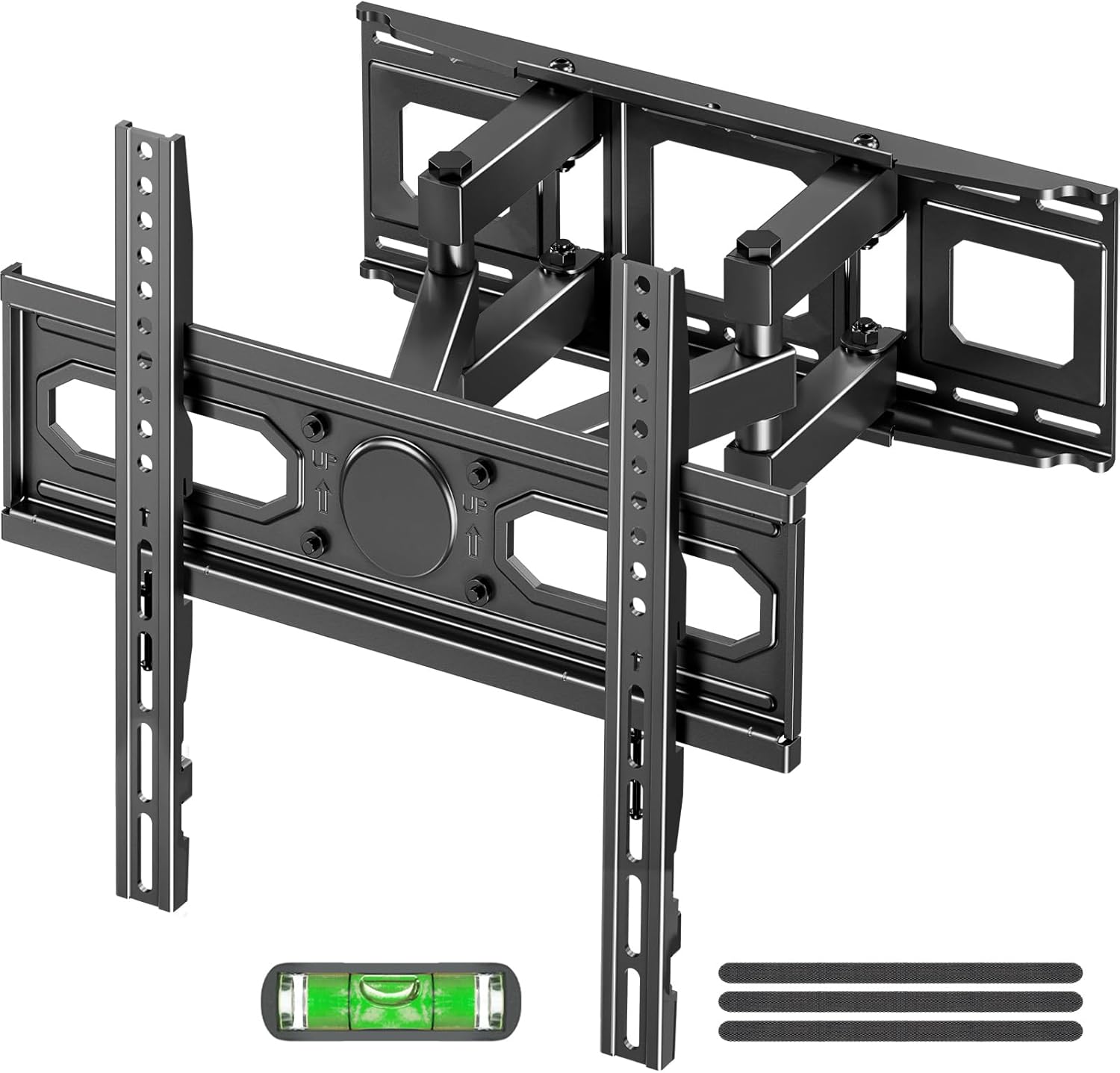
画像: 上view of the MOUNTUP EconoMe Full Motion TV Wall Mount and included accessories.
- 壁プレートアセンブリ
- TVブラケット(2)
- ハードウェアキット(各種ネジ、ワッシャー、スペーサー、アンカー)
- 水準器ツール
- 紙取り付けテンプレート
- ケーブルタイ
4. セットアップとインストール
The installation process involves three main steps. For detailed visual instructions, please refer to the official installation manual PDF available on the product page or contact customer support.

Image: Simplified three-step installation process for the TV wall mount.
- ステップ 1: ブラケットをテレビに取り付ける
Carefully place your TV face down on a soft, clean surface. Identify the VESA mounting holes on the back of your TV. Select the appropriate screws, washers, and spacers from the hardware kit that fit your TV's VESA pattern. Attach the two vertical TV brackets to the back of your TV, ensuring they are securely fastened and evenly aligned.

Image: Guide to available VESA patterns and suitable sizes for TV compatibility.
- ステップ2:壁プレートを壁に取り付ける
Determine the desired height for your TV. Use a stud finder to locate wood studs if installing on a stud wall. Mark the drilling locations using the provided paper mounting template and the integrated level tool. For concrete or brick walls, use a hammer drill to create pilot holes and insert the appropriate anchors. Secure the wall plate assembly to the wall using the provided lag bolts. Ensure the wall plate is level and firmly attached.
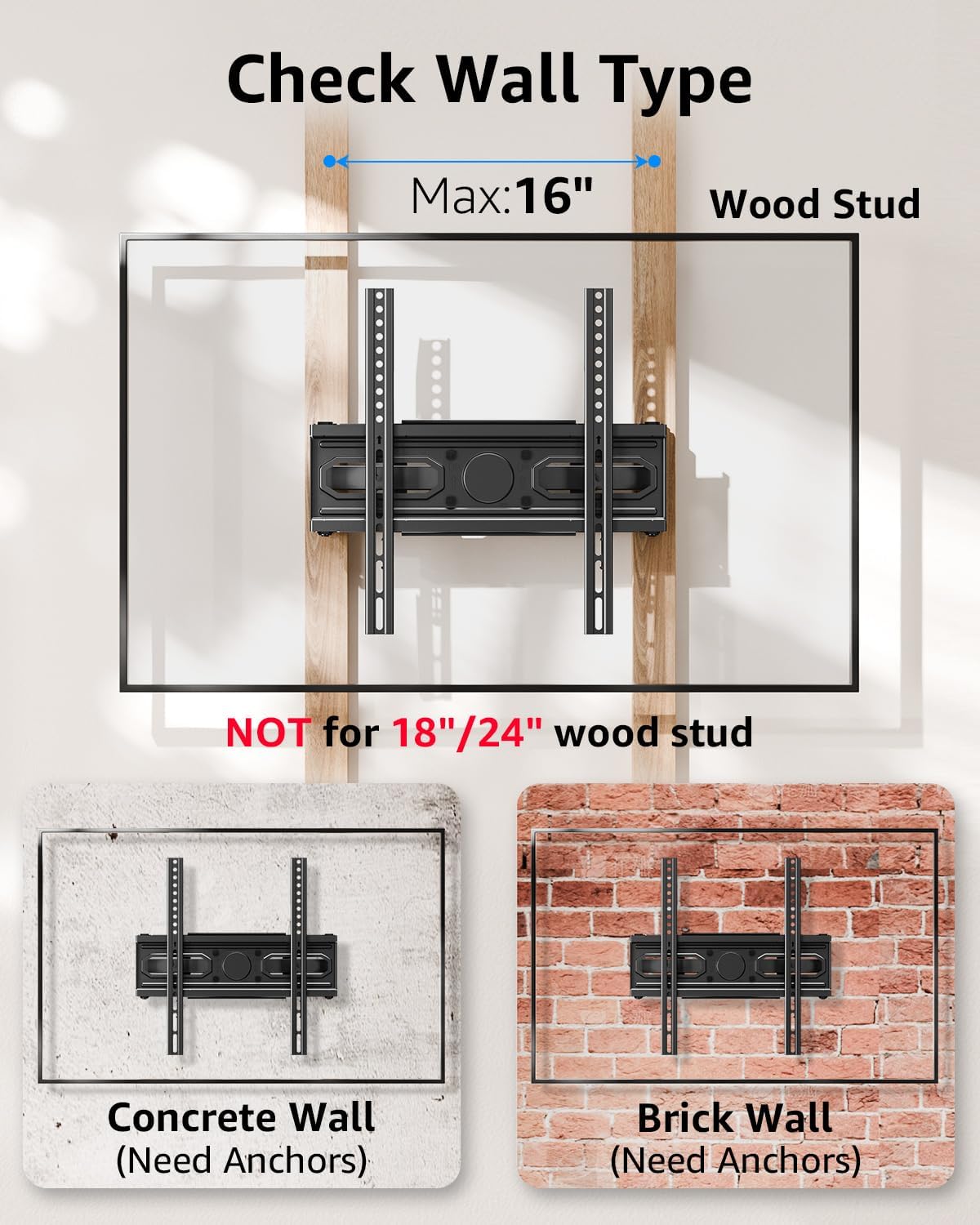
Image: Important information on checking wall type and stud spacing before installation.
- ステップ3:テレビを壁プレートに掛けて固定する
With assistance, carefully lift the TV (with brackets attached) and hook the TV brackets onto the wall plate. Ensure the TV is securely seated on the wall plate. Tighten any safety screws or locking mechanisms on the TV brackets to prevent accidental dislodgement. Double-check all connections for security before releasinテレビを見る。
5. 運営と調整
Your MOUNTUP EconoMe TV wall mount offers a range of adjustments to achieve optimal viewing angles and flexibility.
5.1.傾斜調整
The mount allows for vertical tilt adjustment to reduce glare and improve viewing comfort. You can tilt the TV up by +5° and down by -10°.

Image: Illustration of the tilting capability for anti-glare viewing。
5.2. スイベル調整
The articulating arms allow you to swivel your TV left or right by up to ±45°, providing flexible viewing options from different areas of the room. The maximum swivel angle may vary depending on your TV's size.
5.3. 水平調整
After installation, you can fine-tune the horizontal level of your TV by ±3° to ensure it is perfectly straight.

Image: Demonstrates premium adaptability with leveling and swivel adjustments.
5.4. 伸長と収縮
The dual articulating arms allow the TV to extend up to 14.5 inches (36.8 cm) from the wall and retract back to a slim 2.7 inches (6.8 cm) profile使用していないときはスペースを節約できます。

Image: Illustrates the ultimate flexibility of extension and retraction.
5.5. 高さのオプション
The design allows for two height options for mounting the TV brackets on the wall plate, providing flexibility to achieve eye-level comfort.

Image: Demonstrates two height options for optimal eye-level viewing。
6. メンテナンス
テレビ壁掛け金具の寿命と安全な動作を確保するには、次の簡単なメンテナンス ガイドラインに従ってください。
- クリーニング: 定期的に柔らかく乾いた布でマウント部分の汚れを拭き取ってください。頑固な汚れには、軽くこすった布で拭いてください。amp 布と中性洗剤を少量含ませ、拭いて乾かしてください。研磨剤入りの洗剤や溶剤の使用は避けてください。
- 定期点検: Every few months, inspect all screws and connections to ensure they remain tight and secure. Re-tighten any loose fasteners.
- 動き: If the articulating arms become stiff, a small amount of silicone-based lubricant can be applied to the pivot points, avoiding contact with the TV or wall.
7。 トラブルシューティング
If you encounter any issues with your MOUNTUP EconoMe TV Wall Mount, please refer to the common problems and solutions below. If the issue persists, contact our customer service.
| 問題 | 考えられる原因 | 解決 |
|---|---|---|
| 設置後、テレビが水平ではありません。 | Wall plate not perfectly level; minor adjustments needed. | Use the leveling adjustment feature (±3°) to fine-tune the TV's horizontal position. |
| Difficulty moving or adjusting the TV. | Screws at pivot points are too tight; lack of lubrication. | Slightly loosen the screws at the articulating joints. Apply a small amount of silicone-based lubricant if necessary. |
| 壁に取り付けると緩い感じがします。 | Lag bolts not fully tightened; incorrect wall anchors used. | Ensure all lag bolts securing the wall plate are fully tightened. Verify that the correct anchors were used for your wall type. If unsure, consult a professional. |
| テレビがマウントに適合しません。 | VESA パターンまたはテレビのサイズ/重量が正しくありません。 | Double-check your TV's VESA pattern and weight against the mount's specifications. This mount supports VESA from 100x100mm to 400x400mm and up to 99 lbs. |
8. 仕様
| 特徴 | 仕様 |
|---|---|
| モデル番号 | EU0092A |
| TVサイズの互換性 | 32~65インチ |
| 重量容量 | 最大 99 ポンド (45 kg) |
| VESA互換性 | 100x100mm, 150x150mm, 200x200mm, 200x300mm, 300x300mm, 400x400mm, etc. (Min 100x100mm, Max 400x400mm) |
| 傾斜角度 | +5° / -10° |
| スイベル角度 | ±45° (Max angle depends on TV size) |
| レベル調整 | ±3° |
| 壁からの延長 | 2.7インチ(6.8cm)~14.5インチ(36.8cm) |
| 材料 | 合金鋼 |
| 色 | 黒 |
| アイテム重量 | 8.14ポンド |
| パッケージ寸法 | 17.56 x 6.65 x 2.83インチ |

Image: Demonstrates the durability and stability of the mount, supporting up to 99 lbs.
9. 保証とサポート
MOUNTUP is committed to providing quality products and excellent customer service. For any inquiries, concerns, or assistance with installation or parts, please do not hesitate to contact our support team. We are available to help you with any issues you may encounter.
For the most up-to-date warranty information and detailed support resources, please refer to the official MOUNTUP website or the product's Amazon page. You can also find a downloadable PDF version of the installation manual ここ.